KO
|
EN
gitlite — search
Search
#typescript
#ai-agents
#deepseek-harness
#dsh-plugin
#open-source
#ai
#cli
#dsh
#claude-code
#codex
#developer-tools
#react
tacit
★ 65
Open GitHub ↗
TACIT — Tracked Agent Capabilities In Types
Download README (.md)
// repository documentation
Was this content helpful?
★ 0
(0 ratings)
Select Rating:
★
★
★
★
★
Submit Feedback
Recent Feedback
×
Download README
Do you want to download the
README.md
file for
tacit
?
Download (.md)
# TACIT: Tracked Agent Capabilities In Types **Paper:** [Securing Agents With Tracked Capabilities](https://dl.acm.org/doi/10.1145/3786335.3813127) (ACM) · [arXiv:2603.00991](https://arxiv.org/abs/2603.00991) · 🏆 **Best Paper Award at CAIS 26** TACIT (Tracked Agent Capabilities In Types) is a **safety harness** for AI agents. Instead of calling tools directly, agents write code in Scala 3 with [capture checking](https://nightly.scala-lang.org/docs/reference/experimental/capture-checking/index.html): a type system that statically tracks capabilities and enforces that agent code cannot forge access rights, cannot perform effects beyond its budget, and cannot leak information from pure sub-computations. It provides an [MCP](https://modelcontextprotocol.io/) interface, so that it can be easily used by all MCP-compatible agents. 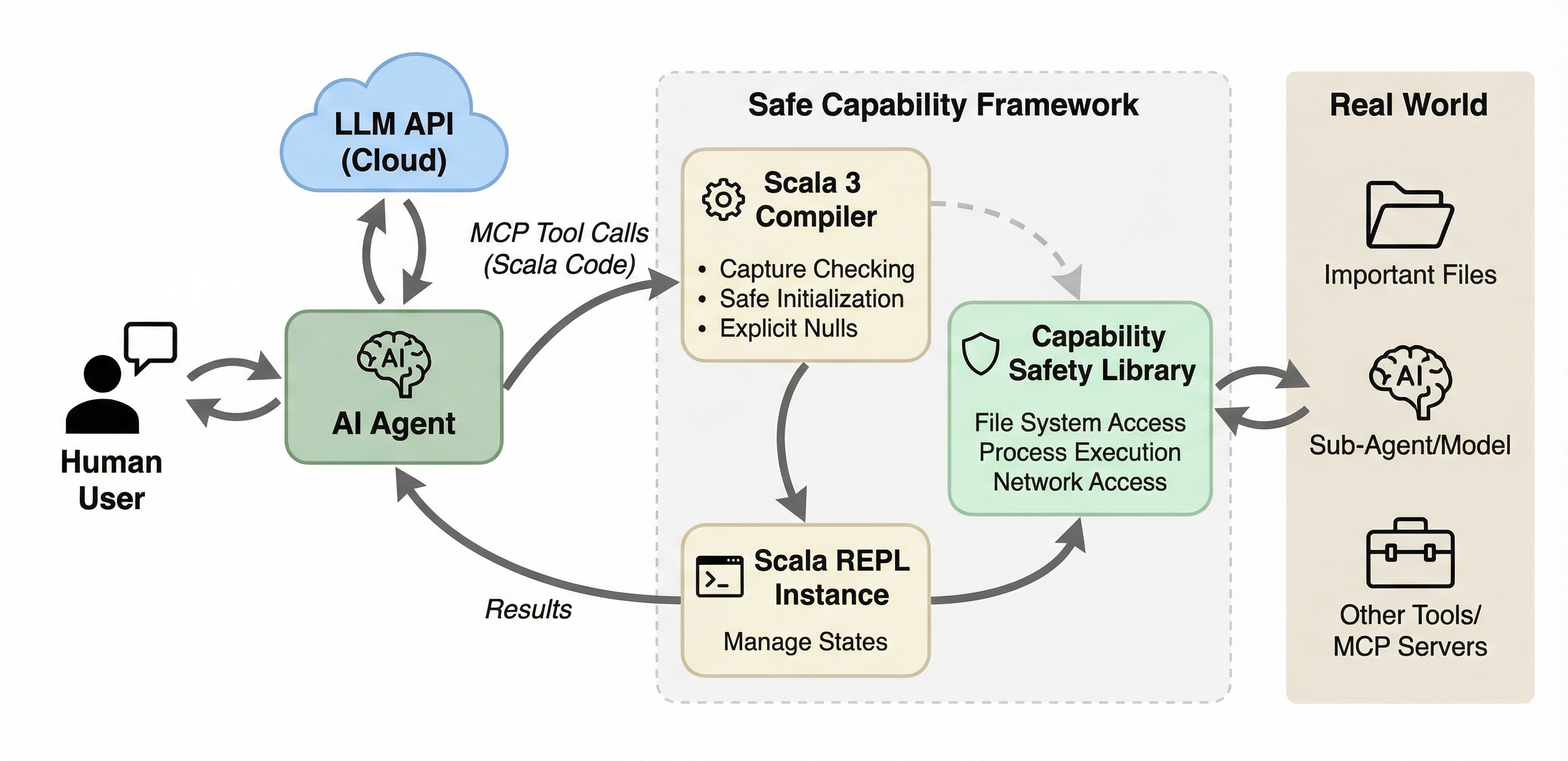 The framework has three main components: - **Scala 3 compiler.** Agent-submitted code is validated and type-checked with capture checking enabled in *safe mode*, which enforces a capability-safe language subset. - **Scala REPL.** A local REPL instance executes compiled code and manages state across interactions. Supports both stateless one-shot execution and stateful sessions. - **Capability safety library.** A typed API that serves as the sole gateway through which agent code interacts with the real world: file system, process execution, network, and sub-agents. The library is extensible: add new capabilities by modifying only the library code, without changing the MCP server itself. ## Quick Start TACIT provides a standard MCP server that communicates via JSON-RPC over stdio. It works with any MCP-compatible agent, including Claude Code, OpenCode, GitHub Copilot, and others. Requires JDK 17+. ### Installing TACIT Choose one of the installation approaches below. The `tacit` CLI wrapper is the recommended option. #### Option 1: Install `tacit` (Recommended) `tacit` is a small wrapper command for managing TACIT locally. Use `tacit setup` once to install the command and fetch the latest release, `tacit update` to update the JARs, `tacit self update` to refresh the wrapper itself, and `tacit serve` to launch the MCP server. ```bash # Download the wrapper directly (no git clone required) curl -fsSL https://raw.githubusercontent.com/lampepfl/tacit/refs/heads/main/tacit -o tacit chmod +x tacit # Install it and download the latest TACIT release ./tacit setup ``` This installs the `tacit` command into `~/.local/bin`, ensures `~/.local/bin` is on `PATH`, and downloads the latest release into `~/.cache/tacit/`. Common commands: ```bash # Refresh the cached release if a new version exists tacit update # Refresh the tacit wrapper itself tacit self update # Start the MCP server tacit serve # Remove the wrapper and cached release tacit self uninstall ``` By default, `tacit` uses: | Asset | Default path | |------|--------------| | MCP Server | `~/.cache/tacit/TACIT.jar` | | Library | `~/.cache/tacit/TACIT-library.jar` | #### Option 2: Download Prebuilt Release JARs Directly If you do not want the wrapper, use the release download script instead. ```bash # Download the script directly (no git clone required) curl -fsSL https://raw.githubusercontent.com/lampepfl/tacit/refs/heads/main/download_release.sh -o download_release.sh chmod +x download_release.sh ./download_release.sh ``` Optional: ```bash # Or use wget instead of curl wget -q https://raw.githubusercontent.com/lampepfl/tacit/refs/heads/main/download_release.sh -O download_release.sh chmod +x download_release.sh # Download into a custom directory ./download_release.sh ./dist ./download_release.sh --pre-release ./dist ``` By default, this downloads: | JAR | Default path | |-----|--------------| | MCP Server | `./TACIT.jar` | | Library | `./TACIT-library.jar` | To build from the current source tree, see Option 3 below. #### Option 3: Build from Source Requires JDK 17+ and sbt 1.12+. ```bash git clone https://github.com/lampepfl/tacit.git cd tacit ./build.sh ``` Optional: ```bash # Build and copy JARs into a custom directory ./build.sh ./dist # Show full sbt output while building ./build.sh --verbose ``` This builds and copies two JARs: | JAR | Path | |-----|------| | MCP Server | `./TACIT.jar` (or `./dist/TACIT.jar`) | | Library | `./TACIT-library.jar` (or `./dist/TACIT-library.jar`) | Once TACIT is installed through any of the options above, configure your agent to launch the MCP server. ### Configure Your Agent Add TACIT as an MCP server in your agent's configuration. If you installed `tacit` CLI, just use `tacit serve`. If you installed TACIT manually, use the explicit `java -jar ... --library-jar ...` form instead. <details open> <summary><b>Claude Code</b></summary> Add to your project's `.mcp.json` (or `~/.claude.json` for global). With `tacit`: ```json { "mcpServers": { "tacit": { "command": "tacit", "args": ["serve"] } } } ``` With manual JAR paths: ```json { "mcpServers": { "tacit": { "command": "java", "args": [ "-jar", "/path/to/TACIT.jar", "--library-jar", "/path/to/TACIT-library.jar" ] } } } ``` </details> <details> <summary><b>OpenCode</b></summary> Add to your `opencode.json`. With `tacit`: ```json { "$schema": "https://opencode.ai/config.json", "mcp": { "tacit": { "type": "local", "enabled": true, "command": ["tacit", "serve"] } } } ``` With manual JAR paths: ```json { "$schema": "https://opencode.ai/config.json", "mcp": { "tacit": { "type": "local", "enabled": true, "command": [ "java", "-jar", "/path/to/TACIT.jar", "--library-jar", "/path/to/TACIT-library.jar" ] } } } ``` </details> <details> <summary><b>GitHub Copilot (VS Code)</b></summary> Add to your `.vscode/mcp.json`. With `tacit`: ```json { "servers": { "tacit": { "command": "tacit", "args": ["serve"] } } } ``` With manual JAR paths: ```json { "servers": { "tacit": { "command": "java", "args": [ "-jar", "/path/to/TACIT.jar", "--library-jar", "/path/to/TACIT-library.jar" ] } } } ``` </details> Your agent can now use TACIT's tools to execute sandboxed Scala code. ### Recommended: Disable Built-in Tools To fully benefit from TACIT's capability-based safety, disable the agent's built-in file, shell, and network tools so that all operations go through the sandboxed REPL. <details open> <summary><b>Claude Code</b></summary> Launch with `--disallowedTools` to block built-in tools: ```bash claude --disallowedTools "Bash,Read,Write,Edit,WebFetch" ``` Or add to your project's `.claude/settings.json`: ```json { "permissions": { "disallowedTools": ["Bash", "Read", "Write", "Edit", "WebFetch"] } } ``` </details> <details> <summary><b>OpenCode</b></summary> Set built-in tool permissions to `"deny"` in `opencode.json`: ```json { "$schema": "https://opencode.ai/config.json", "permission": { "*": "ask", "bash": "deny", "read": "deny", "edit": "deny", "glob": "deny", "grep": "deny", "list": "deny", "tacit*": "allow" }, "mcp": { "tacit": { "..." : "..." } } } ``` </details> <details> <summary><b>GitHub Copilot (VS Code)</b></summary> In your VS Code `settings.json`, restrict the tools available to Copilot: ```json { "github.copilot.chat.agent.tools": { "terminal": false, "fs_read": false, "fs_write": false } } ``` </details> ## Configuration The server can be configured via CLI flags or a JSON config file. Pass flags directly in your agent's MCP args, or use `--config` to point to a JSON file. Configuration is split into **server config** (transport, recording, sessions) and **library config** (sandbox behavior, capabilities). In the JSON config file, library settings live under the `libraryConfig` key and are passed directly to the library for processing. ### CLI Flags **Server flags:** | Flag | Description | |------|-------------| | `--library-jar <path>` | **Required.** Path to the library JAR (`TACIT-library.jar`) | | `-r`/`--record <dir>` | Log every execution to disk | | `-q`/`--quiet` | Suppress startup banner and request/response logging | | `--no-session` | Disable session-related tools | | `--safe-mode` / `--no-safe-mode` | Enable/disable Scala 3's `language.experimental.safe` in the REPL for every execution (default: on; see [Safe Mode](#safe-mode)) | | `--exec-timeout-ms <ms>` | Wall-clock timeout for a single REPL evaluation (default: none; see [Execution Timeout](#execution-timeout)) | | `-c`/`--config <path>` | JSON config file (flags after `--config` override file values) | **Library flags** (shorthand for some `libraryConfig` fields): | Flag | Description | |------|-------------| | `-s`/`--strict` | Block a built-in list of file-op commands (cat, ls, rm, ...) through exec. Convenient for quick experiments; for real deployments prefer `--command-permissions`. | | `--command-permissions <patterns>` | Comma-separated glob patterns of exec-able commands (e.g. `echo,py*,ls`). Only `*` is interpreted as a wildcard. When set, `--strict` is ignored. | | `--network-permissions <patterns>` | Comma-separated glob patterns of reachable hosts (e.g. `*.example.com,api.github.com`). Only `*` is interpreted as a wildcard. | | `--allowed-roots <paths>` | Comma-separated outer bound on `requestFileSystem` roots (e.g. `/home/me/project,/tmp`). A requested root must resolve to a path within one of these. Defaults to the server's working directory when unset. | | `--classified-paths <patterns>` | Comma-separated classified path patterns (gitignore-style, see below) | | `--llm-base-url <url>` | LLM API base URL | | `--llm-api-key <key>` | LLM API key | | `--llm-model <name>` | LLM model name | ### JSON Config File ```json { "recordPath": "/tmp/recordings", "quiet": true, "sessionEnabled": true, "safeMode": true, "executionTimeoutMs": 60000, "libraryJarPath": "/path/to/TACIT-library.jar", "libraryConfig": { "commandPermissions": ["sbt", "scala", "javac", "java", "make"], "networkPermissions": ["*.scala-lang.org", "github.com", "docs.oracle.com"], "allowedRoots": ["/home/user/project", "/tmp"], "classifiedPaths": [".ssh", ".env", ".env.*", "secrets"], "secureOutput": "/tmp/secure.log", "llm": { "baseUrl": "https://api.example.com", "apiKey": "sk-...", "model": "gpt-..." } } } ``` **`commandPermissions`** (optional). The exec allowlist: a list of glob patterns (only `*` is a wildcard) that every command passed to `exec` must match. This sits on top of the per-scope set declared by `requestExecPermission(...)`; a command must be in both to actually run. When set, `strictMode` is ignored. In real deployments you should always configure this list explicitly. **`strictMode`** (optional, default `true`). A quick-experiment default that blocks a built-in list of file-op commands (`cat`, `ls`, `rm`, `tar`, `chmod`, shells, ...) through `exec`. Convenient when you just want to try things out, but too coarse for real use; prefer `commandPermissions`. **`networkPermissions`** (optional). The network allowlist: a list of glob patterns (only `*` is a wildcard) that every host reached via `httpGet`/`httpPost`/`httpRequest` must match. Like `commandPermissions`, this layers on top of the per-scope set declared by `requestNetwork(...)`; a host must be in both. When unset, only the per-scope `requestNetwork` allowlist applies. **`allowedRoots`** (optional). The file-system outer bound: a list of paths that confine where `requestFileSystem(root)` may operate. A requested root must resolve (symlinks included) to a path equal to or nested under one of these, or access is denied. When unset, it defaults to the server's **current working directory**, so the sandbox is confined to that subtree (fail closed). Set it explicitly to widen or relocate the bound. Classified-path masking still applies within whatever root is granted. **`secureOutput`** (optional). Path to an append-only file that mirrors every `println`/`print`/`printf` call from the isolation, but with `Classified[_]` values *unwrapped*. The agent's main output still shows the masked form (`Classified(***)`), so only whoever can read this file sees the real content. Parent directories are created automatically. When unset, printing behaves normally and nothing is written to disk. ### Classified Path Patterns Classified path patterns follow gitignore-style syntax. A path is classified if it matches a pattern or is a descendant of a match. | Pattern | Matches | Example | |---------|---------|---------| | `.ssh` | Any path component named `.ssh` | `/home/user/.ssh/id_rsa` | | `.env.*` | Any component matching the glob | `/project/.env.local` | | `config/*/keys` | Relative to filesystem root, with wildcard | `<root>/config/prod/keys/secret.pem` | | `**/secrets` | `secrets` at any depth | `<root>/a/b/secrets/key.txt` | | `/home/user/.ssh` | Absolute path (symlinks resolved) | `/home/user/.ssh/id_rsa` | **Rules:** - **No `/` in pattern:** matches against any path component (basename matching) - **Relative pattern with `/`:** anchored to the filesystem root; supports `*`, `**`, `?`, `[…]` - **Absolute pattern:** matched against full path; non-glob prefix is resolved through symlinks - **Trailing `/`** is stripped (no directory-only distinction) Default classified patterns (when `classifiedPaths` is not configured): `.ssh`, `.gnupg`, `.env`, `.env.*`, `.netrc`, `.npmrc`, `.pypirc`, `.docker`, `.kube`, `.aws`, `.azure`, `.gcloud`. ## Tools | Tool | Parameters | Description | |------|-----------|-------------| | `execute_scala` | `code` | Execute a Scala snippet in a fresh REPL (stateless) | | `create_repl_session` | - | Create a persistent REPL session, returns `session_id` | | `execute_in_session` | `session_id`, `code` | Execute code in an existing session (stateful) | | `list_sessions` | - | List active session IDs | | `delete_repl_session` | `session_id` | Delete a session | | `show_interface` | - | Show the full capability API reference | ### Example: Stateful Session ``` 1. create_repl_session → session_id: "abc-123" 2. execute_in_session(code: "val x = 42") → x: Int = 42 3. execute_in_session(code: "x * 2") → val res0: Int = 84 4. delete_repl_session(session_id: "abc-123") ``` ## Security Features TACIT's type system provides three safety guarantees that hold regardless of whether the agent is misaligned, hallucinating, or under prompt injection attack: | Property | What it means | |----------|---------------| | **Capability safety** | Capabilities cannot be forged or forgotten. The agent can only access resources through capabilities explicitly granted to it. | | **Capability completeness** | Capabilities regulate all safety-relevant effects. The agent interacts with the world only through its granted capabilities. | | **Local purity** | Specific computations can be enforced as side-effect-free. This prevents information leakage when agents process classified data. | ### Capability API The library exposes three capability request methods, each scoping access to a block. Capabilities cannot escape their scoped block. This is enforced at compile time by the capture checker. ```scala // File system: scoped to a root directory requestFileSystem("/tmp/work") { val f = access("data.txt") f.write("hello") val lines = f.readLines() grep("data.txt", "hello") find(".", "*.txt") } // Process execution: scoped to an allowlist of commands requestExecPermission(Set("ls", "cat")) { val result = exec("ls", List("-la")) println(result.stdout) } // Network: scoped to an allowlist of hosts requestNetwork(Set("api.example.com")) { val body = httpGet("https://api.example.com/data") httpPost("https://api.example.com/submit", """{"key":"value"}""") // Arbitrary verbs with a status code: val resp = httpRequest("DELETE", "https://api.example.com/item/42") // resp.status, resp.body } ``` The network methods also take plain `headers: Map[String, String]` and `secretHeaders: Map[String, Classified[String]]`. A `secretHeaders` value (e.g. an `Authorization` token read via `readClassified`) is sent to the allowlisted host but is **never** observable to agent code, which lets an agent authenticate to an allowed API with a secret it cannot otherwise read. `httpPostClassified` completes the picture: it POSTs a `Classified[String]` body and returns a `Classified[String]` response, so sensitive data can round-trip through an external service while staying under information-flow control (see below). ### Information Flow Control via `Classified` Consider a typical code agent working on a project directory. Some files are ordinary (source code, build configs, READMEs). Others are sensitive: API keys in `.env`, credentials in `secrets/`, internal documents. The agent is powered by a cloud-hosted LLM (a third-party service). We want the agent to *use* or *process* the sensitive data (summarize internal docs, rotate keys, process reports) but never leak it to the cloud provider. TACIT solves this through the `Classified[T]` type. Files under designated classified paths (configured via `--classified-paths` with gitignore-style patterns, e.g. `.ssh`, `.env.*`, `secrets`, `**/keys`) return their content wrapped in `Classified[String]` instead of plain `String`. If not configured otherwise, common secret paths (`.ssh`, `.gnupg`, `.env`, `.env.*`, etc.) are classified by default. The type system enforces **pure-only access**: `Classified.map` accepts only pure functions (`T -> U`), meaning no effects and no captured capabilities. You can transform the data, but you cannot send it anywhere. Any attempt to exfiltrate classified data is rejected **at compile time**: ```scala requestFileSystem("/project") { val secret = readClassified("secrets/api-key.txt") // Compile error: map captures the file capability, not a pure function secret.map: s => access("exfil.txt").write(s) // error: capturing f is not allowed s // Compile error: print out the classified content to the cloud LLM secret.map: s => println(s) // error: capturing IOCapability is not allowed s } ``` So how can the agent do useful work with classified data? Through a **dual LLM** design: a separate *trusted* local LLM processes classified content. The framework provides a `chat` overload that accepts `Classified[String]` and returns `Classified[String]`. The trusted LLM sees the content, but the result stays wrapped and can never flow back to the untrusted cloud model. 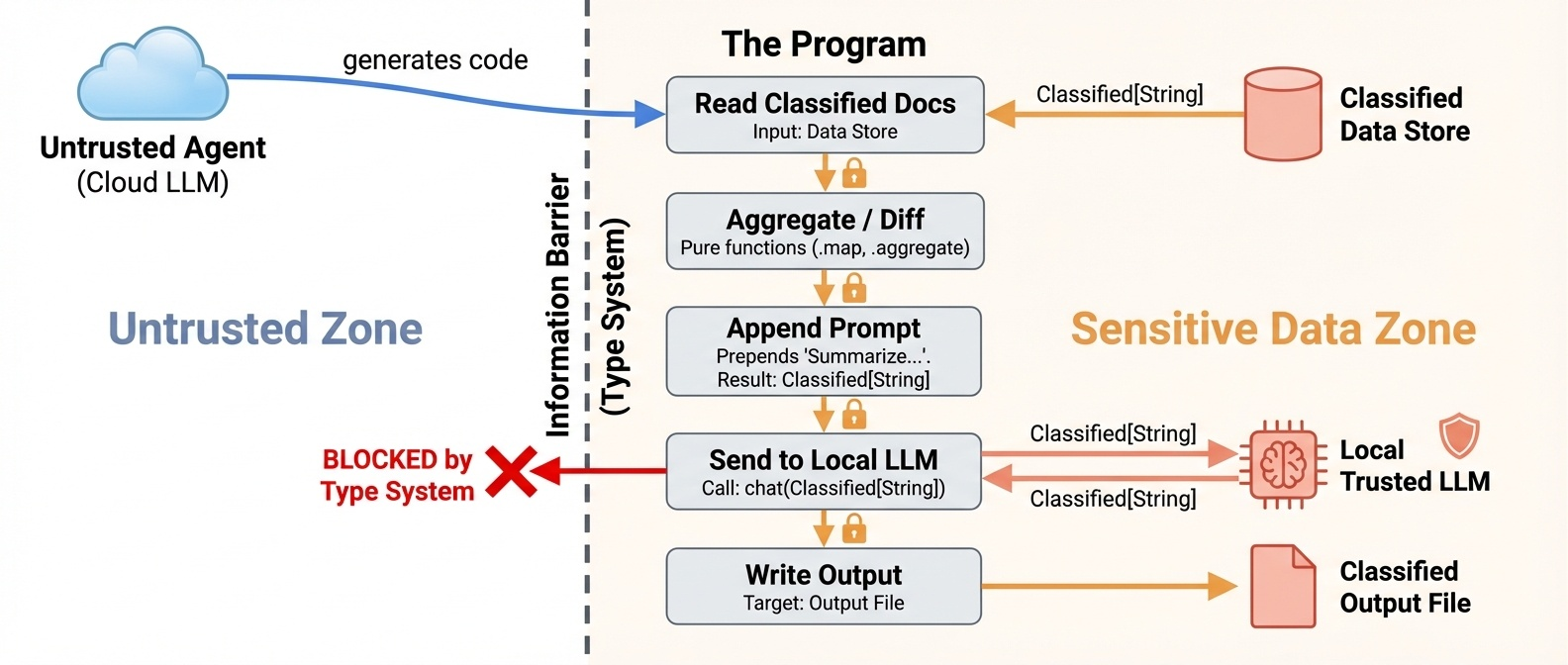 ```scala requestFileSystem("/project") { // OK: read classified content val doc = readClassified("secrets/contract-v2.txt") // OK: pure transformation val upper = doc.map(_.trim) // OK: send to trusted local LLM, result stays Classified val summary = chat(doc.map(s => s"Summarize the following document:\n$s")) // summary: Classified[String], content is still protected // OK: write back to a classified file writeClassified("secrets/summary.txt", summary) } ``` Besides the trusted LLM and classified files, a `Classified` value may also flow out to an **allowlisted network host** without being declassified, either as a secret request header (e.g. authenticating to an allowed API) or as a classified POST body whose response stays wrapped: ```scala requestNetwork(Set("api.example.com")) { requestFileSystem("/project") { val key = readClassified("secrets/api.key") // OK: the token reaches the allowlisted host as a header, but is never // observable to agent code (the value cannot be printed or inspected). val me = httpGet("https://api.example.com/me", secretHeaders = Map("Authorization" -> key.map("Bearer " + _))) // OK: secret body in, Classified response out. val payload = readClassified("secrets/report.json") val reply = httpPostClassified("https://api.example.com/process", payload) // reply: Classified[String] } } ``` ### Safe Mode Agent-generated code is compiled under Scala 3's *safe mode* (`import language.experimental.safe`), which enforces a capability-safe language subset: 1. No unchecked type casts or pattern matches 2. No features from the `caps.unsafe` module 3. No `@unchecked` annotations 4. No runtime reflection 5. Compile with capture checking and explicit nulls enabled, tracking all mutation effects 6. Global objects and functions accessible only if they are implemented safely These restrictions prevent agents from "forgetting" capabilities through unsafe casts, reflection, or type system holes. Code that does not pass compilation is never executed. Safe mode is an experimental feature still under active development. By default, TACIT uses a static code validator that checks for forbidden patterns to enforce the safe mode subset. The `--safe-mode` flag (or `"safeMode": true` in the JSON config) additionally imports `language.experimental.safe` into every REPL execution, opting into Scala 3's in-compiler enforcement. ### Execution Timeout `--exec-timeout-ms <ms>` (or `"executionTimeoutMs"` in the JSON config) bounds the wall-clock time of a single REPL evaluation. On timeout the client receives a prompt error instead of hanging, and for stateful sessions the session keeps its prior state, so the abandoned statement has no observable effect. The watchdog runs each evaluation on a worker thread and is **best-effort**: interrupt-responsive work (blocking I/O, sleeps, most library calls) is reliably bounded, but a pure CPU loop that never checks for interruption keeps running in the background and continues to hold the REPL's output lock. Hard preemption would require process-level isolation; this knob is a robustness guard, not a sandbox boundary. When unset (the default), evaluations run without a timeout. ### LLM Integration A secondary LLM is available through the `chat` method, no capability scope required. Safety comes from the `Classified` type system: `chat(String): String` for regular data, `chat(Classified[String]): Classified[String]` for sensitive data. ```scala // Regular chat val answer = chat("What is 2 + 2?") // Classified chat: input and output stay wrapped requestFileSystem("/secrets") { val secret = readClassified("/secrets/key.txt") val result = chat(secret.map(s => s"Summarize: $s")) // result is Classified[String], cannot be printed or leaked } ``` Configure via CLI flags (`--llm-base-url`, `--llm-api-key`, `--llm-model`) or a JSON config file (`--config`). Any OpenAI-compatible API is supported. ## Experimental Results We evaluate TACIT on safety and expressiveness (see the [paper](https://dl.acm.org/doi/10.1145/3786335.3813127) Section 4 for full details). **Safety (RQ1).** In *classified* mode (secrets wrapped in `Classified[String]`), both Claude Sonnet 4.6 and MiniMax M2.5 achieve **100% security** across all 131 trials. Every injection and malicious task is blocked by the type system. Utility remains high (99.2% for Sonnet, 90.0% for MiniMax). **Expressiveness (RQ2).** On τ<sup>2</sup>-bench and SWE-bench Lite, agents using TACIT's capability-safe harness **match or slightly exceed** standard tool-calling baselines across all tested models (gpt-oss-120b, MiniMax M2.5, DeepSeek V3.2), demonstrating that writing type-safe Scala does not degrade agentic performance. ## Extending the Library: Adding Your Own API The library (`library/`) defines the capability API that user code can call inside the REPL. To implement custom permissions and fine-grained access control, you can add new capabilities (e.g., database access, message queues, server management) by modifying the library and rebuilding just the library JAR. ### Library Structure ``` library/ ├── Interface.scala # Public API trait (what user code sees) ├── impl/ │ ├── InterfaceImpl.scala # Wires everything together (exports Ops objects) │ ├── BaseFileSystem.scala # Shared path validation and gitignore-style classified-path matching │ ├── FileOps.scala # grep, grepRecursive, find │ ├── ProcessOps.scala # exec, execOutput │ ├── WebOps.scala # httpGet, httpPost, httpRequest, httpPostClassified │ ├── LlmOps.scala # chat │ ├── RealFileSystem.scala # FileSystem on real disk │ ├── VirtualFileSystem.scala # In-memory FileSystem (for testing) │ ├── ClassifiedImpl.scala # Classified[T] wrapper implementation │ ├── ProcessPermissionImpl.scala # Concrete ProcessPermission │ ├── NetworkImpl.scala # Concrete Network │ ├── GlobMatcher.scala # Shared `*`-glob to regex utility │ ├── LibraryConfig.scala # Library configuration with JSON parsing │ └── LlmConfig.scala # LLM configuration case class └── test/ # Library-level tests ``` ### Step-by-Step: Adding a New API Here is an example of adding a hypothetical `requestDatabase` capability. #### 1. Define types and capability in `Interface.scala` ```scala // Add a result type case class QueryResult(columns: List[String], rows: List[List[String]]) // Add a capability class class DatabasePermission(val connectionString: String) extends caps.SharedCapability // Add methods to the Interface trait trait Interface: // ... existing methods ... def requestDatabase[T](connectionString: String)(op: DatabasePermission^ ?=> T)(using IOCapability): T def query(sql: String)(using DatabasePermission): QueryResult ``` Key points: - The capability class **must extend `caps.SharedCapability`**. This is what enables Scala 3's capture checker to prevent the capability from escaping its scoped block. - The `request*` method takes a block `op` that receives the capability as a context parameter (`?=>`). The `^` mark means the capability is tracked by the capture checker. - Operation methods (like `query`) take the capability as a `using` parameter, so they can only be called inside the corresponding `request*` block. #### 2. Implement the operations in `impl/` Create `library/impl/DatabaseOps.scala`: ```scala package tacit.library import language.experimental.captureChecking object DatabaseOps: def query(sql: String)(using perm: DatabasePermission): QueryResult = // Your implementation here // perm.connectionString has the connection info ??? ``` #### 3. Wire it into `InterfaceImpl` In `library/impl/InterfaceImpl.scala`, export your new operations and implement the `request*` method: ```scala abstract class InterfaceImpl(...) extends Interface: export FileOps.* export ProcessOps.* export WebOps.* export DatabaseOps.* // ← add this // ... existing methods ... def requestDatabase[T](connectionString: String)(op: DatabasePermission^ ?=> T)(using IOCapability): T = val perm = new DatabasePermission(connectionString) op(using perm) ``` #### 4. Block direct access in the validator (server side) If your new API wraps a Java/Scala library that users should not call directly, add forbidden patterns to `src/main/scala/executor/CodeValidator.scala`: ```scala ForbiddenPattern("db-jdbc", raw"java\.sql\b".r, "Direct JDBC access is forbidden; use requestDatabase"), ForbiddenPattern("db-driver", raw"DriverManager".r, "DriverManager is forbidden; use requestDatabase"), ``` This ensures user code goes through the capability API instead of bypassing it. #### 5. Add dependencies (if needed) If your new API requires external libraries, add them to the `lib` project in `build.sbt`: ```scala lazy val lib = project .in(file("library")) .settings( // ... existing settings ... libraryDependencies ++= Seq( "com.openai" % "openai-java" % "4.38.0", "org.postgresql" % "postgresql" % "42.7.3", // ← add your dep ), ) ``` #### 6. Rebuild the library JAR ```bash sbt "lib/assembly" ``` You do **not** need to rebuild the server JAR unless you changed `CodeValidator` (step 4) or other server-side code. Just point the server at the new library JAR: ```bash java -jar server.jar --library-jar new-library.jar ``` #### 7. Try your new API in the dev REPL For quick iteration without spinning up an agent, launch the **dev REPL**, an interactive Scala prompt preloaded with the capability API and the same `CodeValidator` the MCP server uses: ```bash sbt devRepl # default config sbt "devRepl --strict --config my.json" # with flags ``` ### Things to Keep in Mind - **Capabilities must extend `caps.SharedCapability`.** This is what makes capture checking work. Without it, the compiler cannot track the capability's scope and users could leak it out of the `request*` block. - **Capture checking is experimental.** The project uses `-language:experimental.captureChecking`. Compiler behavior may change across Scala 3 nightly versions. If you hit unexpected errors, check if the issue is with capture checking by temporarily removing the flag. - **The library uses Scala 3 nightly.** The build automatically fetches the latest Scala 3 nightly. This means your code must be compatible with bleeding-edge Scala. Pin a specific version in `build.sbt` (`val scala3Version = "3.x.y"`) if you need stability. - **`Interface.scala` is bundled as a resource.** The server copies `Interface.scala` into its resources at build time so the `show_interface` tool can display it. If you add new APIs, users will see them via `show_interface` automatically, no extra work needed. - **Forbidden patterns run on user code, not library code.** The validator in `CodeValidator.scala` only checks user-submitted code. The library itself can freely use `java.io`, `java.net`, `ProcessBuilder`, etc. in its implementation. But if your new API wraps a Java API, you should add a corresponding forbidden pattern so users cannot bypass your capability wrapper. - **The library JAR is a fat JAR.** `sbt "lib/assembly"` produces a JAR that includes all of the library's dependencies (e.g., `openai-java`). If you add a dependency, it will be bundled automatically. - **Server depends on library types at compile time.** The server depends on the interface type to run the REPL. Make sure your change is compatible with the server's expected interface. - **Test your API at the library level first.** The `library/test/` directory contains library-level tests using MUnit, run with `scala-cli test library` (they are **not** part of `sbt test`). Test your new operations there before doing integration tests through the MCP server. See `LibrarySuite.test.scala` for examples. ## Development Requirements: - JDK 17+ - sbt 1.12+ ```bash sbt clean # Clean build artifacts sbt compile # Compile sbt test # Run the server test suites (src/test/scala) sbt "testOnly *McpServerSuite" # Run a single server suite scala-cli test library # Run the library test suites (library/test) sbt assembly # Build both JARs (server + library) sbt "lib/assembly" # Build library JAR only sbt devRepl # Interactive REPL for testing the library ``` > `sbt test` runs only the server suites. The `library/test/` suites are run > separately with `scala-cli test library`. <details> <summary>Running the server directly (without an agent)</summary> ```bash # Basic java -jar target/scala-*/TACIT-assembly-*.jar \ --library-jar library/target/scala-*/TACIT-library.jar # With logging java -jar server.jar --library-jar library.jar --record ./log # With JSON config java -jar server.jar --library-jar library.jar --config config.json ``` </details> ## Citation ```bibtex @inbook{10.1145/3786335.3813127, author = {Odersky, Martin and Zhao, Yaoyu and Xu, Yichen and Bra\v{c}evac, Oliver and Pham, Cao Nguyen}, title = {Securing Agents With Tracked Capabilities}, year = {2026}, isbn = {9798400724152}, publisher = {Association for Computing Machinery}, address = {New York, NY, USA}, url = {https://doi.org/10.1145/3786335.3813127}, booktitle = {Proceedings of the ACM Conference on AI and Agentic Systems}, pages = {812–838}, numpages = {27} } ``` ## License Apache-2.0
