KO
|
EN
gitlite — search
Search
#typescript
#ai-agents
#deepseek-harness
#dsh-plugin
#open-source
#ai
#cli
#dsh
#claude-code
#codex
#developer-tools
#react
go-tflite
★ 320
Open GitHub ↗
Go binding for TensorFlow Lite
Download README (.md)
Explore Similar Repositories
ionic-audio
:
An audio player for Ionic 3 and Angular 4. Works with HTML 5 audio or native audio using Cordova Media plugin.
cronv
:
A visualizer for CRONTAB
mqttMultimeter
:
Cross platform MQTT client for MQTT debugging and message inspection. It is based on the .NET library MQTTnet.
dockyard
:
A fast & beautiful Docker GUI client
ruoyi-plus-soybean
:
RuoYi-Plus-Soybean 是一个现代化的企业级多租户管理系统,它结合了 RuoYi-Vue-Plus 的强大后端功能和 Soybean Admin 的现代化前端特性,为开发者提供了完整的企业管理解决方案。
// repository documentation
Was this content helpful?
★ 0
(0 ratings)
Select Rating:
★
★
★
★
★
Submit Feedback
Recent Feedback
×
Download README
Do you want to download the
README.md
file for
go-tflite
?
Download (.md)
# go-tflite Go binding for TensorFlow Lite 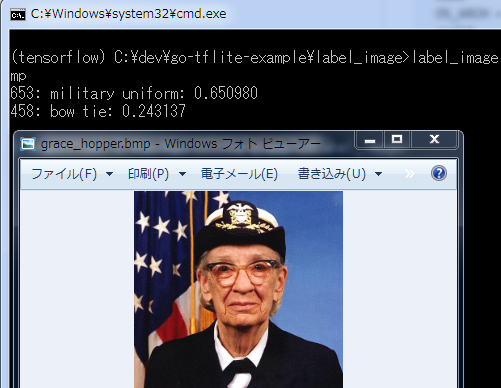 ## Usage ```go model := tflite.NewModelFromFile("sin_model.tflite") if model == nil { log.Fatal("cannot load model") } defer model.Delete() options := tflite.NewInterpreterOptions() defer options.Delete() interpreter := tflite.NewInterpreter(model, options) defer interpreter.Delete() interpreter.AllocateTensors() v := float64(1.2) * math.Pi / 180.0 input := interpreter.GetInputTensor(0) input.Float32s()[0] = float32(v) interpreter.Invoke() got := float64(interpreter.GetOutputTensor(0).Float32s()[0]) ``` See `_example` for more examples ## Requirements * TensorFlow Lite - This release requires 2.2.0-rc3 ## Tensorflow Installation You must install Tensorflow Lite C API. Assuming the source is under /source/directory/tensorflow ``` $ cd /source/directory/tensorflow $ bazel build --config opt --config monolithic tensorflow:libtensorflow_c.so ``` Or to just compile the tensorflow lite libraries: ``` $ cd /some/path/tensorflow $ bazel build --config opt --config monolithic //tensorflow/lite:libtensorflowlite.so $ bazel build --config opt --config monolithic //tensorflow/lite/c:libtensorflowlite_c.so ``` In order for go to find the headers you must set the CGO_CFLAGS environment variable for the source and libraries of tensorflow. If your libraries are not installed in a standard location, you must also give the go linker the path to the shared librares with the CGO_LDFLAGS environment variable. ``` $ export CGO_CFLAGS=-I/source/directory/tensorflow $ export CGO_LDFLAGS=-L/path/to/tensorflow/libaries ``` If you don't love bazel, you can try `Makefile.tflite`. Put this file as `Makefile` in `tensorflow/lite/c`, and run `make`. Sorry, this has not been test for Linux or Mac Then run `go build` on some of the examples. ## Edge TPU To be able to compile and use the EdgeTPU delegate, you need to install the libraries from here: https://github.com/google-coral/edgetpu There is also a deb package here: https://coral.withgoogle.com/docs/accelerator/get-started/#1-install-the-edge-tpu-runtime The libraries from should be installed in a system wide library path like `/usr/local/lib` The include files should be installed somewhere that is accesable from your CGO include path For x86: ``` cd /tmp && git clone https://github.com/google-coral/edgetpu.git && \ cp edgetpu/libedgetpu/direct/k8/libedgetpu.so.1.0 /usr/local/lib/libedgetpu.so.1.0 && \ ln -rs /usr/local/lib/libedgetpu.so.1.0 /usr/local/lib/libedgetpu.so.1 && \ ln -rs /usr/local/lib/libedgetpu.so.1.0 /usr/local/lib/libedgetpu.so && \ mkdir -p /usr/local/include/libedgetpu && \ cp edgetpu/libedgetpu/edgetpu.h /usr/local/include/edgetpu.h && \ cp edgetpu/libedgetpu/edgetpu_c.h /usr/local/include/edgetpu_c.h && \ rm -Rf edgetpu ``` ## Docker build See <https://github.com/mattn/go-mnist-example/> ## License MIT ## Author Yasuhiro Matsumoto (a.k.a. mattn)
