KO
|
EN
gitlite — search
Search
#llm
#python
#typescript
#machine-learning
#ai
#nextjs
#deep-learning
#agent
#esp32
#streamlit
#ai-agents
#nodejs
altv-esbuild
★ 30
Open GitHub ↗
SUSPENDED
Download README (.md)
Explore Similar Repositories
Esp32-Win7-VCP-drivers
:
INF files that enable ESP32-S3 Serial/JTAG peripheral and TinyUSB CDC stack on Win7
Barbarian-xp-farm
:
Unlimited promotions!! With this mod you can gain thousands of XP from barbarians.
gr-difi
:
GNU Radio Digital Intermediate Frequency Interoperability (DIFI) Out of Tree Module
DeepfakeTextDetection
:
Code and datasets for the paper "Deepfake Text Detection: Limitations and Opportunities"
Self-supervised-group-meiosis-contrastive-learning-for-EEG-based-emotion-recognition
:
No description available.
// repository documentation
Was this content helpful?
★ 0
(0 ratings)
Select Rating:
★
★
★
★
★
Submit Feedback
Recent Feedback
×
Download README
Do you want to download the
README.md
file for
altv-esbuild
?
Download (.md)
# This project is suspended Currently on hold due to unclear situation with alt:V. # altv-esbuild [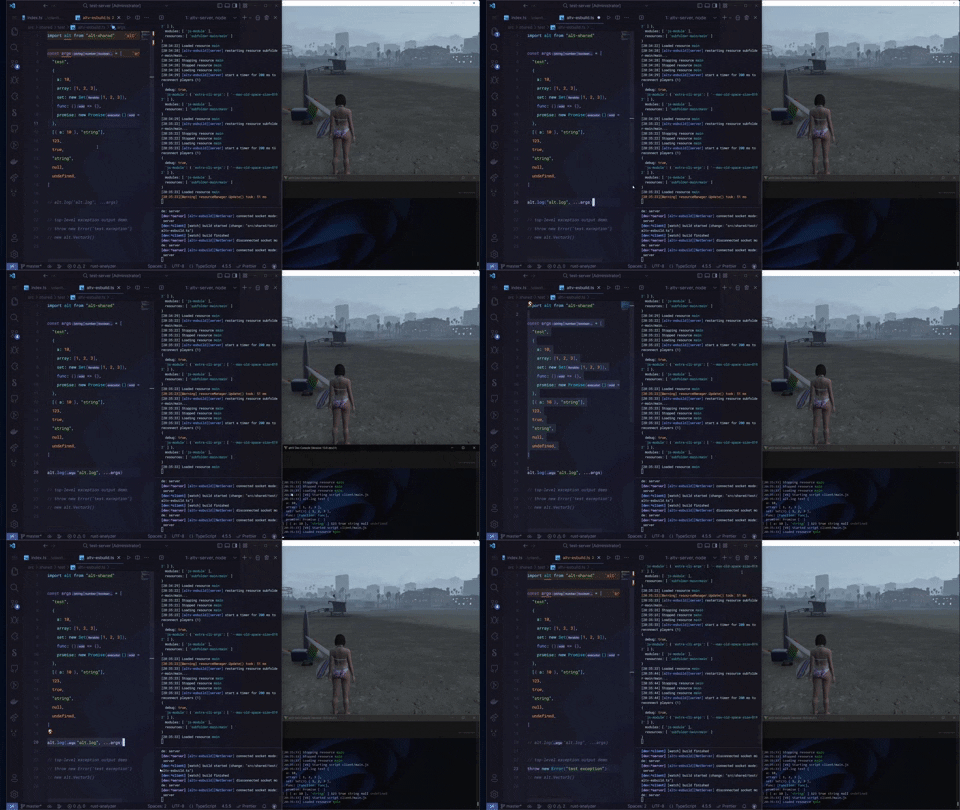](https://imgur.com/a/vWBZsoe) > You can click for better quality Special thanks ❤️ to [innxz](https://github.com/innxz) and [uncle_ara](https://github.com/uncle-ara) for financially supporting me and this library. A plugin that greatly simplifies server/client JS and TS development (as well as production) on the [alt:V](https://altv.mp) platform.<br> (extended and improved version of the previous [esbuild dev plugin](https://github.com/xxshady/esbuild-plugin-altv-dev-server)). ## Features - Write your scripts in JS/TS with enabled 5-million-polygon cars and mlo without client crashes - Hot reload without server restart or client reconnect (using alt:V [resource restart](https://docs.altv.mp/articles/commandlineargs.html#server-commands)) - Full client and server support - Restart console command for client and server ("res" by default) - Improved top-level exception output during development - ~~Direct support for alt:V enums, even in JS code ([documentation](https://xxshady.github.io/altv-esbuild/interfaces/ipluginoptions.html#altvenums))~~ it was [integrated](https://github.com/altmp/altv-js-module/pull/319) into js module ## Docs Docs web page: <https://xxshady.github.io/altv-esbuild>. ## How to use? Example resource can be found [here](https://github.com/xxshady/altv-esbuild/tree/main/example). ### Install from npm ```cli npm i altv-esbuild ``` ### Add to your build code of the server and client Example of the build server code: ```js import esbuild from "esbuild" import { altvEsbuild } from "altv-esbuild" // your own variable const DEV_MODE = true esbuild.build({ entryPoints: ["src/main.js"], outfile: "dist/bundle.js", bundle: true, watch: DEV_MODE, // this build option is outdated, see example directory in the repo target: "esnext", format: "esm", plugins: [ altvEsbuild({ mode: "server", // use "server" for server code, and "client" for client code // see docs for more info about these options: dev: { enabled: DEV_MODE, // if `DEV_MODE` is false it will also be automatically set to false too enhancedRestartCommand: true, }, }), ], external: [ // none of the following is required, this plugin handles all alt:V modules automatically // "alt-server", // "alt-client", // "alt-shared", // "natives" ] }) ``` ## Limitations ### Imports of types, interfaces esbuild doesn't support importing types as values, you should use type-only imports `import type` or `import { type YourType } ` syntax.<br> typescript-eslint with [consistent-type-imports](https://typescript-eslint.io/rules/consistent-type-imports/) rule helps a lot with this. `types.ts` ```ts export type SomeType = number ``` `script.ts` ```ts import { type SomeType } from './types.ts' ``` ### alt:V [Connection queue](https://docs.altv.mp/articles/connection_queue.html) is not supported between hot reloads (or just resource restarts).<br> Player disconnect is also [not supported](https://github.com/xxshady/altv-esbuild/issues/8) between hot reloads. Only [player connect](https://xxshady.github.io/altv-esbuild/interfaces/iplugindevoption.html#playersreconnect) is emulated for now in dev environment. ### esbuild Not supported build options - Wild-card `*` [`external`](https://esbuild.github.io/api/#external) (for example: `"node_modules/*"`) - [`packages`](https://esbuild.github.io/api/#packages) ## How to find exact source location of any exception? You can use [esbuild source-maps](https://esbuild.github.io/api/#sourcemap) like this: `sourcemap: "inline"`. ### serverside Enable source-maps in [server.toml](https://docs.altv.mp/articles/configs/server.html) and [here you go](https://imgur.com/HJYM0y1). ### clientside Here its a bit complicated. If you use vscode [Source maps navigator](https://marketplace.visualstudio.com/items?itemName=vlkoti.vscode-sourcemaps-navigator) extension can help you jump to your source code. ## Some libraries don't work with bundling If you see such errors it may mean this is your case: - `Error: Dynamic require of "crypto" is not supported` - `SyntaxError: Unexpected identifier` - `ReferenceError: __dirname is not defined` Libraries that must be external: discord.js, Prisma, TypeORM ✅ **Solution:** add this library to [`external`](https://esbuild.github.io/api/#external) build option of esbuild ## Contributions All contributions are greatly appreciated. If there are any questions or you would like to discuss a feature, you can always [open issue](https://github.com/xxshady/altv-esbuild/issues).
