KO
|
EN
gitlite — search
Search
#python
#java
#python3
#arduino
#golang
#machine-learning
#rust
#html
#flask
#javascript
#seismology
#nodejs
dev-tool-kit
★ 66
Open GitHub ↗
No description available.
Download README (.md)
Explore Similar Repositories
pojde
:
Develop from any device with a browser.
DarkV2ray-Manager-Bot
:
The world's first public V2ray manager Telegram bot
proxmox-backup-client
:
Rocky Linux 8 , Fedora 36, CentOS 8 or CentOS 7 Client for Proxmox Backup Server
machine_learning_book
:
Stanford's CS229 Machine Learning lecture notes compiled into a Tufte-style textbook
ctc_decoder
:
A ctc decoder for both online and offline asr model
// repository documentation
Was this content helpful?
★ 0
(0 ratings)
Select Rating:
★
★
★
★
★
Submit Feedback
Recent Feedback
×
Download README
Do you want to download the
README.md
file for
dev-tool-kit
?
Download (.md)
# DevToolKit [](https://github.com/qaware/dev-tool-kit/actions/workflows/build.yml)  This repository contains a desktop application with many useful tools for software developers. It is written in Go using [Wails](http://wails.app/) for providing a multi-platform GUI. 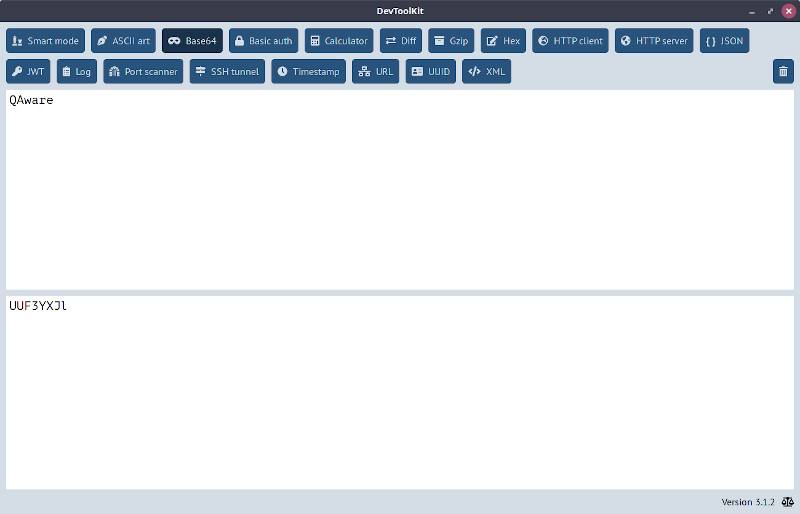 ## Usage ### Tools All the tools are organized in tabs. You can click on your button of choice or press `Ctrl+f` to search for a tool. Among others, the following tools are included: * Base64 encoding * Hex editor * HTTP client * JSON and XML pretty printing * JWT decoding * Port scanner ### Customization You can add a custom tab to the DevToolKit. Create a new file called `pages.xml` in the same directory as the executable. Here is an example for a simple HTML page with just a single link: ```XML <pages> <page> <name>MyTool</name> <title>My cool tool</title> <tooltip>This is my cool new tool.</tooltip> <icon>fa-tools</icon> <body> <a href="http://www.qaware.de">QAware</a> </body> </page> </pages> ``` Here, `<name>` must be a unique name, `<title>` is the button label, `<tooltip>` is the text for the button tooltip, `<icon>` is the [Font Awesome](https://fontawesome.com/v5.14.0/icons?d=gallery&m=free) icon, and `<body>` is the HTML source of the page. ### Errors In case of a crash, a stack trace is written to the file `panic.txt` in the same directory as the executable. If you raise a bug report, please attach the content of this file. ## Development ### Install Wails See https://wails.app/gettingstarted/ to learn how to setup Wails on your platform. ### Build locally Checkout the code and run `make build-debug` to quickly build a development version with debug logging enabled. The artifact will appear in `build/`. ### Release Change the version number in the file `main.go` and create a tag consisting of a `v` as prefix and the same version number. Push the tag to the repository and thus trigger the GitHub actions that will automatically create a new release. After that, the installed DevToolKits from all the users will update to that new version.
