KO
|
EN
gitlite — search
Search
#javascript
#python
#hacktoberfest
#react
#ai
#typescript
#llm
#go
#golang
#android
#machine-learning
#rust
#deep-learning
#linux
webfilebrowser
★ 14
Open GitHub ↗
Web File Browser
Download README (.md)
Explore Similar Repositories
CodeRunner-templates
:
My CodeRunner templates (See readme for list)
rock
:
Generate file structures or project skeletons from predefined templates.
coqjvm
:
Coq executable semantics and resource verifier
serpent
:
An Open Web app version of the classic game "snake".
jpacman-framework-v5
:
Pacman-like game used for teaching software testing.
// repository documentation
Was this content helpful?
★ 0
(0 ratings)
Select Rating:
★
★
★
★
★
Submit Feedback
Recent Feedback
×
Download README
Do you want to download the
README.md
file for
webfilebrowser
?
Download (.md)
 --- Introduction ------------ Web File Browser is a simple open-source file browser written in PHP (1 single file) that allows users to create, delete, edit, copy, rename, move and upload files and directories through a light, full-text, web-based interface. 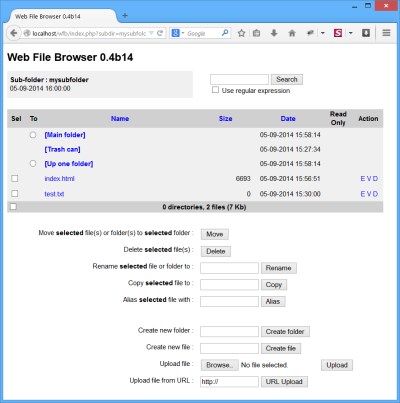 Up-to-date version is available at [GitHub](https://github.com/cgdave/webfilebrowser). Installation ------------ Copy the `wfb.php` file (and optionally the two directories `wfbimages` and `wfbtrash`) to your target directory in your web server's document root. Start your favorite Web Browser and point to `http://yourserver.yourdomain/yourdirectory/wfb.php`. You can also change the name of `wfb.php` to `index.php`so as it is considered as the index file of your directory (whichever his name this file wont appear). You may also want to put some user information in the `wfbreadme.html`. Customization ------------- Web File Browser allows you to customize some features such as: - Use optional icons or only text - Title, colors, sizes, ... - Enable/disable links on files - Enable/disable file uploads - Customize list of extensions that allow files to be edited - ... Look at the source for optional customization. Security -------- Web File Browser includes a built-in authentication (look at the source). You can also rely on your web server for authentication. For instance with Apache you can setup a `.htaccess` file like this: ```plain <Files "wfb.php"> AuthType Basic AuthUserFile ".htpasswd" AuthName "webFileBrowser" Require valid-user </Files> ``` FAQ --- ### File upload does not work, what's wrong ? There are two main reasons for that : - First, check your `php.ini` : ``` file_uploads = On upload_max_filesize = 2M ``` and verify that the value in `$uploadmaxsize` variable is the same as this value (for instance `2M` means 2 megabytes = 2097152 bytes) - Second, if you run your PHP-enabled web server under Linux/Unix, uploaded files (and created files/directories) are created under the ownership of the Unix user that runs your web server. As the PHP function `chown()` does not work unless this user is root (which is obviously a bad idea) it is not possible to chown files to another user after creation. A simple workaround is to `chown`/`chgrp` your directories to the web browser `user`/`group`, Another workaround is to add the web browser group to the secondary groups of the user owner of the directories (that's what I do). In that case remember to set `$filemode` to `0664` and $dirmode to `0775`. ### URL upload does not work, what's wrong ? Check your `php.ini` : ``` allow_url_fopen = On ``` and keep in mind that only URL explicitly pointing to a file (such as `http://myserver/myfile.txt`) can be URL-uploaded. ### How do I hide files ? Customize `$hidefilepattern` so as it contains a regular expression matching the name of the files you want to hide. An example is given is the source to hide dot files. ### Why delete action does not appear ? When you delete a file Web File Browser just move it into the trash can directory. This directory (located in the base directory) must exists and be writeable, if not the delete button is inhibited. You can customize its name using `$trashcan`. ### Which web browsers are supported ? Web File Browser has been tested on most browsers fro the last 10 years, it should work on yours ;-) TODO ---- Some features that might be developed one day: - Handling of multiple uploads - Zip/Unzip files and directories - Reorganization of the code and added comments Internationalization -------------------- Thanks to contributors, these language are supported: - English (corrected by Randall COHEN) - French - Spanish and Catalan thanks to Albert LOMBARTE - German thanks to Johannes EDER - Swedish thanks to Mikael WANBERG - Ukranian thanks to Dmytro KOVALOV - Dutch thanks to Luk VANLANDUYT - Norwegian thanks to Paul LOE - Finnish thanks to Petteri HIETAVIRTA - Turkish thanks to Tayfun BILSEL - Greek thanks to Balaskas EUAGGELOS - Polish thanks to Slawomir BROWKIN History ------- - Versions 0.1a, 0.2a and 0.3a were alpha versions not worth publishing... - Version 0.4b1 was first beta version. - Versions 0.4b2 and 0.4b3 fixed few bugs and added few sub-features - Versions 0.4b4, 0.4b5, 0.4b6 fixed few bugs and added trash can management - Version 0.4b7 added direct links to main directory and trash can and README file management - Version 0.4b8 fixed a few bugs, added file restore feature in trash can and added URL upload feature - Version 0.4b9 fixed a few bugs and added file aliasing feature - Version 0.4b10 added multilingual support - Version 0.4b11 fixed a few bugs regarding PHP warnings - Version 0.4b12 fixed issue with "register_globals", added search (thanks to Larry CHAFFIN for the idea) and download features, added images (thaks again Larry), added optionnal images, fixed few bugs - Version 0.4b13 reorganized PHP and generated HTML/JavaScript code, added help messages in the status bar, added multiple file selection (also fixed few bugs) - Version 0.4b14 added profile management and other authentication methods, fixed some tricky bugs (thanks to Jean-Jacques LE MOUEL) - Version 0.4b15 migrated to GitHub, started modernization Disclaimer --------- This program is distributed in the hope that it will be useful, but WITHOUT ANY WARRANTY; without even the implied warranty of MERCHANTABILITY or FITNESS FOR A PARTICULAR PURPOSE. See the GNU General Public License for more details. License ------- This program is free software; you can redistribute it and/or modify it under the terms of the GNU General Public License as published by the Free Software Foundation
