KO
|
EN
gitlite — search
Search
#python
#java
#python3
#arduino
#golang
#machine-learning
#rust
#html
#flask
#javascript
#seismology
#nodejs
hugo-tracks-theme
★ 21
Open GitHub ↗
This is port of Tracks theme
Download README (.md)
Explore Similar Repositories
tarfs
:
tar file system as loadable kernel module
workshop-microservices-micro
:
A demo using Zeit's micro
exrot
:
:camera: Snap webcam photos from the command line.
HHBadgeHUD
:
一款更Q的通知图标控件
ShipLog
:
Helps with vita stdio
// repository documentation
Was this content helpful?
★ 0
(0 ratings)
Select Rating:
★
★
★
★
★
Submit Feedback
Recent Feedback
×
Download README
Do you want to download the
README.md
file for
hugo-tracks-theme
?
Download (.md)
# Tracks theme for hugo Tracks is an elegant, responsive theme. This Hugo theme was ported from [competethemes](https://www.competethemes.com/tracks/). 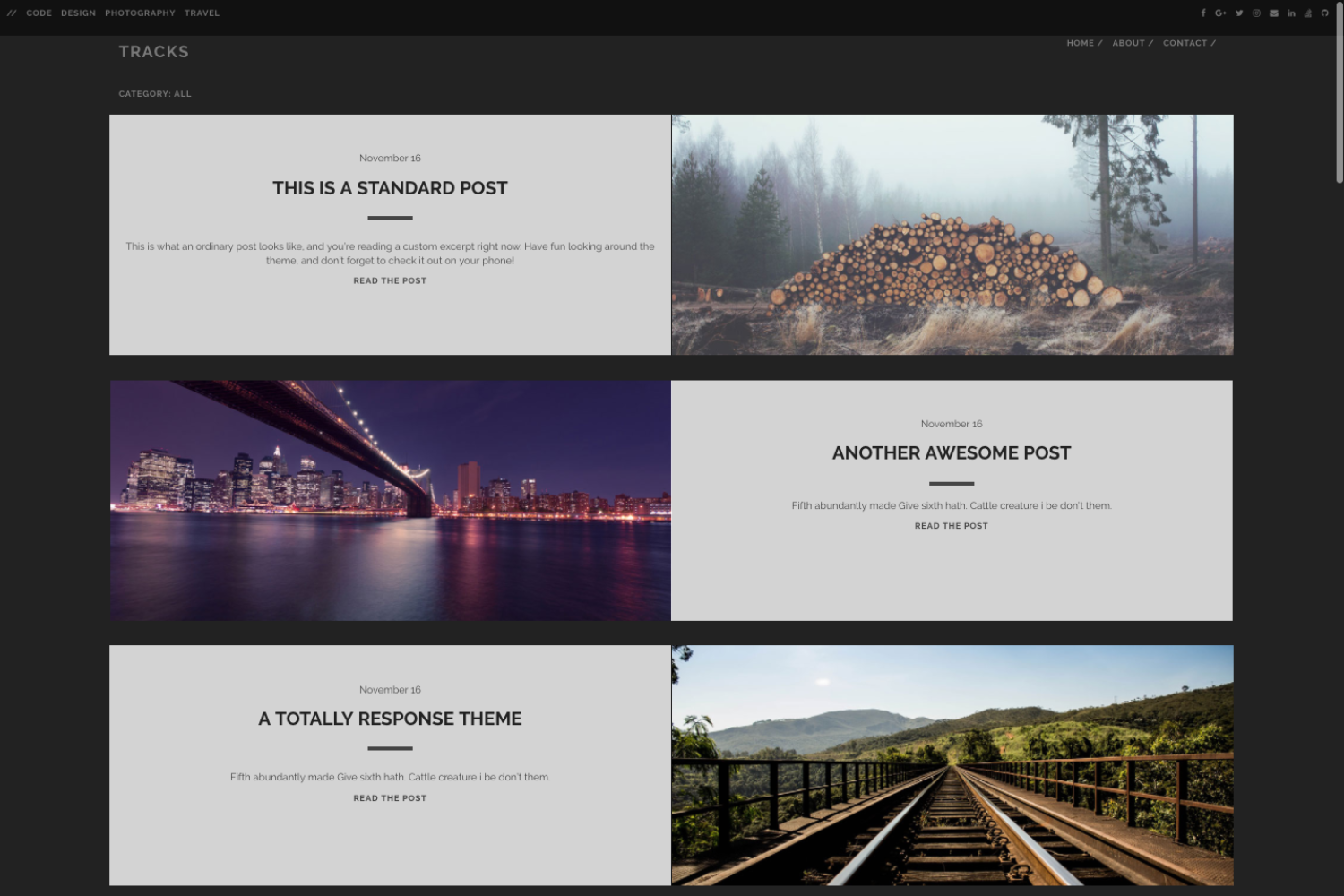 ## Installation Go to the directory where you have your Hugo site and run: ``` $ mkdir themes $ cd themes $ git clone https://github.com/ageekymonk/hugo-tracks-theme.git ``` For more information read the official [setup guide](https://gohugo.io/overview/installing/) of Hugo. ## Configuration After installing the Universal theme successfully, we recommend you to take a look at the [exampleSite](https://github.com/ageekymonk/hugo-tracks-theme/tree/master/exampleSite) directory. You will find a working Hugo site configured with the Universal theme that you can use as a starting point for your site. First, let's take a look at the [config.toml](https://github.com/ageekymonk/hugo-tracks-theme/tree/master/exampleSite/config.toml). It will be useful to learn how to customize your site. Feel free to play around with the settings. ### Style You can change the color of the theme by modifying the following key. ```toml style = "default" ``` ### More style customizations? Create `css/custom.css` in your `<<base dir>>/static` folder and add all your custom styling. ### Comments The optional comments system is powered by [Disqus](https://disqus.com). If you want to enable comments, create an account in Disqus and write down your shortname. ```toml disqusShortname = "your-disqus-short-name" ``` You can disable the comments system by leaving the `disqusShortname` empty. ### Google Analytics You can optionally enable Google Analytics. Type your tracking code in the ``. ```toml googleAnalytics = "UA-XXXXX-X" ``` Leave the `googleAnalytics` key empty to disable it. ### Make the contact form working Since this page will be static, you can use [formspree.io](//formspree.io/) as proxy to send the actual email. Each month, visitors can send you up to one thousand emails without incurring extra charges. Begin the setup by following the steps below: 1. Enter your email address under 'email' in the [`config.toml`](https://github.com/ageekymonk/hugo-tracks-them/tree/master/exampleSite/config.toml) 2. Upload the generated site to your server 3. Send a dummy email yourself to confirm your account 4. Click the confirm link in the email from [formspree.io](//formspree.io/) 5. You're done. Happy mailing! ### Nearly finished In order to see your site in action, run Hugo's built-in local server. ``` $ hugo server ``` Now enter [`localhost:1313`](http://localhost:1313) in the address bar of your browser. ## Contributing Have you found a bug or got an idea for a new feature? Feel free to use the [issue tracker](https://github.com/ageekymonk/hugo-tracks-theme/issues) to let me know. Or make directly a [pull request](https://github.com/ageekymonk/hugo-tracks-theme/pulls). ## License This port is released under the MIT License. ## Thanks Thanks to [Steve Francia](https://github.com/spf13) for creating Hugo and the awesome community around the project. And also thanks to [competethemes](https://www.competethemes.com/tracks/) for creating this awesome theme.
