KO
|
EN
gitlite — search
Search
#python
#java
#python3
#arduino
#golang
#machine-learning
#rust
#html
#flask
#javascript
#seismology
#nodejs
ONAP-VESPA
★ 10
Open GitHub ↗
VESPA: VES-Prometheus Adapter for ONAP
Download README (.md)
Explore Similar Repositories
Lidar-Auto-Focus-BMMCC-Edition
:
Blackmagic Micro Cinema Camera Controller + Lidar Auto Focus
calibrate-your-judgement
:
No description available.
mrt-rs
:
A library for parsing Multi-Threaded Routing Toolkit (MRT) files in Rust.
dlx
:
DLX assembly IDE, interpreter and debugger
globs
:
Psuedo-glob text for set generation
// repository documentation
Was this content helpful?
★ 0
(0 ratings)
Select Rating:
★
★
★
★
★
Submit Feedback
Recent Feedback
×
Download README
Do you want to download the
README.md
file for
ONAP-VESPA
?
Download (.md)
 [](https://travis-ci.org/nokia/ONAP-VESPA) [](https://codecov.io/gh/nokia/ONAP-VESPA) [](https://github.com/nokia/ONAP-VESPA/releases/latest) <!-- [](https://godoc.org/github.com/nokia/ONAP-VESPA/govel) --> > **Important notice:** The project is currently being imported into Github, and has a number of reworking in progress # VES-Agent VES-Agent is a service acting as a bridge between prometheus and ONAP's VES-Collector. It has 2 main roles : * Act as a Webhook to Alertmanager, receives alerts, transform them to VES fault events and send them to VES collector * Periodically query configured metrics from prometheus, map them into VES measurements event batch and send them to VES collector VES-Agent can be deployed in standalone configuration, or can be clustered to enable high availability. High availability is implemented using Raft consensus which requires 3 or 5 nodes in order to get a reliable HA. In high available configuration, 1 VES-Agent node is elected as a leader, while others are followers. Leadership is transfered as needed. Only the leader node will be able to process incoming alerts and metrics. It's also responsible from sending heartbeats to VES collector. Only the leader node can update global replicated state while follower passively receive and apply updates. States snapshots and replication logs of each node are stored locally in filesystem. The replicated state is assured to be consistent accross the cluster ## Architecture 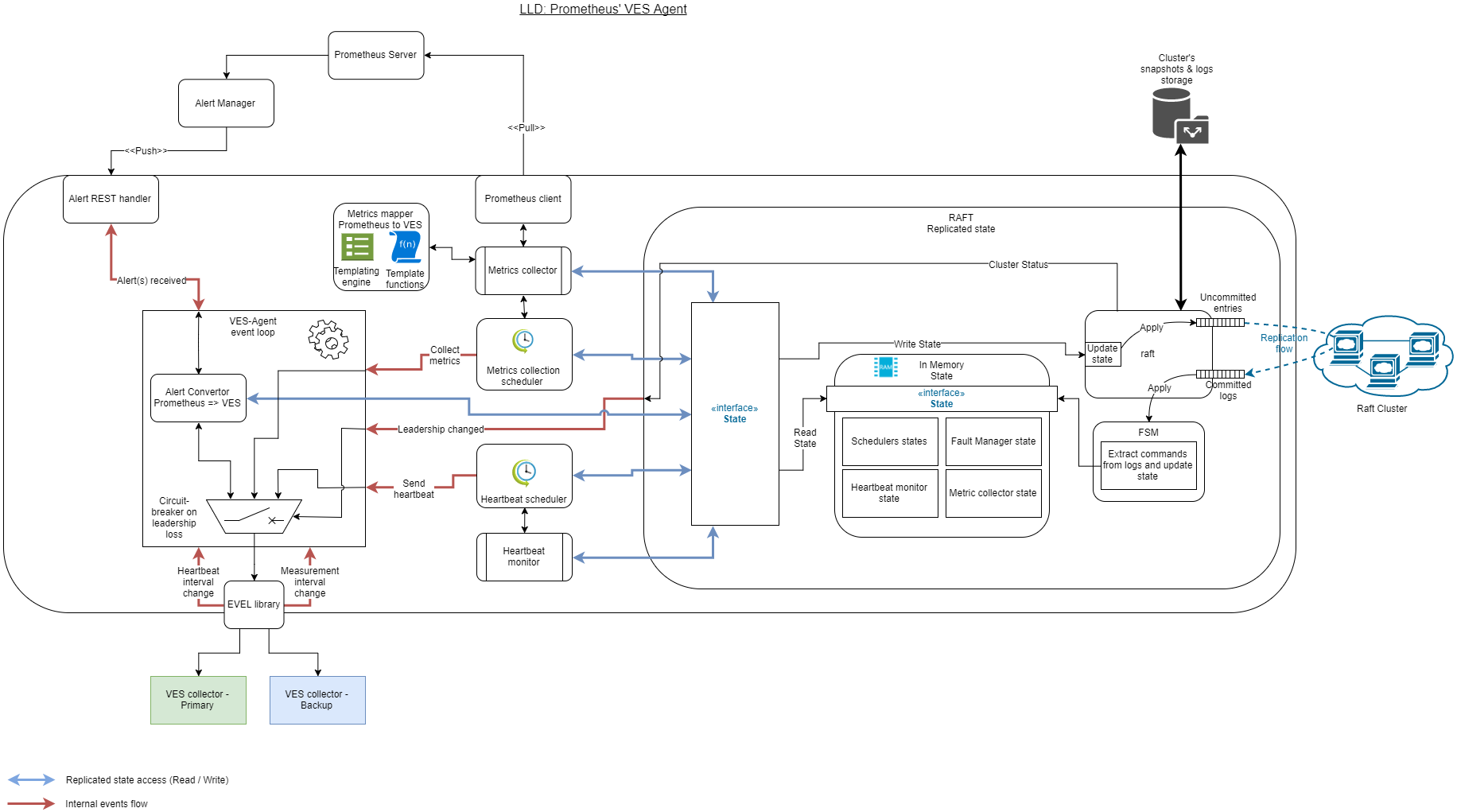 ### Event Loop The VES-Agent's event loop is the main process goroutine where all the business logic happen. It waits on multiple input channels for an event to occure. When an event arrives, specific business logic is executed depending on its type and source. One event has to be considered differently: Raft cluster leadership change. This event is triggered when the process gain or loose cluster leadership, and is used as a circuit breaker for the event-loop. When process is not the leader, no business logic will happen. #### Events * **Alert(s) received** : Sent from the Alertmanager REST webhook on alert notification reception (either a raise or clear). Contains one or more alerts in prometheus format. On reception, event loop will convert it into VES event and send it to collector, unless the process is not the leader in which case nothing will happen, and an error is returned to the Alertmanager * **Leadership change** : Sent from Raft cluster when the process gain or loose leadership. The event is used to circuit-break the eventloop * **Metric collection**: Sent from metric collection scheduler when it's time to collect a new batch of metrics * **Heartbeat monitor** : Sent from heartbeat scheduler when it's time to send a new heartbeat to VES collector * **Heartbeat interval change** : Sent from VES collector to change heartbeat interval. On reception, Heartbeat scheduler is reconfigured * **Measurement interval change** : Sent from VES collector to change measurements interval. On reception, metrics collection scheduler is reconfigured ### Global Replicated State The global state is kept replicated accross all nodes in the cluster using RAFT mechanisms. The current state is stored in memory, offering quick reading speed. All nodes, whatever their status is, can read the current state directly from memory. However writting to it is a privilege reserved to the leader node. The global replicated state consists of : * Schedulers states (heartbeat + metrics) * Trigger interval * Time of next trigger (can be in the past, if trigger has been delayed or unsuccesful) * Heartbeats state * Next event index * Metrics state * Next event index * Faults state * Next event index * Active faults * Sequence numbers for active faults Writes to the state are not directly applied to memory. Updates happen in 2 phases instead to replicate the state, and keep it consistent accross the cluster. 1. All the state mutations are converted into commands, encapsulated into a log, and sent to all nodes in the cluster. Other nodes will aknowledge the reception of the log. At that time, logs are not committed on any node, meaning that the state has not been updated yet. 2. Once the quorum is reached in nodes having received and aknowledged the log, the log is committed on all the nodes. It's send through a FSM which extracts the command from the log, and apply it to the in-memory state. Writes operations are synchronous, and returns only when the change has been committed accross the cluster. Logs are saved to disk and can be replayed in order to restore the state (for example after a restart). A node which is late after a restart will receive the missing logs from the leader to resynchronize with the cluster. In order to avoid large disk space usage and long resynchronization time, state is snapshotted regularly, and logs included in the snapshot are dismissed. Snapshots are also sent to nodes that need resynchronization. For more details about Raft consensus algorithm, have a look at this [Raft paper](https://raft.github.io/raft.pdf) A more gentle introduction is available on [The Secrete Lives Of Data](http://thesecretlivesofdata.com/raft/) ## Backup VES-collector In case one event (heartbeat, metric or fault) cannot be sent to the VES collector, the ves-agent will switch to a second VES collector (if configured). All the next events will be sent to this new collector while available. ## Build > Agent, simulator and govel library are tested using **Golang v1.11.5**, while other version may work. Your `GOPATH` variable must be set, and the `bin/` directory from it must be set in the `PATH` variable 1. If needed, setup `HTTP_PROXY` and `HTTPS_PROXY` environment variables 2. Download dependencies by running `go mod download` 3. Build agent with `go build ./ves-agent` 4. Build the simulator: 1. Install **packr** by running `go get github.com/gobuffalo/packr/packr` 2. Run `go generate ./...` 3. Run compilation with `go build ./ves-simu` Resulting executable binaries will be found in the current working dircetory * **ves-agent[.exe]** is the main executable used to run VES-Agent * **ves-simu[.exe]** is a VES collector simulator, mainly usedfor testing ## Unit testing From repository root directory, run the command `go test -race ./...` to run all the unit tests ## Packaging **[Goreleaser](https://goreleaser.com/)** is used to package the software for multiple targets. 1. Install **rpmbuild** using your distribution package manager 2. Install **goreleaser** by following [installation instructions](https://goreleaser.com/install/) 3. Run `goreleaser --snapshot` Build artifacts will be located in `./dist/` directory. ## Configuring Configuration of the ves-agent can be set by * a configuration file in yml format: /etc/ves-agent/ves-agent.yml * command line parameters, see ves-agent -h * environment variables respecting the syntax VES_YAMLSECTION_NAME (all in upper case) ### Global configuration Internal global configuration of the ves-agent. ```yaml debug: true # Print ves-agent log entries datadir: ./data # raft data directory caCert: # root certificate content. ``` ### VES Collectors The VES-Agent's connection to VES collector is defined in the `primaryCollector` section of configuration file. The configuration for the backup collector is in the `backupCollector` section. Only the `primaryCollector` section is required. Both sections specify how to connect to the collector (adress, port, path before the /eventListener part of the POST URL and topic) and the credentials to be used (user name and encrypted password with associated passphrase). ```yaml primaryCollector: serverRoot: api # Optional, add "/api/" as the URL path prefix fqdn: 135.117.116.201 port: 8443 secure: true topic: mytopic # Optional, add "/mytopic/" as the URL path suffix user: user password: U2FsdGVkX1/6lYKUMhpyz1IFBtgaE3MVwj2uoj+4PR8= passphrase: mypassphrase backupCollector: serverRoot: api fqdn: 135.117.116.202 port: 8443 secure: true topic: mytopic user: user password: U2FsdGVkX1/6lYKUMhpyz1IFBtgaE3MVwj2uoj+4PR8= passphrase: mypassphrase ``` ### Event configuration The event fields and timing information which are common to heartbearts, measurements and faults are configured in the `event` section of configuration file. ```yaml event: vnfName: dpa2bhsxp5001v # reportingEntityName: dpa2bhsxp5001vm001oam001 # host name of the VM where the ves-agent is running reportingEntityID: 1af5bfa9-40b4-4522-b045-40e54f0310fc # UUID of the VM where the ves-agent is running, retrieved from the openstack metadata. maxSize: 2000000 # maximum size of an event nfNamingCode: hsxp # part of vnfName, respecting naming rules nfcNamingCodes: # mapping between VM names and naming code - type: oam # part of processing VM name, respecting naming rules vnfcs: [lr-ope-0,lr-ope-1,lr-ope-2] - type: etl # part of OPE VM name, respecting naming rules vnfcs: [lr-pro-0,lr-pro-1] retryInterval: 5s # interval to wait after a timeout before retrying to post the event maxMissed: 2 # nb of retry to send an event before switching to the second ves-collector ``` ### Measurements Measurements are configured in the `measurement` section of configuration file. This section specify how to connect to metric source (eg: prometheus), which metrics to query, and how to map them to a VES event ```yaml measurement: domainAbbreviation: Mvfs defaultInterval: 300s # Default interval between each meatric collection maxBufferingDuration: 1h # Max interval to retry prometheus: address: http://localhost:9090 # URL to prometheus server timeout: 30s keepalive: 30s rules: defaults: <rule> # Default rules. All fields except "expr" can have a default value metrics: [<rule>, ...] # List of metrics querying rules (see next section) ``` #### Rules A rule express how to fetch a metric from prometheus, and how to map it into a VES measurement event. A rule has a set of mandatory parameters : * **expr** : Prometheus query to fetch a metric * **target** : Template expression giving the target field in the VES measurement event. For example `CPUUsageArray.Percent` * **vmId** : Template expression giving the ID of the VM to use in measurement header * **labels** : A list a key / values to be added in the target structure * _name_ : Key name * _expr_ : Template expression giving the value If **target** has value `AdditionalObjects`, then a few additional fields are needed * **object_name** : Template expression givig the value of `objectName` fiedl in `JSONObject` structure * **object_instance** * **object_keys** * _name_ : Key name * _expr_ : Template expression giving the key value > **Template expressions** are based on [Golang's templates](https://golang.org/pkg/text/template/) implementing data-driven templates for generating textual outputs. During template evaluation, metrics labels are accessible (except for the `expr` parameter) under the `labels` key, eg: `{{.labels.MyLabelName}}`. The collection interval in seconds is available under the `interval` key. And the vm ID defined in `vmID` parameter is available under the `vmId` key. For available functions, see [Sprig libary documentation](http://masterminds.github.io/sprig/) ##### Example ```yaml rules: defaults: vmId: '{{.labels.VNFC}}' target: '{{.labels.VESField}}' labels: - name: CPUIdentifier expr: "{{.labels.VCID}}" - name: VMIdentifier expr: '{{.vmId}}' - name: FilesystemName expr: '{{.labels.FISY}}' metrics: - target: MemoryUsageArray.MemoryFree expr: (MemoryTotal - MemoryUsed) / 1024 - target: MemoryUsageArray.MemoryUsed expr: MemoryUsed / 1024 - target: AdditionalObjects expr: FileSystemPercent object_name: additionalFilesystemCounters object_instance: percentFilesystemUsage object_keys: - name: filesystemName expr: '{{.labels.FISY}}' ``` 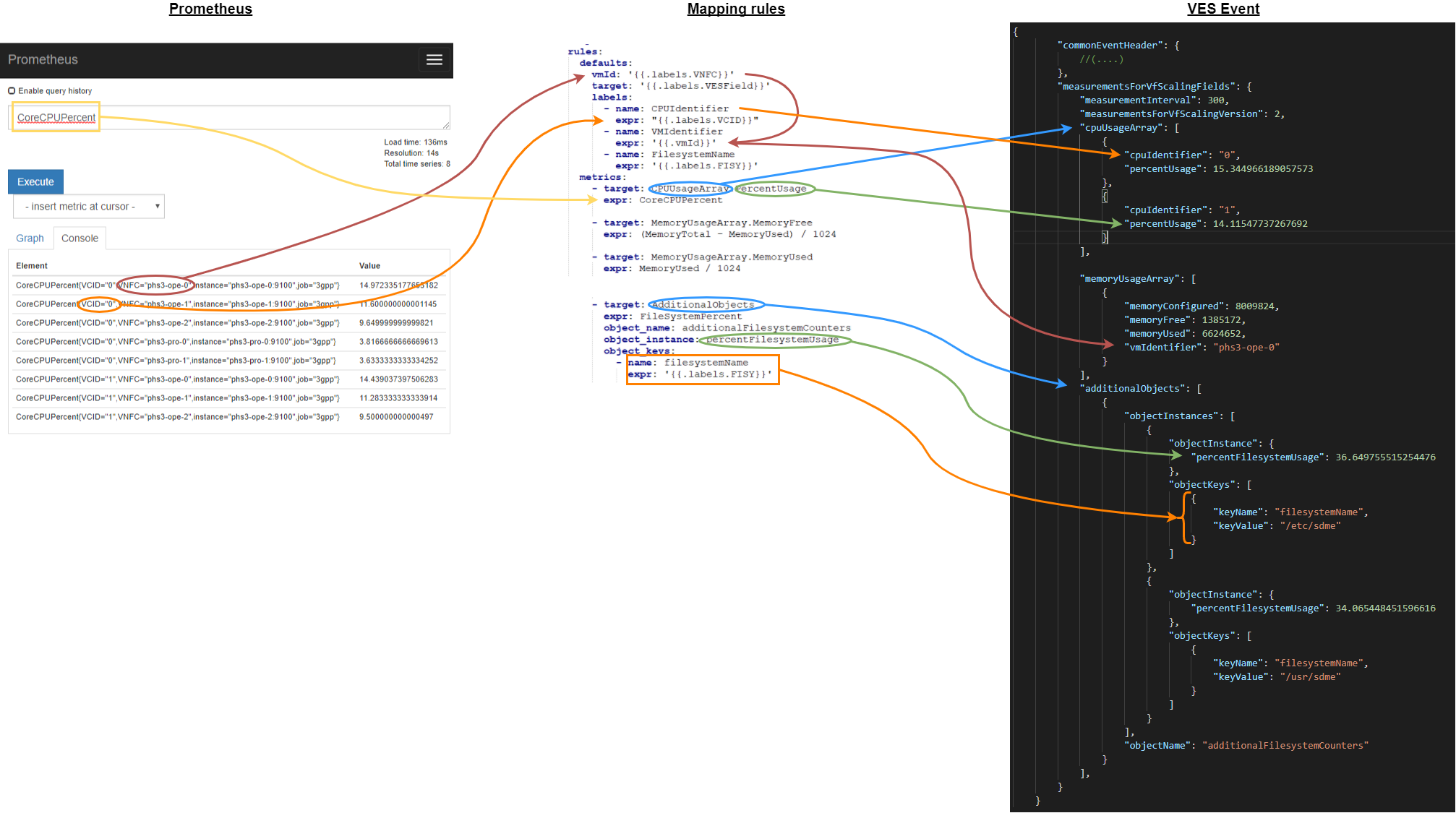 ### Heartbeat Measurements are configured in the `heartbeat` section of configuration file. This section only specify the default interval between 2 heartbeats. ```yaml heartbeat: defaultInterval: 60s ``` ### High Availability Enabling clustering and high availability is done in the `cluster` section of configuration file. Basically, the section contains the list of clustered nodes, with their IP:port, and their unbique ID. The local node's ID is needed too, identifying which of the nodes is the local one. ```yaml cluster: debug: false # Print raft debug messages into logfile displayLogs: false # Print replication log entries id: "1" # ID of local node. Must be unique accross the cluster peers: # List of all the nodes in the cluster (local node included). This configuration must be the same on all the nodes - id: "1" address: "127.0.0.1:6737" - id: "2" address: "127.0.0.2:6737" - id: "3" address: "127.0.0.3:6737" ``` ### Example Check the full configuration examples [here](./doc/examples/README.md) ## Using the VES collector simulator Please refer to [VES-Simulator documentation](./ves-simu/README.md)
