KO
|
EN
gitlite — search
Search
#javascript
#nodejs
#python
#hacktoberfest
#machine-learning
#deep-learning
#laravel
#deno
#vscode
#arduino
#php
#kubernetes
effect-bi
★ 32
Open GitHub ↗
一站式报表平台
Download README (.md)
Explore Similar Repositories
webtopup
:
Web top up untuk berbagai game, voucher, dan PPOB.
geminiclaw
:
Personal autonomous agent powered by Gemini CLI. Orchestrates scheduling, persistent memory, MCP tools, and multi-channel messaging.
cursor-usage-tracker
:
Monitor Cursor IDE usage, detect spending anomalies, and alert your team. Self-hosted, open-source.
dspy-lm-auth
:
No description available.
agentbnb
:
Where AI agents hire AI agents — hiring and coordination infrastructure for the agent economy
// repository documentation
Was this content helpful?
★ 0
(0 ratings)
Select Rating:
★
★
★
★
★
Submit Feedback
Recent Feedback
×
Download README
Do you want to download the
README.md
file for
effect-bi
?
Download (.md)
# Effect BI · 数据工作台 面向分析型数据栈的一体化前端:**对话(LangGraph)**、**血缘(Neo4j)**、**Cube 语义层**、**可视化查询与看板**、**ETL / Airflow** 等,由 **React + Vite** 与 **`backend/node`(Express)** 承载主 API;**`backend/langgraph`** 为独立 FastAPI 子模块(Git submodule)。产品与技术说明见 **[docs/README.md](docs/README.md)**。 ## 平台使用指南 报表开发典型流程:**数据转换 → 指标语义层建模 → 可视化查询出图 → 看板配置** ### 1 · 数据与任务(`/etl`) 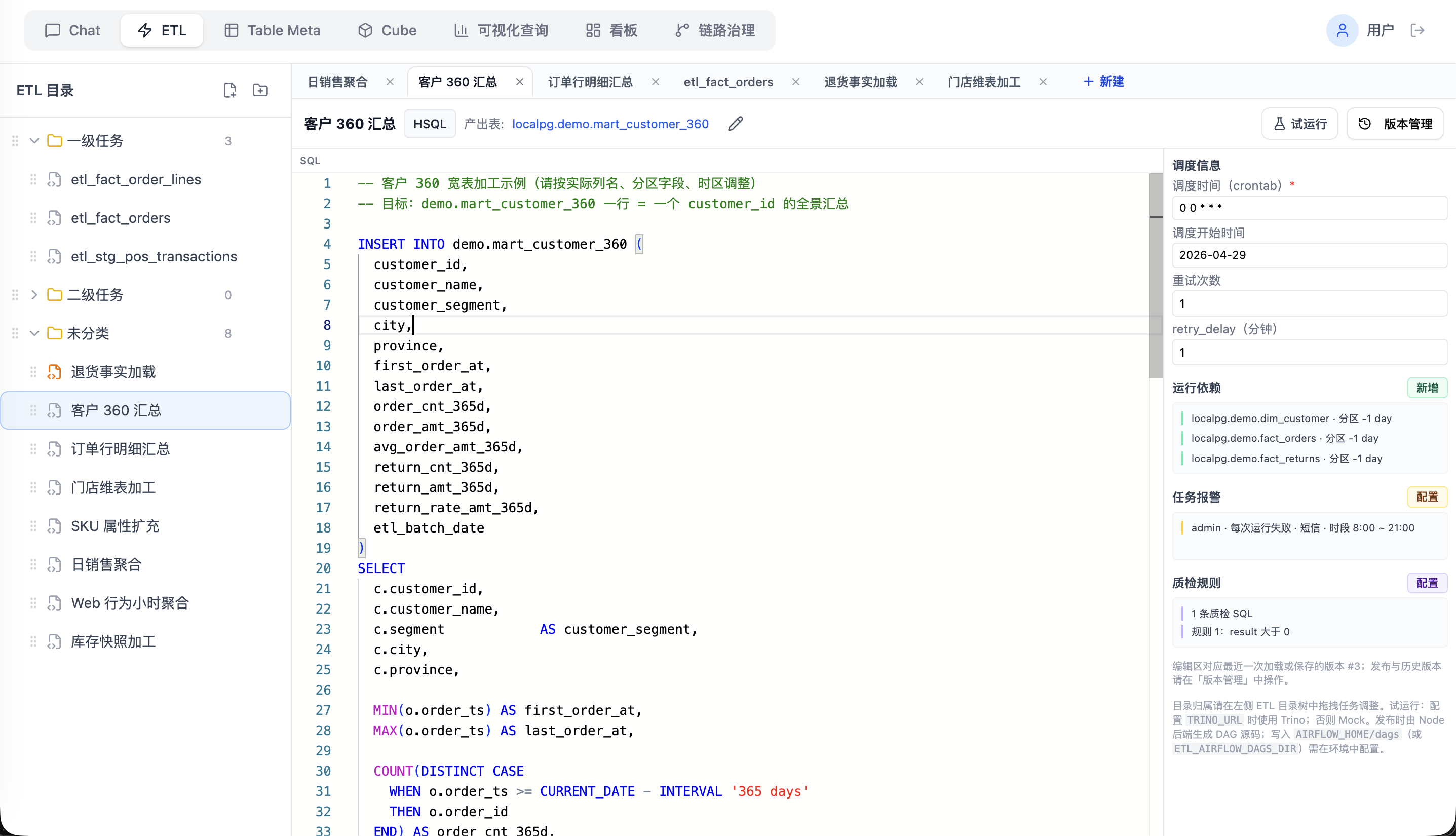 在 ETL 模块维护任务与版本、配置运行依赖(上游表 / 分区),并与调度侧衔接,保证报表所需表与分区持续就绪。 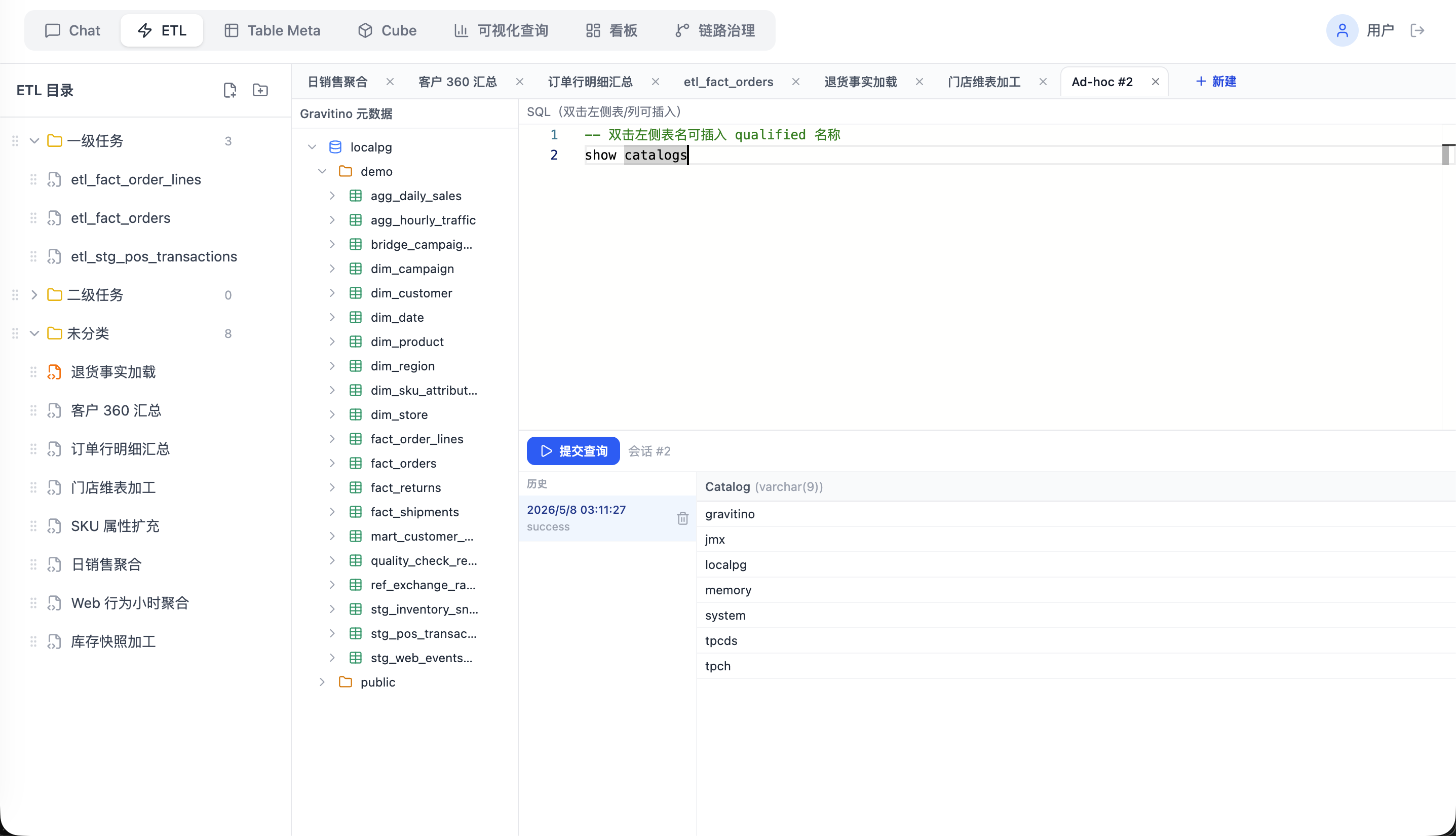 同一模块内可使用 **Ad-hoc** 对 Gravitino 目录下的表做即席查询,便于加工或排查数据后再进入语义层。 ### 2 · 指标语义层建模(`/cube`) 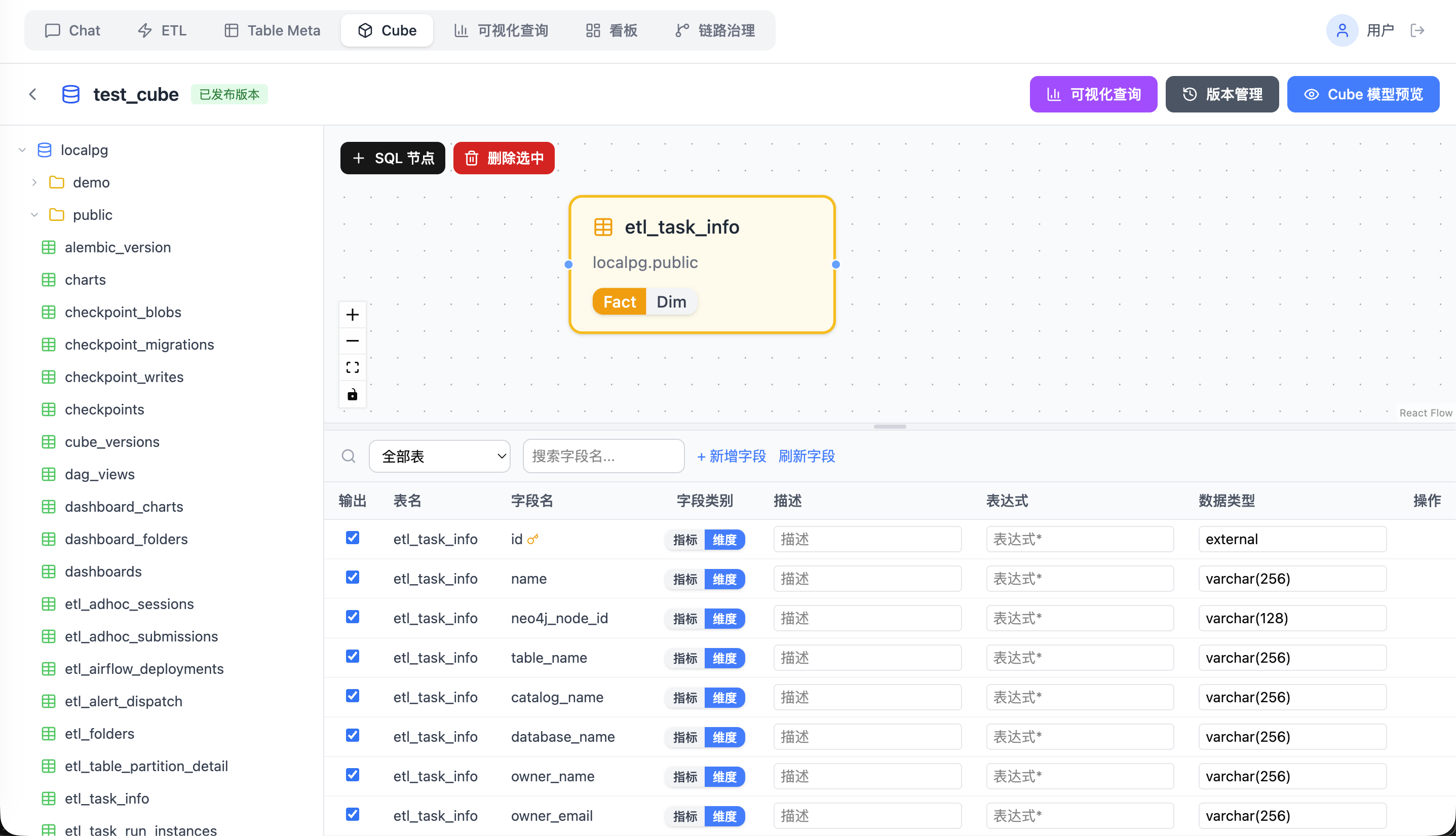 在 Cube 画布中拖拽事实 / 维度表、声明度量与维度,发布为可供查询页消费的 **Cube View**(支持版本化与回滚)。 ### 3 · 可视化查询(`/query`) 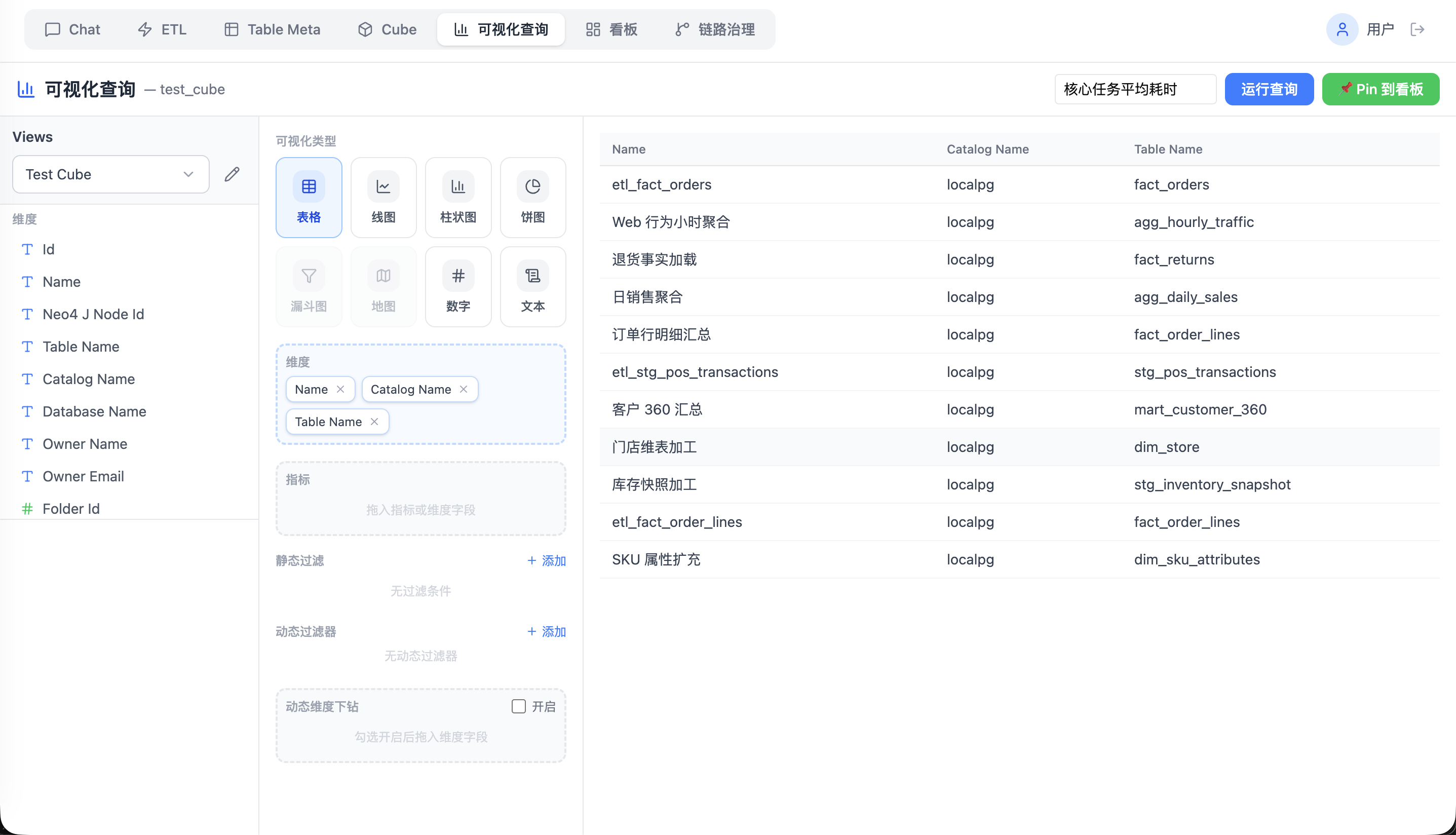 选择已发布的 View,配置维度、指标、过滤与排序,即时出图;满意后可 **Pin** 到看板。 ### 4 · 看板(`/dashboard`) 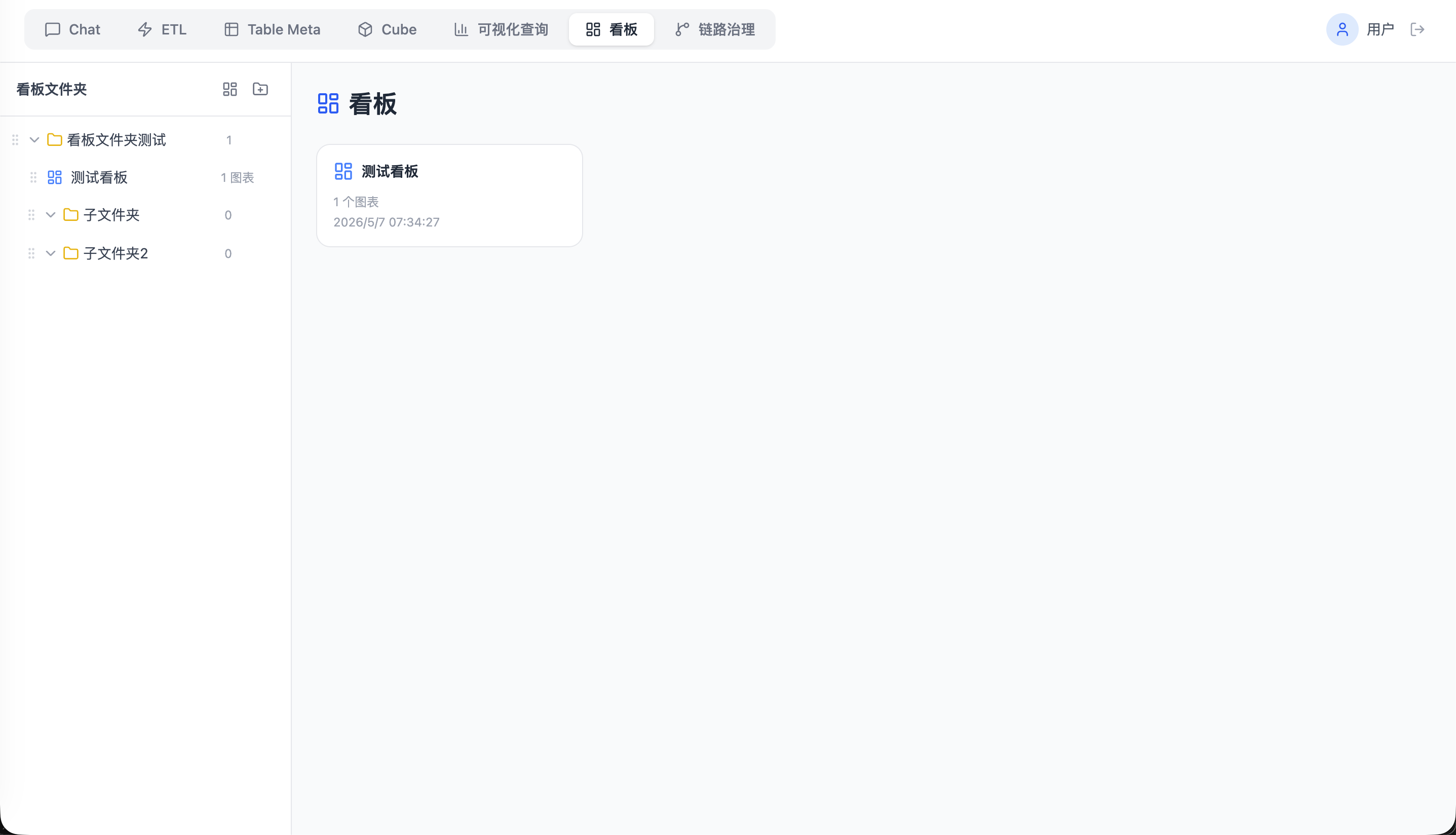 进入 **`/dashboard`** 列表视图时,左侧为 **文件夹树**:可按目录收纳看板,支持展开 / 折叠、拖拽调整文件夹顺序,以及将看板拖入文件夹或根目录以整理结构(与标题拖拽移动目录的行为一致)。 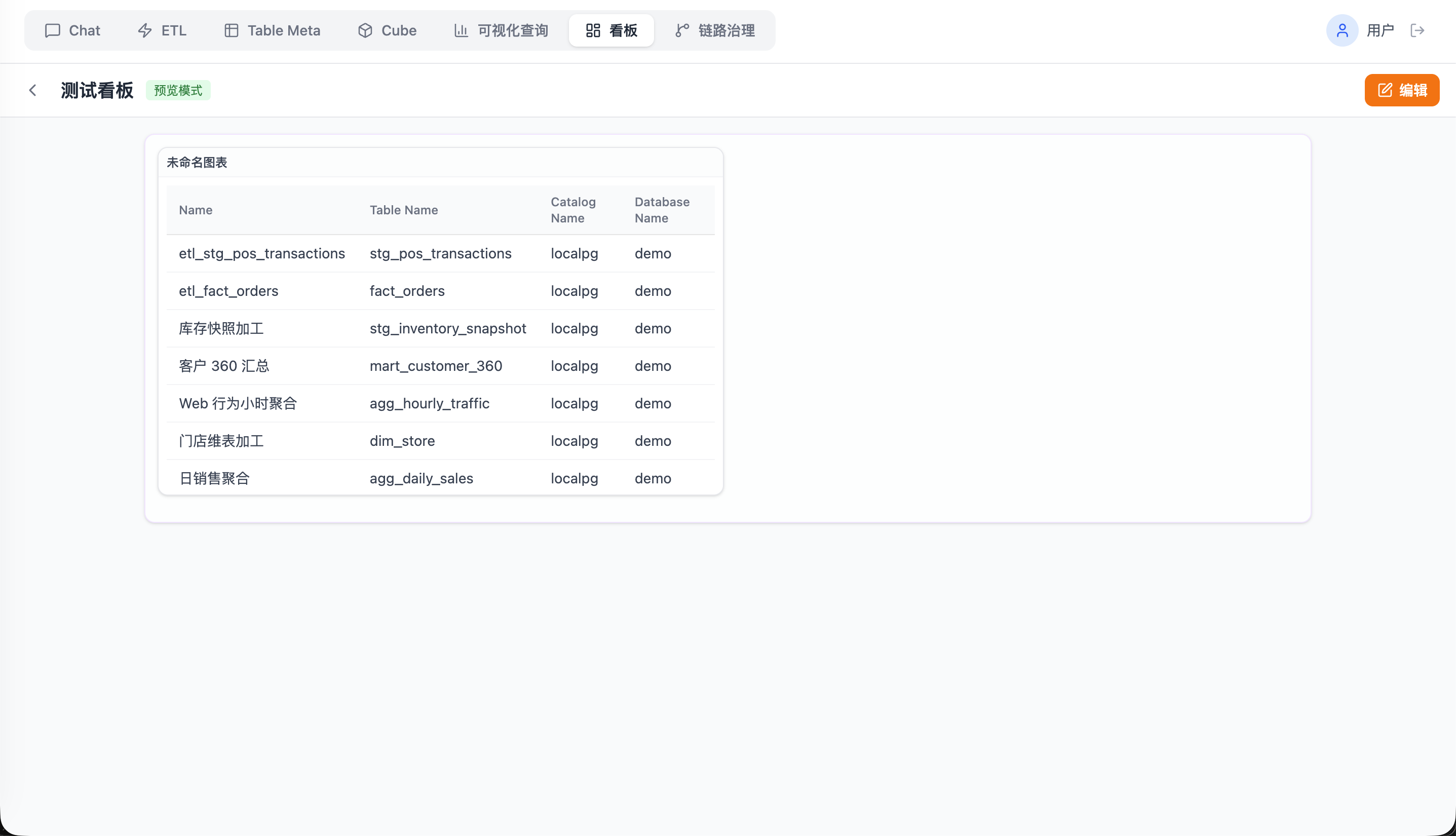 打开某一看板后,阅览 Pin 下的图表,使用看板级筛选;图表侧还可按需启用动态过滤、维度下钻等能力。 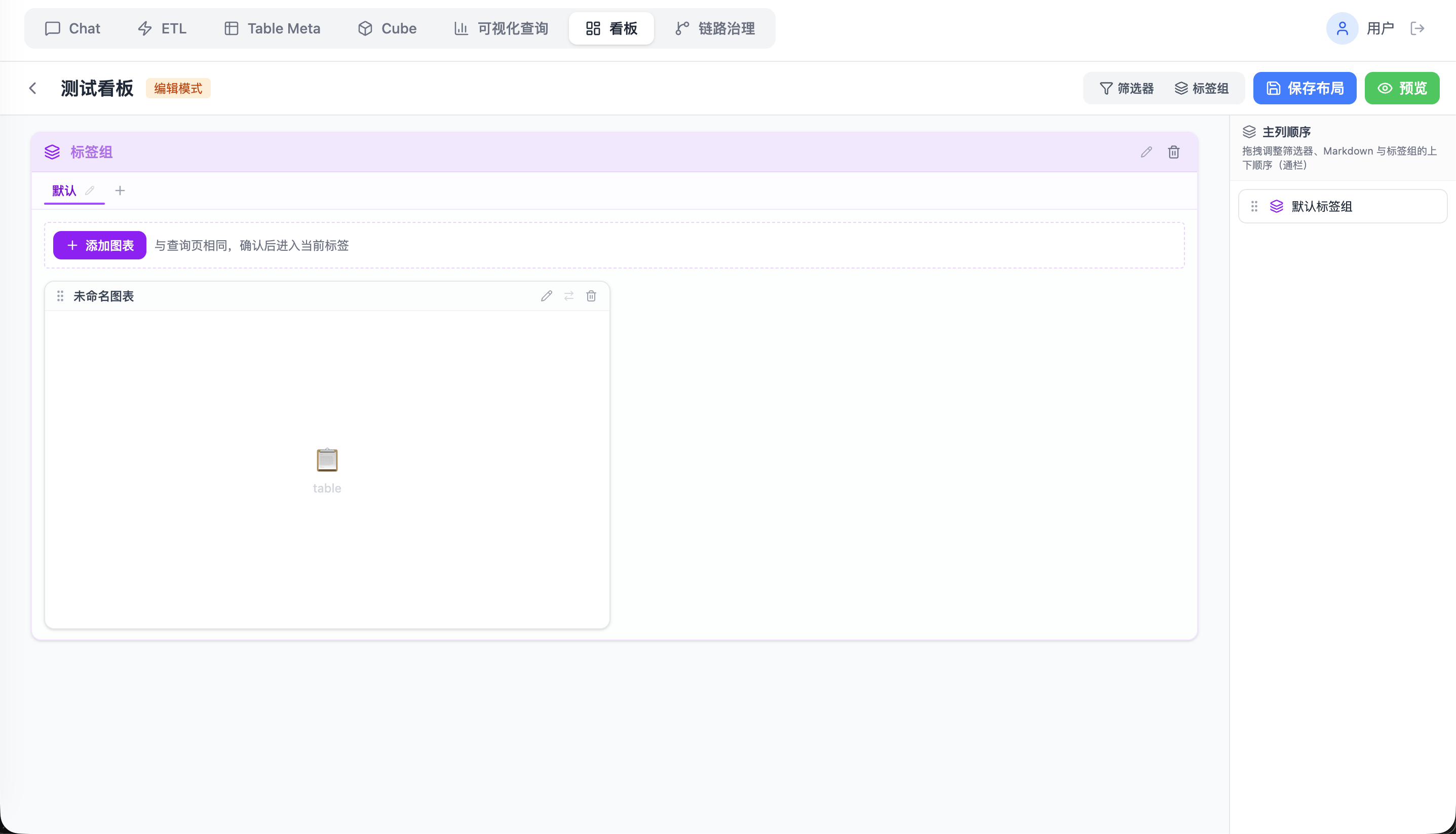 在看板编辑模式下调整网格布局、标签页与单个图表占位,完成后再保存以便阅览端使用统一的筛选与下钻体验。 ### (可选)血缘(`/lineage`) 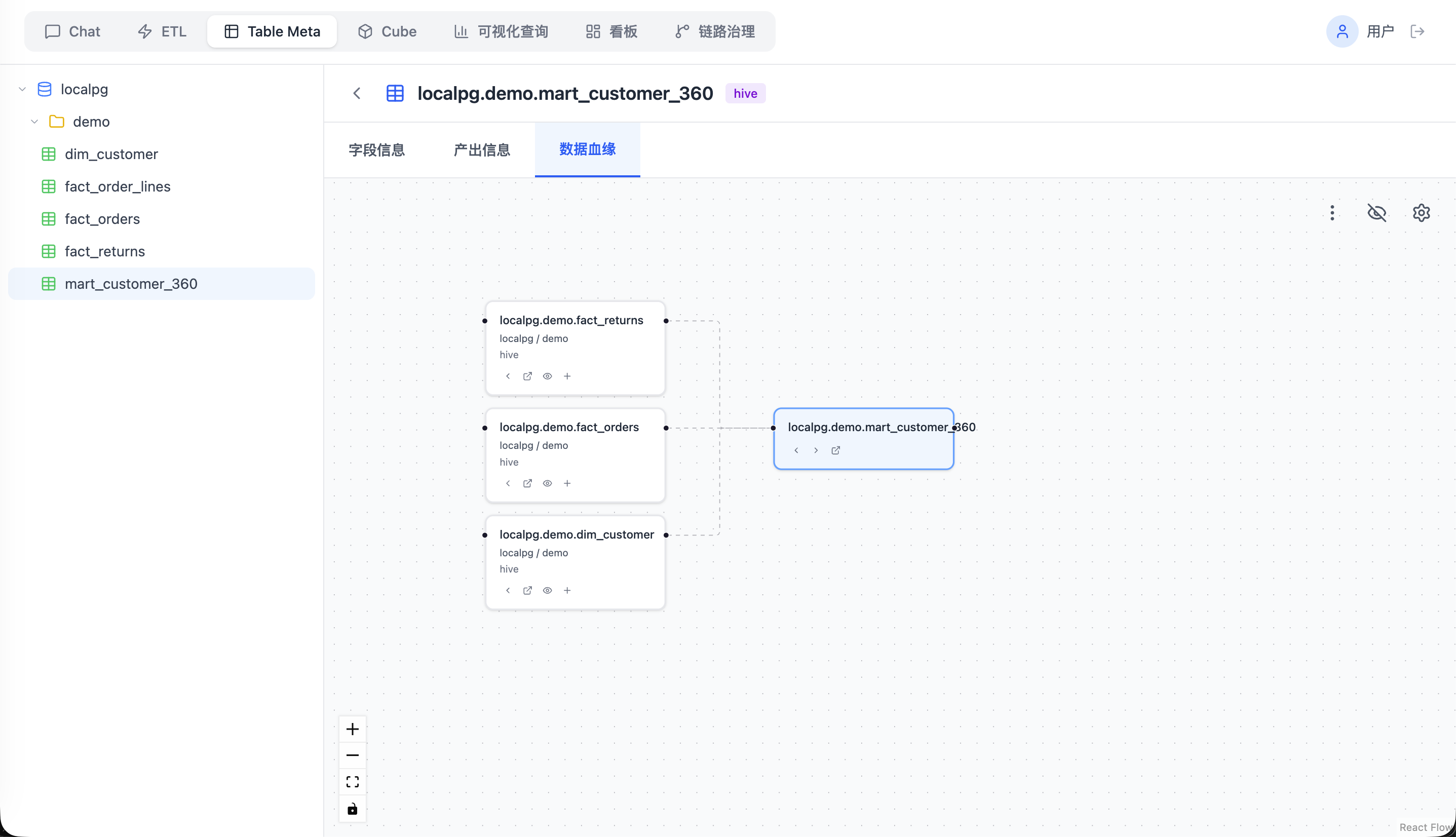 建模或排障时打开血缘,确认报表依赖的表、任务产出关系,再调整 ETL 或语义层。 ### (可选)链路治理(`/dags`) 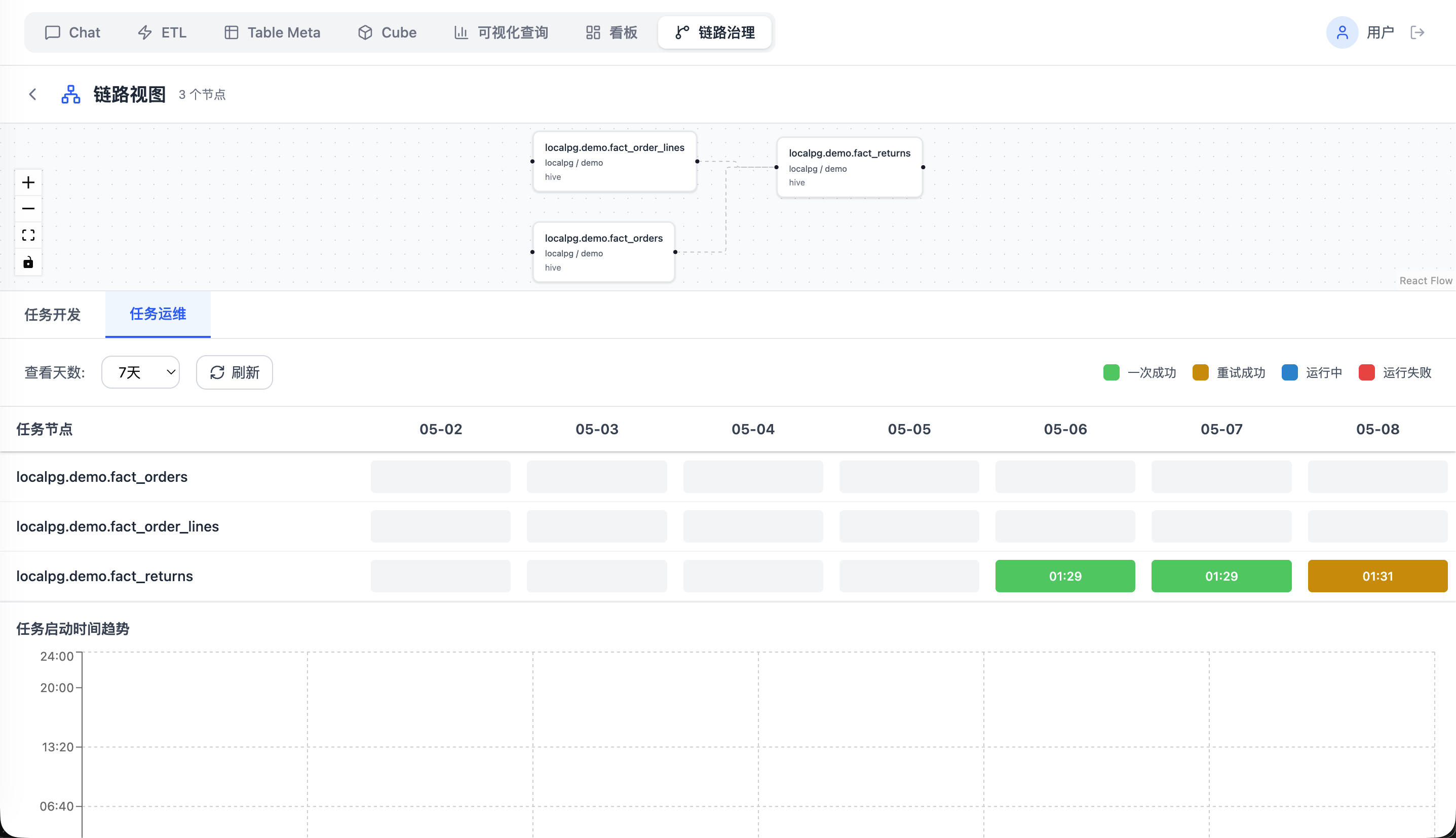 在**报表补数**、**产出延迟**或**产出失败**等场景下,结合调度侧视图排查链路:确认相关 DAG / 任务是否已触发、运行是否成功、是否存在依赖未就绪或重试滞后,从而定位是上游数据、调度窗口还是任务本身的问题。 ### (可选)对话(`/chat`) 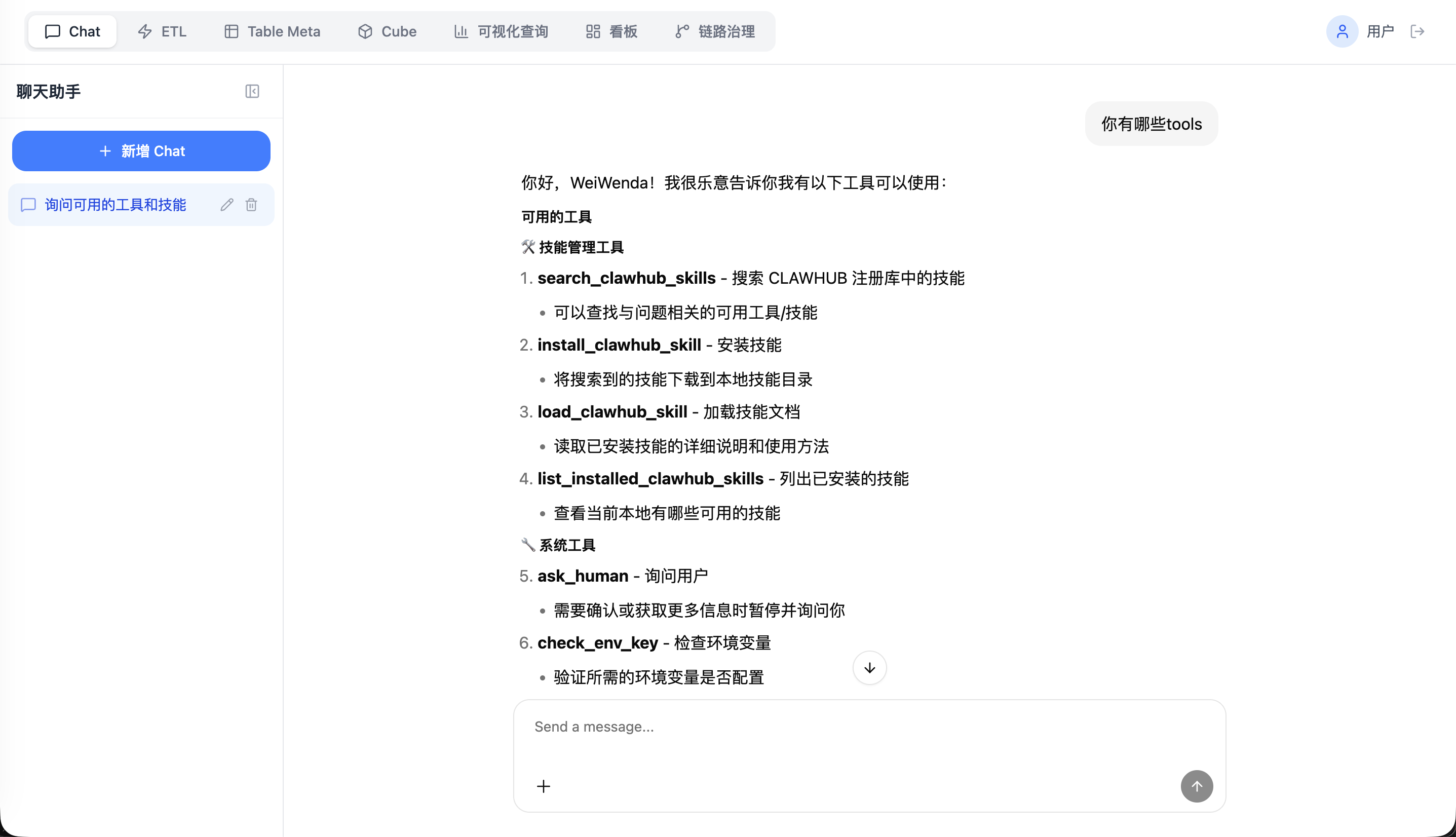 该模块作为**预留入口**:后续可在此基础上扩展 **AI 查数**(自然语言对接语义层 / 查询)、**AI 数据开发**(辅助 SQL、ETL 与建模说明)、**AI 分析**(解读图表与指标)等能力;当前实现以对话框架与路由占位为主,具体能力与产品范围以版本说明为准。 ## 架构概览 下图概括 **Docker Compose**(`docker-compose.stack.yaml`)下的主要组件与数据流;本地开发时由 Vite 将 `/api`、`/langgraph` 等代理到本机 Node 与 LangGraph,逻辑关系一致。 ```mermaid flowchart TB subgraph client["浏览器"] U[用户] end subgraph app["Effect BI 应用"] SPA["React + Vite 前端"] API["Express · backend/node"] LG["FastAPI · LangGraph"] end subgraph data["数据与查询"] PG[("PostgreSQL + pgvector")] Neo[("Neo4j")] Cube["Cube.js"] Trino["Trino"] Grav["Apache Gravitino"] end subgraph orch["调度"] AF["Apache Airflow"] end U --> SPA SPA -->|/api| API SPA -->|/langgraph| LG API --> PG API --> Neo API --> Trino API --> Cube API --> AF LG --> PG Cube --> PG Trino --> Grav ``` 更细的分层、路由表与开发期代理说明见 **[docs/README.md](docs/README.md)** 第 3 节。 ## 主要开源组件 以下为仓库直接依赖或 **Docker Compose** 中引用的代表性开源项目(许可证以各项目官方为准;本仓库自有代码见根目录 [LICENSE](LICENSE))。 ### 基础设施(容器镜像 / 外部服务) | 项目 | 用途 | | -------------------------------------------------------------------------------------------- | ---------------------------------- | | [PostgreSQL](https://www.postgresql.org/) + [pgvector](https://github.com/pgvector/pgvector) | 业务数据、LangGraph checkpoint、Cube 仓库等 | | [Neo4j](https://neo4j.com/) | 血缘图存储与查询 | | [Apache Gravitino](https://gravitino.apache.org/) | 元数据与 Trino 动态目录 | | [Trino](https://trino.io/) | 分布式 SQL 查询 | | [Cube](https://cube.dev/) | 语义层与 REST / SQL API | | [Apache Airflow](https://airflow.apache.org/) | 工作流调度 | ### 前端(`package.json`) | 项目 | 用途 | | ------------------------------------------------------------------------- | ------------------ | | [React](https://react.dev/) / [React Router](https://reactrouter.com/) | UI 与路由 | | [Vite](https://vite.dev/) / [TypeScript](https://www.typescriptlang.org/) | 构建与类型 | | [Tailwind CSS](https://tailwindcss.com/) | 样式 | | [Recharts](https://recharts.org/) | 图表 | | [React Flow](https://reactflow.dev/)(`@xyflow/react`) | 画布与血缘图布局 | | [Assistant UI](https://www.assistant-ui.com/) | 对话界面与 LangGraph 适配 | | [Monaco Editor](https://microsoft.github.io/monaco-editor/) | 代码编辑 | ### 主后端 Node(`backend/node`) | 项目 | 用途 | | --------------------------------- | -------- | | [Express](https://expressjs.com/) | HTTP API | ### AI 后端(`backend/langgraph`,`pyproject.toml`) | 项目 | 用途 | | --------------------------------------------------------------------------------------------------- | ---------------- | | [FastAPI](https://fastapi.tiangolo.com/) / [Uvicorn](https://www.uvicorn.org/) | Web 服务 | | [LangGraph](https://langchain-ai.github.io/langgraph/) / [LangChain](https://python.langchain.com/) | Agent 编排与 LLM 调用 | | [Langfuse](https://langfuse.com/) / [Prometheus 客户端](https://github.com/prometheus/client_python) 等 | 可观测性(按环境启用) | --- ## Quick start ### 克隆与子模块 ```bash git clone --recurse-submodules https://github.com/WeiWenda/effect-bi.git cd effect-bi # 若已克隆但未拉子模块: git submodule update --init --recursive ``` ### Docker Compose 启动(`docker-compose.stack.yaml`) ```bash cp docker/stack/env.example docker/stack/.env bash docker/stack/trino/sync-plugin-from-dev.sh docker compose --env-file docker/stack/.env -f docker-compose.stack.yaml build docker compose --env-file docker/stack/.env -f docker-compose.stack.yaml up -d ``` Compose 在解析 YAML 里的 `${VAR:?…}` 时需要这份 env(`service.env_file` 只负责注入容器,不会自动参与变量替换)。若不想写 `--env-file`,也可把同名变量放进仓库根目录的 `.env`,或先在 shell 里 `export`。 默认入口:Web **[http://localhost:3001](http://localhost:3001)**,LangGraph **8001**,Airflow **8080**,Trino **8088**;更多变量与说明见 **docker-compose.stack.yaml** 文件头注释与 **docker/stack/env.example**。 停止:`docker compose --env-file docker/stack/.env -f docker-compose.stack.yaml down`。 ### 单独构建镜像(可选) ```bash docker build --build-arg NODE_IMAGE=docker.m.daocloud.io/library/node:22-bookworm-slim -t effect-bi:local . docker build -f backend/langgraph/Dockerfile \ --build-arg PYTHON_IMAGE=docker.m.daocloud.io/library/python:3.13-slim-bookworm \ --build-arg APT_MIRROR_HOST=mirrors.aliyun.com \ -t effect-bi-langgraph:latest backend/langgraph ``` --- ## Development Guide ### 本地开发(需要提前按需启动gravitino、airflow、cube、neo4j、pg、trino等服务) ```bash npm install npm run dev:all ``` | 命令 | 作用 | | --------------------- | ----------------------------------------------------------------------------------------------- | | `npm run dev:all` | 启动 **Vite**(前端)、**Node / Express**(`backend/node`)、**LangGraph / FastAPI**(`backend/langgraph`) | | `npm run dev:stop` | 停止上述三个进程 | | `npm run dev:restart` | 重启上述三个进程 | | `npm run dev:status` | 查看上述进程是否在运行 | | `npm run dev` | 仅启动 **Vite**(不拉起 Node 与 LangGraph) | 可选环境变量:`FRONTEND_PORT`(默认 5173)、`BACKEND_PORT`(默认 3001)、`LANGGRAPH_PORT`(默认 8001);PID 与日志目录为 `.dev-pids/`。 LangGraph 相关配置见 `backend/langgraph/.env.example`。
