KO
|
EN
gitlite — search
Search
#typescript
#ai-agents
#deepseek-harness
#dsh-plugin
#open-source
#ai
#claude-code
#cli
#windows
#codex
#developer-tools
#dsh
streamlit-auth0
★ 86
Open GitHub ↗
No description available.
Download README (.md)
Explore Similar Repositories
stencil
:
Customizable transactional and marketing email templates
Text-Summarization
:
Abstractive and Extractive Text summarization using Transformers.
BMBC
:
BMBC: Bilateral Motion Estimation with Bilateral Cost Volume for Video Interpolation, ECCV 2020
AODA
:
Official implementation of "Adversarial Open Domain Adaptation for Sketch-to-Photo Synthesis"(WACV 2022/CVPRW 2021)
meshsync
:
MeshSync one of a family of custom controllers within Meshery Operator.
// repository documentation
Was this content helpful?
★ 0
(0 ratings)
Select Rating:
★
★
★
★
★
Submit Feedback
Recent Feedback
×
Download README
Do you want to download the
README.md
file for
streamlit-auth0
?
Download (.md)
# Welcome to Auth0-Streamlit **The fastest way to provide comprehensive login inside Streamlit** 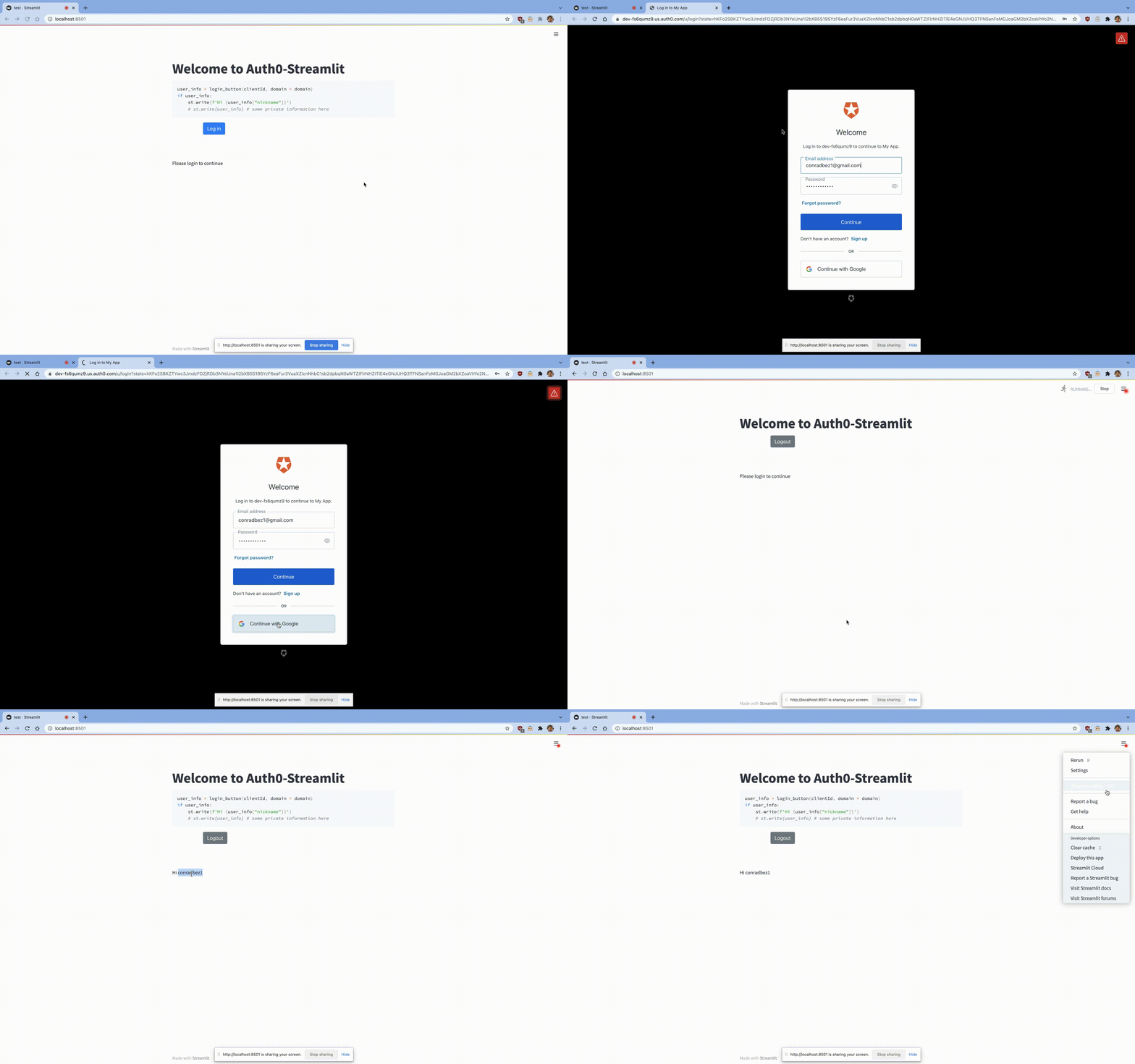 ## Installation `pip install streamlit-auth0-component` ## Setup - Register for Auth0 - Create a Single Page Application and navigate to the "settings" tab - set your callback url's to `http://localhost:8501/component/auth0_component.login_button/index.html` assuming you're running on localhost or `http://YOUR_DOMAIN/component/auth0_component.login_button/index.html` if you're deploying - Copy `client_id` and `domain` from this page - Follow example below ## An example On Auth0 website start a "Single Page Web Application" and copy your client-id / domain (of form xxxx.us.auth0.com) into code below. ``` from auth0_component import login_button import streamlit as st clientId = "...." domain = "...." user_info = login_button(clientId, domain = domain) st.write(user_info) ``` `user_info` will now contain your user's information ## Todo - Pass all info through JWT, at the moment the `sub` field is the only field assing through verification - Test with other providers, only Google tested ## Deploy - `Change version in setup.py` - `cd auth0_component/frontend/ && npm run build && cd .. && cd .. && rm -rf dist/* && python setup.py sdist bdist_wheel` - `twine upload dist/*`
