KO
|
EN
gitlite — search
Search
#php
#python
#java
#javascript
#c-plus-plus
#cli
#c
#hacktoberfest
#objective-c
#analytics
#algorithm
#scrapy
intent_classifier
★ 84
Open GitHub ↗
No description available.
Download README (.md)
Explore Similar Repositories
imagemin-lint-staged
:
imagemin CLI designed for lint-staged usage with sensible defaults
copernicus
:
An alternative implementation of the Bitcoin Cash protocol, written in Golang
service
:
📦 Dependency injection / inversion of control framework.
producthunt-preview
:
ProductHunt product previewer 💅
athena-cli
:
Presto-like CLI tool for AWS Athena
// repository documentation
Was this content helpful?
★ 0
(0 ratings)
Select Rating:
★
★
★
★
★
Submit Feedback
Recent Feedback
×
Download README
Do you want to download the
README.md
file for
intent_classifier
?
Download (.md)
# This repo is not currently supported as intent classifier became a part of DeepPavlov open-source library. Try it [here](http://docs.deeppavlov.ai/en/latest/components/classifiers.html). # Neural Networks for Intent Classifier In this repo one can find code for training and infering intent classification that is presented as _shallow-and-wide Convolutional Neural Network_[1]. #### Currently considered fasttext version in this repo does not works on Windows correctly. Also this repo contains pre-trained model for intent classification on [SNIPS dataset](https://github.com/snipsco/nlu-benchmark/tree/master/2017-06-custom-intent-engines) SNIPS dataset considers the following intents: `AddToPlaylist`, `BookRestaurant`, `GetWeather`, `PlayMusic`, `RateBook`, `SearchCreativeWork`, `SearchScreeningEvent`. 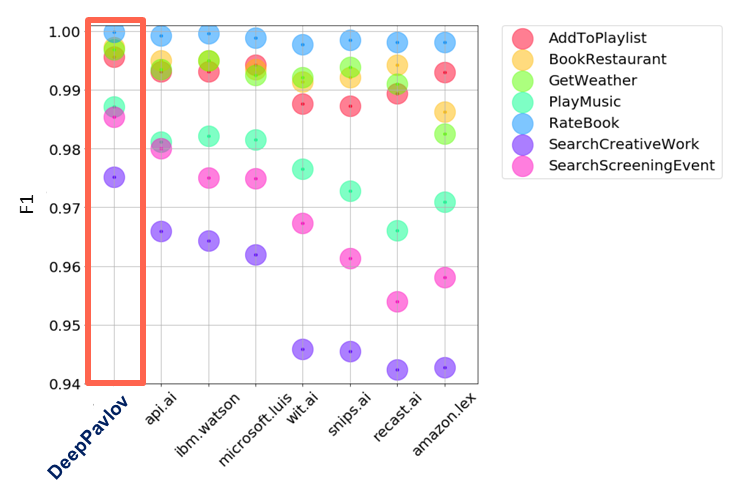 Test results for other intent recognition services are from https://www.slideshare.net/KonstantinSavenkov/nlu-intent-detection-benchmark-by-intento-august-2017 ### How to install First of all, one have to download this repo: ``` git clone https://github.com/deepmipt/intent_classifier.git cd intent_classifier ``` The next step is to install requirements: ``` pip install -r requirements.txt ``` ### How to use pre-trained model (SNIPS) Now one is able to infer pre-trained model: ``` ./intent_classifier.py ./snips_pretrained/snips_config.json ``` The script loads pre-trained model, if necessary downloads pre-trained fastText embedding model [2], and then it is ready to predict class and probability of given phrase to belong with this class. Example: ``` ./intent_classifier.py ./snips_pretrained/snips_config.json >I want you to add 'I love you, baby' to my playlist >(0.99986315, 'AddToPlaylist') ``` ### How to train on your own data The repo contains script `train.py` for training multilabel classifier. Training data file should be presented in the following `data.csv` form: | request |class_0|class_1|class_2|class_3| ...| |------------- |:-----:|:-----:|:-----:|:-----:|:--:| | text_0 | 1 | 0 | 0 |0 |... | | text_1 | 0 | 0 | 1 |0 |... | | text_2 | 0 | 1 | 0 |0 |... | | text_3 | 1 | 0 | 0 |0 |... | | ... | ... | ... | ... |... |... || Then one is ready to run `train.py` that includes reading data, tokenization, constructing data, building dataset, initializing and training model with given parameters on dataset from `data.csv`: ``` ./train.py config.json data.csv ``` The model will be trained using parameters from `config.json` file. There is a description of several parameters: - Directory named `model_path` should exist. For example, if `config.json` contains `"model_path": "./cnn_model"`, then configuration parameters for the trained model will be saved to `./cnn_model/cnn_model_opt.json` and weights of the model will be saved to `./cnn_model/cnn_model.h5`. - Parameter `model_from_saved` means whether to load pre-trained model - Parameter `lear_metrics` is a string that can include either metrics from `keras.metrics` or custom metrics from the file `metrics.py` (for example, `fmeasure`). - Parameter `confident_threshold` is within the range `[0,1]` and means the boundary whether sample belongs to the class. - Parameter `fasttext_model` contains path to pre-trained binary skipgram fastText [2] model for English language. If one prefers to use default model, it will be downloaded when one will train model. - Parameter `text_size` means the number of words for padding of each tokenized text request. - Parameter `model_name` contains name of the class method from `multiclass.ry` returning uncompiled Keras model. One can use `cnn_model` that is shallow-and-wide CNN (`config.json` contains parameters for this model), `dcnn_model` that is deep CNN model (be attentive to provide necessary parameters for the model), also it is possible to write own model. - All other parameters refer to learning and network configuration. ### How to infer Infering can be done in two ways: ``` ./infer.py config.json ``` or ``` ./intent_classifier.py config.json ``` The first one runs `infer.py` file that contains reading parameters from `config.json` file, initializing tokenizer, initializing and infering model. The second one is doing the same but reads samples from command line. ### References [1] Kim Y. Convolutional neural networks for sentence classification //arXiv preprint arXiv:1408.5882. – 2014. [2] P. Bojanowski*, E. Grave*, A. Joulin, T. Mikolov, Enriching Word Vectors with Subword Information.
