KO
|
EN
gitlite — search
Search
#javascript
#python
#hacktoberfest
#react
#ai
#typescript
#llm
#go
#golang
#android
#machine-learning
#rust
#deep-learning
#linux
intellijcoder
★ 52
Open GitHub ↗
IntelliJ IDEA plugin for TopCoder
Download README (.md)
Explore Similar Repositories
challenges
:
TopCoder, Sphere Online Judge, Google Code Jam, Project Euler, Sedgewick's Algorithms, ...
eclipsecoder
:
EclipseCoder is an Eclipse plug-in to be used while competing or practicing at the TopCoder online algorithm competition using either C++ or Java.
marathon-docker-template
:
Template code for participating in Topcoder Marathon Matches
Bits-O-Cpp
:
Bits of sweet C++ code that I use often.
topcoder-dl
:
:bookmark: Scrape Data Science tutorials from Topcoder and save as PDF
// repository documentation
Was this content helpful?
★ 0
(0 ratings)
Select Rating:
★
★
★
★
★
Submit Feedback
Recent Feedback
×
Download README
Do you want to download the
README.md
file for
intellijcoder
?
Download (.md)
intellijcoder ============= IntelliJ IDEA plugin for TopCoder Installation ------------------------- Just like any other IntelliJ IDEA plugin: * Windows: `File -> Settings -> Plugins -> Browse repositories... -> IntelliJCoder -> Download and install` * Mac OS: `IntelliJ IDEA -> Preferences -> Plugins -> Browse repositories... -> IntelliJCoder -> Download and install` Usage ------------------------- * Create new or open existing project in IntelliJ IDEA. * Make sure you have JDK configured for your project (`File -> Project Structure -> Project -> SDK`) * Make sure the Main Toolbar is shown! This is a toolbar where TopCoder icon is located and it's hidden by default, Click `View -> Appearance -> Toolbar` to enable it * Press TopCoder button  on the main toolbar to launch Arena applet * Login to Arena, then select a contest and open a problem * IntelliJCoder will automatically create a new module with a solution stub and a test class and run tests * After you finished editing your code, use Compile and Sumbit buttons in Arena to submit your code to TopCoder servers * Thanks to the contributors you can now setup your favorite imports and method templates in Settings: * Windows: `File -> Settings -> IntelliJCoder` * Mac OS: `IntelliJ IDEA -> Preferences -> IntelliJCoder` Screenshot ------------------------- 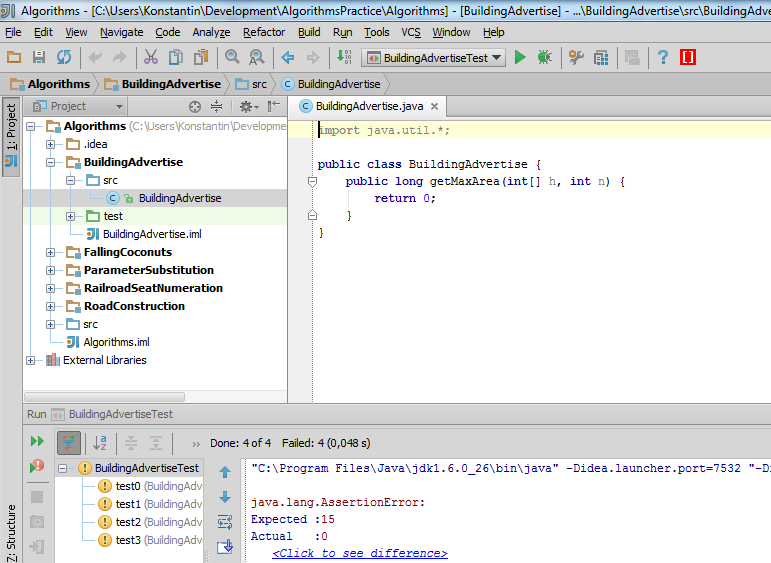 Support ------------------------- New features are developed by contributors now (thanks a lot to all of them). I don't actively develop this project - only critical bug fixes. However, contributions are always welcome. I'll do my best to merge your changes and deploy a new version to JetBrains website. How to build (for contributors) ------------------------- * Check out project ``` git clone https://github.com/fadeyev/intellijcoder.git ``` * Repository contains `.idea` project files, so just open the project in IDEA: `File -> Open` * Configure the project: * Open project settings: `File -> Project Structure (Ctrl+Alt+Shift+S)` * Set up IntelliJ IDEA Plugin SDK: `Project -> Project SDK -> New... ->IntelliJ Platform Plugin SDK -> <Pick your IDEA directory> -> OK` * Set this SDK as SDK for modules: `Modules -> intellijcoder -> Dependencies -> Module SDK -> <Pick your SDK here>` `Modules -> intellijcoder-idea -> Dependencies -> Module SDK -> <Pick your SDK here>` * You also need to set up IDEA Junit plugin library location, since IntelliJCoder depends on it: `Libraries -> JUnit IDEA Plugin -> <If idea-junit.jar location is incorrect, please set up the correct one>` * Check that there are no errors at the bottom of the dialog. Press OK to close Project Settings. * To be able to debug the plugin you may want to check out fresh IntelliJ IDEA sources: http://www.jetbrains.org/pages/viewpage.action?pageId=983225 ``` git clone https://github.com/JetBrains/intellij-community.git ``` and then attach them to IntelliJ IDEA Plugin SDK: `File -> Project Structure -> SDKs -> IDEA IC-*** -> Sourcepath -> Add -> <Point to the checked out folder>` * To build a jar file, right-click on **intellijcoder-idea** module, select the option "Prepare Plugin Module intellijcoder-idea for Deployment"
