KO
|
EN
gitlite — search
Search
#python
#java
#python3
#arduino
#golang
#machine-learning
#rust
#html
#flask
#javascript
#seismology
#nodejs
wo
★ 10
Open GitHub ↗
wo(rkspace management)
Download README (.md)
Explore Similar Repositories
yap
:
Built for people who think faster than they type
elc117-2026a
:
ELC117 - Paradigmas de Programação - UFSM - 2026a
vibedeck
:
VibeDeck is a local-first Kanban hub where OpenClaw turns natural-language requirements into cards and auto-dispatches them to coding agents.
cursor-plugin
:
Datadog Cursor Plugin
addhumanity
:
An experimental skill pack that injects human-like mindstates into agents to expand reasoning beyond default robotic tone.
// repository documentation
Was this content helpful?
★ 0
(0 ratings)
Select Rating:
★
★
★
★
★
Submit Feedback
Recent Feedback
×
Download README
Do you want to download the
README.md
file for
wo
?
Download (.md)
# wo `wo` is a fast workspace jumper for repo-style directories. It indexes workspaces once, resolves names quickly, and (with shell integration) changes directory and runs trusted hooks. **This video is old, wo scan is now `wo scan [directory] [depth]`. no flags. can also be configured to auto scan a directory and depth in a config file when running just wo scan.** 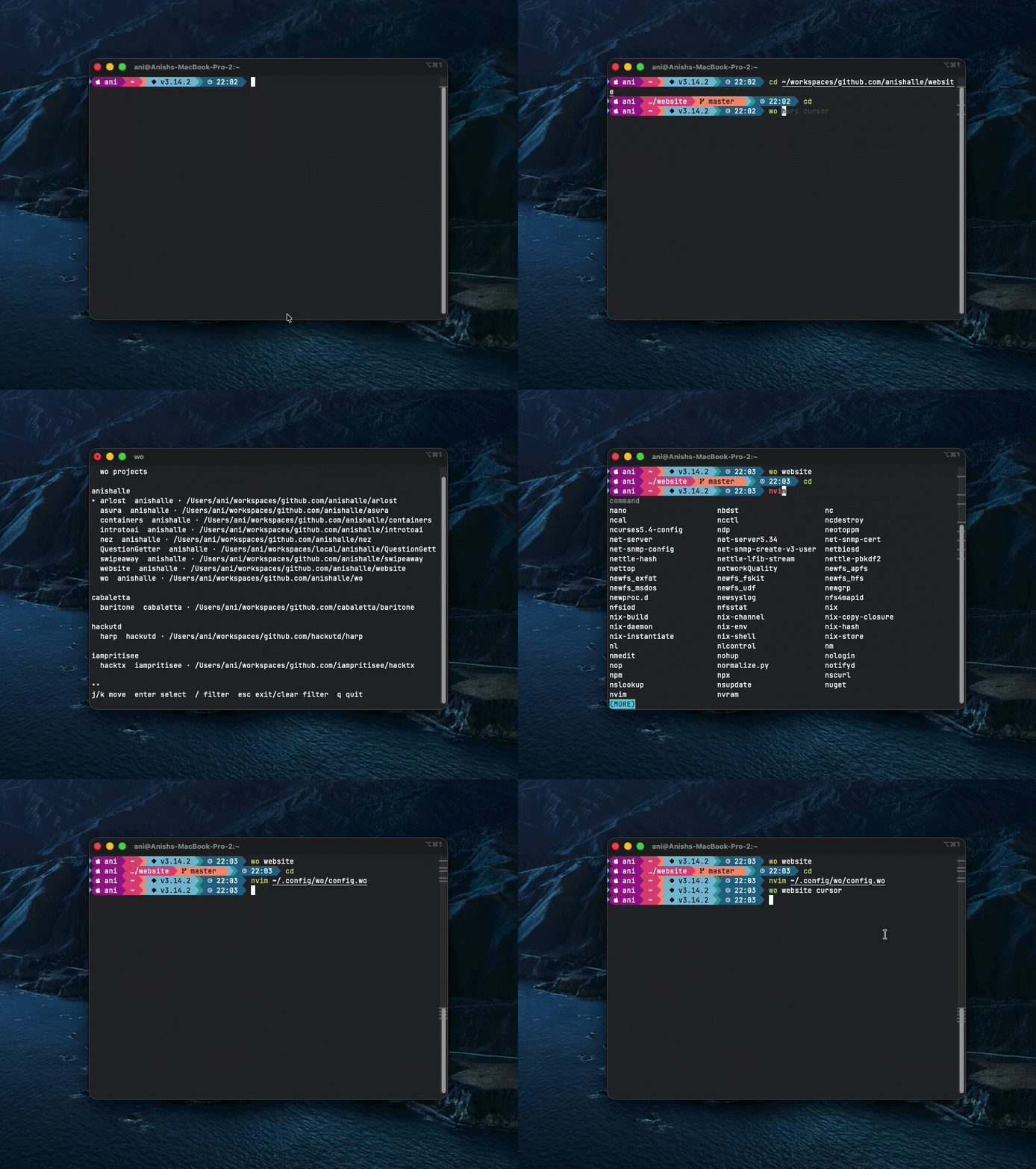 i too, work on 500 projects at the same time, and i hate cding into them, and worse, finding out which projects i have on my pc. this is meant to speed up a small aspect of my daily coding life ## What `wo` Does - Jump to a workspace by name: `wo harp` - Browse indexed workspaces in an interactive picker: `wo` - Resolve ambiguous names with picker/confirmation - Discover workspaces from `.git/` or `.wo` - Run startup hooks and named hook profiles - Support workspace-local and global hook profiles - Provide shell completion for workspace names and hook profile names ## Install ```bash make install # or ./scripts/install.sh ``` ## Uninstall ```bash make uninstall # or ./scripts/uninstall.sh ``` `uninstall` removes: - installed `wo` binary - installed `wo` man page - runtime SQLite index/trust state (`wo.db*`) `uninstall` keeps: - workspace `.wo` files - config files ## Shell Integration (Required For `cd`) `wo` only changes your current shell directory when shell integration is loaded. Without integration, `wo` prints the resolved path. ```bash # zsh source <(wo init zsh) # bash source <(wo init bash) # fish wo init fish | source ``` After loading shell integration: - `wo <TAB>` completes workspace names for arg 1 - `wo <workspace> <TAB>` completes hook profiles for arg 2 ## Quick Start ```bash # index paths from ~/.config/wo/paths.wo wo scan # scan one root wo scan ~/workspaces # scan one root with explicit depth wo scan ~/workspaces 3 # scan targets from a custom file wo scan ~/tmp/paths.wo # jump to workspace wo harp # jump and run named profile hook wo harp code # force global profile wo harp code --global # skip all hooks for this invocation # this is specifically for hooks that invoke on jump, (think direnv) wo harp --clean # always force picker wo harp --pick ``` ## Workspace Detection A directory is indexed if it has either: - `.git/` - `.wo` ## Workspace `.wo` File (TOML) Place a `.wo` file at workspace root. ```toml name = "harp" # optional name and owner owner = "hackutd" [enter] # commands that run on enter ( wo harp ) commands = ["echo startup", "nvim ."] shell = "inherit" [code] command = "code ." chdir = false [nvim] comand = "nvim ." chdir = true #implicitly true [test] commands = ["go test ./...", "make lint"] chdir = false ``` Schema notes: - `[enter]` is startup hooks. - Top-level tables other than `name`, `owner`, and `enter` are hook profiles. - Profiles support `command` (single), `commands` (list), and `chdir` (bool, default `true`). - `chdir = false` means: run hooks in workspace, then return to your original directory. - If both startup and profile hooks exist, `wo` runs startup first, then profile. - Hook failures are printed to stderr; `wo` continues running remaining hooks. ## Global Config ### Main app config (`config.toml`) Location: - `os.UserConfigDir()/wo/config.toml` - Example by OS: - macOS: `~/Library/Application Support/wo/config.toml` - Linux: `~/.config/wo/config.toml` Default values: ```toml [scan] depth_default = 1 follow_symlink = false [search] backend = "auto" # auto|internal|fzf [ui] theme = "gh" [hooks] enabled = true [correction] enabled = true min_score = 0.72 min_gap = 0.10 ``` ### Global hook profiles (`config.wo`) Location: - `$XDG_CONFIG_HOME/wo/config.wo` if `XDG_CONFIG_HOME` is set - else `~/.config/wo/config.wo` Example: ```toml [cursor] command = "cursor ." chdir = true [code] command = "code ." chdir = false ``` Rules: - Global profile names are available to all workspaces. - `wo <workspace> <profile>` checks workspace profile first, then global. - `wo <workspace> <profile> --global` forces global profile lookup. - If profile exists in both places, workspace definition overrides global. - `[enter]` in global `config.wo` is disallowed; `wo` warns and ignores it. - Missing requested profile returns an error. ### Scan target file (`paths.wo`) Location: - `~/.config/wo/paths.wo` - or `$XDG_CONFIG_HOME/wo/paths.wo` when `XDG_CONFIG_HOME` is set Format: - one scan target per line - path first, optional depth second - blank lines and `# comments` are ignored - `~` is expanded to your home directory Example: ```text ~/workspaces 3 /Volumes/D/path/here 4 ``` Notes: - `wo scan` reads this file by default. - `wo scan <filename>` reads scan targets from that file. - `wo scan <path>` scans a single path using the default depth. - `wo scan <path> <depth>` scans a single path using that depth. - scanned paths are normalized to absolute paths before they are stored in SQLite. ## Hook Completion Behavior For `wo <workspace> <TAB>`: - workspace profiles are listed first - global profiles are listed after workspace profiles - names are prefix-filtered as you type - duplicate names are deduped with workspace definition winning - `[enter]` is never shown in profile completion ## Command Reference Top-level usage: ```text wo [workspace] [profile] [--clean] [--pick] [--global] wo ``` Commands: - `wo` Opens interactive browse picker. Press `s` to toggle full path display. - `wo <workspace>` Resolves workspace, changes directory, runs startup hooks. - `wo <workspace> <profile>` Resolves workspace, runs startup + selected profile hooks. - `wo scan [path|scan-file] [depth] [--follow-symlinks] [--prune]` Index filesystem roots from a direct path or a scan target file. - `wo list [--owner <owner>] [--json]` List indexed workspaces. - `wo doctor` Run config/db/fzf/root checks. - `wo trust list|allow|deny|reset` Manage workspace hook trust decisions. - `wo init <zsh|bash|fish>` Print shell integration script. - `wo completion <bash|zsh|fish>` Print shell completion script. Root flags: - `--clean` skip all hooks for this invocation - `--pick` force interactive picker even if one exact match - `--global` use global profile source (requires profile argument) ## Trust Model Workspace hook execution is trust-gated: - first run prompts for trust decision - decision is stored with workspace fingerprint - if `.wo` changes, trust is re-evaluated Manage trust: ```bash wo trust list wo trust allow <workspace> wo trust deny <workspace> wo trust reset <workspace> wo trust reset --all ``` Global `config.wo` profiles are considered user-managed and are not trust-prompted. ## Troubleshooting - `hook profile "<name>" not found`: - Workspace file must be named `.wo` (not `config.wo`) inside the repo. - Global profiles must be in `~/.config/wo/config.wo` (or `$XDG_CONFIG_HOME/wo/config.wo`). - `wo` prints a path but does not change directory: - Load shell integration (`wo init zsh|bash|fish`). - Completion not reflecting latest behavior: - Reload shell integration in your current shell session. ## Notes - `fzf` is optional. If installed and `search.backend=auto|fzf`, `wo` can use it for interactive picking. - `WO_DEBUG=1` enables debug logs.
