KO
|
EN
gitlite — search
Search
#python
#java
#python3
#arduino
#golang
#machine-learning
#rust
#html
#flask
#javascript
#seismology
#nodejs
Hideout-editor
★ 14
Open GitHub ↗
No description available.
Download README (.md)
Explore Similar Repositories
polar-high
:
Polars-backed LP/MIP eDSL on top of HiGHS — a generic optimization-modelling kernel.
ai-investment-skills
:
6 Claude Code skills for individual investors: options flow scanner (lottery-call filter), stop-loss monitor, earnings risk check, sector rotation, position classifier. Free tier included.
Ai-Birth-date
:
Frontend : Php, Css tailwind
DiffST
:
PyTorch code for our paper "DiffST: Spatiotemporal-Aware Diffusion for Real-World Space-Time Video Super-Resolution"
glm-rush-plus
:
智谱 GLM Coding Plan 抢购助手 Plus - 自动捕获真实API参数 + 极速并发引擎
// repository documentation
Was this content helpful?
★ 0
(0 ratings)
Select Rating:
★
★
★
★
★
Submit Feedback
Recent Feedback
×
Download README
Do you want to download the
README.md
file for
Hideout-editor
?
Download (.md)
**English** | [Русский](README.ru.md) [](https://github.com/l1kiru/Hideout-editor/actions/workflows/ci.yml) [](https://opensource.org/licenses/MIT) [](https://nodejs.org/) [](https://www.python.org/) Hideout Editor — a local web app for creating and organizing Path of Exile 2 hideout maps with boundary marking, decoration placement, and export to `.hideout` format. ## Screenshots 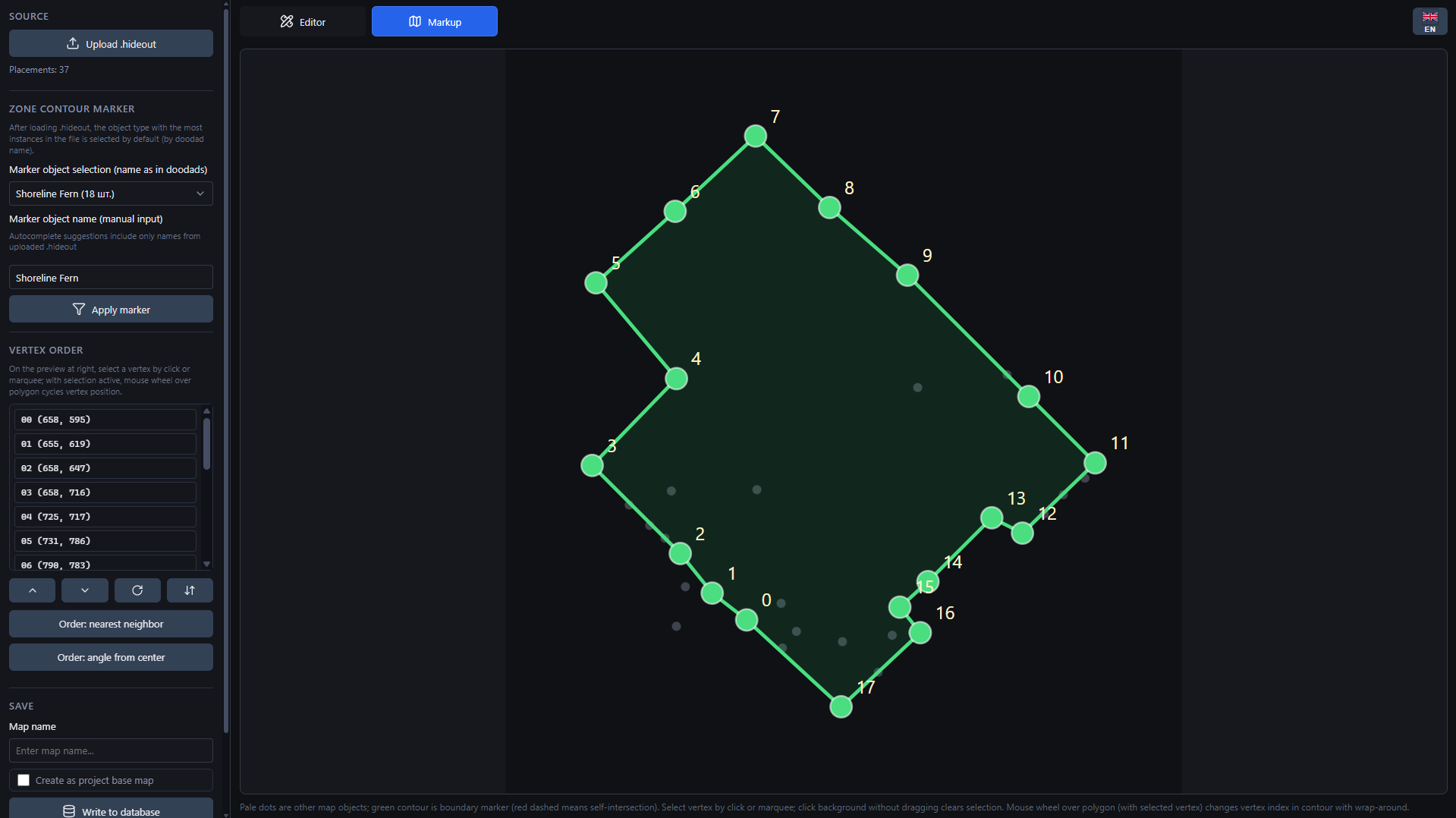 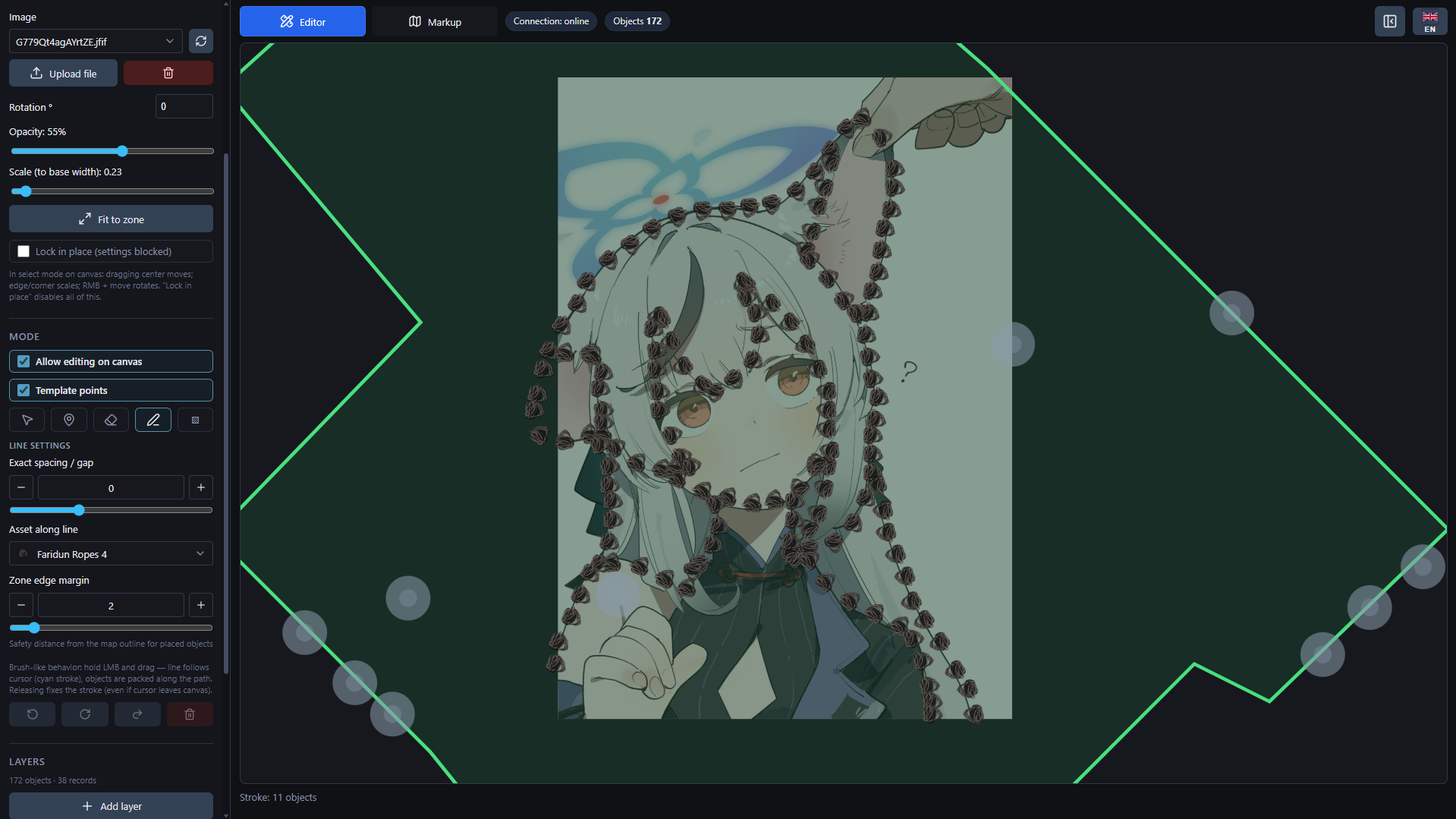 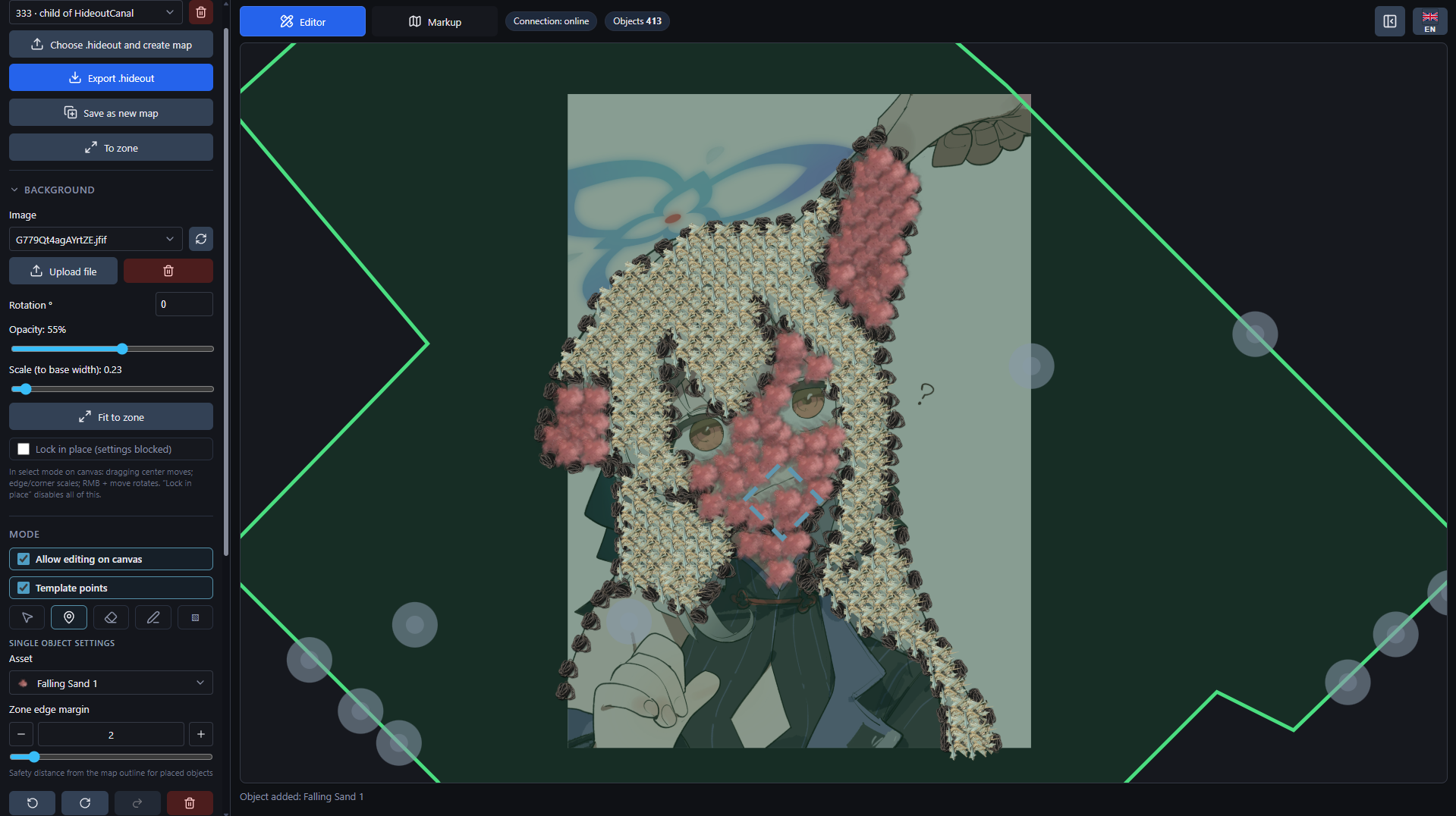 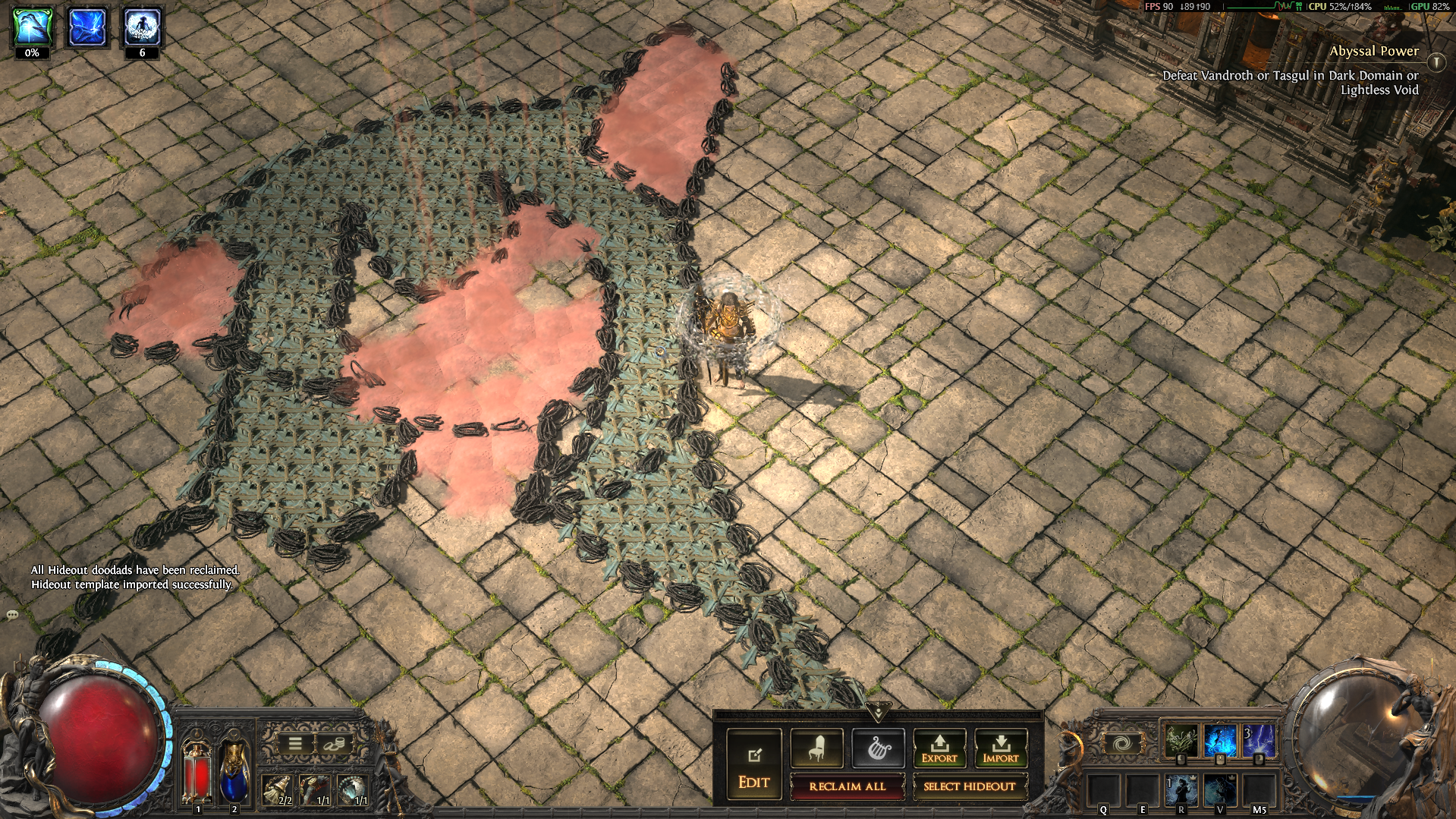 ## What you need - Python 3.10 or newer - Node.js 22 (LTS) or newer — CI is pinned to Node 22 - npm 10 or newer — ships together with Node.js 22 - Git, only if you want to update the project with `git pull` ## How to start From a downloaded archive or a cloned repository, open the project folder and run: ```bash python dev.py ``` On macOS or Linux, use this command if `python` points to Python 2 or is not found: ```bash python3 dev.py ``` On Windows you can also double-click `Start.bat`. The first start may take a while because the script prepares the project: 1. creates `.venv` for Python packages; 2. installs backend dependencies from `requirements-api.txt`; 3. installs frontend dependencies inside `frontend/node_modules`; 4. starts the backend and the frontend. When the script says that everything is up, open: - app: http://localhost:5173 - API docs: http://127.0.0.1:8000/api/docs - backend health check: http://127.0.0.1:8000/api/health If your system resolves `python` to Python 3, you can use the root npm wrapper: ```bash npm start ``` If your machine only has `python3`, prefer `python3 dev.py` directly because the root npm script still calls `python`. To stop the app, return to the terminal and press `Ctrl+C`. ## Updating If you cloned the project with Git: ```bash git pull python dev.py ``` If your machine only has `python3`, use `python3 dev.py` after `git pull`. On Windows, `UpdateAndStart.bat` does the same thing: it runs `git pull` and then starts the app. If dependencies changed, or the project starts with strange errors, rebuild local dependencies: ```bash python dev.py --reinstall ``` If your machine only has `python3`, run `python3 dev.py --reinstall`. Your local data is stored in `hideout_settings/`, `hideout_scenes/`, `input/images/`, and `logs/`. These folders are ignored by Git and are not added to the release archive. Editor defaults and hotkeys are saved to `hideout_settings/user-settings.json` when you use the **Settings** tab in the app and click Save. The `input/hideout/` folder is the exception: it ships a small set of sample `.hideout` maps to use as starting points (see [Boundary marking page](#boundary-marking-page)). ## Useful start flags ```bash python dev.py --skip-install # start faster, without reinstalling packages python dev.py --reinstall # remove .venv and frontend/node_modules, then install again python dev.py --dev # backend auto-reload for development python dev.py --no-browser # do not open the browser automatically ``` Ports can be changed through environment variables: | Variable | Default | What it changes | | ------------------------------ | ----------- | --------------- | | `HIDEOUT_EDITOR_BACKEND_HOST` | `127.0.0.1` | backend host | | `HIDEOUT_EDITOR_BACKEND_PORT` | `8000` | backend port | | `HIDEOUT_EDITOR_FRONTEND_PORT` | `5173` | frontend port | ## Boundary marking page The boundary marking page turns a hideout dump file (`.hideout`) into the closed polygon that defines the playable area. Open the app and switch to the **Boundary** tab. **Loading a source file.** Two options: 1. **Upload .hideout** — opens the system file picker. Use it for your own exports. 2. **Sample maps** — a dropdown next to the upload button. Pick any of the sample maps that ship under [`input/hideout/`](input/hideout/) and the page loads it through the same parser as a manual upload. The samples are a few small base maps I prepared by hand; treat them as starting points or reference templates. **Building the boundary.** Once a file is loaded: 1. The page picks the most frequent doodad type as the boundary marker (e.g. the type you placed manually in the game to outline the zone). Override it via **Zone contour marker → Marker object selection** or by typing a different doodad name. 2. The polygon preview on the right shows the marker points (green) and the rest of the map (pale). Click a vertex or drag a marquee to select it; the mouse wheel cycles the selected vertex through the order. 3. The **Vertex order** controls reorder one vertex at a time, reverse the ring, or apply an automatic heuristic (nearest-neighbour / polar angle). 4. The contour must close cleanly: a red dashed segment means self-intersection — fix it before saving. **Saving.** Enter a map name and press **Write to database**. Tick _Create as project base map_ if this should appear in the editor's base map list. From that point on you can switch to the editor tab, place decorations on top, and export the final `.hideout`. ## Project layout - `backend/` — FastAPI app, map storage, import/export endpoints. - `frontend/` — React/Vite interface. - `hideout_core/` — shared Python logic. - `backend/seed_data/` — catalog data needed by the backend. - `shared/` — generated scene contract artifacts and editor asset catalog. - `docs/` — installation, update, and troubleshooting notes. - `input/hideout/` — sample base `.hideout` maps shipped with the project, exposed on the boundary marking page as **Sample maps**. - `scripts/` — helper scripts for maintainers. - `tests/` — backend tests. ## Documentation - [Installation](docs/INSTALL.md) - [Updating](docs/UPDATE.md) — includes what happens to saved maps after an update - [Troubleshooting](docs/TROUBLESHOOTING.md) - [Editor state ownership](docs/editor-state.md) — where your maps and settings are stored ## License MIT. See [LICENSE](LICENSE).
