KO
|
EN
gitlite — search
Search
#javascript
#python
#hacktoberfest
#react
#ai
#typescript
#llm
#go
#golang
#android
#machine-learning
#rust
#deep-learning
#linux
dvorak_AutoHotkey
★ 8
Open GitHub ↗
自用dvorak键位布局
Download README (.md)
Explore Similar Repositories
angular2-google-place-autocomplete
:
Angular2 goole place auto complete is a directive.
SpotifyKit
:
A comprehensive Swift framework for the Spotify Web API.
go-radiooooo
:
Archiving scraper for radiooooo.com
Schedule_Sampling_Seq2Seq_Movie_Script_Chatbot_PyTorch
:
Build a chatbot based on gender with Seq2Seq and Schedule-Sampling Seq2Seq with PyTorch
angular-placeholder-shimmer
:
An angular placeholder shimmer for angularjs applications
// repository documentation
Was this content helpful?
★ 0
(0 ratings)
Select Rating:
★
★
★
★
★
Submit Feedback
Recent Feedback
×
Download README
Do you want to download the
README.md
file for
dvorak_AutoHotkey
?
Download (.md)
# 1. dvorak_AutoHotkey 自用dvorak键位布局 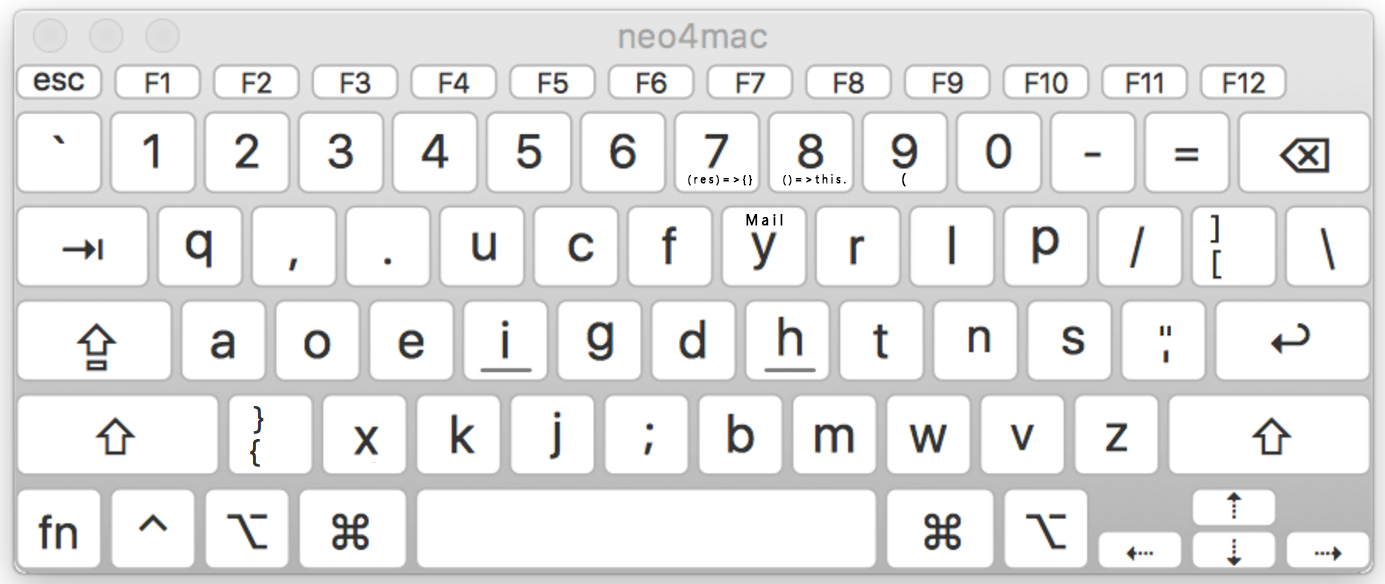 非常感谢 TANG ZhiXiong 给了我的布局很大参考 https://github.com/district10/neo_keyboard_layout # 2. Mac mac 的修改实现使用了 [`Karabiner-Elements`](https://karabiner-elements.pqrs.org/docs/). ## 2.1. Installation ### 2.1.1. Copy JSON rules ```bash open /Users/$USER/.config/karabiner/assets/complex_modifications ``` Copy `programmer-dvorak.json` to this folder (Command + Shift +. To show hidden files) ### 2.1.2. Create Profiles Create one profile called `QWERTY` and one profile called `DVORAK`. Names must be exact. ### 2.1.3. Set QWERTY Rule - Switch to `QWERTY` profile. - Go to Complex Modifications tab. - Select "Add Rule" at bottom left. - Enable rule "Programmer Dvorak - QWERTY Switcher" ### 2.1.4. Set DVORAK Rule - Switch to `DVORAK` profile. - Go to Complex Modifications tab. - Select "Add Rule" at bottom left. - Enable rule "Programmer Dvorak" ## 2.2. 快速切换 alt + 0 切换到 qwer alt + 1 切换到 dvorak ## 2.3. json 配置文件 `Karabiner-Elements` 的配置文件不能添加额外字段作为注释,否则这条规则就不能生效 ``` { "type": "basic", "from": { // from 區塊定義了按下什麼以後會觸發 map 事件 "key_code": "KEY" // 一般非 modifier 的按鍵 "modifiers": { // 使用哪些 modifier 的按鍵 "mandatory": [ // 必要的 modifier 按鍵,有了才會觸發 ], "optional": [ // 非必要的 modifier,按了也認定可以觸發此 rule ] } }, "to": [// to 區塊定義了要 map 到什麼動作 { "key_code": "target_key" }, ... // 更多的 key_code ] } ``` ## 2.4. mac 的其他快捷键修改 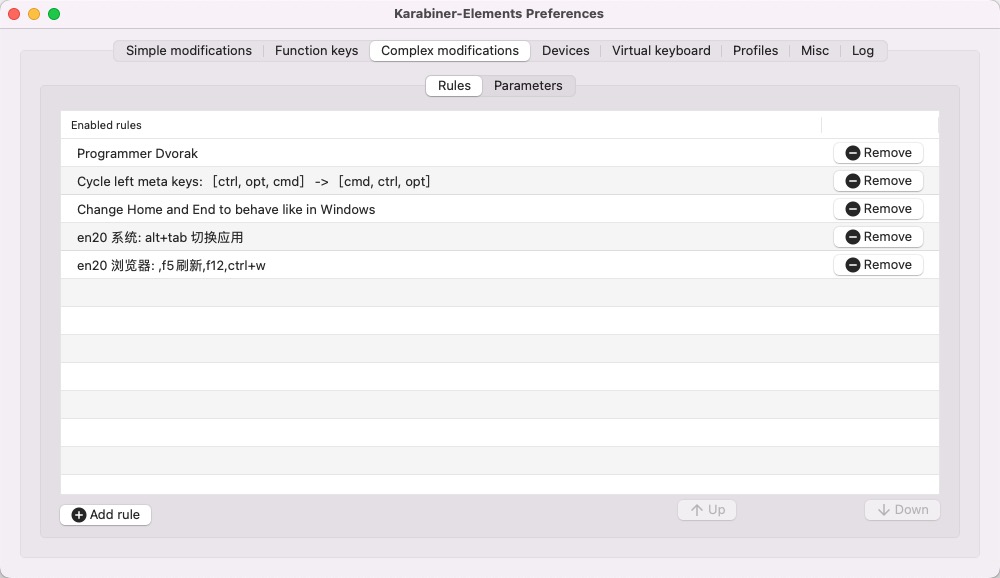 ## 2.5. mac 下鼠标无法使用侧键前进后退 加载 `mouse-browser-back.json`,目前用的毒蝰 mini 完美,在 idea 也能退回上次位置 ## 2.6. 卸载 sudo '/Library/Application Support/org.pqrs/Karabiner-Elements/uninstall.sh' # 3. Rime 配置 使用的 Rime 配置:雾凇拼音 https://github.com/iDvel/rime-ice 作者博客: https://dvel.me/posts/rime-ice/ 自己仓库: https://github.com/Tyrone2333/rime-ice ### 3.1. 个人需求 #### 3.1.1. shift 切换英文 default.yaml 修改 `Shift_L: commit_code` 然后系统偏好输入法里取消掉 `使用大写锁定键切换ABC` ```yaml ascii_composer: good_old_caps_lock: true # true | false switch_key: Caps_Lock: clear # commit_code | commit_text | clear Shift_L: commit_code # commit_code | commit_text | inline_ascii | clear | noop ``` #### 3.1.2. 默认英文标点 rime_ice.schema.yaml ```yaml - name: ascii_punct states: [ 。,, ., ] reset: 0 ``` 把 reset 改成 1,就默认永远是英文标点。 Ctrl+Shift+3 临时切换。 注释掉 reset 并使用方案选单切换,是永久切换。 #### 3.1.3. 模糊音 rime_ice.schema.yaml ```yaml speller: algebra: ### 模糊音 # 声母 - derive/^([zcs])h/$1/ # z c s → zh ch sh - derive/^([zcs])([^h])/$1h$2/ # zh ch sh → z c s # 韵母 - derive/ang/an/ - derive/an/ang/ - derive/eng/en/ - derive/en/eng/ - derive/in/ing/ - derive/ing/in/ ``` #### 3.1.4. 自定义文本 custom_phrase.txt 以 Tab 分割:汉字`<Tab>`编码`<Tab>`权重 示例: ```text 想想 xx 2 想象 xx 1 ``` # 4. todo mac 版实现了 : ; 对调,但是 win 一直不知道如何实现
