KO
|
EN
gitlite — search
Search
#javascript
#python
#hacktoberfest
#react
#ai
#typescript
#llm
#go
#golang
#android
#machine-learning
#rust
#deep-learning
#linux
privyplace
★ 8
Open GitHub ↗
Kubernetes based self-hosted platform
Download README (.md)
Explore Similar Repositories
NMF
:
Implementation of Projected gradient NMF
sword-of-the-orc-king
:
Roguelike adventure game being written in Lua and LÖVE
pytorch-mobile-kit
:
PyTorch Mobile starter kit.
math240
:
MATH 240, Discrete Structures, Fall 2019 at McGill University. Handwritten lecture notes including diagrams from Rosen's "Discrete Mathematics and Its Applications."
Cloud-Hospital
:
本系统使用了大量的优化手段,如抢号(秒杀)场景的考虑、复杂计算的优化和组件化的考虑等,可适配改造于各类管理平台和购物平台等
// repository documentation
Was this content helpful?
★ 0
(0 ratings)
Select Rating:
★
★
★
★
★
Submit Feedback
Recent Feedback
×
Download README
Do you want to download the
README.md
file for
privyplace
?
Download (.md)
# PrivyPlace *Disclaimer: still in development, use at your own risk* PrivyPlace is a opiniated personal cloud distribution based on a selection of open source software and deployed on a single node Kubernetes cluster. It makes use of several open-source software, mainly: - [k3s](https://k3s.io/): A lightweight distribtution of Kubernetes - [Ansible](https://www.ansible.com/): to orchestrate cluster installation, generate and deploy the k8s ressources - [kube-prometheus](https://github.com/coreos/kube-prometheus) for the monitoring stack, based on Prometheus and grafana - [Organizr](https://github.com/causefx/Organizr) to protect applications and provide Single Sign-On - [Ingress-nginx](https://kubernetes.github.io/ingress-nginx/) to serve cluster ingress in https - [Cert-Manager](https://cert-manager.io/) to generate [Let's Encrypt](https://letsencrypt.org/) certificate - [Postgresql](https://www.postgresql.org/) as main database for apps Additionnaly to the infrastucture, several apps are available to install on the cluster, for now: - An application portal, based on [Homer](https://github.com/bastienwirtz/homer) - [FreshRSS](https://freshrss.org/) a great RSS aggregator - [Searx](https://asciimoo.github.io/searx/) an internet metasearch engine - [srt2hls](https://github.com/mbugeia/srt2hls) an audio HLS streaming server - [Droppy](https://github.com/silverwind/droppy) a file storage server with a web interface - [The Lounge](https://thelounge.chat/) a web IRC client - [mStream](https://mstream.io/) a music streaming server - [Shiori](https://github.com/go-shiori/shiori) a simple bookmark manager - [Adminer](https://www.adminer.org/) for database management 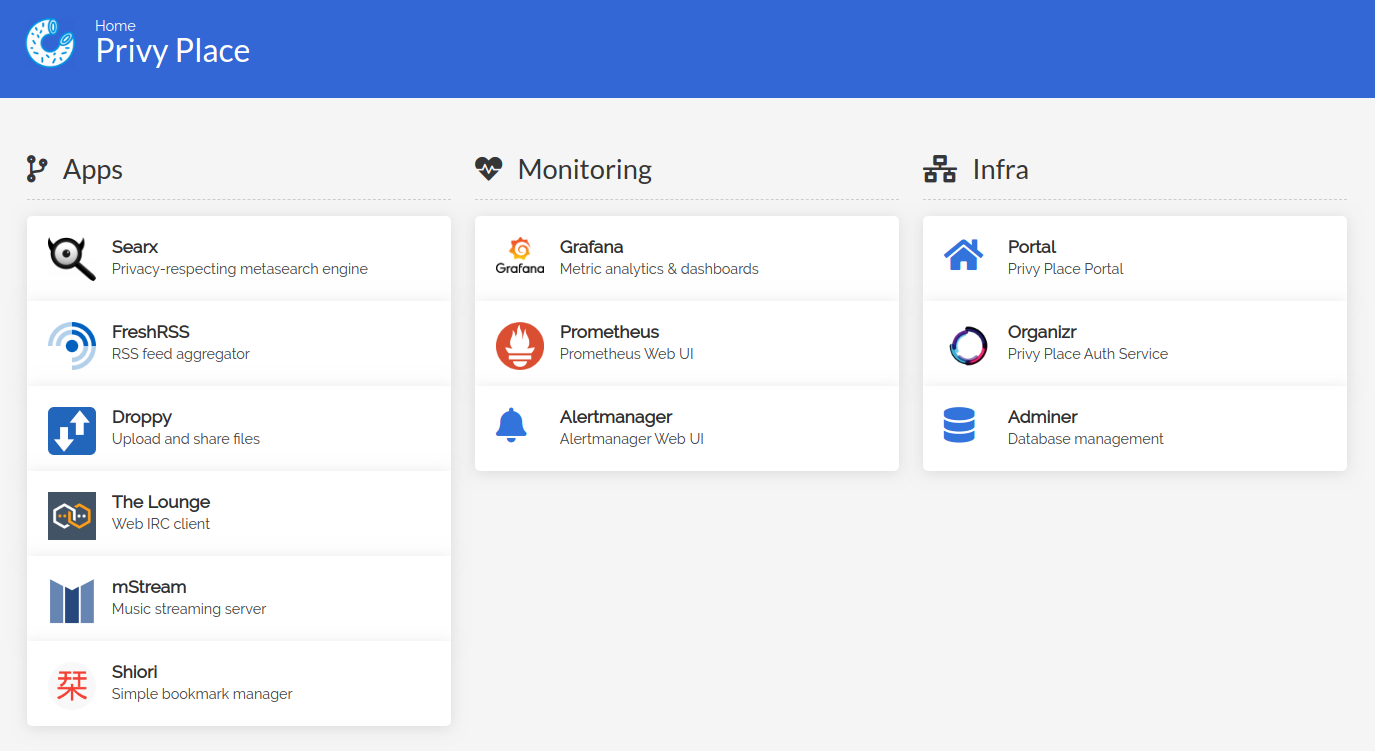 ## Security considerations PrivyPlace assumes, for now, a single tenant cluster where everyone connected is an administrator. ### SSO and ingress protection By default, once the first run setup done (see below), all applications will be secured by proper default values and a Single Sign-On solution. For now, it use the [external auth ingress functionality](https://kubernetes.github.io/ingress-nginx/examples/auth/external-auth/) coupled to Organizr. All apps that support reverse proxy header authentification can make use of it to manage user. This is the case for Grafana where the `x-organizr-user` header is used to pass the Organizr user to Grafana. The authentification can be disabled on specific ingress like in the stream app by using the annotation `nginx.ingress.kubernetes.io/enable-global-auth: "false"`. ## Usage ### Requirements #### local machine ``` pip3 install ansible PyYAML openshift git clone https://github.com/mbugeia/privyplace cd privyplace ``` #### remote server - Debian 10 (untested on other) - root ssh access - Firewall rules to allow ports 80 and 443 from internet - A domain with DNS configured to point to your server, for example ``` yourdomain.tld. 300 IN A yourserveripv4 *.yourdomain.tld. 300 IN A yourserveripv4 ``` ### Configure #### Configure ansible inventory `cp inventory.yml.example inventory.yml` Then edit `inventory.yml` and replace `yourdomain.tld` by your real domain name. #### Customize your installation Common default value are in `group_vars/all.yml`, you can overide them in `group_vars/privyplace.yml`, some options need to be set: ``` # mains options letsencrypt_email: "youremail@example.com" letsencrypt_env: # staging or prod main_domain: yourdomain.tld # passwords postgres_password: postgresmasterpassword freshrss_db_password: freshrsspassword # shh public key to connect to ansible-executor authorized_keys: | ssh-rsa your ssh public key ``` You can override default value here like `freshrss_domain: "myrssdomain.tld"` or disable app by setting `app_freshrss_enabled: false`. ### Deploy ``` ansible-playbook -i inventory.yml privyplace.yml --diff ``` ### First run configuration As for now, Organizr need to be configured manually. Once the deploy is finished, go to https://yourdomain.tld. You can then follow Organizr first time setup instructions https://docs.organizr.app/books/installation/page/first-time-setup Here is the values you need to set to makes it work: - Install type: `Personal` - Admin infos: Whatever you want - Security: Whatever you want - Database: Name: `organizr` Location: `/data` ### Enjoy you self-hosted applications Go to https://portal.yourdomain.tld ## Advanced Usage ### Access the cluster from you local machine - [Install Kubectl](https://kubernetes.io/fr/docs/tasks/tools/install-kubectl/) - mkdir ~/.kube - scp root@youserverip:.kube/config ~/.kube/config - Edit ~/.kube/config and replace https://127.0.0.1:6443 with your server ip ### Partial deploy ``` # Check before deploy ansible-playbook -i inventory.yml privyplace.yml --diff --check # Deploy only ingress ansible-playbook -i inventory.yml privyplace.yml --diff --tags ingress # Deploy only roles setup-cluster ansible-playbook -i inventory.yml privyplace.yml --diff --tags setup-cluster # Deploy only organizr ansible-playbook -i inventory.yml privyplace.yml --diff --tags organizr ``` ### Build monitoring ressources ``` apt install jsonnet GO111MODULE="on" go get github.com/jsonnet-bundler/jsonnet-bundler/cmd/jb mkdir kube-prometheus cd kube-prometheus jb init jb install github.com/coreos/kube-prometheus/jsonnet/kube-prometheus # customize custom-kube-prometheus.jsonnet ./build-monitoring.sh ``` ### Build docker image ``` export DOCKER_ID_USER="privyplace" # build and push latest php/* images ./docker-build.sh docker/debian/php # make a clean release and push all debian images ./docker-build.sh docker/debian v0.0.1 ``` ## Knows issues - SSO doesn't redirect back to the app after login
