KO
|
EN
gitlite — search
Search
#javascript
#python
#hacktoberfest
#react
#ai
#typescript
#llm
#go
#golang
#android
#machine-learning
#rust
#deep-learning
#linux
gl_vrs
★ 15
Open GitHub ↗
Variable Rate Shading in OpenGL
Download README (.md)
Explore Similar Repositories
CTMWA
:
Crossmodal Translation based Meta Weight Adaption for Robust Image-Text Sentiment Analysis
StarRail_Lua
:
lua files dumped from some anime game with stars and rails
professional-portfolio
:
No description available.
TeRF
:
No description available.
CICDash
:
Introducing CICDash — an open-source dashboard for visualizing your GitHub Actions (GHA) workflow trends.
// repository documentation
Was this content helpful?
★ 0
(0 ratings)
Select Rating:
★
★
★
★
★
Submit Feedback
Recent Feedback
×
Download README
Do you want to download the
README.md
file for
gl_vrs
?
Download (.md)
# Variable Rate Shading 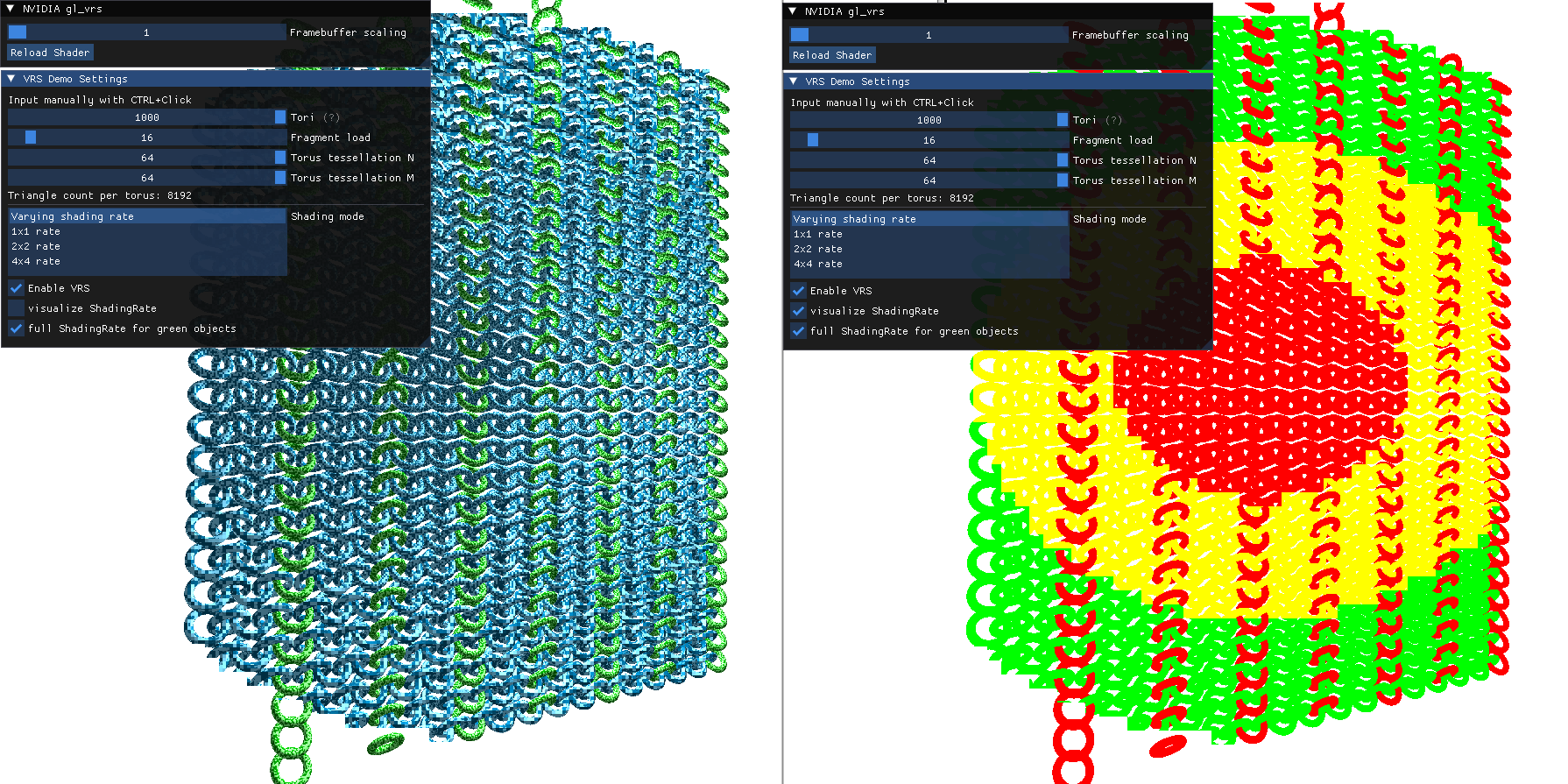 ## This sample shows the functionality of Variable Rate Shading Variable Rate Shading is a hardware feature introduced with the NVIDIA Turing GPUs and exposed via the GL_NV_shading_rate_image extension. Variable Rate Shading allows the hardware to shade primitives at a different frequency than the rate of rasterization. The user can pick between various rates, including no shading, normal resolution, half resolution and quarter resolution. If the rendering uses multi sampling, the shading rate can be increased to allow for multiple samples within the same primitive to be shaded. This can reduce shader generated aliasing. The shading rate is defined for blocks of pixels with a constant rate within each block. ## Sample showing a reduced shading rate The sample lets the user pick predefined shading rates. Checking "visualizeShadingRate" will show a color-coded image of the shading rate per pixel. It is possible to vary the shading rate per triangle in the vertex shader; in the sample, all green objects are selected for full shading rate. This can be deactivated from the menu. As the reduction in shading rate can be subtle, the sample allows rendering at a lower resolution and "zooming in" via the "framebuffer scaling" setting. #### Building Ideally, clone this and other interesting [nvpro-samples](https://github.com/nvpro-samples) repositories into a common subdirectory. You will always need [nvpro_core](https://github.com/nvpro-samples/nvpro_core). The nvpro_core is searched either as a subdirectory of the sample, or one directory up. If you are interested in multiple samples, you can use the [build_all](https://github.com/nvpro-samples/build_all) CMake as the entry point; it will also give you options to enable/disable individual samples when creating the solution.
