KO
|
EN
gitlite — search
Search
#typescript
#ai-agents
#ai
#dsh-plugin
#deepseek-harness
#open-source
#cli
#claude-code
#codex
#developer-tools
#react
#windows
hexagons
★ 13
Open GitHub ↗
A hexagon library for JavaFX
Download README (.md)
Explore Similar Repositories
jeditermfx
:
Techsenger JediTermFX – Terminal Emulator for JavaFX.
SynchronizeFX
:
JavaFX data-binding between JVMs over the network
froxty
:
:icecream: iOS frosty/translucent effect to JavaFX.
fxsvgimage
:
A small self-sufficient library which allows to convert a SVG file to a JavaFX Node tree or an Image (no dependencies)
FXSkins
:
Skins with new features and looks for existing JavaFX controls
// repository documentation
Was this content helpful?
★ 0
(0 ratings)
Select Rating:
★
★
★
★
★
Submit Feedback
Recent Feedback
×
Download README
Do you want to download the
README.md
file for
hexagons
?
Download (.md)
Hexagons ======== This is a hexagon library for JavaFX. Features: - Pathfinding - Field of View - Calculate distance between hexes, line drawing and other useful functions - Transform an image file (e.g. png) into hexagons - Render the hexagons on the screen On http://www.redblobgames.com/grids/hexagons you can find a lot of information about the mathematical properties of hexagons. In fact, I had much help from the information there when writing this library. Installation ============ ```shell git clone https://github.com/linustornkrantz/hexagons.git ``` To create a jar that can be used in your project: ```shell ./gradlew build ``` Note that it depends on JavaFX. If you are not using the Oracle JRE, you may have to handle that dependency on your own (e.g. sudo apt-get install openjfx). Basic usage =========== When creating your hexagons, make sure that you also add them to a map: ```java HexagonMap map = new HexagonMap(10); // The size of the hexagons map.addHexagon(new Hexagon(3, 3)); map.addHexagon(new Hexagon(3, 4)); ``` To render the hexagons: ```java map.render(group); // Renders into a JavaFX Group ``` The Hexagon class extends javafx.scene.shape.Polygon which means that you can change the appearance like this: ```java for (Hexagon h : map.getAllHexagons()) { h.setStrokeWidth(2.0); h.setStroke(Color.WHITE); } ``` To be notified when the user clicks on a Hexagon: ```java map.setOnHexagonClickedCallback(hexagon -> hexagon.setBackgroundColor(Color.BLUE)); ``` Pathfinding =========== Basic pathfinding: ```java Hexagon start = map.getHexagon(-21, 74); Hexagon destination = map.getHexagon(-27, 67); ArrayList<Hexagon> path = start.getPathTo(destination); ``` If you need more control, you may want to extend the Hexagon class and implement an IPathInfoSupplier: ```java ArrayList<Hexagon> path = start.getPathTo(destination, new IPathInfoSupplier() { @Override public boolean isBlockingPath(Hexagon hexagon) { return ((MyHexagon) hexagon).canHeroMoveThroughHere(); } @Override public int getMovementCost(Hexagon from, Hexagon to) { return ((MyHexagon) hexagon).isThereRoadBetween(from, to) ? 1 : 2; } }); ``` Generate hexagons from an image file ==================================== If you have an Image (e.g. png) then you can turn that image into a map of hexagons: ```java Image image = new Image("path/to/image"); HexagonMap map = new HexagonMap(5, image, 40); ``` Or if you want more control over the hexagon generation: ```java Image image = new Image("path/to/image"); HexagonMap map = new HexagonMap(5, image, 40, new IHexagonCreator() { @Override public void createHexagon(int q, int r, Color imagePixelColor, HexagonMap map) { if (imagePixelColor.getBrightness() > 0.7) { Hexagon h = new Hexagon(q, r); h.setBackgroundColor(Color.GREEN); map.addHexagon(h); } } }); ``` Full example ============ Assuming your png looks like this: 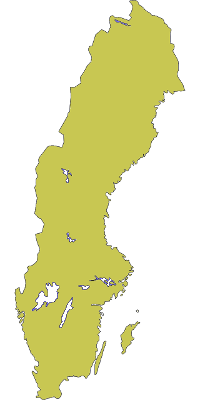 After running the code below you would see this: 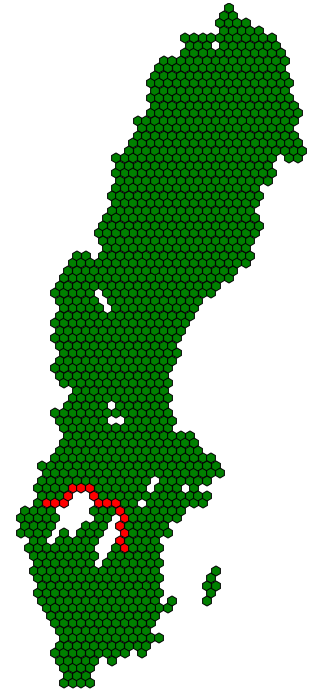 ```java public class Main extends Application { @Override public void start(Stage primaryStage) throws Exception{ Image image = new Image("path/to/image"); // Convert the image to hexagons HexagonMap map = new HexagonMap(5, image, 40, new IHexagonCreator() { @Override public void createHexagon(int q, int r, Color imagePixelColor, HexagonMap map) { if (imagePixelColor.getBrightness() > 0.7) { Hexagon h = new Hexagon(q, r); h.setBackgroundColor(Color.GREEN); map.addHexagon(h); } } }); Hexagon start = map.getHexagon(-21, 74); // Try some pathfinding Hexagon destination = map.getHexagon(-27, 67); for (Hexagon hexagon : start.getPathTo(destination)) { hexagon.setBackgroundColor(Color.RED); } Group hexagonGroup = new Group(); // Render on screen map.render(hexagonGroup); Scene hexScene = new Scene(hexagonGroup, 400, 700); primaryStage.setScene(hexScene); primaryStage.show(); } } ```
