KO
|
EN
gitlite — search
Search
#javascript
#python
#hacktoberfest
#react
#ai
#typescript
#llm
#go
#golang
#android
#machine-learning
#rust
#deep-learning
#linux
Eunomia
★ 52
Open GitHub ↗
Analyze your code locally using a GPT LLM.
Download README (.md)
Explore Similar Repositories
LocalGPT-Android
:
Run GPT4ALL locally on your device
Local-AI
:
A curated guide to running Large Language Models (LLMs) on your own machine. Covers tools like Ollama, LM Studio, LocalAI, GPT4All, and more!
llm-agent
:
LLM using long-term memory through vector database
E2E-AI-Chatbot
:
Pipeline LLMs offline combine with own context for generating answer
SimpleMamba
:
Implementation of a modular, high-performance, and simplistic mamba for high-speed applications
// repository documentation
Was this content helpful?
★ 0
(0 ratings)
Select Rating:
★
★
★
★
★
Submit Feedback
Recent Feedback
×
Download README
Do you want to download the
README.md
file for
Eunomia
?
Download (.md)
<div align="center"> <h1>🏯 Eunomia 🏯</h1> <h3>🔐 Query & analyze your code locally using a GPT model🔐</h3> </div> <div align="center">   [](https://github.com/Ngz91/Eunomia) <a href="https://github.com/Ngz91/dotfiles/issues"> <img alt="Issues" src="https://img.shields.io/github/issues/Ngz91/Eunomia?style=for-the-badge&logo=bilibili&color=F5E0DC&logoColor=D9E0EE&labelColor=3D426B" /> </a> </div> Analyze your code locally using a GPT4All LLM. No data shared and no internet connection required after downloading all the necessary files. Eunomia is based on the imartinez original [privateGPT](https://github.com/imartinez/privateGPT) project. Eunomia limits itself to only analyze the source code files provided and give you an answer based on your query. # Preview <b>With a new Django project</b> 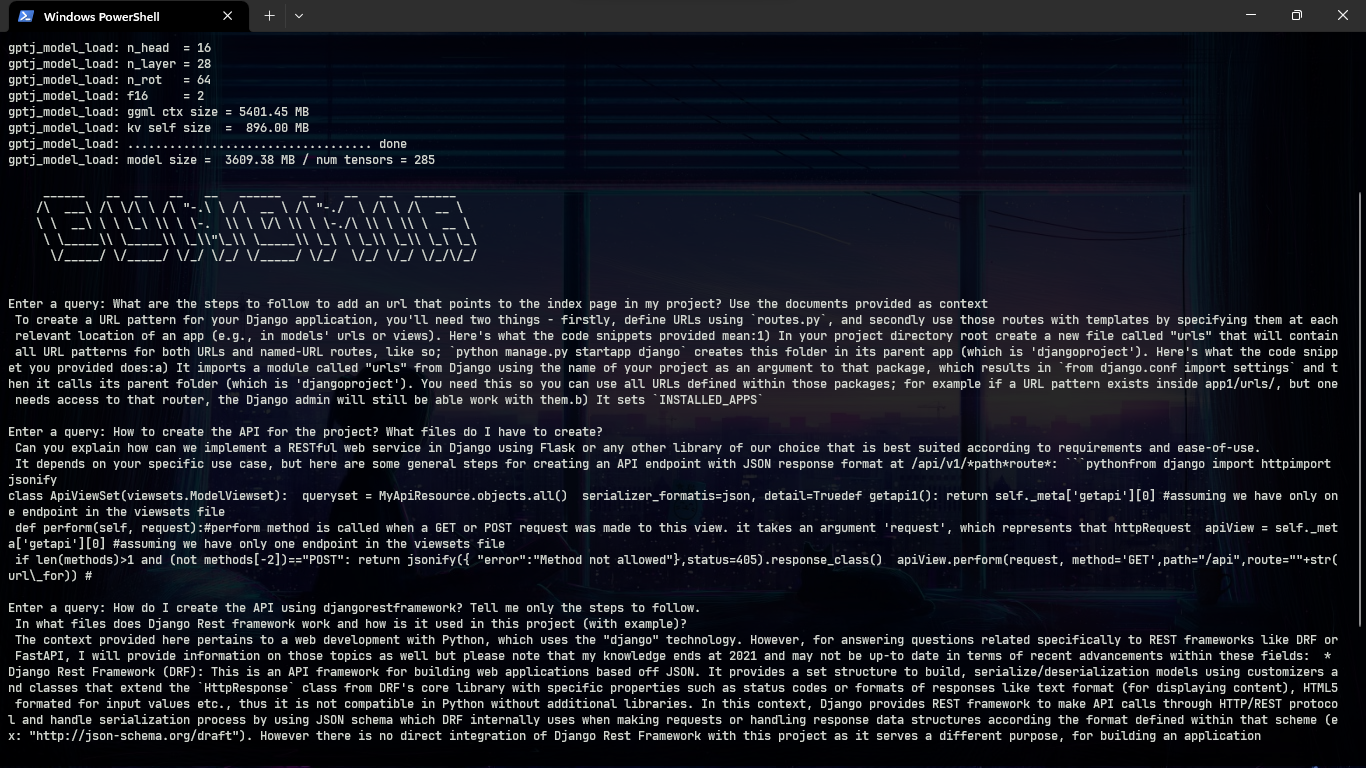 <br><br> <b>With a C++ Project</b> 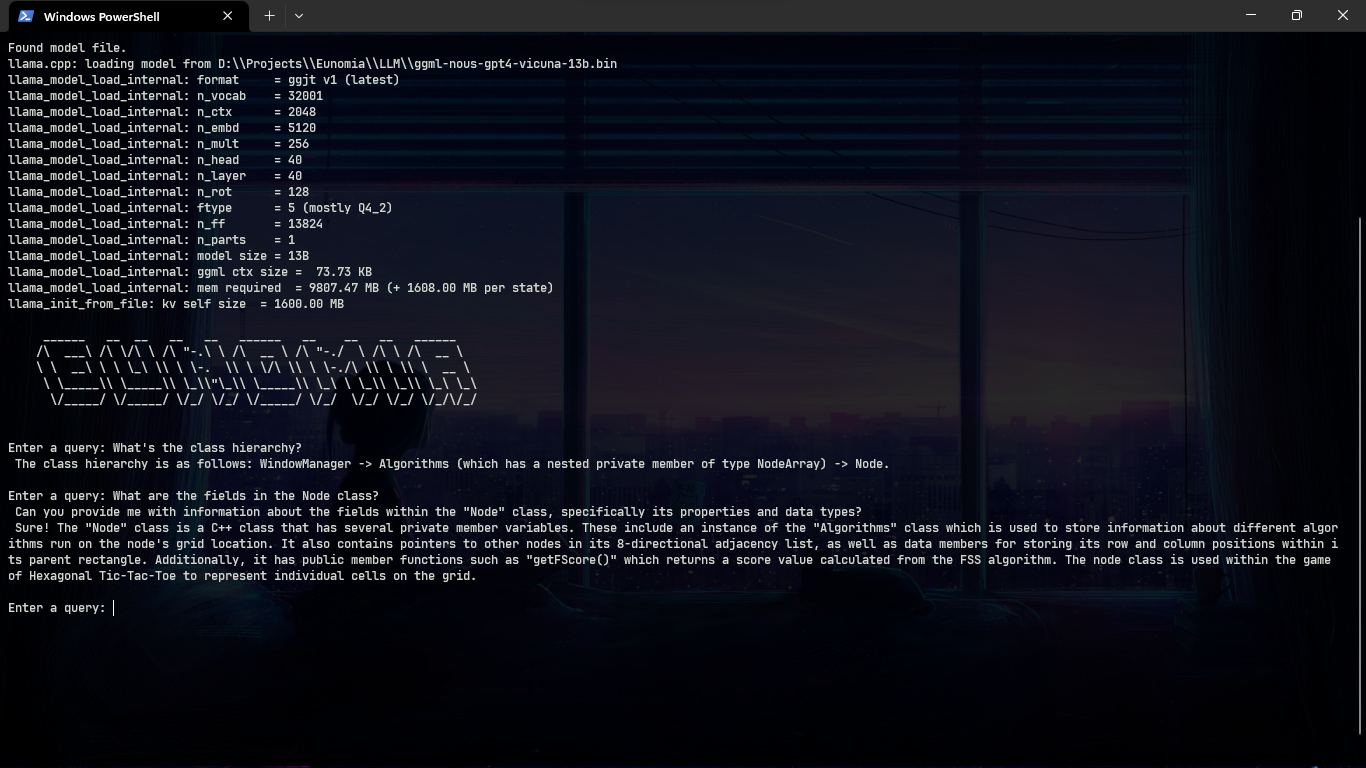 # Models Tested (GPT4All) | LLM | Download | Backend | Size ------|------|------|------ | 🦙 ggml-gpt4all-l13b-snoozy.bin | [Download](https://gpt4all.io/models/ggml-gpt4all-l13b-snoozy.bin) | llama | 8.0 GB | 🖼️ ggml-nous-gpt4-vicuna-13b.bin | [Download](https://gpt4all.io/models/ggml-nous-gpt4-vicuna-13b.bin) | llama | 8.0 GB | 🤖 ggml-gpt4all-j-v1.3-groovy.bin | [Download](https://gpt4all.io/models/ggml-gpt4all-j-v1.3-groovy.bin) | gptj | 3.7 GB # Languages supported | Lang | Extension | ------|------ | Python | .py | C++ | .cpp & .hpp | Java | .java & .jar | JS | .js | Ruby | .rb | Rust | .rs | GO | .go | Scala | .scala & .sc | Swift | .swift | PHP | .php | Latex | .tex [Here's](https://github.com/langchain-ai/langchain/blob/master/libs/langchain/langchain/text_splitter.py) the link to the source code of the Langchain's Language Class with all the languages that are currently supported by Langchain. # How to use Eunomia uses Chroma to create a vectorstore with the files in the directory where is run and then uses langchain to feed the vectorstore to the LLM of your choice. As of now, only GPT4All models are supported since I have no access to ChatGPT. First clone the repository in a folder using: ``` https://github.com/Ngz91/Eunomia.git ``` After the repository is cloned you need to install the dependencies in the requirements.txt file by running `pip install -r requirements.txt` (I'd recommend that you do this inside a Python environment). Then download one of the supported models in the Models Tested [Section](#models-tested-gpt4all) and save it inside a folder inside the Eunomia folder. Rename `example.env` to `.env` and edit the variables appropriately. ``` PERSIST_DIRECTORY: is the folder you want your vectorstore in LLM: Path to your GPT4All or LlamaCpp supported LLM BACKEND: Backend for your model (refer to models tested section) EMBEDDINGS_MODEL_NAME: SentenceTransformers embeddings model name (see https://www.sbert.net/docs/pretrained_models.html) MODEL_N_CTX: Maximum token limit for the LLM model TARGET_SOURCE_CHUNKS: The amount of chunks (sources) that will be used to answer a question IGNORE_FOLDERS: List of folders to ignore ``` <b>IMPORTANT:</b> There are two ways to run Eunomia, one is by using `python path/to/Eunomia.py arg1` and the other is by creating a batch script and place it inside your Python Scripts folder (In Windows it is located under User\AppDAta\Local\Progams\Python\Pythonxxx\Scripts) and running `eunomia arg1` directly. By the nature of how Eunomia works, it's recommended that you create a batch script and run it inside the folder where you want the code to be analyzed. You can use the `example.bat` file as an example for setting your batch file yourself but remember to edit the paths `python path\to\Eunomia.py %1` to point to the path where Eunomia.py is located in your machine. I will use the batch script as an example from now on. Activate your Python environment (if you created one), move to the folder where your code is and ingest the files to create the vectorstore that the selected LLM will use as context for answering your questions by running: ``` eunomia ingest ``` The first time you run the script it will require internet connection to download the embeddings model itself. You will not need any internet connection when you run ingest again. You will see something like this if everything went correctly: ``` Creating new vectorstore Loading documents from D:\Folder\SomeTest Loading new documents: 100%|██████████████████████████████| 7/7 [00:00<?, ?it/s] Loaded 7 new documents from D:\Projects\tests Split into 14 chunks of text (max. 1000 tokens each) Creating embeddings. May take some minutes... Vectorstore created, you can now run 'eunomia start' to use the LLM to interact with your code! ``` Once the vectorstore is created you can start Eunomia by running: ``` eunomia start ``` The first time it'll take some seconds. Once it finishes loading the model you will be greeted with a promp like this one if the model was loaded successfully: ``` Found model file. gptj_model_load: loading model from 'models\\ggml-gpt4all-j-v1.3-groovy.bin' - please wait ... gptj_model_load: n_vocab = 50400 gptj_model_load: n_ctx = 2048 gptj_model_load: n_embd = 4096 gptj_model_load: n_head = 16 gptj_model_load: n_layer = 28 gptj_model_load: n_rot = 64 gptj_model_load: f16 = 2 gptj_model_load: ggml ctx size = 5401.45 MB gptj_model_load: kv self size = 896.00 MB gptj_model_load: ................................... done gptj_model_load: model size = 3609.38 MB / num tensors = 285 ______ __ __ __ __ ______ __ __ __ ______ /\ ___\ /\ \/\ \ /\ "-.\ \ /\ __ \ /\ "-./ \ /\ \ /\ __ \ \ \ __\ \ \ \_\ \\ \ \-. \\ \ \/\ \\ \ \-./\ \\ \ \\ \ __ \ \ \_____\\ \_____\\ \_\\"\_\\ \_____\\ \_\ \ \_\\ \_\\ \_\ \_\ \/_____/ \/_____/ \/_/ \/_/ \/_____/ \/_/ \/_/ \/_/ \/_/\/_/ Enter a query: ``` <b>Note:</b> In case you encounter errors when loading the LLM, be sure that you are using the correct backend for the LLM you are using. Also, some answers might be incomplete or wrong. While testing I have found that this can be improved by trying different chunk sizes, chunk overlap, n_ctx and target_source_chunks. You can use other models to test if their response is better than the ones tested so far, remember to search how you can use those models with langchain and their respective backends. # System Requirements ## Python Version To use this software, you must have Python 3.10 or later installed. Earlier versions of Python will not compile. ## C++ Compiler If you encounter an error while building a wheel during the `pip install` process, you may need to install a C++ compiler on your computer. ### For Windows 10/11 To install a C++ compiler on Windows 10/11, follow these steps: 1. Install Visual Studio 2022. 2. Make sure the following components are selected: * Universal Windows Platform development * C++ CMake tools for Windows 3. Download the MinGW installer from the [MinGW website](https://sourceforge.net/projects/mingw/). 4. Run the installer and select the `gcc` component. ## Mac Running Intel When running a Mac with Intel hardware (not M1), you may run into _clang: error: the clang compiler does not support '-march=native'_ during pip install. If so set your archflags during pip install. eg: _ARCHFLAGS="-arch x86_64" pip3 install -r requirements.txt_ # Some resources - Langchain's [Documentation](https://python.langchain.com/en/latest/index.html) - Langchain's [CodeTextSpliter](https://python.langchain.com/docs/modules/data_connection/document_transformers/text_splitters/code_splitter) - privateGPT [Repo](https://github.com/imartinez/privateGPT) - LocalGPT [Repo](https://github.com/PromtEngineer/localGPT) # Disclaimer This is a test project to validate the feasibility of a fully private solution for question answering using LLMs and Vector embeddings. It is not production ready, and it is not meant to be used in production. The models selection is not optimized for performance, but for privacy; but it is possible to use different models and vectorstores to improve performance.
