KO
|
EN
gitlite — search
Search
#typescript
#ai-agents
#ai
#dsh-plugin
#deepseek-harness
#open-source
#claude-code
#codex
#cli
#developer-tools
#react
#windows
pulse-php-fpm
★ 46
Open GitHub ↗
PHP FPM status card for Laravel Pulse
Download README (.md)
Explore Similar Repositories
laravel-pulse-schedule
:
Laravel Pulse card that list all scheduled tasks.
pulse-api
:
Add an API layer to Laravel Pulse metrics
pulse-users
:
A Usage Distribution card for Laravel Pulse
404-monitor
:
A Laravel Pulse package that allows you to track 404 errors.
ohdear-pulse
:
Integrate Oh Dear in Laravel Pulse
// repository documentation
Was this content helpful?
★ 0
(0 ratings)
Select Rating:
★
★
★
★
★
Submit Feedback
Recent Feedback
×
Download README
Do you want to download the
README.md
file for
pulse-php-fpm
?
Download (.md)
# PHP FPM status card for Laravel Pulse Get real-time insights into the status of your PHP FPM with this convenient card for Laravel Pulse. ## Example 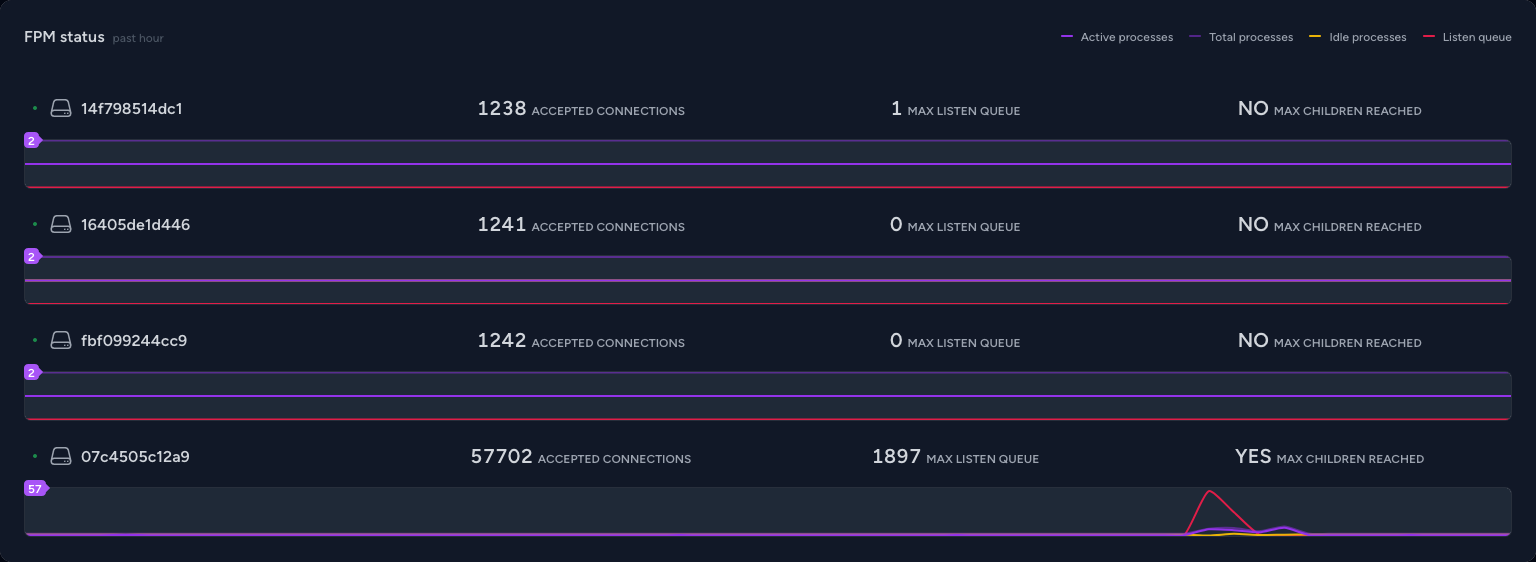 ## Installation Install the package using Composer: ```shell composer require maantje/pulse-php-fpm ``` ## Enable PHP FPM status path Configure your PHP FPM status path in your FPM configuration: ``` pm.status_path = /status ``` ## Register the recorder In your `pulse.php` configuration file, register the PhpFpmRecorder with the desired settings: ```php return [ // ... 'recorders' => [ \Maantje\Pulse\PhpFpm\Recorders\PhpFpmRecorder::class => [ // Optionally set a server name gethostname() is the default 'server_name' => env('PULSE_SERVER_NAME', gethostname()), // Optionally set a status path the current value is the default 'status_path' => 'localhost:9000/status', // with unix socket unix:/var/run/php-fpm/web.sock/status // Optionally give datasets, these are the default values. // Omitting a dataset or setting the value to false will remove the line from the chart // You can also set a color as value that will be used in the chart 'datasets' => [ 'active processes' => '#9333ea', 'total processes' => 'rgba(147,51,234,0.5)', 'idle processes' => '#eab308', 'listen queue' => '#e11d48', ], ], ] ] ``` Ensure you're running [the `pulse:check` command](https://laravel.com/docs/10.x/pulse#capturing-entries). ## Add to your dashboard Integrate the card into your Pulse dashboard by [publish the vendor view](https://laravel.com/docs/10.x/pulse#dashboard-customization). and then modifying the `dashboard.blade.php` file: ```diff <x-pulse> <livewire:pulse.servers cols="full" /> + <livewire:fpm cols="full" /> <livewire:pulse.usage cols="4" rows="2" /> <livewire:pulse.queues cols="4" /> <livewire:pulse.cache cols="4" /> <livewire:pulse.slow-queries cols="8" /> <livewire:pulse.exceptions cols="6" /> <livewire:pulse.slow-requests cols="6" /> <livewire:pulse.slow-jobs cols="6" /> <livewire:pulse.slow-outgoing-requests cols="6" /> </x-pulse> ``` And that's it! Enjoy enhanced visibility into your PHP FPM status on your Pulse dashboard.
