KO
|
EN
gitlite — search
Search
#python
#java
#python3
#arduino
#golang
#machine-learning
#rust
#html
#flask
#javascript
#seismology
#nodejs
grav-theme-klb4
★ 13
Open GitHub ↗
Grav Theme for Knowledgebase
Download README (.md)
Explore Similar Repositories
Python_Basic4beginners
:
Educational Code Examples for Getting Used to Python3 (Numpy and Matplotlib)
varfont-prep-workshop
:
An example project to demo the RoboFont script VarFont Prep
SAFE
:
This repository currently contains just SAFE.Tool - a dotnet tool that might serve as an utility to manage SAFE projects.
image_classifier
:
Image classifier in Elixir
NJU_KEPractice
:
The final project for the Knowledge Engineering course at Nanjing University.
// repository documentation
Was this content helpful?
★ 0
(0 ratings)
Select Rating:
★
★
★
★
★
Submit Feedback
Recent Feedback
×
Download README
Do you want to download the
README.md
file for
grav-theme-klb4
?
Download (.md)
# Klb4 Theme 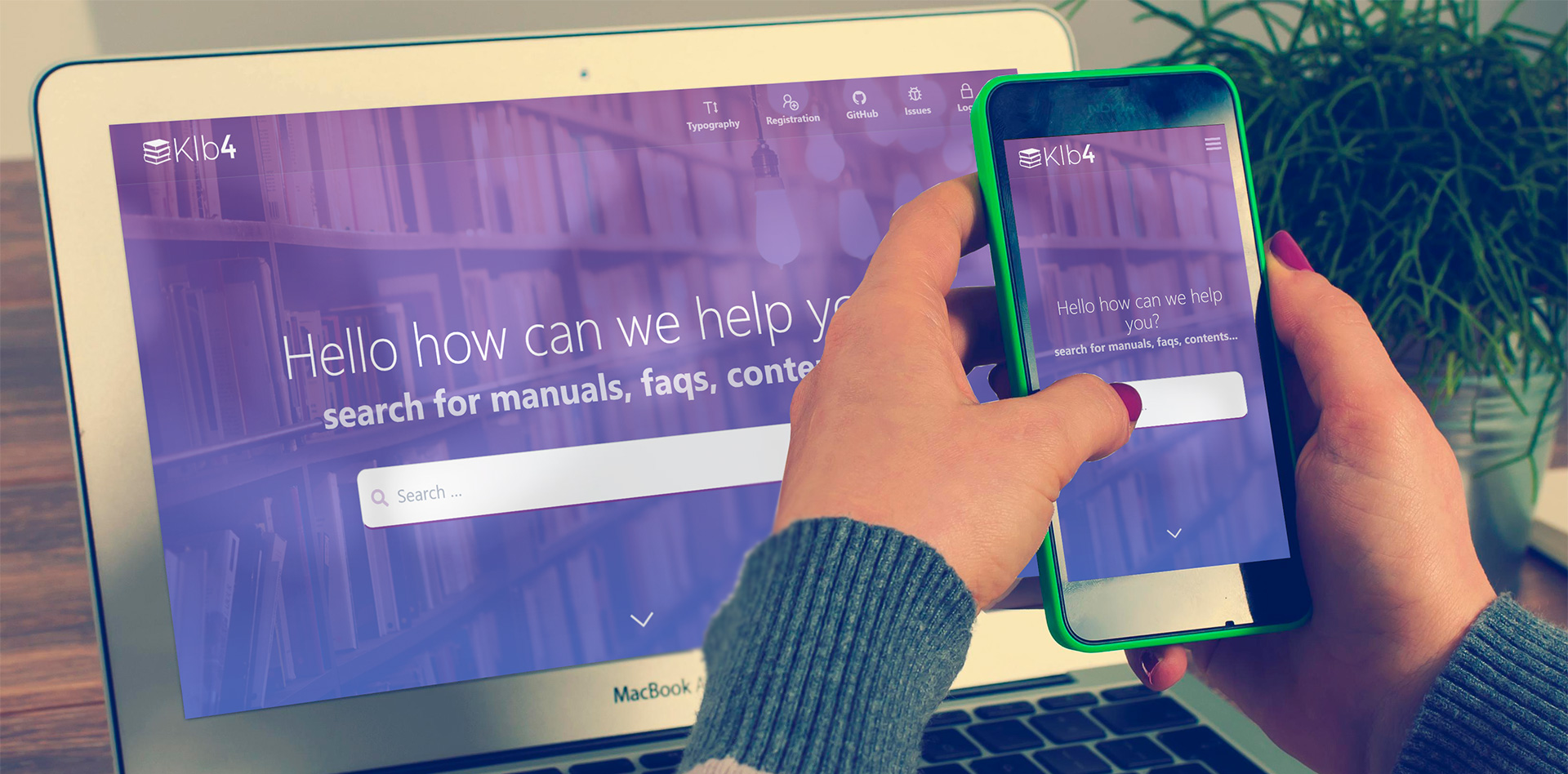 **Klb4** is a theme for [Grav CMS](http://github.com/getgrav/grav) of knowledgebase for companies. This theme is built with the [Spectre.css](https://picturepan2.github.io/spectre/) framework and provides a powerful base for developing your own themes. Klb4 uses functionality that is only available in Grav 1.4+, as such you cannot run Klb4 on earlier versions of Grav. ## Features - Lightweight and minimal for optimal performance - Spectre CSS Framework - Fully responsive with full-page mobile navigation - SCSS based CSS source files for easy customization - Built-in support for on-page navigation - Multiple page template types - Fontawesome icon support - Compatibility with [SnappGrav Plugin](https://github.com/iusvar/grav-plugin-snappygrav) - Compatibility with [TNT Search](https://github.com/trilbymedia/grav-plugin-tntsearch) - Css style adaptation for printing - Two layouts for blog list ### Supported Page Templates - Default view template `default.md` - Error view template `error.md` - Blog view template `blog.md` - Blog item view template `item.md` - Modular view templates: `modular.md` - Features Modular view template `features.md` - Hero Modular view template `hero.md` - Text Modular view template `text.md` - Bottom Section Modular view template `bottom.md` # Installation Installing the Klb4 theme can be done in one of two ways. Our GPM (Grav Package Manager) installation method enables you to quickly and easily install the theme with a simple terminal command, while the manual method enables you to do so via a zip file. The theme by itself is useful, but you may have an easier time getting up and running by installing a skeleton. The Klb4 theme can be found in both the [Website](https://github.com/lauroguedes/grav-skeleton-klb4) which are self-contained repositories for a complete sites which include: sample content, configuration, theme, and plugins. ## GPM Installation (Preferred) The simplest way to install this theme is via the [Grav Package Manager (GPM)](http://learn.getgrav.org/advanced/grav-gpm) through your system's Terminal (also called the command line). From the root of your Grav install type: bin/gpm install klb4 This will install the Klb4 theme into your `/user/themes` directory within Grav. Its files can be found under `/your/site/grav/user/themes/klb4`. ## Manual Installation To install this theme, just download the zip version of this repository and unzip it under `/your/site/grav/user/themes`. Then, rename the folder to `klb4`. You can find these files either on [GitHub](https://github.com/getgrav/grav-theme-klb4) or via [GetGrav.org](http://getgrav.org/downloads/themes). You should now have all the theme files under /your/site/grav/user/themes/klb4 ## Default Options Klb4 comes with a few default options that can be set site-wide. These options are: ```yaml enabled: true # Enable the theme production-mode: true # In production mode, only minified CSS is used. When disabled, nested CSS with sourcemaps are enabled grid-size: grid-lg # The max-width of the theme, options include: `grid-xl`, `grid-lg`, and `grid-md` layout-list-blog: true # Change list layout blog header-fixed: true # Cause the header to be fixed at the top of the browser header-animated: true # Allows the fixed header to resize to a smaller header when scrolled header-dark: false # Inverts the text/logo to work better on dark backgrounds header-transparent: false # Allows the fixed header to be transparent over the page header-showexternallinks: true # Allows an outher menu type in header header-externallinks: # A array list of links for menu sticky-footer: true # Causes the footer to be sticky at the bottom of the page blog-page: "/blog" # The route to the blog listing page, useful for a blog style layout with sidebar custom_logo: # A custom logo rather than the default (see below) custom_logo_mobile: # A custom logo to use for mobile navigation ``` To make modifications, you can copy the `user/themes/klb4/klb4.yaml` file to `user/config/themes/` folder and modify, or you can use the admin plugin. > NOTE: Do not modify the `user/themes/klb4/klb4.yaml` file directly or your changes will be lost with any updates ## Custom Logos To add a custom logo, you should put the log into the `user/themes/klb4/images/logo` folder. Standard image formats are support (`.png`,`.jpg`, `.gif`, `.svg`, etc.). Then reference the logo via the YAML like so: ```yaml custom_logo: - name: "my-logo.png" custom_logo_mobile: - name: "my-mobile-logo.png" ``` Alternatively, you can you use the drag-n-drop "Custom Logo" field in the Klb4 theme options. ## Page Overrides Klb4 has the ability to allow pages to override some of the default options by letting the user set `body_classes` for any page. The theme will merge the combination of the defaults with any `body_classes` set. For example: ```yaml body_classes: "header-dark header-transparent" ``` On a particular page will ensure that page has those options enabled (assuming they are false by default). ## Hero Options The hero template allows some options to be set in the page frontmatter. This is used by the modular `hero` as well as the blog and item templates to provide a more dynamic header. ```yaml hero_classes: text-light title-h1h2 parallax overlay-dark-gradient hero-large hero_overlay: true # Enable overlay effect hero_showsearch: true # Enable plugin simplesearch or tntsearch on hero page hero_image: road.jpg hero_align: center ``` The `hero_classes` option allows a variety of hero classes to be set dynamically these include: - `text-light` | `text-dark` - Controls if the text should be light or dark depending on the content - `title-h1h2` - Enforced a close matched h1/h2 title pairing - `parallax` - Enables a CSS-powered parallax effect - `overlay-dark-gradient` - Displays a transparent gradient which further darkens the underlying image - `overlay-light-gradient` - Displays a transparent gradient which further lightens the underlying image - `overlay-dark` - Displays a solid transparent overlay which further darkens the underlying image - `overlay-light` - Displays a solid transparent overlay which further darkens the underlying image - `hero-fullscreen` | `hero-large` | `hero-medium` | `hero-small` | `hero-tiny` - Size of the hero block The `hero_image` should point to an image file in the current page folder. ## Features Modular Options The features modular template provides the ability to set a class on the features, as well as an array of feature items. For example: ```yaml class: standard features: - icon: "fa fa-desktop" header: Systems text: "Find project and system information" url: "https://github.com/lauroguedes/grav-theme-klb4" target: true - icon: "fa fa-question-circle" header: FAQs text: "Find information about frequently asked questions" target: false - icon: "fa fa-clipboard" header: Manuals text: "Learn all about our products and services through the manuals" url: /manuals target: false - icon: "fa fa-bullhorn" header: Marketing text: "Access marketing kits and use to advertise your business" target: false - icon: "fa fa-gavel" header: Policies text: "Learn all about our internal and external policies" target: false - icon: "fa fa-book" header: "Knowledgebase Tutorials" text: "Learn how to use and create content in Klb4" target: false ``` ## Text Modular Options The text box provides a single option to control if any image found in the page folder should be left or right aligned: ```yaml image_align: left ``` ## Bottom Modular Options The bottom box provides a single option to create um bootom footer content with logo and follow-us socials ```yaml title_social: "Follow us" social: - icon: "fa fa-facebook-official" text: Facebook url: "https://facebook.com" - icon: "fa fa-twitter" text: Twitter url: "https://twitter.com" - icon: "fa fa-instagram" text: Instagram url: "https://instagram.com" ``` ## Permission Groups Klb4 Theme comes with predefined permission groups and permissions that can be used to free or not access certain types of content. To use this feature, integrate [skeleton](https://github.com/lauroguedes/grav-skeleton-klb4) file `groups.yaml` into the theme and install the [login plugin](https://github.com/getgrav/grav-plugin-login). ## Permission Settings The Klb4 theme comes with a permission setting field on all types of pages so you can block or release a particular page for different users.
