KO
|
EN
gitlite — search
Search
#python
#java
#python3
#arduino
#golang
#machine-learning
#rust
#html
#flask
#javascript
#seismology
#nodejs
obsidian-habit-calendar
★ 27
Open GitHub ↗
Habit calendar for obsidian
Download README (.md)
Explore Similar Repositories
Mysa_HA
:
High-performance Home Assistant integration for Mysa Thermostats with real-time MQTT control and instant UI feedback.
booster_assets
:
Booster robot descriptions and example motion data
understand_vggt
:
logit lens for VGGT
ziniao_webdriver_demo
:
包含基于紫鸟浏览器的电商平台WebDriver自动化示例
nestjs-hexigonal
:
No description available.
// repository documentation
Was this content helpful?
★ 0
(0 ratings)
Select Rating:
★
★
★
★
★
Submit Feedback
Recent Feedback
×
Download README
Do you want to download the
README.md
file for
obsidian-habit-calendar
?
Download (.md)
# Obsidian Habit Calendar 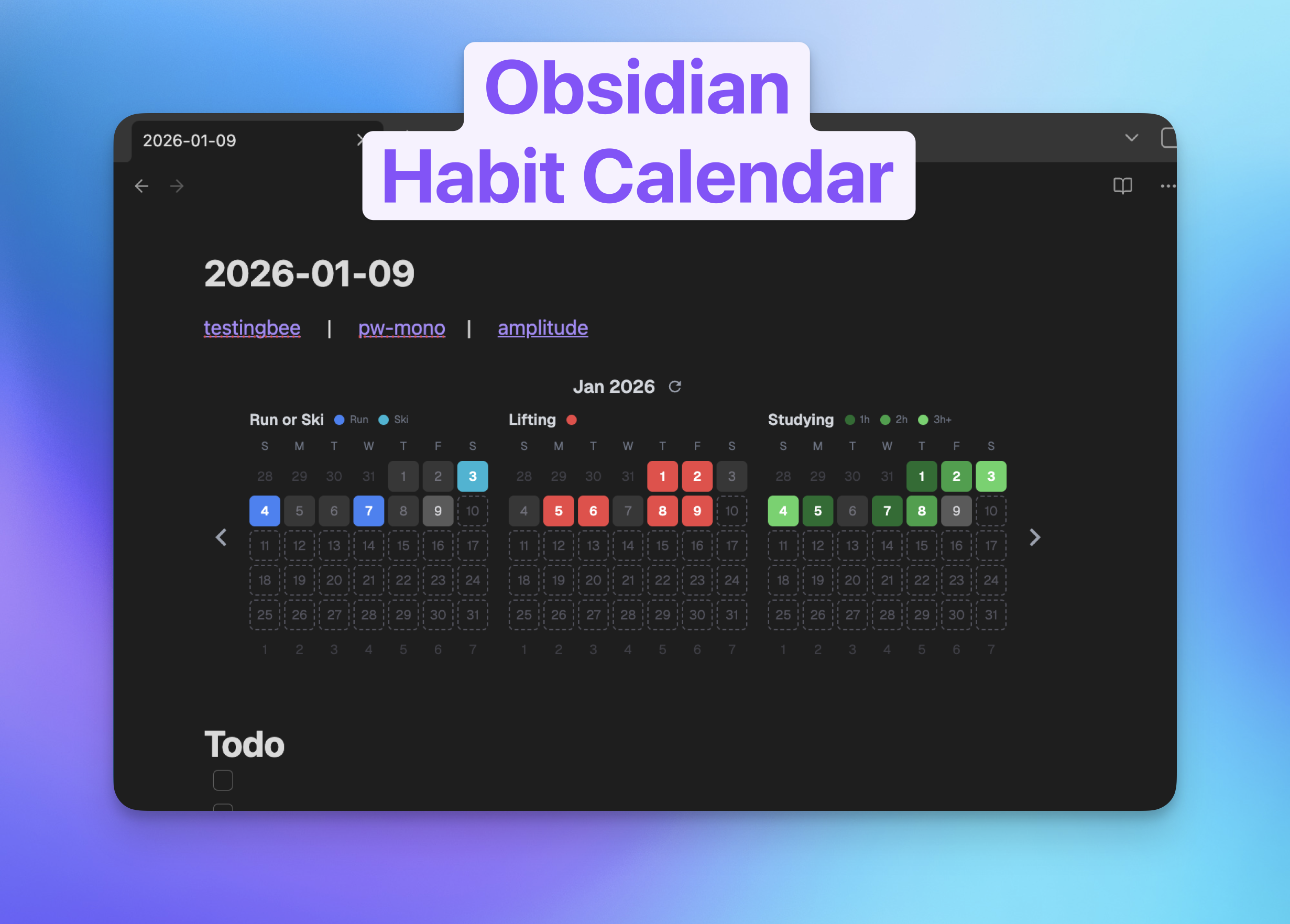 A customizable habit tracking calendar that embeds directly into your Obsidian notes. Track multiple habits with different options and visualize your progress over time. ## Quick Start (No Coding Required) ### 1. Get a Database You'll need a free PostgreSQL database. Choose one: **Neon (Recommended)** 1. Sign up at [neon.tech](https://neon.tech) 2. Create a new project 3. Copy the connection string **Supabase** 1. Sign up at [supabase.com](https://supabase.com) 2. Create a new project 3. Go to Settings > Database and copy the connection string **Railway** 1. Sign up at [railway.app](https://railway.app) 2. Create a new project and add a PostgreSQL database 3. Copy the connection string ### 2. Deploy Your Calendar **Deploy to Vercel (Easiest)** 1. Fork this repo on GitHub 2. Go to [vercel.com](https://vercel.com) and import your fork 3. Add `DATABASE_URL` environment variable (paste your database connection string) 4. Click Deploy 5. Copy your deployment URL (e.g., `https://yourapp.vercel.app`) **Deploy to Render** 1. Fork this repo on GitHub 2. Create a Web Service at [render.com](https://render.com) 3. Connect your GitHub repo 4. Set build command: `pnpm install && pnpm db:push && pnpm build` 5. Set start command: `pnpm start` 6. Add environment variable: `DATABASE_URL` (paste your database connection string) 7. Deploy and copy your URL ### 3. Embed in Obsidian In any Obsidian note, add: ```html <iframe src="https://yourapp.vercel.app" width="120%" height="230px"></iframe> ``` Replace `https://yourapp.vercel.app` with your deployed URL. Adjust `width` and `height` as needed. ## How to Use Click any calendar cell to cycle through your habit options. Each click rotates to the next option. Click past the last option to mark it as "off" (empty). ## Customizing Your Habits Before deploying (or after by redeploying), edit `src/config/calendars.ts` to define your habits: ```typescript export const calendarsConfig: CalendarConfig[] = [ { title: 'Exercise', options: [ { key: 'run', label: 'Run', color: '#3b82f6' }, { key: 'gym', label: 'Gym', color: '#ef4444' }, ], }, { title: 'Study Time', options: [ { key: 'study1h', label: '1 hour', color: '#10b981' }, { key: 'study2h', label: '2 hours', color: '#059669' }, { key: 'study3h', label: '3+ hours', color: '#047857' }, ], }, ]; ``` Each calendar can have: - **title**: Display name - **options**: Array of choices with: - **key**: Unique identifier - **label**: Display text - **color**: Hex color code ## For Developers ### Local Development **Prerequisites** - Node.js 20+ and pnpm **Setup** 1. Clone and install: ```bash git clone https://github.com/yourusername/obsidian-habit-calendar.git cd obsidian-habit-calendar pnpm install ``` 2. Create `.env` file: ```bash cp .env.example .env ``` Edit `.env` and add your database URL: ```env DATABASE_URL="postgresql://username:password@host:port/database" ``` 3. Initialize database and run: ```bash pnpm db:push pnpm dev ``` Open [http://localhost:3000](http://localhost:3000) ### Available Scripts - `pnpm dev` - Start development server - `pnpm build` - Build for production - `pnpm start` - Start production server - `pnpm check` - Run Biome linter - `pnpm check:write` - Fix linting issues - `pnpm db:push` - Push schema changes to database - `pnpm db:studio` - Open Drizzle Studio (database GUI) ### Database Management View and edit your data using Drizzle Studio: ```bash pnpm db:studio ``` Opens at [https://local.drizzle.studio](https://local.drizzle.studio) ## Contributing Contributions are welcome! Please feel free to submit a Pull Request. ## License This project is licensed under the MIT License - see the [LICENSE](LICENSE) file for details. ## Acknowledgments Built with the [T3 Stack](https://create.t3.gg/) - a fantastic starting point for full-stack TypeScript apps.
