KO
|
EN
gitlite — search
Search
#javascript
#python
#hacktoberfest
#react
#ai
#typescript
#llm
#go
#golang
#android
#machine-learning
#rust
#deep-learning
#linux
ai-models-serialization
★ 51
Open GitHub ↗
AI模型序列化总结
Download README (.md)
Explore Similar Repositories
SparkML
:
Spark ML with pyspark
customer_churn_prediction
:
零售电商客户流失模型,基于tensorflow,xgboost4j-spark,spark-ml实现LR,FM,GBDT,RF,进行模型效果对比,离线/在线部署方式总结
mlflow-spark-summit-2019
:
MLFlow Spark Summit 2019 Presentation
US-Stock-Prediction-Using-ML-And-Spark
:
Predict stock price based on financial news feeds
spark-training
:
Repository used for Spark Trainings
// repository documentation
Was this content helpful?
★ 0
(0 ratings)
Select Rating:
★
★
★
★
★
Submit Feedback
Recent Feedback
×
Download README
Do you want to download the
README.md
file for
ai-models-serialization
?
Download (.md)
# 开源AI模型序列化总结 ## 目录 * [模型序列化简介](#模型序列化简介) * [序列化分类](#序列化分类) * [Scikit-learn模型序列化方法](#Scikit-learn模型序列化方法) * [XGBoost模型序列化方法](#XGBoost模型序列化方法) * [LightGBM模型序列化方式](#LightGBM模型序列化方式) * [Spark-ML模型序列化方式](#Spark-ML模型序列化方式) * [Keras模型序列化方法](#Keras模型序列化方法) * [Pytorch模型序列化方法](#Pytorch模型序列化方法) * [MXNet模型序列化方法](#MXNet模型序列化方法) * [总结](#总结) ## 模型序列化简介 模型序列化是模型部署的第一步,如何把训练好的模型存储起来,以供后续的模型预测使用,是模型部署的首先要考虑的问题。本文主要罗列当前流行开源模型不同序列化方法,以供查阅参考,欢迎添加和指正([Github](https://github.com/aipredict/ai-models-serialization))。 ## 序列化分类 - 跨平台跨语言通用序列化方法,主要使用三种格式:XML,JSON,和Protobuf,前两种是文本格式,人和机器都可以理解,后一种是二进制格式,只有机器能理解,但在存储传输解析上有很大的速度优势。 * [PMML (Predictive Model Markup Language)](http://dmg.org/pmml/v4-4/GeneralStructure.html),基于XML格式。由数据挖掘组织DMG(Data Mining Group)开发和维护,是表示传统机器学习模型的实际标准,具有广泛的应用。详细参考文章[《使用PMML部署机器学习模型》](https://github.com/aipredict/ai-deployment/blob/master/deploy-ml-using-pmml/README.md)。 * [ONNX (Open Neural Network Exchange)](https://onnx.ai/),基于Protobuf二进制格式。初始由微软和Facebook推出,后面得到了各大厂商和框架的支持,已成为表示深度神经网络模型的不二标准,通过`onnx-ml`也已经可以支持传统非深度神经网络模型。详细参考文章[《使用ONNX部署深度学习和传统机器学习模型》](https://github.com/aipredict/ai-deployment/blob/master/deploy-ml-dl-using-onnx/README.md)。 * [PFA (Portable Format for Analytics)](http://dmg.org/pfa/index.html),基于JSON格式。PFA同样由PMML的领导组织DMG开发,最新标准是2015发布的0.8.1,后续再没有发布新版本。[OpenDataGroup](http://www.opendatagroup.com)公司开发了基于PFA的预测库[Hadrian](https://github.com/opendatagroup/hadrian),提供Java/Scala/Python/R等多语言接口。 * [MLeap](https://github.com/combust/mleap),基于JSON或者Protobuf格式。开源但非标准,由初创公司[Combust](http://www.combust.ml)开发,刚开始主要提供对Spark Pipelines的支持,目前也可以支持Scikit-learn等模型。Combust同时提供了MLeap Runtime来支持MLeap格式模型,基于Scala开发,实现了一个独立的预测运行引擎,不依赖于Spark或者Scikit-learn等库。 * [Core ML](https://developer.apple.com/machine-learning/core-ml/),基于Protobuf二进制格式,由苹果公司开发,主要目标为在移动设备上使用AI模型。 - 模型本身提供的自定义序列化方法 * 文本或者二进制格式 * 语言专有或者跨语言跨平台自定义格式 - 语言级通用序列化方法 * Python - [pickle](https://docs.python.org/3/library/pickle.html) * Python - [joblib](https://joblib.readthedocs.io/en/latest/persistence.html) * R - [rda](https://www.rdocumentation.org/packages/base/versions/3.6.1/topics/save) joblib在序列化大numpy数组时有性能优势,pickle的c实现cpickle速度也很快。 - 用户自定义序列化方法 * 以上方法都无法达到要求,用户可以使用自定义序列化格式,以满足自己的特殊部署需求:部署性能、模型大小、环境要求等等。但这种方法在模型升级维护以及版本兼容性上是一个大的挑战。 如何选择模型序列化方法,可以参考以下顺序,优先使用跨平台跨语言通用序列化方法,最后再考虑使用自定义序列化方法:  在同一类型格式选项中,可以参考以下筛选流程: 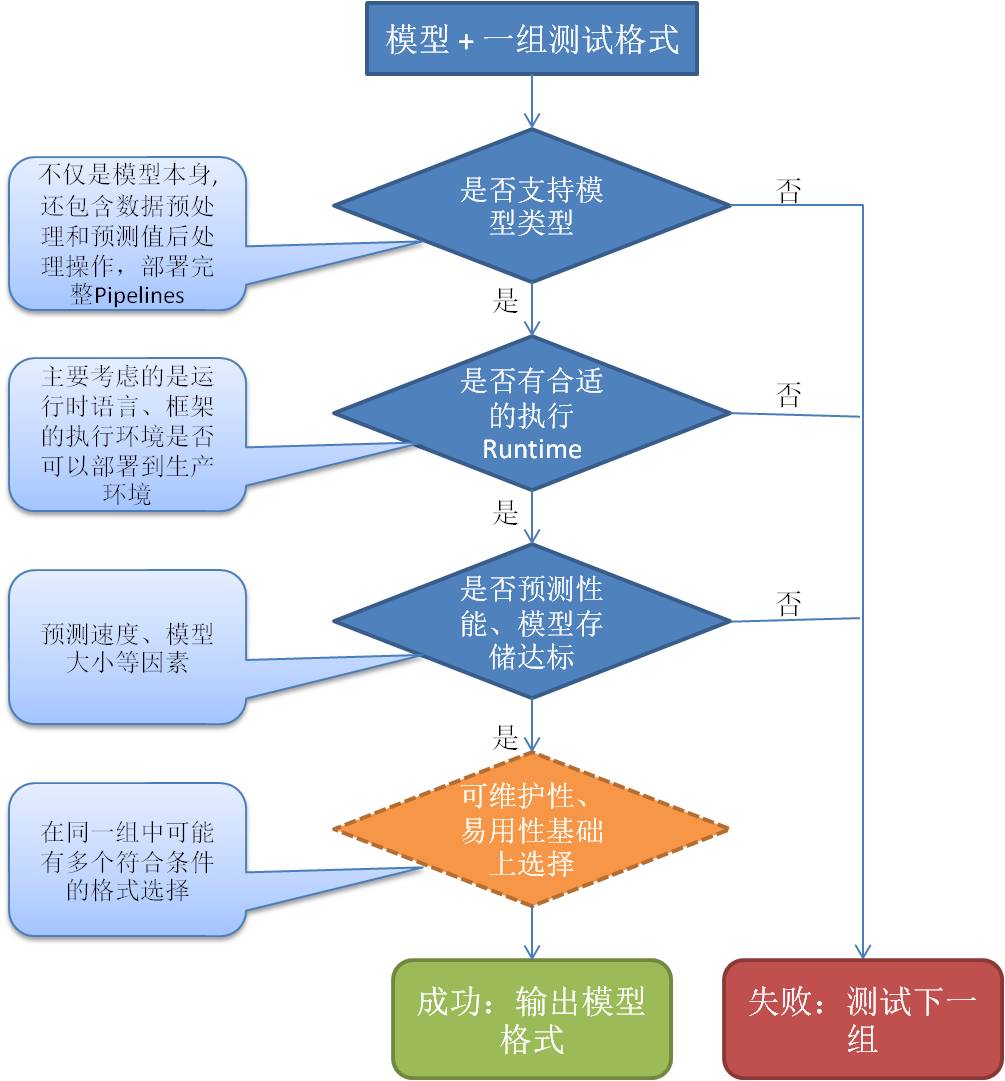 ## Scikit-learn模型序列化方法: * PMML:[Nyoka](https://github.com/nyoka-pmml/nyoka#nyoka-to-export-scikit-learn-models),[SkLearn2PMML](https://github.com/jpmml/sklearn2pmml) * ONNX:[sklearn-onnx](https://github.com/onnx/sklearn-onnx), 或者[ONNXMLTools](https://github.com/onnx/onnxmltools)包装了sklearn-onnx * [MLeap](https://github.com/combust/mleap#create-and-export-a-scikit-learn-pipeline) * Pickle 或者 Joblib ## XGBoost模型序列化方法: * XGBoost自定义二进制格式,该格式是一种与语言和平台无关的内部通用格式。 * [xgboost.Booster.save_model](https://xgboost.readthedocs.io/en/latest/python/python_api.html#xgboost.Booster.save_model) * [xgboost.Booster.load_model](https://xgboost.readthedocs.io/en/latest/python/python_api.html#xgboost.Booster.load_model) * PMML:[Nyoka](https://github.com/nyoka-pmml/nyoka#nyoka-to-export-xgboost-models),[SkLearn2PMML](https://github.com/jpmml/sklearn2pmml) * ONNX:[ONNXMLTools](https://github.com/onnx/onnxmltools) * Pickle 或者 Joblib(使用Python API) ## LightGBM模型序列化方式: * LightGBM自定义格式:文本文件或者字符串。 * [lightgbm.Booster.save_model](https://lightgbm.readthedocs.io/en/latest/pythonapi/lightgbm.Booster.html#lightgbm.Booster.save_model) * [lightgbm.Booster.model_to_string](https://lightgbm.readthedocs.io/en/latest/pythonapi/lightgbm.Booster.html#lightgbm.Booster.model_to_string) * 构造函数导入模型 [lightgbm.Booster](https://lightgbm.readthedocs.io/en/latest/pythonapi/lightgbm.Booster.html#lightgbm.Booster) * PMML:[Nyoka](https://github.com/nyoka-pmml/nyoka#nyoka-to-export-lightgbm-models),[SkLearn2PMML](https://github.com/jpmml/sklearn2pmml) * ONNX:[ONNXMLTools](https://github.com/onnx/onnxmltools) * Pickle 或者 Joblib(使用Python API) ## Spark-ML模型序列化方式 * Spark-ML内部存储格式,PipelineModel提供[save](https://spark.apache.org/docs/2.2.0/api/scala/index.html#org.apache.spark.ml.PipelineModel)和[load](https://spark.apache.org/docs/2.2.0/api/scala/index.html#org.apache.spark.ml.PipelineModel$)方法,输入的是一个路径,而不是文件名,因为要存储到多个不同的文件中。Spark在大数据的分布式处理有很大优势,比如适合批量预测和模型评估,但是对于实时预测来说,太重量级了,效率不高。提供Scala,Java和Python接口,可以跨平台和语言读取。 * PMML:[JPMML-SparkML](https://github.com/jpmml/jpmml-sparkml) * ONNX:[ONNXMLTools](https://github.com/onnx/onnxmltools),还在实验阶段。 * PFA:[Aardpfark](https://github.com/CODAIT/aardpfark),支持还不完全。 * [MLeap](https://github.com/combust/mleap) ## Keras模型序列化方法 * [Keras内部格式](https://www.tensorflow.org/guide/keras/save_and_serialize): 1. HDF5: ```python # Save the model model.save('path_to_my_model.h5') # Recreate the exact same model purely from the file new_model = keras.models.load_model('path_to_my_model.h5') ``` 2. TensorFlow `SavedModel` 格式,该格式是TensorFlow对象的独立序列化格式,由TensorFlow serving和TensorFlow(而不是Python)支持。 ```python # Export the model to a SavedModel model.save('path_to_saved_model', save_format='tf') # Recreate the exact same model new_model = keras.models.load_model('path_to_saved_model') ``` 3. 分别存储模型结构和模型权重值(Weights)。模型结构可以存储为JSON: ```python json_string = model.to_json() model = keras.models.model_from_json(json_string) ``` 或者YAML: ```python yaml_string = model.to_yaml() model = keras.models.model_from_yaml(yaml_string) ``` 模型权重值可以存储为HDF5格式: ```python model.save_weights('path_to_my_weights.h5') ``` 或者TF格式: ```python model.save_weights('path_to_my_weights', save_format='tf') ``` 因为该方法没有存储模型训练配置参数和优化器(Optimizer),所以如果您需要再继续训练模型,必须重新调用compile()函数来设置。但是如果只是用于模型预测,这种序列化方式已经足够了,完整的例子: ```python # Save JSON config to disk json_config = model.to_json() with open('model_config.json', 'w') as json_file: json_file.write(json_config) # Save weights to disk model.save_weights('path_to_my_weights.h5') # Reload the model from the 2 files we saved with open('model_config.json') as json_file: json_config = json_file.read() new_model = keras.models.model_from_json(json_config) new_model.load_weights('path_to_my_weights.h5') # Make prediction against the restored model. new_model.predict(x_test) ``` * PMML: [Nyoka](https://github.com/nyoka-pmml/nyoka#nyoka-to-export-keras-models),导出的是扩展的PMML模型,不属于PMML标准。 * ONNX:[keras2onnx](https://github.com/onnx/keras-onnx/) ## Pytorch模型序列化方法 * [Pytorch内部格式](https://pytorch.org/tutorials/beginner/saving_loading_models.html):只存储已训练模型的状态(包括weights and biases),因为仅仅为了模型预测。 ```python # Saving & Loading Model for Inference torch.save(model.state_dict(), PATH) model = TheModelClass(*args, **kwargs) model.load_state_dict(torch.load(PATH)) model.eval() ``` * ONNX:内部支持[torch.onnx.export](https://pytorch.org/docs/master/onnx.html) ## MXNet模型序列化方法 * [MXNet内部格式](https://mxnet.apache.org/api/python/docs/tutorials/packages/gluon/blocks/save_load_params.html): 1. 只存储模型参数,不包含模型结构,加载时需要建立模型结构。 ```python # Saving model parameters to file net = build_net(gluon.nn.Sequential()) train_model(net) net.save_parameters(file_name) # Loading model parameters from file new_net = build_net(gluon.nn.Sequential()) new_net.load_parameters(file_name, ctx=ctx) ``` 2. 存储模型参数和结构到JSON文件中,该格式可以跨平台和语言使用,可以在不同的语言中被加载,比如C,C++或者Scala。 ```python # Saving model parameters AND architecture to file net = build_net(gluon.nn.HybridSequential()) net.hybridize() train_model(net) # Two files path-symbol.json and path-xxxx.params will be created, where xxxx is the 4 digits epoch number. net.export(path) # Loading model parameters AND architecture from file gluon.nn.SymbolBlock.imports(symbol_file, input_names, param_file=None, ctx=None) ``` * ONNX:内部支持[mxnet.contrib.onnx.export_model](https://mxnet.apache.org/api/python/docs/api/contrib/onnx/index.html#mxnet.contrib.onnx.export_model) ## 总结 这并不是一个完整的列表,欢迎大家贡献,标星^_^。 Github地址:[https://github.com/aipredict/ai-models-serialization](https://github.com/aipredict/ai-models-serialization)
