KO
|
EN
gitlite — search
Search
#typescript
#ai-agents
#deepseek-harness
#dsh-plugin
#open-source
#ai
#cli
#dsh
#claude-code
#codex
#developer-tools
#react
ai-robo-advisor
★ 48
Open GitHub ↗
AI Robo-Advisor
Download README (.md)
Explore Similar Repositories
Robo-Advisor-with-Python
:
Robo-Advisor with Python, published by Packt Publishing
open-robo-advisor
:
Open Robo-Advisor is a flexible robo-advisor library written in Python. 🤖
// repository documentation
Was this content helpful?
★ 0
(0 ratings)
Select Rating:
★
★
★
★
★
Submit Feedback
Recent Feedback
×
Download README
Do you want to download the
README.md
file for
ai-robo-advisor
?
Download (.md)
# 🤖 AI Robo Advisor [](https://www.python.org/downloads/) [](https://opensource.org/licenses/MIT) [](https://pytest.org/) Welcome to your personal AI-powered investment assistant! This project democratizes professional-grade investment strategies using AI, making hedge fund-level analysis accessible to everyone. ## 🎯 How It Works 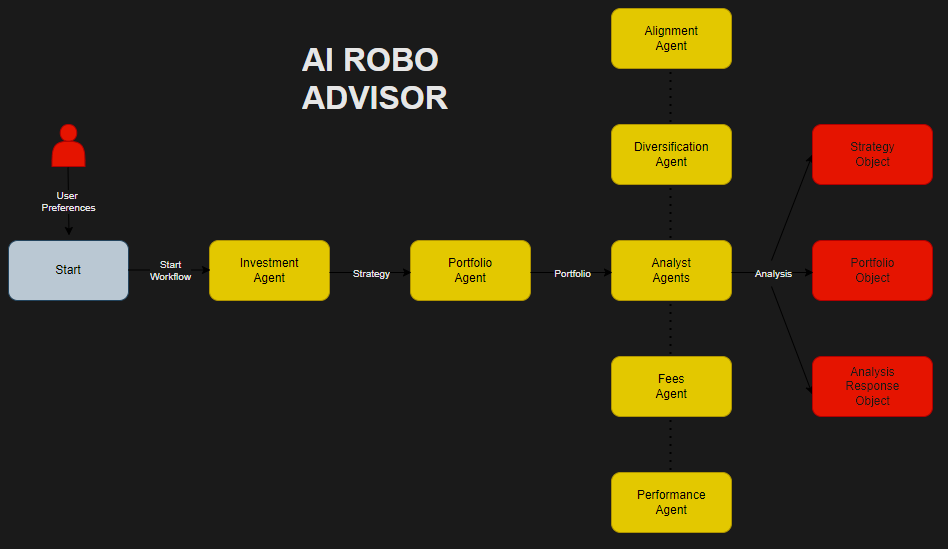 **Multi-Agent System:** 1. **Investment Agent** - Collects preferences via questionnaire and creates investment strategy 2. **Portfolio Agent** - Translates strategy into concrete ETF portfolio (max 4 ETFs) 3. **Analyst Agents** - Comprehensive analysis including: - **Fees Agent** - Analyzes Total Expense Ratios (TER) - **Diversification Agent** - Evaluates asset class, geography, and sector distribution - **Alignment Agent** - Assesses risk tolerance and time horizon alignment - **Performance Agent** - Calculates CAGR, volatility, Sharpe ratio, max drawdown, alpha & beta - **Analysis Orchestrator** - Aggregates all analyses for final reporting > **⚠️ Disclaimer:** This project is for educational and research purposes only. Not financial advice. Consult a qualified professional before making investment decisions. ## ✨ Key Features - **AI-Driven Analysis** - Advanced market data analysis and strategy suggestions - **Portfolio Management** - Build and track ETF-based investment portfolios - **Educational Tool** - Learn LangGraph and AI applications in finance ## 📋 Table of Contents - [Prerequisites](#prerequisites) - [Quick Start](#quick-start) - [Docker Setup](#docker-setup) - [Installation](#installation) - [Usage](#usage) - [Testing](#testing) - [Contributing](#contributing) - [License](#license) <a id="prerequisites"></a> ## � Prerequisites - **Python 3.10+** - **API Keys Required:** - **OpenAI API Key** (or Google/Anthropic) - For LLM functionality - **Polygon.io API Key** - For financial data (free tier available) <a id="quick-start"></a> ## ⚡ Quick Start ```bash # Clone and navigate git clone https://github.com/matvix90/ai-robo-advisor.git cd ai-robo-advisor # Setup environment python3 -m venv venv && source venv/bin/activate pip install -e . # Configure API keys cp .env.example .env # Edit .env with your API keys # Run the advisor run-advisor ``` <a id="installation"></a> ## 🚀 Installation ### 1. Clone Repository ```bash git clone https://github.com/matvix90/ai-robo-advisor.git cd ai-robo-advisor ``` ### 2. Create Virtual Environment ```bash python3 -m venv venv source venv/bin/activate # On Windows: venv\Scripts\activate ``` ### 3. Install Dependencies ```bash pip install -e . ``` ### 4. Configure API Keys ```bash # Copy example environment file cp .env.example .env # Edit .env file with your keys: # OPENAI_API_KEY=your-openai-api-key # POLYGON_API_KEY=your-polygon-api-key ``` **Note:** Portfolios limited to 4 ETFs and 2 years of data (free Polygon.io constraints). <a id="docker-setup"></a> ## 🐳 Docker Setup Complete Docker environment for consistent, cross-platform development. Eliminates "works on my machine" issues with optimized multi-stage builds. ### Quick Docker Start ```bash # Setup cp .env.example .env # Edit .env with your API keys # Validate and start (recommended) ./docker-run.sh validate ./docker-run.sh # Or manual approach ./docker/validate-setup.sh ./docker-run.sh up --build ``` ### Available Commands ```bash # Quick commands ./docker-run.sh # Start development environment ./docker-run.sh down # Stop containers ./docker-run.sh logs # View logs ./docker-run.sh shell # Interactive shell ./docker-run.sh test # Run tests # Advanced usage ./docker-run.sh interactive # Development container with tools ./docker-run.sh prod # Production mode ./docker-run.sh clean # Clean up everything ./docker-run.sh help # Show all commands ``` ### Docker Architecture - **Multi-stage builds**: Base → Dependencies → Development/Production/Interactive - **Hot-reload**: Source code changes reflected instantly - **Optimized images**: Separate dev/prod configurations - **Security**: Non-root user, isolated environment 📖 **[Complete Docker Guide](docker/README.md)** - Detailed setup, troubleshooting, and advanced usage. <a id="usage"></a> ## 💼 Usage ### Command Line Interface 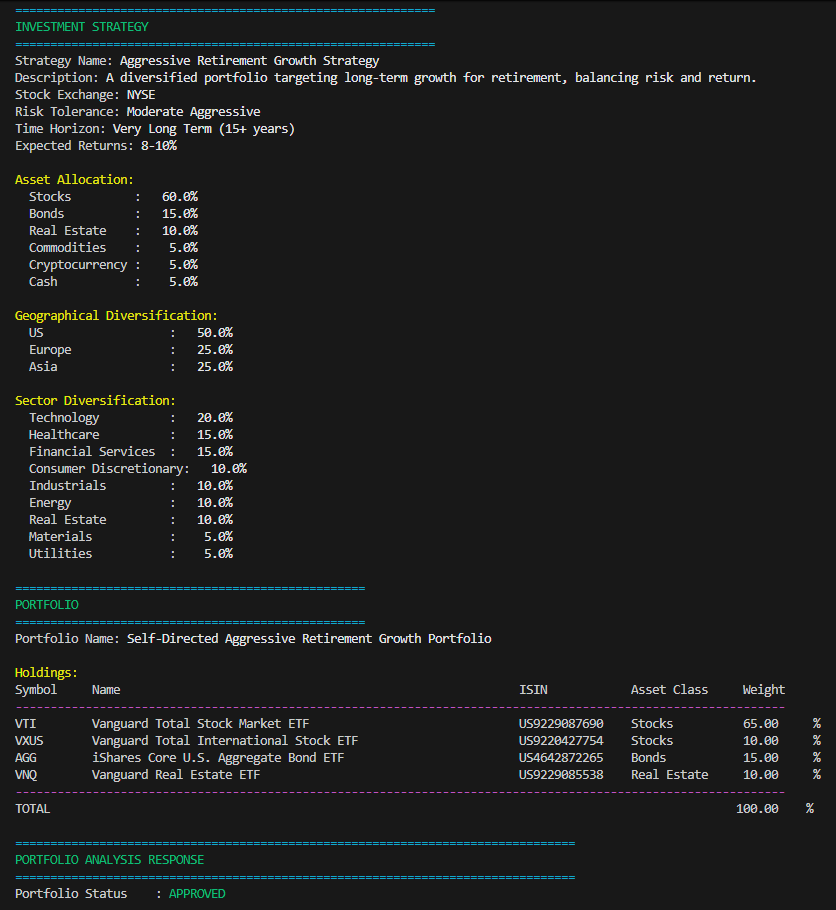 ```bash # Basic run run-advisor # Show AI reasoning process run-advisor --show-reasoning ``` 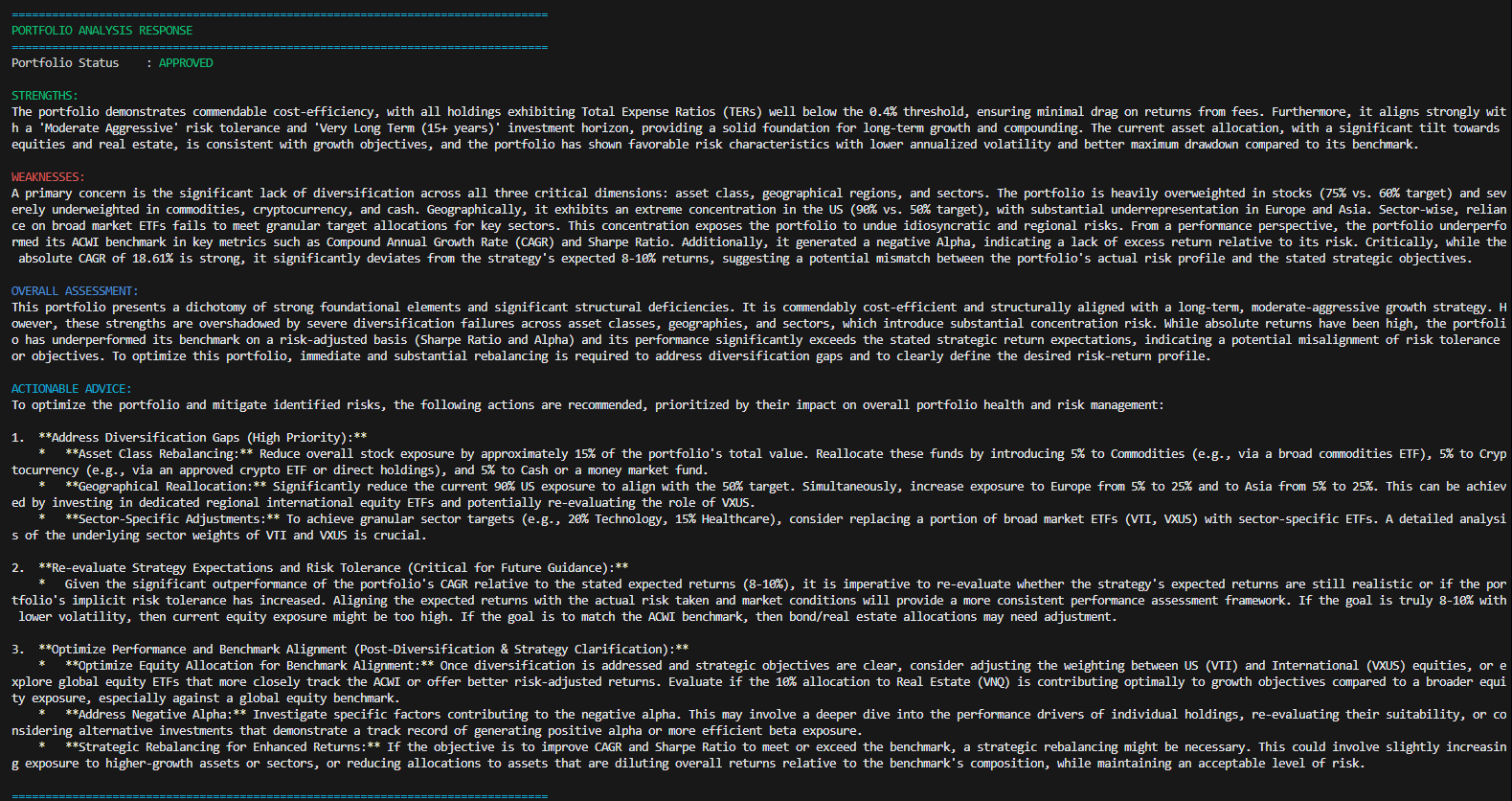 <a id="testing"></a> ## 🧪 Testing Comprehensive test suite for code quality and regression prevention. ### Quick Test Commands ```bash # Run all tests python -m pytest tests/ # OR ./run_tests.sh # Run with coverage python -m pytest tests/ --cov=src --cov-report=html # Test categories python -m pytest tests/ -m unit # Unit tests only python -m pytest tests/ -m integration # Integration tests python -m pytest tests/ -m "not slow" # Fast tests ``` ### Test Dependencies ```bash pip install -e ".[test]" ``` <a id="contributing"></a> ## 🤝 Contributing Contributions welcome! Please: 1. Fork the repository 2. Create your feature branch (`git checkout -b feature/AmazingFeature`) 3. Commit changes (`git commit -m 'Add AmazingFeature'`) 4. Push to branch (`git push origin feature/AmazingFeature`) 5. Open a Pull Request See [`CONTRIBUTING.md`](CONTRIBUTING.md) for detailed guidelines. <a id="license"></a> ## 📄 License Distributed under the MIT License. See [`LICENSE`](LICENSE) for more information. ## ❤️ Contributors [](https://github.com/matvix90/ai-robo-advisor/graphs/contributors) ---
