KO
|
EN
gitlite — search
Search
#javascript
#python
#hacktoberfest
#react
#ai
#typescript
#llm
#go
#golang
#android
#machine-learning
#rust
#deep-learning
#linux
sublime-text
★ 20
Open GitHub ↗
Personal Sublime Text setup
Download README (.md)
Explore Similar Repositories
mysql-udf-base64
:
It provides base64 encode/decode UDF (user defined function) for MySQL-5.1/5.5/5.6
es-google-drive-river
:
Google Drive river for Elasticsearch
meet-meteor
:
A shower of Meteor meetups
oem_gateway
:
Part of OpenEnergyMonitor project. Gateway from data source to target database.
guide-to-data-mining
:
iPython Notebook of the Guide to Data Mining
// repository documentation
Was this content helpful?
★ 0
(0 ratings)
Select Rating:
★
★
★
★
★
Submit Feedback
Recent Feedback
×
Download README
Do you want to download the
README.md
file for
sublime-text
?
Download (.md)
Sublime Text Setup ================== A list of all my Sublime Text packages, preferences, and other stuff related to my daily toolkit. 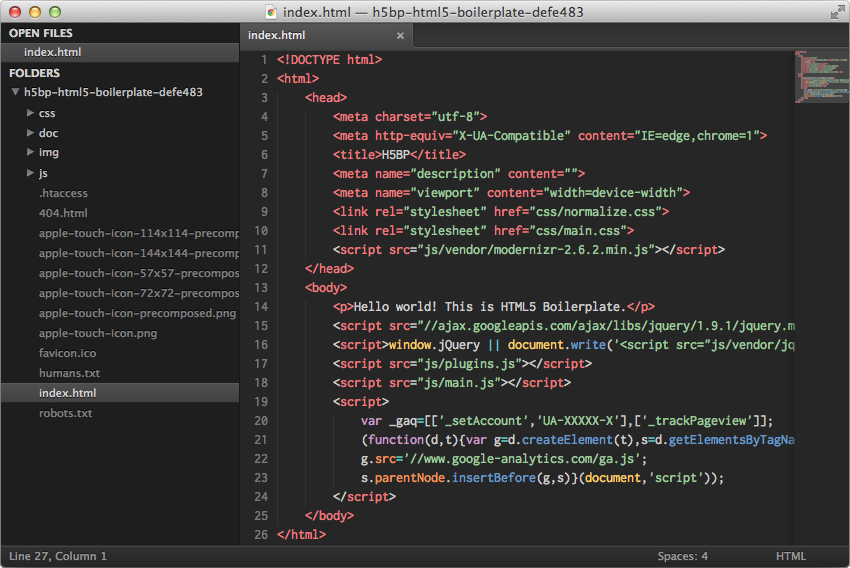 Theme, Colour Scheme, & Font ---------------------------- * [Soda Dark](https://github.com/buymeasoda/soda-theme/) * [Tomorrow Night Eighties](https://github.com/chriskempson/tomorrow-theme/blob/master/textmate/Tomorrow-Night-Eighties.tmTheme) * [Inconsolata](http://www.levien.com/type/myfonts/inconsolata.html) Packages -------- * [Alignment](https://github.com/wbond/sublime_alignment) - Align cursors for code formatting * [AutoFileName](https://github.com/BoundInCode/AutoFileName) - Auto completes filenames (e.g. in `src` attributes or css `url()` declarations) * [Emmet](https://github.com/sergeche/emmet-sublime) - Ultra quick html generation * [Insert Nums](https://bitbucket.org/markstahler/insert-nums) - Insert increasing numbers at each cursor * [SelectUntil](https://github.com/xavi-/sublime-selectuntil) - Each cursor select until specified string * [SFTP](http://wbond.net/sublime_packages/sftp) - Download/upload via SFTP * [SideBarEnhancements](https://github.com/titoBouzout/SideBarEnhancements) - Adds a lot of filesystem functionality to the sidebar * [Sublime-HTMLPrettify](https://github.com/victorporof/Sublime-HTMLPrettify) - Tidy up markup * [SublimeLinter](https://github.com/SublimeLinter/SublimeLinter) - Highlight syntax errors * [SyncedSideBar](https://github.com/sobstel/SyncedSideBar) - Open file is highlighted in sidebar * [Tag](https://github.com/SublimeText/Tag) - Adds xml/html tag formatting functionality Syntaxes -------- * [ApacheConf](https://github.com/colinta/ApacheConf.tmLanguage) - Syntax highlighting for Apache config files (e.g. `.htaccess`) * [jQuery](https://github.com/SublimeText/jQuery) - jQuery snippets & autocomplete * [PHP-Twig](https://github.com/Anomareh/PHP-Twig.tmbundle) - Twig syntax highlighting Preferences ----------- ```js { // Leaves the window open if all tabs are closed "close_windows_when_empty": false, // Nice dark color scheme with pastel colours "color_scheme": "Packages/Color Scheme - Default/Tomorrow-Night-Eighties.tmTheme", // I like to force spaces on everyone "detect_indentation": false, // I know some plugins are slow but I can live with it "detect_slow_plugins": false, // I'm from New Zealand, download dictionaries from: http://extensions.services.openoffice.org/en/dictionaries "dictionary": "Packages/Language - English/en_NZ.dic", // Disables dragging of text, I used to always accidentally do this "drag_text": false, // Personal preference "ensure_newline_at_eof_on_save": true, // Most files these days are UTF-8 "fallback_encoding": "UTF-8", // I don't use code folding "fold_buttons": false, // Beautiful fixed width font, available here: http://www.levien.com/type/myfonts/inconsolata.html "font_face": "Inconsolata", // Large enough "font_size": 14.0, // Highlight the line the cursor/s is/are in "highlight_line": true, // Displays an indicator on tabs that have unsaved changes "highlight_modified_tabs": true, // On exit, application will ask to save unsaved changes "hot_exit": false, // These give nice spacing between lines "line_padding_bottom": 1, "line_padding_top": 1, // When files are double clicked/dragged onto Sublime they open in the current window "open_files_in_new_window": false, // When the application is quit and restared no open files are remembered "remember_open_files": false, // Allows to scroll past the end of the file to position the last line in the middle of the window "scroll_past_end": true, // Shift+Tab unindents the current line/s "shift_tab_unindent": true, // Nice dark theme with a dark sidebar "theme": "Soda Dark.sublime-theme", // Use spaces for indenting "translate_tabs_to_spaces": true, // Removes all trailing spaces/tabs from the ends of lines "trim_trailing_white_space_on_save": true, // Caret is slightly wider than normal "wide_caret": true, // Disable word wrapping "word_wrap": false } ```
