KO
|
EN
gitlite — search
Search
#javascript
#python
#hacktoberfest
#react
#ai
#typescript
#llm
#go
#golang
#android
#machine-learning
#rust
#deep-learning
#linux
cpp-matplotlib
★ 9
Open GitHub ↗
No description available.
Download README (.md)
Explore Similar Repositories
firecracker
:
Rainmeter for Ubuntu, done in Python.
rsyslog-scripts
:
scripts that make rsyslog easy to use.
arr-pluck
:
Get the value of a specified property from all elements in a collection.
PD-IP-Checker
:
No description available.
harmonic_centrality
:
fast harmonic centrality algorithm for networkx library
// repository documentation
Was this content helpful?
★ 0
(0 ratings)
Select Rating:
★
★
★
★
★
Submit Feedback
Recent Feedback
×
Download README
Do you want to download the
README.md
file for
cpp-matplotlib
?
Download (.md)
# Contents * [About](#about) * [Usage](#usage) * [Prereqs](#prereqs) * [Building](#building) * [Running the Example](#running-the-example) # About An easy-to-use **C++11** library for simple plotting from C++ via a ZeroMQ bridge to an [IPython](http://ipython.org/) kernel. It provides the ability to send [NumPy](http://www.numpy.org/) array compatible data to an IPython kernel session as well as execute arbitrary code. Execution of arbitrary code is "protected" by IPython's kernel HMAC signing mechanism: only code signed by a secret key provided by IPython will run. As of 2015-03-19 it has been tested with IPython version 1.2.1 on Ubuntu 14.04. # Usage First, create an IPython kernel session ``` $ ipython kernel --pylab NOTE: When using the `ipython kernel` entry point, Ctrl-C will not work. ... blah blah blah ... To connect another client to this kernel, use: --existing kernel-NNN.json ``` It is important to remember that NNN in the last line, which is the PID of the kernel. This JSON file is stored somewhere in your $HOME, exactly where can vary. Find it with <tt>find ~/ -name kernel-NNN.json</tt>. Here we create some 1D data and plot it. The numpy.array "MyData" will be available for working with in the IPython session, even after the C++ program finishes. All library code lives in the <tt>cppmpl</tt> namespace. ```c++ #include "cpp_mpl.hpp" int main() { // ... cppmpl::CppMatplotlib mpl{"/path/to/kernel-NNN.json"}; mpl.Connect(); // Create a nice curve std::vector<cppmpl::NumpyArray::dtype> raw_data; double x = 0.0; while (x < 3.14159 * 4) { raw_data.push_back(std::sin(x)); x += 0.05; } // Send it to IPython for plotting cppmpl::NumpyArray data("MyData", raw_data); mpl.SendData(data); mpl.RunCode("plot(MyData)\n" "title('f(x) = sin(x)')\n" "xlabel('x')\n" "ylabel('f(x)')\n"); // NOTE: if you want to store the python in an external file, use the // convenience function LoadFile("my_code.py"), as in, // mpl.RunCode(cppmpl::LoadFile("plotting_code.py")); // ... } ``` And the result is 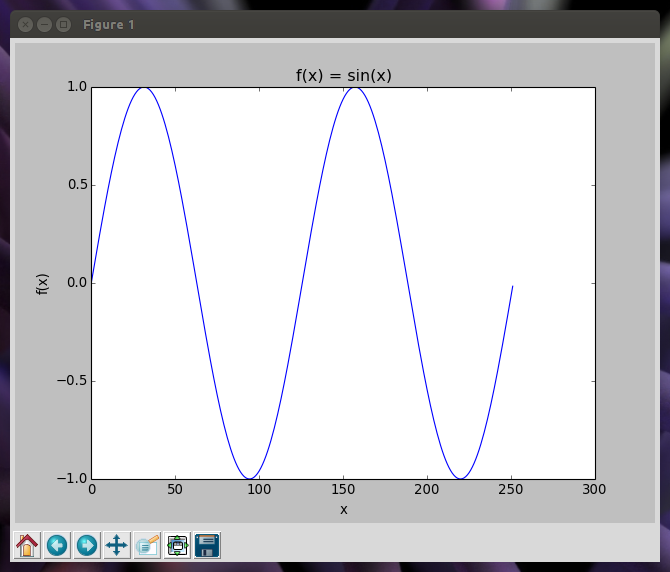 See [src/main.cc](src/main.cc) for a complete program. To work with "MyData" you can connect to the kernel using an IPython console, notebook, or qtconsole: ``` $ ipython console --existing kernel-NNN.json Python 2.7.6 (default, Mar 22 2014, 22:59:56) Type "copyright", "credits" or "license" for more information. IPython 1.2.1 -- An enhanced Interactive Python. ? -> Introduction and overview of IPython's features. %quickref -> Quick reference. help -> Python's own help system. object? -> Details about 'object', use 'object??' for extra details. In [1]: MyData *= 4 In [84]: print MyData[9] [ 1.73986214] ``` ## Compiling / Linking When compiling you must link against <tt>libcpp_mpl.so</tt>, which, assuming you've installed it to somewhere in your library path: ``` $ g++ my_prog.cc -std=c++11 -lcpp_mpl -lyour_other_libs ``` # Prereqs ## Ubuntu 14.04 sudo apt-get install ipython python-matplotlib libzmq3-dev \ libjsoncpp-dev uuid-dev libssl-dev # Building # git clone this repository to cpp-matplotlib/ cd cpp-matplotlib mkdir build cd build cmake .. make ## Installing make install By default installs to /usr/local. Don't forget to run <tt>sudo ldconfig</tt> to update the library cache. ## Generating the documentation cd cpp-matplotlib doxygen Doxyfile # open html/index.html # Running the Example In terminal 1: ipython kernel --pylab # this will print out the kernel PID to connect to, NNN below. In terminal 2: # Once per kernel invocation: export KERNEL_CONFIG=`find ~/ -name kernel-NNN.json` # Each time you run the program build/cpp-matplotlib-example $KERNEL_CONFIG In terminal 3 (if desired): ipython console --existing kernel-NNN.json
