KO
|
EN
gitlite — search
Search
#javascript
#ruby
#php
#python
#java
#dotfiles
#hacktoberfest
#puppet
#c-sharp
#erlang
#shell
#zsh
docker-build-step-plugin
★ 117
Open GitHub ↗
No description available.
Download README (.md)
Explore Similar Repositories
django-bootstrap3-datetimepicker
:
No description available.
Alembic
:
:alembic: Functional JSON Parser - Linux Ready :penguin:
nodemailer-sendgrid-transport
:
SendGrid transport for Nodemailer
mailgun
:
mailgun library for ruby
requestmapper
:
🔍 Request mapper is a plugin for IntelliJ IDEA for quick navigation to URL mapping declarations
// repository documentation
Was this content helpful?
★ 0
(0 ratings)
Select Rating:
★
★
★
★
★
Submit Feedback
Recent Feedback
×
Download README
Do you want to download the
README.md
file for
docker-build-step-plugin
?
Download (.md)
# Docker Build Step Plugin This plugin allows adding various Docker commands into your Jenkins Freestyle job as a build step. # Plugin Information If you would like to use Docker for dynamic node provisioning, you should check the [Docker plugin](https://wiki.jenkins-ci.org/display/JENKINS/Docker+Plugin). ## Commands Plugin currently support following commands: - commit changes in specified container - create new container from image - create image from Dockerfile - create exec command - kill container(s) - pull image from a repository - push image to a repository - remove container(s) - remove all containers - restart container(s) - start container(s) - stop container(s) - stop all containers - start/stop all containers created from specified image - start exec command ## Build Variables Some commands also export build variables, so that you can easily use them in subsequent build steps. Variables exported by create and start commands: `DOCKER_CONTAINER_IDS` - IDs of created/started containers `DOCKER_IP_$HOSTNAME` - IP of running container with hostname `$HOSTNAME` When port binding is set up (in start command), the following environment variables are exported: `DOCKER_HOST_BIND_PORTS` - contains comma separated list of ports to which are bound docker container ports `DOCKER_HOST_PORT_$SCHEMA_$PORT` - which docker container port is bound to this port (e.g. DOCKER_HOST_PORT_TCP_80 would contain value 8080 in case that container port 8080 is bound to port 80 on host) `DOCKER_HOST_SOCKET_$SCHEMA_$PORT` - host IP:PORT to which conatiner $PORT using $SCHEMA is bound. E.g. with following port binding 127.0.0.1:80:8080, container TCP port is 8080 is bound to host port 80 on loopback and DOCKER_HOST_SOCKET_TCP_8080 will contain 127.0.0.1:80. ## Known limitations Commands run without any issue only on master, on remote slaves some commands may fail execution. See [JENKINS-24071](https://issues.jenkins-ci.org/browse/JENKINS-24071) for details. # Setup ## Build Nodes The Docker service must be installed and running on nodes where you run the build. ## Set Docker URL In Jenkins global configuration, you need to specify Docker REST API URL. Jenkins -> Manage Jenkins -> Configure System -> Docker Builder * Configure Docker server REST API URL * For Linux nodes, set the local socket `unix:///var/run/docker.sock` * For other nodes, you may need to set something like `tcp://127.0.0.1:2375` * Test the connection. # Usage ## Commands In the build area of Jenkins Job, add the build step Execute Docker command There is a range of Docker Command options, roughly correlating with the Docker CLI commands. 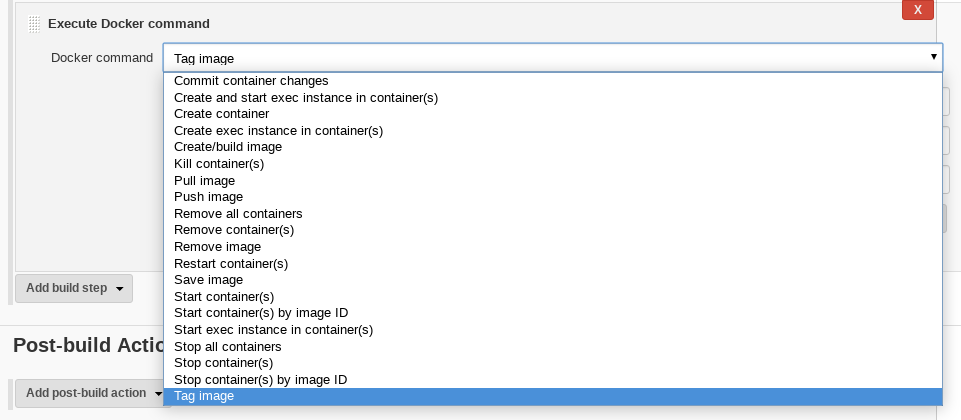 ## Docker Pull ### Fields | Field | Description | | ----- | ----- | | Name of the image to pull (repository/image:tag) | base name of the image | | Tag | Actual tag, e.g. `3.4.5` or `latest` | | Registry | hostname of registry used to store images e.g. `mydocker.mycompany.com` | | Docker registry URL | registry URL to use for pull authentication, e.g. `https://mydocker.mycompany.com` | | Registry Credentials | ...Choose correct credential here from the list... | 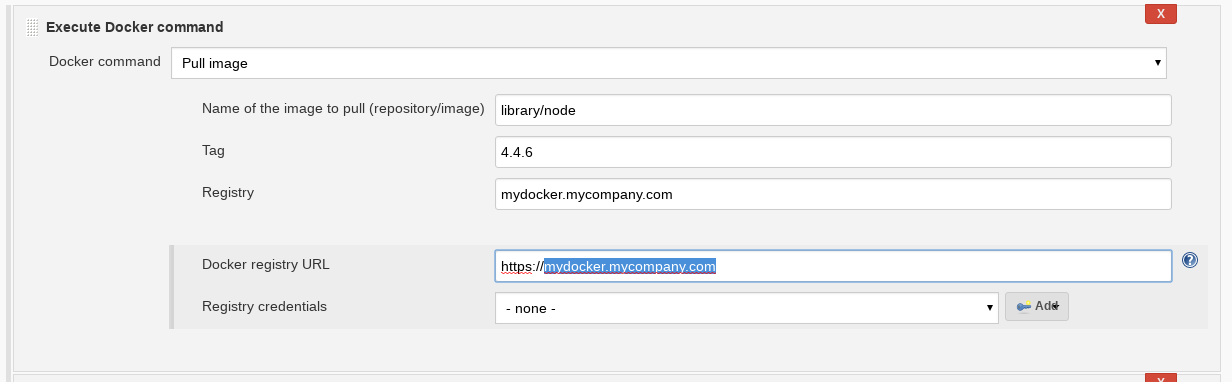 ## Docker Tag ### Fields | Field | Description | | ----- | ----- | | Name of the image to tag (repository /image:tag) | base name of the image | | Target repository of the new tag | destination repository/image name e.g. `dac/nodeynode` | | The tag to set | Actual destination tag, e.g. `3.4.5` or `latest` | 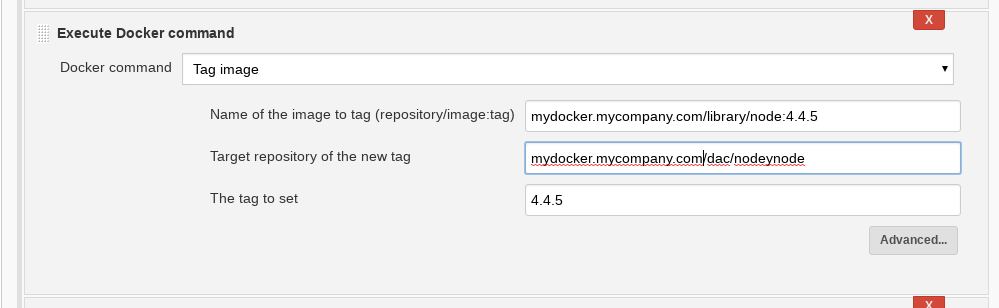 ### Scenario 1: Tag a Dockerhub image with a local tag #### Effective Docker command line docker tag library/node:8.9.4 dac/nodeynode:8.9.4 #### Settings | Field | Value | | ----- | ----- | | Name of the image to tag (repository /image:tag) | library/node:8.9.4 | | Target repository of the new tag | dac/nodeynode | | The tag to set | 8.9.4 | #### Result [Docker] INFO: Done [Docker] INFO: start tagging image library/node:8.9.4 in dac/nodeynode as 8.9.4 [Docker] INFO: Tagged image library/node:8.9.4 in dac/nodeynode as 8.9.4 ### Scenario 2: Tag a private repo image with a local tag #### Effective Docker command line docker tag mydocker.mycompany.com/library/node:4.4.6 dac/nodeynode:4.4.6 #### Settings | Field | Value | | ----- | ----- | | Name of the image to tag (repository/image:tag) | mydocker.mycompany.com/library/node:4.4.6 | | Target repository of the new tag | dac/nodeynode | | The tag to set | 4.4.6 | #### Result [Docker] INFO: Done [Docker] INFO: start tagging image mydocker.mycompany.com/library/node:4.4.6 in dac/nodeynode as 4.4.6 [Docker] INFO: Tagged image mydocker.mycompany.com/library/node:4.4.6 in dac/nodeynode as 4.4.6 ## Docker Push ### Fields | Field | Description | | ----- | ----- | | Name of the image to push (repository /image) | base name of the image | | Tag | Actual tag, e.g. `3.4.5` or `latest` | | Registry | hostname of registry used to store images e.g. `mydocker.mycompany.com` | | Docker registry | registry hostname to use for authentication, e.g. `mydocker.mycompany.com` | | Registry Credentials | ...Choose correct credential here from the list... | 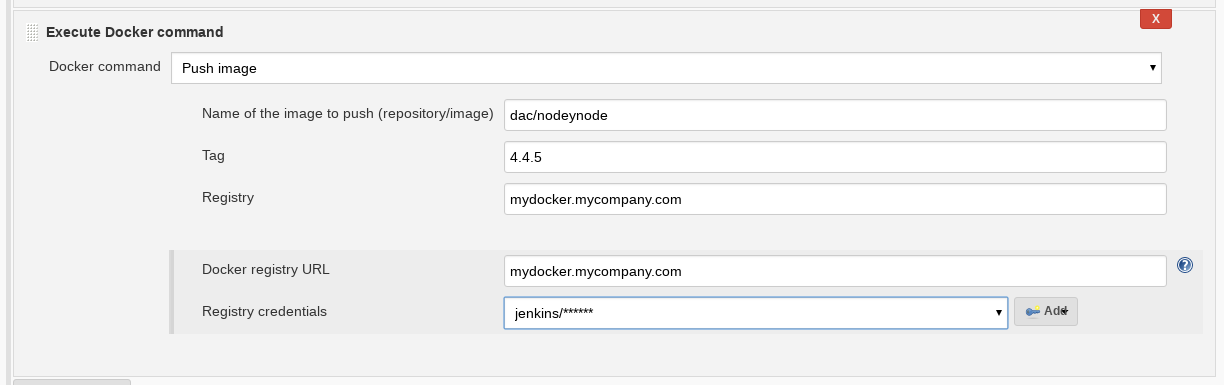 ### Scenario 1: Push a local image to a private repo #### Effective Docker command line docker login ... docker push mydocker.mycompany.com/dac/nodeynode:4.4.6 #### Settings | Field | Value | | ----- | ----- | | Name of the image to push (repository /image) | dac/nodeynode | | Tag| 4.4.6 | | Registry | mydocker.mycompany.com | | Docker registry | mydocker.mycompany.com | | Registry Credentials | ...Choose correct credential here from the list... | #### Result [Docker] INFO: Pushing image mydocker.mycompany.com/dac/nodeynode:4.4.6 [Docker] INFO: PushResponseItem[stream=<null>,status=The push refers to repository [mydocker.mycompany.com/dac/nodeynode],progressDetail=<null>,progress=<null>,id=<null>,from=<null>,time=<null>,errorDetail=<null>,error=<null>,aux=<null>] [Docker] INFO: PushResponseItem[stream=<null>,status=Preparing,progressDetail=ResponseItem.ProgressDetail[current=<null>,total=<null>,start=<null>],progress=<null>,id=c747e356ef2e,from=<null>,time=<null>,errorDetail=<null>,error=<null>,aux=<null>] … [==================================================>] 326.3MB,id=ec0200a19d76,from=<null>,time=<null>,errorDetail=<null>,error=<null>,aux=<null>] [Docker] INFO: PushResponseItem[stream=<null>,status=Pushing,progressDetail=ResponseItem.ProgressDetail[current=326362624,total=318467546,start=<null>],progress=[==================================================>] 326.4MB,id=ec0200a19d76,from=<null>,time=<null>,errorDetail=<null>,error=<null>,aux=<null>] [Docker] INFO: PushResponseItem[stream=<null>,status=Pushed,progressDetail=ResponseItem.ProgressDetail[current=<null>,total=<null>,start=<null>],progress=<null>,id=ec0200a19d76,from=<null>,time=<null>,errorDetail=<null>,error=<null>,aux=<null>] [Docker] INFO: PushResponseItem[stream=<null>,status=4.4.6: digest: sha256:bbdd44f8824f93e3da152db5b425fd28bcab03f6746efa7ef1e20555ff21e8bd size: 1587,progressDetail=<null>,progress=<null>,id=<null>,from=<null>,time=<null>,errorDetail=<null>,error=<null>,aux=<null>] [Docker] INFO: PushResponseItem[stream=<null>,status=<null>,progressDetail=ResponseItem.ProgressDetail[current=<null>,total=<null>,start=<null>],progress=<null>,id=<null>,from=<null>,time=<null>,errorDetail=<null>,error=<null>,aux=ResponseItem.AuxDetail[size=1587,tag=4.4.6,digest=sha256:bbdd44f8824f93e3da152db5b425fd28bcab03f6746efa7ef1e20555ff21e8bd]] [Docker] INFO: Done pushing image mydocker.mycompany.com/dac/nodeynode:4.4.6 <!-- ## Docker Build and Publish --> # Reference * Jenkins Plugin ID: `docker-build-step` * [`docker-build-step` in Jenkins Plugins](https://plugins.jenkins.io/docker-build-step) * [`Docker build step plugin` in Jenkins Plugin Wiki](https://wiki.jenkins.io/display/JENKINS/Docker+build+step+plugin) * [`docker-build-step-plugin` GitHub project](https://github.com/jenkinsci/docker-build-step-plugin) * [Docker website](https://www.docker.com/) # Credits Uses components from [Docker Commons Plugin](https://wiki.jenkins.io/display/JENKINS/Docker+Commons+Plugin) which provides APIs for other Docker-related plugins # License See [License](./LICENSE)
