KO
|
EN
gitlite — search
Search
#typescript
#ai-agents
#ai
#dsh-plugin
#deepseek-harness
#open-source
#cli
#claude-code
#codex
#developer-tools
#react
#windows
sub-agent-statusline
★ 205
Open GitHub ↗
No description available.
Download README (.md)
Explore Similar Repositories
whirl
:
Fast iterative local development and testing of Apache Airflow workflows
vue-diff
:
VueJS diff viewer plugin
GiLight2D
:
⚪ Experimental ✨ 2D Raytracing for Unity Urp
nestjs-event-store
:
NestJS CQRS module for EventStore.org. It requires @nestjs/cqrs
api
:
🗄️ API code examples for JavaScript Everywhere by Adam D. Scott, published by O'Reilly Media
// repository documentation
Was this content helpful?
★ 0
(0 ratings)
Select Rating:
★
★
★
★
★
Submit Feedback
Recent Feedback
×
Download README
Do you want to download the
README.md
file for
sub-agent-statusline
?
Download (.md)
# Subagent Monitor  See delegated work without leaving OpenCode. **Subagent Monitor** is an MIT-licensed OpenCode TUI sidebar plugin that keeps running, completed, and failed subagents visible, with elapsed time and token/context usage when OpenCode provides it. [](https://www.npmjs.com/package/opencode-subagent-statusline) [](https://www.npmjs.com/package/opencode-subagent-statusline) [](https://github.com/Joaquinvesapa/sub-agent-statusline) [](https://raw.githubusercontent.com/Joaquinvesapa/sub-agent-statusline/main/LICENSE) ## Install Add the package to your OpenCode TUI configuration: ```json { "$schema": "https://opencode.ai/tui.json", "plugin": ["opencode-subagent-statusline"] } ``` The configuration usually lives at: ```txt ~/.config/opencode/tui.json ``` Restart OpenCode after saving the file. The package is published as `opencode-subagent-statusline` and requires Node `>=22.13`. ## Why Subagent Monitor? Delegating work is powerful, but child sessions can disappear into the background. Without a visible status surface, you have to guess: - Is the review agent still running? - Did the test agent finish? - Which child session failed? - How much context did a subagent use? Subagent Monitor restores that visibility inside OpenCode, so you can keep working while still knowing what your delegated agents are doing. ## What you get The sidebar shows: - running subagents; - recent completed subagents; - failed subagents; - elapsed time; - token/context usage when available. When subagent activity is active, the plugin also adds a compact summary to the home/footer area. ## Gentle AI integration [Gentle AI](https://github.com/Gentleman-Programming/gentle-ai) offers Subagent Monitor as an optional OpenCode community plugin. Select and install it through Gentle AI to add the selected plugin to OpenCode's `tui.json`, or install this package directly using the configuration above. This integration is optional. Subagent Monitor remains an independently installable OpenCode plugin. ## Screenshots Full OpenCode context with demo content in Spanish: 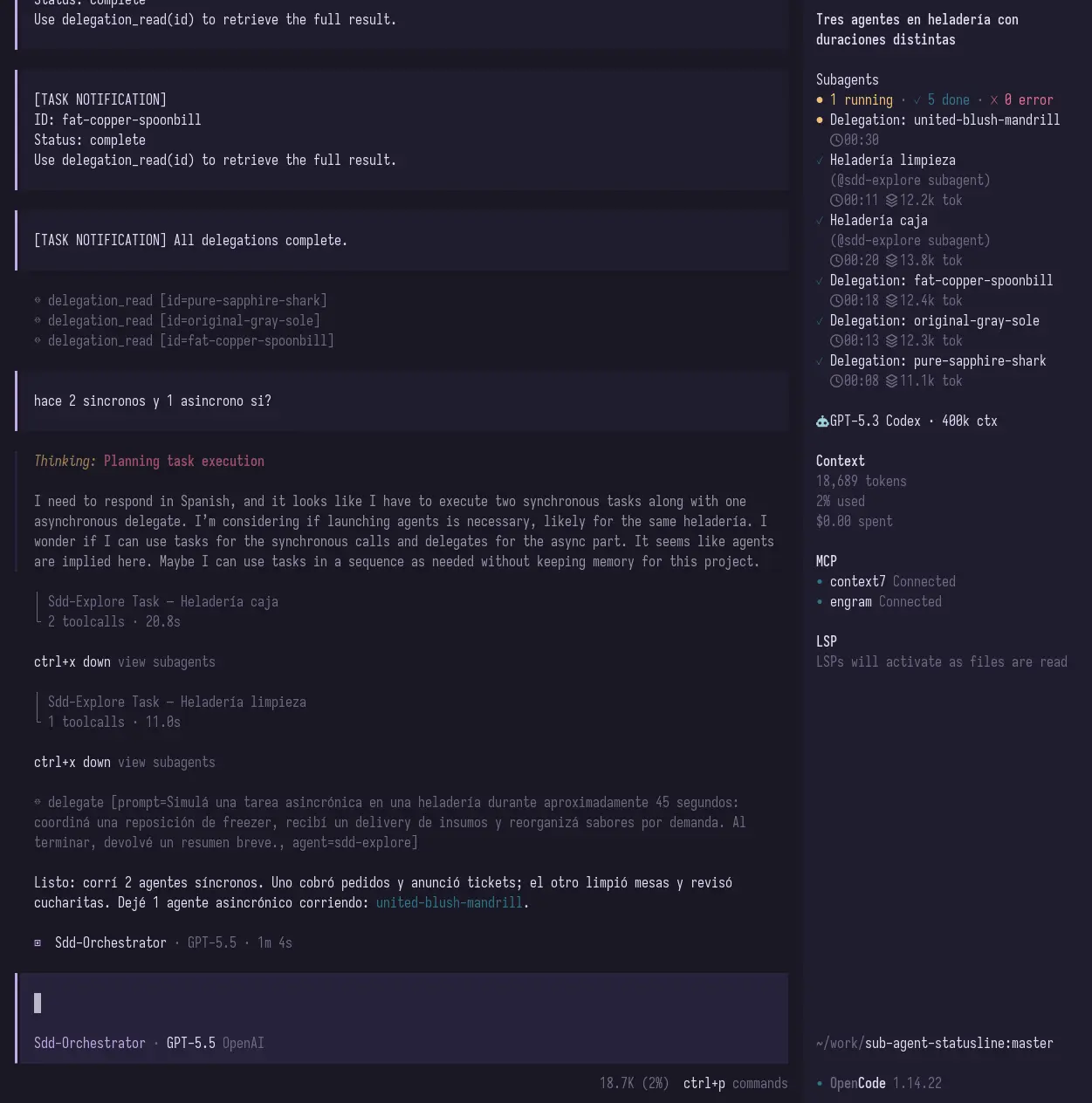 Focused sidebar view: 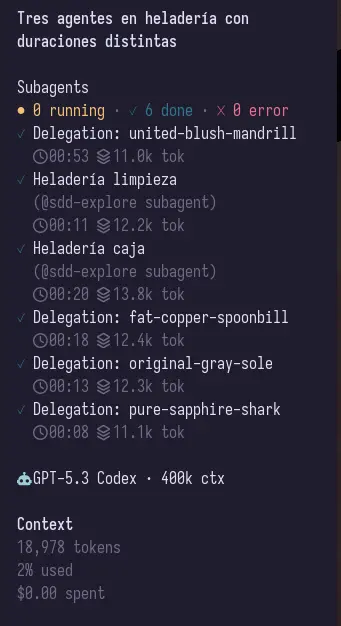 ## Keyboard navigation Run `Subagents: Focus sidebar list` from the OpenCode command palette, or press `Alt+B`, to focus the subagent sidebar list without using the mouse. List navigation shortcuts are handled only while the sidebar list is focused. | Shortcut | Action | | --- | --- | | `Alt+B` | Toggle focus between the subagent sidebar list and the prompt. | | `j` / `ArrowDown` | Move selection to the next visible subagent. | | `k` / `ArrowUp` | Move selection to the previous visible subagent. | | `Enter` | Open the selected subagent session. | | `c` | Toggle retained completed history in the sidebar. | | `h` / `ArrowLeft` | Collapse the subagent section. | | `l` / `ArrowRight` | Expand the subagent section. | | `Esc` | Leave list focus mode and return to the prompt. | Opening a selected session is a no-op when there is no visible or navigable subagent. Click `Σ` in the sidebar aggregate row to toggle completed history with the mouse. The toggle is not persisted; it resets when OpenCode or the plugin is reloaded. Completed history is bounded retained history, not a full database: terminal rows are kept for up to 3 days with a 1,500-row cap, and rows already pruned from state are not restored. When a child session is opened from the sidebar, returning with OpenCode `Up` (`session_parent`) moves keyboard focus to the parent prompt so you can type immediately. <details> <summary>Stable 1.x public contract</summary> For 1.x releases, the stable user-facing contract is: - npm package name: `opencode-subagent-statusline`; - TUI plugin entrypoints: `opencode-subagent-statusline` and `opencode-subagent-statusline/tui`; - OpenCode `tui.json` plugin configuration; - visible sidebar and home/footer behavior; - command palette entry, `Alt+B`, and focused-list navigation; - local privacy and persistence behavior described in this README; - Node, peer dependency, and install contract declared in `package.json`. Experimental or internal surfaces may change in 1.x without a SemVer-major bump: - `opencode-subagent-statusline/runtime`, intended for diagnostics and file-based runtime experiments; - diagnostic environment variables; - exact `state.json` schema and `status.txt` format; - internal source modules and source-level exports. Use the TUI plugin entrypoints for normal OpenCode usage. </details> ## Documentation For deeper installation, architecture, event-flow, state, rendering, TUI, configuration, testing, and troubleshooting details: - [English documentation](docs/en/00-index.md) - [Documentación en español](docs/es/00-indice.md) - [Testing strategy](docs/testing.md) ## Troubleshooting ### The plugin does not show up Check OpenCode logs: ```sh grep -n "subagent-statusline\|failed to load tui plugin" ~/.local/share/opencode/log/*.log ``` Then restart OpenCode after changing `tui.json`. ### I installed a new version but OpenCode still behaves like the old one OpenCode may be using a cached package. Try clearing the cached package directory under: ```txt ~/.cache/opencode/packages/ ``` Then restart OpenCode. ### Token/context usage is missing OpenCode event payloads can vary by version and by event type. The plugin shows token/context usage when it is available and safely omits it when it is not. ## Local privacy and persistence The plugin persists a local JSON state file and `status.txt` snapshot under `XDG_RUNTIME_DIR` or the system temp directory by default. Those files can include OpenCode-derived subagent titles and summaries, which may contain short fragments derived from prompts or task descriptions. Files are written best-effort with owner-only permissions and atomic temp-file replacement where Node and the host filesystem support them. `OPENCODE_SUBAGENT_STATUSLINE_STATE` overrides the state file path. Treat that environment variable as trusted local configuration because the plugin will write status data to the configured path. For token/context backfill, the TUI reads recent local OpenCode SQLite/log data only from the user's OpenCode data directory. Very large log files are skipped to avoid blocking the TUI. <details> <summary>Development and testing</summary> Install dependencies with lifecycle scripts disabled by default: ```sh pnpm install --ignore-scripts ``` Build the plugin: ```sh pnpm build ``` Test a local TUI build by pointing OpenCode directly at `dist/tui.js`: ```json { "$schema": "https://opencode.ai/tui.json", "plugin": ["/absolute/path/to/sub-agent-statusline/dist/tui.js"] } ``` This project ships the OpenCode TUI sidebar plugin from `src/tui.tsx`. The TUI bundle is built with `tsup` and `esbuild-plugin-solid` in Solid `universal` mode for OpenTUI compatibility. Package entrypoints: ```txt opencode-subagent-statusline -> TUI plugin opencode-subagent-statusline/tui -> TUI plugin opencode-subagent-statusline/runtime -> experimental/diagnostic runtime mode ``` Useful commands: ```sh pnpm build pnpm typecheck pnpm test pnpm test:watch pnpm test:coverage pnpm pack --dry-run ``` Automated tests use Vitest with `@vitest/coverage-v8`. For the testing strategy, file map, examples, and current TUI/e2e boundaries, see [`docs/testing.md`](docs/testing.md). </details> <details> <summary>Security hardening for maintainers</summary> Recommended local npm/pnpm hygiene, following guidance from Gentle AI and Liran Tal: - install project dependencies with lifecycle scripts disabled when possible, for example `pnpm install --ignore-scripts`; - consider setting user-level `ignore-scripts=true` for npm/pnpm and temporarily opt in only when a trusted package needs scripts; - enable dependency age/cooldown policies where supported, for example `npm config set min-release-age 3` or equivalent Renovate/Dependabot cooldowns; - block or review git, tarball, URL, and other exotic dependency specs, for example `npm config set allow-git none` where supported; - optionally screen new packages with tools such as `npq` or Socket Firewall before adding them. These are maintainer/developer controls, not runtime enforcement by this plugin. Release maintainers should keep the repository `NPM_TOKEN` secret restricted, retain npm provenance, require npm 2FA on maintainer accounts, and protect the release branch in GitHub. See the [release process](docs/releasing.md) for the tag and recovery gates. </details> ## Community and releases - [npm package](https://www.npmjs.com/package/opencode-subagent-statusline) - [GitHub repository](https://github.com/Joaquinvesapa/sub-agent-statusline) - [Releases](https://github.com/Joaquinvesapa/sub-agent-statusline/releases) - [Issues](https://github.com/Joaquinvesapa/sub-agent-statusline/issues) - [Contributing](CONTRIBUTING.md) - [Code of Conduct](CODE_OF_CONDUCT.md) - [Security policy](SECURITY.md) ## License [MIT](LICENSE)
