KO
|
EN
gitlite — search
Search
#typescript
#ai-agents
#ai
#dsh-plugin
#deepseek-harness
#open-source
#cli
#claude-code
#codex
#developer-tools
#react
#windows
emoticon
★ 46
Open GitHub ↗
Google日本語入力の顔文字辞書∩(,,Ò‿Ó,,)∩
Download README (.md)
Explore Similar Repositories
whatsapp-emoticons
:
:globe_with_meridians: Browser extension to convert text smileys to WhatsApp Emoticons to make life simple while using WhatsApp Web
KakaoTalkEmoticonDownloader
:
No description available.
serverless-emoticon-faceswap
:
A Serverless Project that Overlays an Emoji on a Face.
Emoticon
:
An Emoticon Keyboard
emotic
:
No description available.
// repository documentation
Was this content helpful?
★ 0
(0 ratings)
Select Rating:
★
★
★
★
★
Submit Feedback
Recent Feedback
×
Download README
Do you want to download the
README.md
file for
emoticon
?
Download (.md)
emoticon ======== Google日本語入力の顔文字辞書を管理するレポジトリ # 使い方 [Google日本語入力](http://www.google.co.jp/ime/) がすでに導入されている前提で話を進めます。 好きなフォルダにリポジトリをcloneしてください。 ``` git clone https://github.com/tiwanari/emoticon.git ``` ## Macの場合 (Windows,Linuxでも同様の操作です) 日本語入力に切り替えた後,メニューバーから「辞書ツール」を選択します。 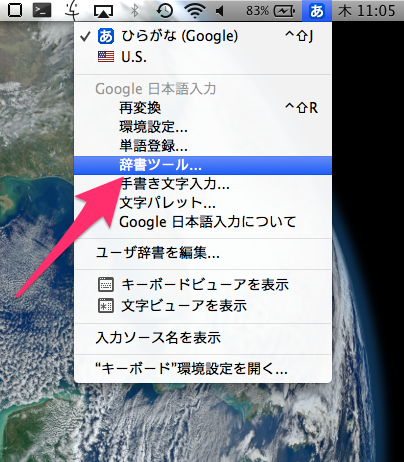 すると,辞書ツールが開くので,左上の「管理」ボタンから「新規辞書にインポート」を選択します。 **辞書を更新する場合は,「選択した辞書にインポート」を選択してください。** 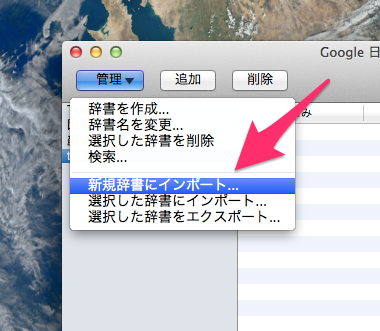 開いたウィンドウで,ファイルの選択を押します。 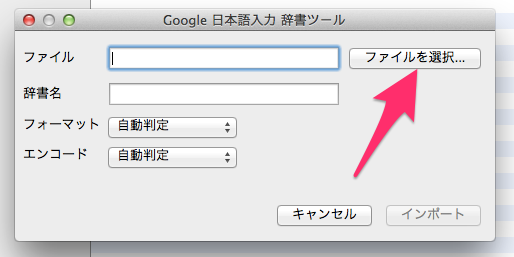 ここで,cloneしたリポジトリの「emoticon.txt」を選択します。 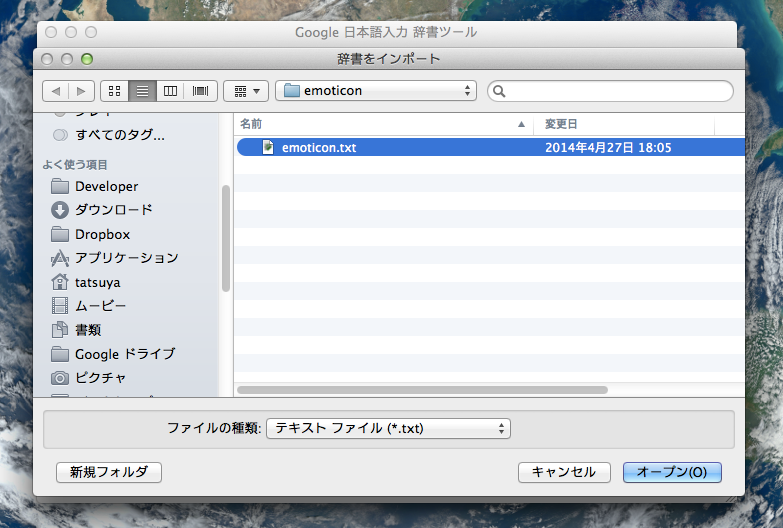 先ほどの画面に戻るので,辞書名を入力して,「インポート」を行います(「フォーマット」と「エンコード」は,「自動判定」で構いません)。 ## 新しい顔文字の追加 [source.txt](./source.txt) に新しい顔文字を追加してください。フォーマットは既存のものと同じように以下となります。 ``` @[ショートカット名]\t[顔文字]\t顔文字 ``` (ただし `\t` はタブを表します。) この `source.txt` を元に `emoticon.txt` を `gen_emoticon.py` によって生成できます。以下のコマンドを使用してください。 ``` python gen_emoticon.py ``` これでできた `emoticon.txt` を上記の通りに Google 日本語入力の辞書に追加してください。 おしまい╭( ・ㅂ・)و グッ! # コントリビューションの方法 1. このリポジトリをフォーク 1. 新しいブランチを作成 1. 上記の `新しい顔文字の追加` に従って新しい顔文字を追加し、変更をコミット 1. プルリクエストをこのリポジトリに対して作る # その他 - 顔文字を検索する CLI ツールをつくっていただきました! [fand/kao](https://github.com/fand/kao) # License MIT
