KO
|
EN
gitlite — search
Search
#javascript
#python
#hacktoberfest
#react
#ai
#typescript
#llm
#go
#golang
#android
#machine-learning
#rust
#deep-learning
#linux
redfish
★ 9
Open GitHub ↗
No description available.
Download README (.md)
Explore Similar Repositories
materialistic-knife-835
:
This is a project of an E-commerce website where customers can register, login and show product and add to cart. this project is a clone from the website https://bluemercury.com
ShangMeiCuiXue
:
一个微信云开发的校园论坛小程序
hilfsmittel-api
:
No description available.
awesome-dots
:
My custom AwesomeWM desktop.
vue3-learn
:
Vue3源码阅读
// repository documentation
Was this content helpful?
★ 0
(0 ratings)
Select Rating:
★
★
★
★
★
Submit Feedback
Recent Feedback
×
Download README
Do you want to download the
README.md
file for
redfish
?
Download (.md)
# Redfish ## Table of Contents * [Requirements and Setup](#requirements-and-setup) * [Supported Platforms](#supported-platforms) * [Usage](#usage) * [GET Requests](#get-requests) * [POST Requests](#post-requests) * [More Information](#for-more-information) ## Description This is collection of JSON files containing Redfish APIs to securely remote manage **flagship Supermicro systems** with AST2600 BMC onboard. This guide helps you interact with Supermicro servers **within minutes** via Redfish APIs. The Redfish APIs are based on DMTF's standard API schema designed to deliver simple and secure management for converged, hybrid IT and the Software Defined Data Center (SDDC). Both human and machine readable, Redfish leverages common Internet and web services standards to expose information directly to the modern tool chain. Together, Redfish and Supermicro create a dominant alliance for managing today's heterogeneous hyperscale data center environments with an industry standard approach for uniform server management and monitoring at scale. Supermicro Redfish APIs support the DMTF Redfish standards for seamless multi-vendor server management experience. You can explore the complete DMTF Redfish specification at https://www.dmtf.org/standards/redfish. ## Requirements and Setup **Supported Supermicro Server with activated license:** * [SFT-DCMS-SINGLE](https://store.supermicro.com/supermicro-server-manager-dcms-license-key-sft-dcms-single.html): This is Supermicro’s Data Center Management Suite license that enables server node to take full advantage of Supermicro Management Software and Utilities features. For license activation instructions follow this [link](https://store.supermicro.com/software/software-license-key-activation-usage). **An API platform to import JSON collection. We recomend these two:** * [Postman](https://www.postman.com/): This is a client application available for Windows, Mac, and Linux. Follow the link for the intructions to download the app. * [Talend](https://chrome.google.com/webstore/detail/talend-api-tester-free-ed/aejoelaoggembcahagimdiliamlcdmfm?hl=en): This is a Chrome extension for the Talend API tester. Follow the link to install Talend. ## Supported Platforms Supermicro Systems * X12 BigTwin 2U 4-Node System: [SYS-220BT-HNC8R](https://www.supermicro.com/en/products/system/bigtwin/2u/sys-220bt-hnc8r) * X12 BigTwin 2U 2-Node System: [SYS-620BT-DNC8R](https://www.supermicro.com/en/products/system/bigtwin/2u/sys-620bt-dnc8r) * X12 Ultra 2U System: [SYS-220U-TNR](https://www.supermicro.com/en/products/system/ultra/2u/sys-220u-tnr) * X12 Ultra 1U System: [SYS-120U-TNR](https://www.supermicro.com/en/products/system/Ultra/1U/SYS-120U-TNR) * H12 WIO 1U System: [AS-1114S-WN10RT](https://www.supermicro.com/en/Aplus/system/1U/1114/AS-1114S-WN10RT.cfm) Supermicro Motherboards * X12 BigTwin MB: [X12DPT-B6](https://www.supermicro.com/en/products/motherboard/x12dpt-b6) * X12 Ultra MB: [X12DPU-6](https://www.supermicro.com/en/products/motherboard/x12dpu-6) * H12 WIO MB: [H12SSW-NTR](https://www.supermicro.com/en/products/motherboard/H12SSW-NTR) ## Usage ## Import the respective JSON file to the API platform. Once Postman or Talend is prepared, you will need to import the JSON collection to the API platform of your choice. To do this you will need to locate the import button. #### Postman For Postman, the import button is on the top left-hand side of the application. <img src="https://user-images.githubusercontent.com/47877642/179284596-4c5f26cd-19a5-46d7-bc1f-e569966c60d6.png" width="500" height="300"> Drag and drop the collection folder. <img src="https://user-images.githubusercontent.com/47877642/179285013-a43f6997-81c1-419c-a298-1c3daecb7df7.png" width="550" height="300"> #### Talend For Talend, the import button is located on the bottom left-hand side. Select "Import API Tester Repository" to import the JSON file. <img src="https://user-images.githubusercontent.com/47877642/179555493-a97af56e-65da-4cb3-b076-723263d5ce07.png" width="500" height="300"> Upload the Talend JSON collection file and select it to import. <img src="https://user-images.githubusercontent.com/47877642/179555737-483a96ff-dde2-4fe3-a2bc-9cb836a31432.png" width="550" height="300"> # GET Requests For each API platform, you need to set the variables according to your needs. For GET request you need to set values for **sut_ip, username, and password**. #### Postman * When you are trying to set a variable in Postman, you need to click on the variable, and then set the desired value to it. Click on "sut_ip" and set the variable with the desired IP address. <img src="https://user-images.githubusercontent.com/47877642/179557415-ed9da848-ceb2-42cc-9569-778c357d181e.png" width="550" height="300"> * Then select the authorization tab to set the username and password, based on your BMC credentials. Click on username and password to set the value. 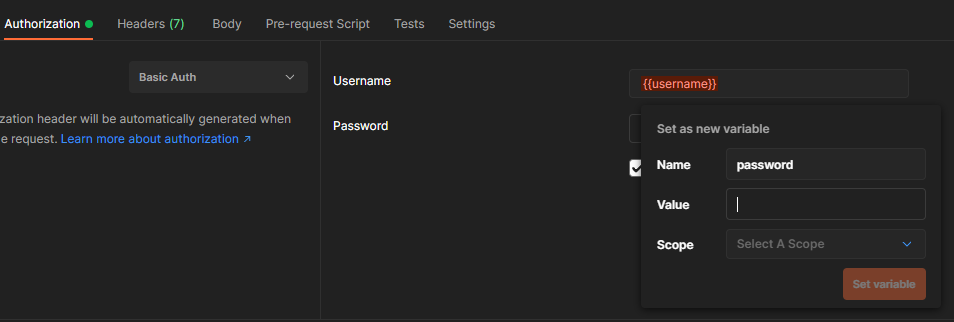 #### Talend * When trying to set variable values on Talend, you need to edit the environment. For this, you need to select the pencil symbol on the top right-hand side of the page. Then set up the "sut_ip" variable to the desired IP address. Username and password go in one variable with a ':' between them. 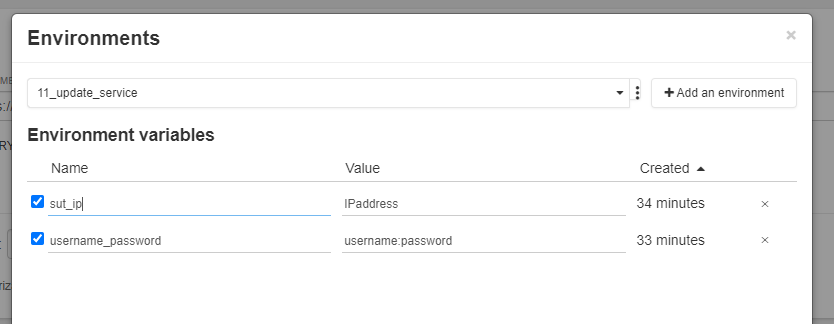 # POST Requests For each API platform you need to set the variables according to your needs. For a POST request you need to set **sut_ip, username, password, and upload the binary file**. * To set up **sut_ip, username, and password**, please follow the GET request instructions to set the values for these variables. #### Postman * To upload the binary file on Postman, you need to select the body tab and under "form-data" you will have a variable called "UpdateFile" where you can select the binary file from the system. <img src="https://user-images.githubusercontent.com/47877642/179560354-cd7a383d-a9d3-453f-9ad1-6d23dabd9cea.png" width="600" height="300"> #### Talend * For Talend, you need to locate the variable called "UpdateFile" within the "Body" section. If unselected, change the item type from text to file, and then upload the binary file from your computer.  ## For More Information For more details about Supermicro's Redfish implementation, please visit the Redfish reference guide: https://www.supermicro.com/manuals/other/RedfishRefGuide.pdf To see Redfish in action, check out Supermicro's orchestration software, SuperCloud Composer, based of Redfish standards: https://www.supermicro.com/en/solutions/management-software/supercloud-composer
