KO
|
EN
gitlite — search
Search
#typescript
#ai-agents
#ai
#dsh-plugin
#deepseek-harness
#open-source
#claude-code
#codex
#cli
#developer-tools
#react
#windows
xiaohongshu-mcp
★ 15,281
Open GitHub ↗
MCP for xiaohongshu.com
Download README (.md)
Explore Similar Repositories
Cookbook
:
The Data Engineering Cookbook
DeDRM_tools
:
DeDRM tools for ebooks
headless-recorder
:
Chrome extension that records your browser interactions and generates a Playwright or Puppeteer script.
ChuanhuChatGPT
:
GUI for ChatGPT API and many LLMs. Supports agents, file-based QA, GPT finetuning and query with web search. All with a neat UI.
lime
:
Open source API-compatible alternative to the text editor Sublime Text
// repository documentation
Was this content helpful?
★ 0
(0 ratings)
Select Rating:
★
★
★
★
★
Submit Feedback
Recent Feedback
×
Download README
Do you want to download the
README.md
file for
xiaohongshu-mcp
?
Download (.md)
# xiaohongshu-mcp <!-- ALL-CONTRIBUTORS-BADGE:START - Do not remove or modify this section --> [](https://raw.githubusercontent.com/xpzouying/xiaohongshu-mcp/main/) <!-- ALL-CONTRIBUTORS-BADGE:END --> [](https://raw.githubusercontent.com/xpzouying/xiaohongshu-mcp/main/DONATIONS.md) [](https://raw.githubusercontent.com/xpzouying/xiaohongshu-mcp/main/DONATIONS.md) [](https://hub.docker.com/r/xpzouying/xiaohongshu-mcp) MCP for 小红书 / xiaohongshu.com。让你的 AI 助手直接访问小红书数据。 ### 🚀 快速开始:选择最适合你的版本 > [!IMPORTANT] > #### 🔥 方案 A:Openclaw 深度集成 (推荐给开发者) > - **Openclaw 太火啦 🔥🔥🔥 ,新增 Openclaw 支持,分为两种,请各位按需使用:** > - [xiaohongshu-mcp-skills](https://github.com/autoclaw-cc/xiaohongshu-mcp-skills)(适用于已部署完本项目的用户) > - [xiaohongshu-skills](https://github.com/autoclaw-cc/xiaohongshu-skills)(开箱即用版) > [!TIP] > #### ✨ 方案 B:x-mcp 浏览器插件版 (推荐给非技术同学 / 追求极简的用户) > - **不想折腾 Docker 或部署环境?试试:[xpzouying/x-mcp](https://github.com/xpzouying/x-mcp)** > - **零配置**:安装插件即用,无需任何代码、代理或复杂的环境配置。 > - **安全稳定**:直接在常用浏览器 (Chrome/Edge) 及本地网络运行,无服务器 IP 风险,且能解决 90% 的部署报错。 ### 📖 相关资源 - **我的博客文章**:[haha.ai/xiaohongshu-mcp](https://www.haha.ai/xiaohongshu-mcp) - **贡献指南**:[Contributing Guide](./CONTRIBUTING.md) ### 🛠️ 疑难杂症 如果您在部署传统 Docker 版本时遇到问题,**务必先查看:[各种疑难杂症 (Issues #56)](https://github.com/xpzouying/xiaohongshu-mcp/issues/56)**。 > *提示:如果环境排查太耗时,切换到 [x-mcp 插件版](https://github.com/xpzouying/x-mcp) 通常是更高效的选择。* ## Star History <!-- 图表由 .github/workflows/star-history.yml 每周生成到 star-history 数据分支(star-history.com 托管图表因 GitHub API 限制已失效) --> <a href="https://www.star-history.com/#xpzouying/xiaohongshu-mcp&Timeline"> <picture> <source media="(prefers-color-scheme: dark)" srcset="https://raw.githubusercontent.com/xpzouying/xiaohongshu-mcp/star-history/assets/star-history-dark.svg" /> <img alt="Star History Chart" src="https://raw.githubusercontent.com/xpzouying/xiaohongshu-mcp/star-history/assets/star-history.svg" /> </picture> </a> ## 赞赏支持 本项目所有的赞赏都会用于慈善捐赠。所有的慈善捐赠记录,请参考 [DONATIONS.md](./DONATIONS.md)。 **捐赠时,请备注 MCP 以及名字。** 如需更正/撤回署名,请开 Issue 或通过邮箱联系。 **支付宝(不展示二维码):** 通过支付宝向 **xpzouying@gmail.com** 赞赏。 **微信:** <img src="donate/wechat@2x.png" alt="WeChat Pay QR" width="260" /> ## 项目简介 **主要功能** > 💡 **提示:** 点击下方功能标题可展开查看视频演示 <details> <summary><b>1. 登录和检查登录状态</b></summary> 第一步必须,小红书需要进行登录。可以检查当前登录状态。 **登录演示:** https://github.com/user-attachments/assets/8b05eb42-d437-41b7-9235-e2143f19e8b7 **检查登录状态演示:** https://github.com/user-attachments/assets/bd9a9a4a-58cb-4421-b8f3-015f703ce1f9 </details> <details> <summary><b>2. 发布图文内容</b></summary> 支持发布图文内容到小红书,包括标题、内容描述和图片。 **图片支持方式:** 支持两种图片输入方式: 1. **HTTP/HTTPS 图片链接** ``` ["https://example.com/image1.jpg", "https://example.com/image2.png"] ``` 2. **本地图片绝对路径**(推荐) ``` ["/Users/username/Pictures/image1.jpg", "/home/user/images/image2.png"] ``` **为什么推荐使用本地路径:** - ✅ 稳定性更好,不依赖网络 - ✅ 上传速度更快 - ✅ 避免图片链接失效问题 - ✅ 支持更多图片格式 **发布图文帖子演示:** https://github.com/user-attachments/assets/8aee0814-eb96-40af-b871-e66e6bbb6b06 </details> <details> <summary><b>3. 发布视频内容</b></summary> 支持发布视频内容到小红书,包括标题、内容描述和本地视频文件。 **视频支持方式:** 仅支持本地视频文件绝对路径: ``` "/Users/username/Videos/video.mp4" ``` **功能特点:** - ✅ 支持本地视频文件上传 - ✅ 自动处理视频格式转换 - ✅ 支持标题、内容描述和标签 - ✅ 等待视频处理完成后自动发布 **注意事项:** - 仅支持本地视频文件,不支持 HTTP 链接 - 视频处理时间较长,请耐心等待 - 建议视频文件大小不超过 1GB </details> <details> <summary><b>4. 搜索内容</b></summary> 根据关键词搜索小红书内容。 **搜索帖子演示:** https://github.com/user-attachments/assets/03c5077d-6160-4b18-b629-2e40933a1fd3 </details> <details> <summary><b>5. 获取推荐列表</b></summary> 获取小红书首页推荐内容列表。 **获取推荐列表演示:** https://github.com/user-attachments/assets/110fc15d-46f2-4cca-bdad-9de5b5b8cc28 </details> <details> <summary><b>6. 获取帖子详情(包括互动数据和评论)</b></summary> 获取小红书帖子的完整详情,包括: - 帖子内容(标题、描述、图片等) - 用户信息 - 互动数据(点赞、收藏、分享、评论数) - 评论列表及子评论 **⚠️ 重要提示:** - 需要提供帖子 ID 和 xsec_token(两个参数缺一不可) - 这两个参数可以从 Feed 列表或搜索结果中获取 - 必须先登录才能使用此功能 **获取帖子详情演示:** https://github.com/user-attachments/assets/76a26130-a216-4371-a6b3-937b8fda092a </details> <details> <summary><b>7. 发表评论到帖子</b></summary> 支持自动发表评论到小红书帖子。 **功能说明:** - 自动定位评论输入框 - 输入评论内容并发布 - 支持 HTTP API 和 MCP 工具调用 **⚠️ 重要提示:** - 需要先登录才能使用此功能 - 需要提供帖子 ID、xsec_token 和评论内容 - 这些参数可以从 Feed 列表或搜索结果中获取 **发表评论演示:** https://github.com/user-attachments/assets/cc385b6c-422c-489b-a5fc-63e92c695b80 </details> <details> <summary><b>8. 获取用户个人主页</b></summary> 获取小红书用户的个人主页信息,包括用户基本信息和笔记内容。 **功能说明:** - 获取用户基本信息(昵称、简介、头像等) - 获取关注数、粉丝数、获赞量统计 - 获取用户发布的笔记内容列表 - 支持 HTTP API 和 MCP 工具调用 **⚠️ 重要提示:** - 需要先登录才能使用此功能 - 需要提供用户 ID 和 xsec_token - 这些参数可以从 Feed 列表或搜索结果中获取 **返回信息包括:** - 用户基本信息:昵称、简介、头像、认证状态 - 统计数据:关注数、粉丝数、获赞量、笔记数 - 笔记列表:用户发布的所有公开笔记 </details> <details> <summary><b>9. 回复评论</b></summary> 回复笔记下的指定评论,支持精准回复特定用户的评论。 **功能说明:** - 回复指定笔记下的特定评论 - 支持通过评论 ID 或用户 ID 定位目标评论 - 需要提供 feed_id、xsec_token、comment_id/user_id 和回复内容 **⚠️ 重要提示:** - 需要先登录才能使用此功能 - comment_id 和 user_id 至少提供一个 - 这些参数可以从帖子详情的评论列表中获取 </details> <details> <summary><b>10. 点赞/取消点赞</b></summary> 为笔记点赞或取消点赞,智能检测当前状态避免重复操作。 **功能说明:** - 为指定笔记点赞或取消点赞 - 智能检测:已点赞时跳过点赞,未点赞时跳过取消点赞 - 需要提供 feed_id 和 xsec_token **⚠️ 重要提示:** - 需要先登录才能使用此功能 - 默认为点赞操作,设置 unlike=true 可取消点赞 </details> <details> <summary><b>11. 收藏/取消收藏</b></summary> 收藏笔记或取消收藏,智能检测当前状态避免重复操作。 **功能说明:** - 收藏指定笔记或取消收藏 - 智能检测:已收藏时跳过收藏,未收藏时跳过取消收藏 - 需要提供 feed_id 和 xsec_token **⚠️ 重要提示:** - 需要先登录才能使用此功能 - 默认为收藏操作,设置 unfavorite=true 可取消收藏 </details> **小红书基础运营知识** - **标题:(非常重要)小红书要求标题不超过 20 个字** - **正文:(非常重要):正文不能超过 1000 个字** - 当前支持图文发送以及视频发送:从推荐的角度看,图文的流量会比视频以及纯文字的更好。 - (低优先级)可以考虑纯文字的支持。1. 个人感觉纯文字会大大增加运营的复杂度;2. 纯文字在我的使用场景的价值较低。 - Tags:现已支持。添加合适的 Tags 能带来更多的流量。 - 根据本人实操,小红书每天的发帖量应该是 **50 篇**。 - **(非常重要)小红书的同一个账号不允许在多个网页端登录**,如果你登录了当前 xiaohongshu-mcp 后,就不要再在其他的网页端登录该账号,否则就会把当前 MCP 的账号“踢出登录”。你可以使用移动 App 端进行查看当前账号信息。 - 曝光低的话,首先查看内容中是否有违禁词,搜一下有很多第三方免费工具。 - 一定不要出现引流、纯搬运的情况,属于官方重点打击对象。 **风险说明** 1. 该项目是在自己的另外一个项目的基础上开源出来的,原来的项目稳定运行一年多,没有出现过封号的情况,只有出现过 Cookies 过期需要重新登录。 2. 我是使用 Claude Code 接入,稳定自动化运营数周后,验证没有问题后开源。 3. 如果账号没有实名认证,特别是新号,一般会触发 **实名认证** 的消息提醒(参见下图)。⚠️ 这个不是封号,不用 MCP 也会要求实名认证。实名认证后,账号就正常了。建议使用该项目前就先实名。 <img width="508" height="306" alt="image" src="https://github.com/user-attachments/assets/34383e1b-f666-409f-9870-002655507dc1" /> 该项目是基于学习的目的,禁止一切违法行为。 **实操结果** 第一天点赞/收藏数达到了 999+, <img width="386" height="278" alt="CleanShot 2025-09-05 at 01 31 55@2x" src="https://github.com/user-attachments/assets/4b5a283b-bd38-45b8-b608-8f818997366c" /> <img width="350" height="280" alt="CleanShot 2025-09-05 at 01 32 49@2x" src="https://github.com/user-attachments/assets/4481e1e7-3ef6-4bbd-8483-dcee8f77a8f2" /> 一周左右的成果 <img width="1840" height="582" alt="CleanShot 2025-09-05 at 01 33 13@2x" src="https://github.com/user-attachments/assets/fb367944-dc48-4bbd-8ece-934caa86323e" /> ## 1. 使用教程 ### 1.1. 快速开始(推荐) **方式一:下载预编译二进制文件** 直接从 [GitHub Releases](https://github.com/xpzouying/xiaohongshu-mcp/releases) 下载对应平台的二进制文件: **主程序(MCP 服务):** - **macOS Apple Silicon**: `xiaohongshu-mcp-darwin-arm64` - **Windows x64**: `xiaohongshu-mcp-windows-amd64.exe` - **Linux x64**: `xiaohongshu-mcp-linux-amd64` **登录工具:** - **macOS Apple Silicon**: `xiaohongshu-login-darwin-arm64` - **Windows x64**: `xiaohongshu-login-windows-amd64.exe` - **Linux x64**: `xiaohongshu-login-linux-amd64` > 目前支持以上三个平台。macOS Intel 与 Linux ARM64 暂不支持。 使用步骤: ```bash # 1. 首先运行登录工具 chmod +x xiaohongshu-login-darwin-arm64 ./xiaohongshu-login-darwin-arm64 # 2. 然后启动 MCP 服务 chmod +x xiaohongshu-mcp-darwin-arm64 ./xiaohongshu-mcp-darwin-arm64 ``` **⚠️ 重要提示**:首次运行时会自动下载无头浏览器(约 150MB),请确保网络连接正常。后续运行无需重复下载。 **方式二:源码编译** <details> <summary>源码编译安装详情</summary> 依赖 Golang 环境,安装方法请参考 [Golang 官方文档](https://go.dev/doc/install)。 设置 Go 国内源的代理, ```bash # 配置 GOPROXY 环境变量,以下三选一 # 1. 七牛 CDN go env -w GOPROXY=https://goproxy.cn,direct # 2. 阿里云 go env -w GOPROXY=https://mirrors.aliyun.com/goproxy/,direct # 3. 官方 go env -w GOPROXY=https://goproxy.io,direct ``` </details> **方式三:使用 Docker 容器(最简单)** <details> <summary>Docker 部署详情</summary> 使用 Docker 部署是最简单的方式,无需安装任何开发环境。 **1. 从 Docker Hub 拉取镜像(推荐)** 我们提供了预构建的 Docker 镜像,可以直接从 Docker Hub 拉取使用: ```bash # 拉取最新镜像 docker pull xpzouying/xiaohongshu-mcp ``` Docker Hub 地址:[https://hub.docker.com/r/xpzouying/xiaohongshu-mcp](https://hub.docker.com/r/xpzouying/xiaohongshu-mcp) **2. 使用 Docker Compose 启动(推荐)** 我们提供了配置好的 `docker-compose.yml` 文件,可以直接使用: ```bash # 下载 docker-compose.yml wget https://raw.githubusercontent.com/xpzouying/xiaohongshu-mcp/main/docker/docker-compose.yml # 或者如果已经克隆了项目,进入 docker 目录 cd docker # 启动服务 docker compose up -d # 查看日志 docker compose logs -f # 停止服务 docker compose stop ``` **3. 自己构建镜像(可选)** ```bash # 在项目根目录运行 docker build -t xpzouying/xiaohongshu-mcp . ``` **4. 配置说明** Docker 版本会自动: - 配置内置浏览器和中文字体 - 挂载 `./data` 用于存储 cookies 和运行数据目录 - 挂载 `./images` 用于存储发布的图片 - 暴露 18060 端口供 MCP 连接 详细使用说明请参考:[Docker 部署指南](./docker/README.md) </details> Windows 遇到问题首先看这里:[Windows 安装指南](./docs/windows_guide.md) ### 1.2. 登录 第一次需要手动登录,需要保存小红书的登录状态。 **使用二进制文件**: ```bash # 运行对应平台的登录工具 ./xiaohongshu-login-darwin-arm64 ``` **使用源码**: ```bash go run cmd/login/main.go ``` ### 1.3. 启动 MCP 服务 启动 xiaohongshu-mcp 服务。 **使用二进制文件**: ```bash # 默认:无头模式,没有浏览器界面 ./xiaohongshu-mcp-darwin-arm64 # 非无头模式,有浏览器界面 ./xiaohongshu-mcp-darwin-arm64 -headless=false ``` **使用源码**: ```bash # 默认:无头模式,没有浏览器界面 go run . # 非无头模式,有浏览器界面 go run . -headless=false ``` **配置代理(可选)**: 如果需要通过代理访问,可以设置 `XHS_PROXY` 环境变量: ```bash # 设置代理后启动 XHS_PROXY=http://user:pass@proxy:port ./xiaohongshu-mcp-darwin-arm64 # 或使用源码 XHS_PROXY=http://proxy:port go run . ``` 支持 HTTP/HTTPS/SOCKS5 代理,日志中会自动隐藏代理的认证信息。 **访问鉴权(可选)**: 默认关闭鉴权。生产环境建议使用 `AUTH_TOKEN` 环境变量配置;非空的启动参数优先于环境变量,留空则读取 `AUTH_TOKEN`。 ```bash # 环境变量 AUTH_TOKEN=your-secret-token ./xiaohongshu-mcp-darwin-arm64 AUTH_TOKEN=your-secret-token go run . # 非空启动参数(优先于环境变量) ./xiaohongshu-mcp-darwin-arm64 -token=your-secret-token go run . -token=your-secret-token ``` 启用鉴权后,所有 MCP 客户端都必须配置自定义请求头 `Authorization: Bearer <token>`。命令行参数可能被进程列表看到,部署环境优先使用 `AUTH_TOKEN`。 例如,支持自定义请求头的 MCP 客户端可使用以下配置: ```json { "mcpServers": { "xiaohongshu-mcp": { "url": "http://localhost:18060/mcp", "headers": { "Authorization": "Bearer your-secret-token" } } } } ``` ## 1.4. 验证 MCP ```bash npx @modelcontextprotocol/inspector ``` 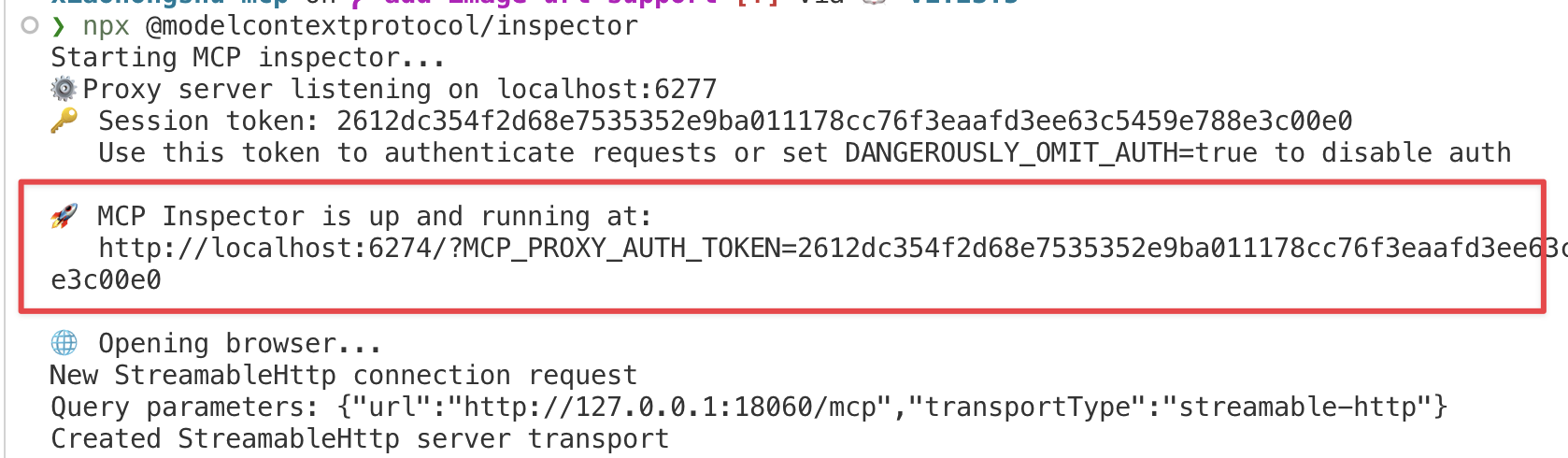 运行后,打开红色标记的链接,配置 MCP inspector,输入 `http://localhost:18060/mcp` ,点击 `Connect` 按钮。 <img width="915" height="659" alt="bf9532dd0b7ba423491accf511a467de" src="https://github.com/user-attachments/assets/08bc3cef-73e7-42d2-b923-7ba9e6c8af30" /> **注意:** 左侧边框中的选项是否正确。 按照上面配置 MCP inspector 后,点击 `List Tools` 按钮,查看所有的 Tools。 ## 1.5. 使用 MCP 发布 ### 检查登录状态 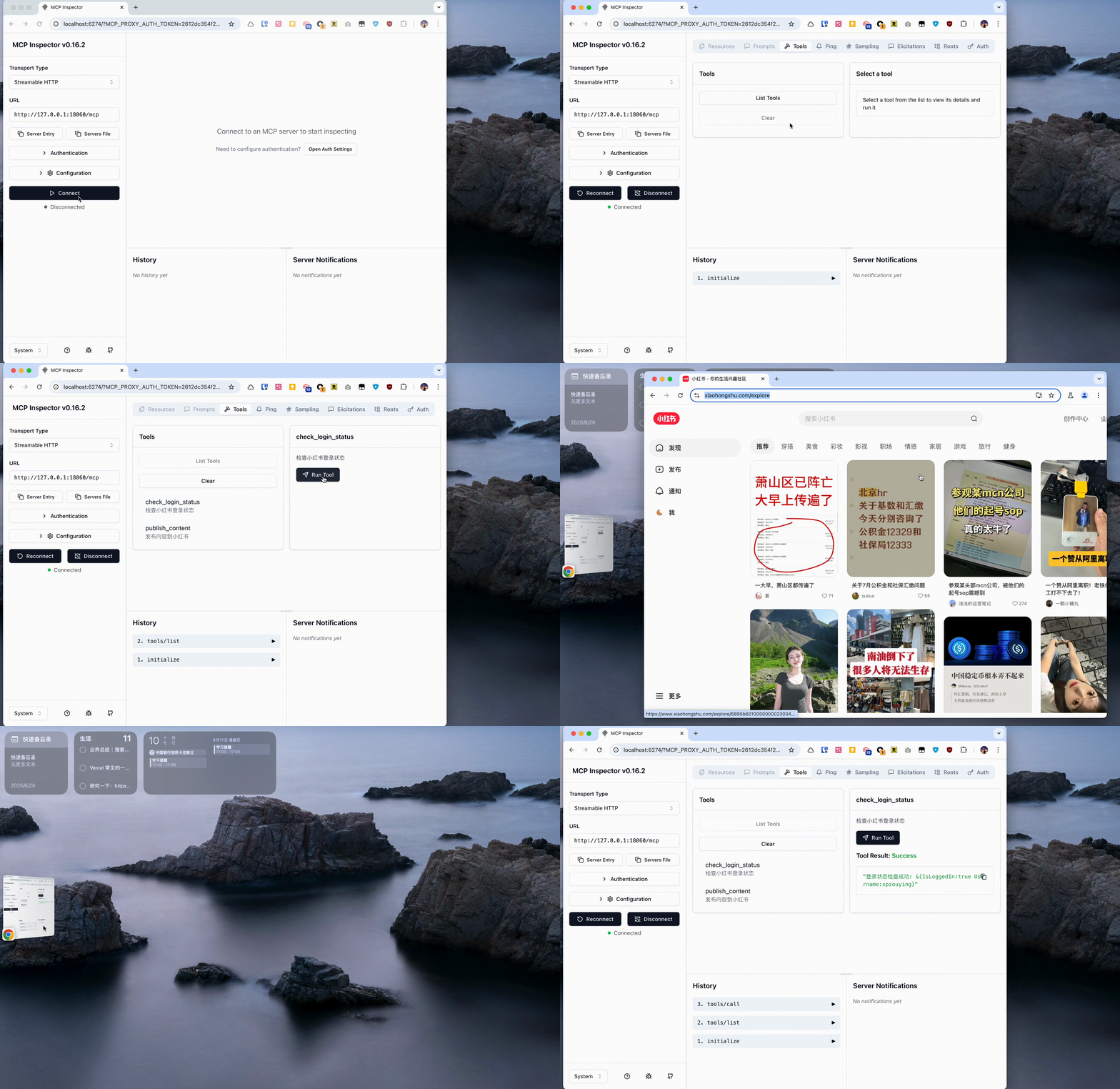 ### 发布图文 示例中是从 https://unsplash.com/ 中随机找了个图片做测试。 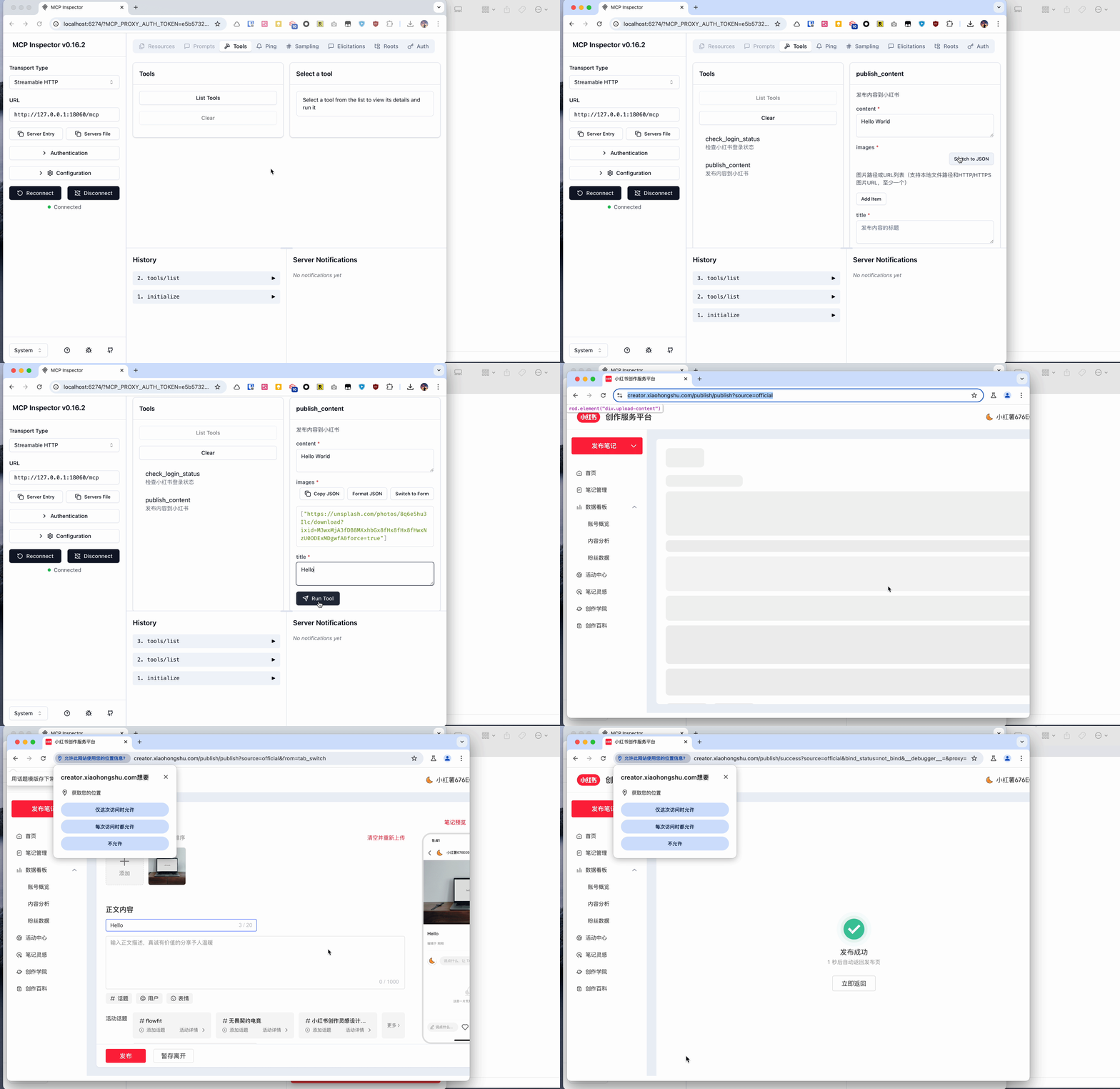 ### 搜索内容 使用搜索功能,根据关键词搜索小红书内容: 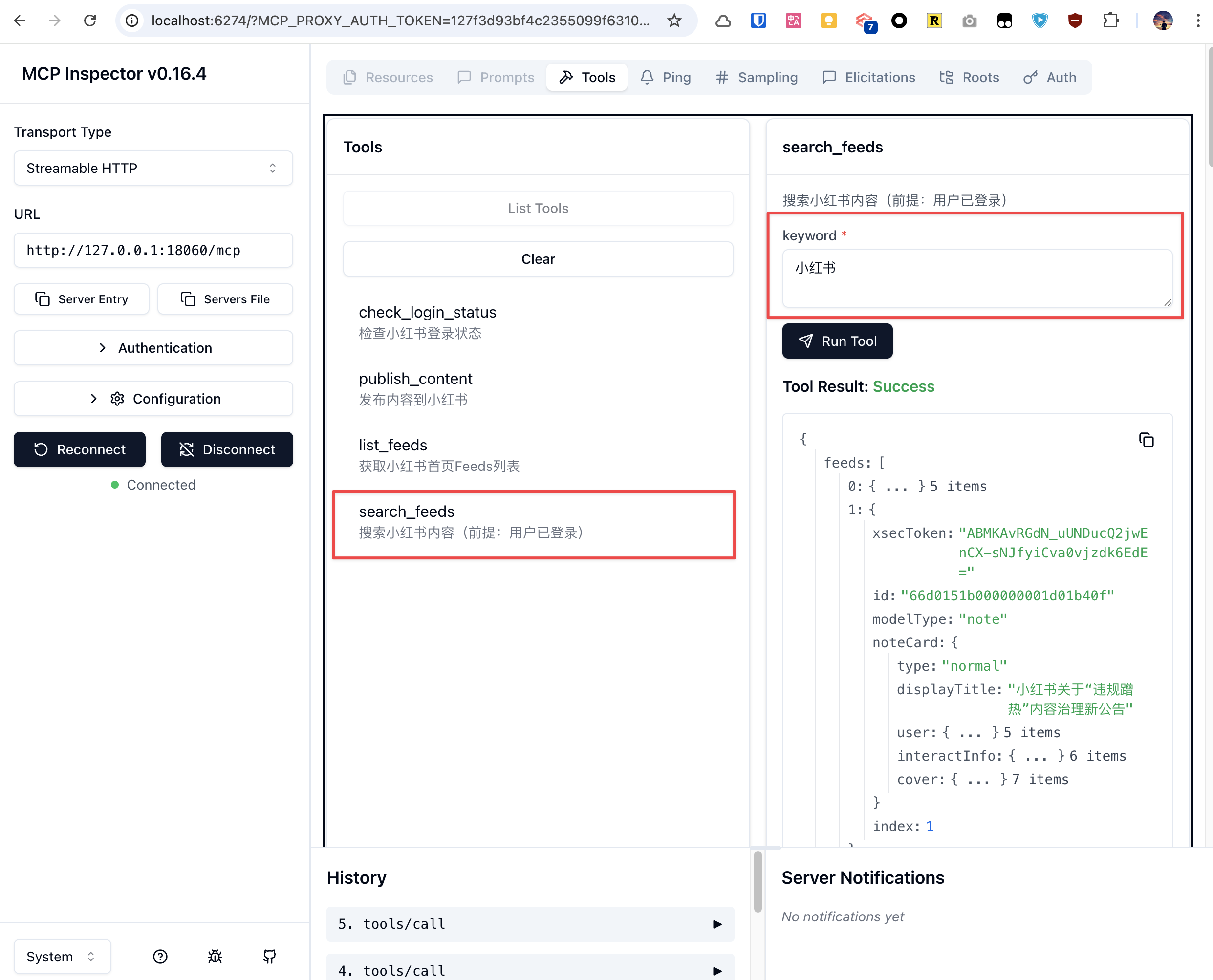 ## 2. MCP 客户端接入 本服务支持标准的 Model Context Protocol (MCP),可以接入各种支持 MCP 的 AI 客户端。 ### 2.1. 快速开始 #### 启动 MCP 服务 ```bash # 启动服务(默认无头模式) go run . # 或者有界面模式 go run . -headless=false ``` 服务将运行在:`http://localhost:18060/mcp` #### 验证服务状态 ```bash # 测试 MCP 连接 curl -X POST http://localhost:18060/mcp \ -H "Content-Type: application/json" \ -H "Authorization: Bearer your-secret-token" \ -d '{"jsonrpc":"2.0","method":"initialize","params":{},"id":1}' ``` #### Claude Code CLI 接入 ```bash # 添加 HTTP MCP 服务器 claude mcp add --transport http xiaohongshu-mcp http://localhost:18060/mcp # 检查 MCP 是否添加成功(确保 MCP 已经启动的前提下,运行下面命令) claude mcp list ``` ### 2.2. 支持的客户端 <details> <summary><b>Claude Code CLI</b></summary> 官方命令行工具,已在上面快速开始部分展示: ```bash # 添加 HTTP MCP 服务器 claude mcp add --transport http xiaohongshu-mcp http://localhost:18060/mcp # 检查 MCP 是否添加成功(确保 MCP 已经启动的前提下,运行下面命令) claude mcp list ``` </details> <details> <summary><b>Open Code CLI</b></summary> 使用交互式命令添加 MCP Server: ```bash opencode mcp add ``` 以添加 `xiaohongshu-mcp` 为例: ``` ┌ Add MCP server │ ◇ Enter MCP server name │ xiaohongshu-mcp │ ◇ Select MCP server type │ Remote │ ◇ Enter MCP server URL │ http://localhost:18060/mcp │ ◇ Does this server require OAuth authentication? │ No │ ◆ MCP server "xiaohongshu-mcp" added to C:\Users\admin\.config\opencode\opencode.json │ └ MCP server added successfully ``` 验证是否添加成功(确保 MCP 已启动的前提下): ```bash opencode mcp list ``` ``` ┌ MCP Servers │ ● ✓ xiaohongshu-mcp connected ``` </details> <details> <summary><b>Cursor</b></summary> #### 配置文件的方式 创建或编辑 MCP 配置文件: **项目级配置**(推荐): 在项目根目录创建 `.cursor/mcp.json`: ```json { "mcpServers": { "xiaohongshu-mcp": { "url": "http://localhost:18060/mcp", "description": "小红书内容发布服务 - MCP Streamable HTTP" } } } ``` **全局配置**: 在用户目录创建 `~/.cursor/mcp.json` (同样内容)。 #### 使用步骤 1. 确保小红书 MCP 服务正在运行 2. 保存配置文件后,重启 Cursor 3. 在 Cursor 聊天中,工具应该自动可用 4. 可以通过聊天界面的 "Available Tools" 查看已连接的 MCP 工具 **Demo** 插件 MCP 接入: 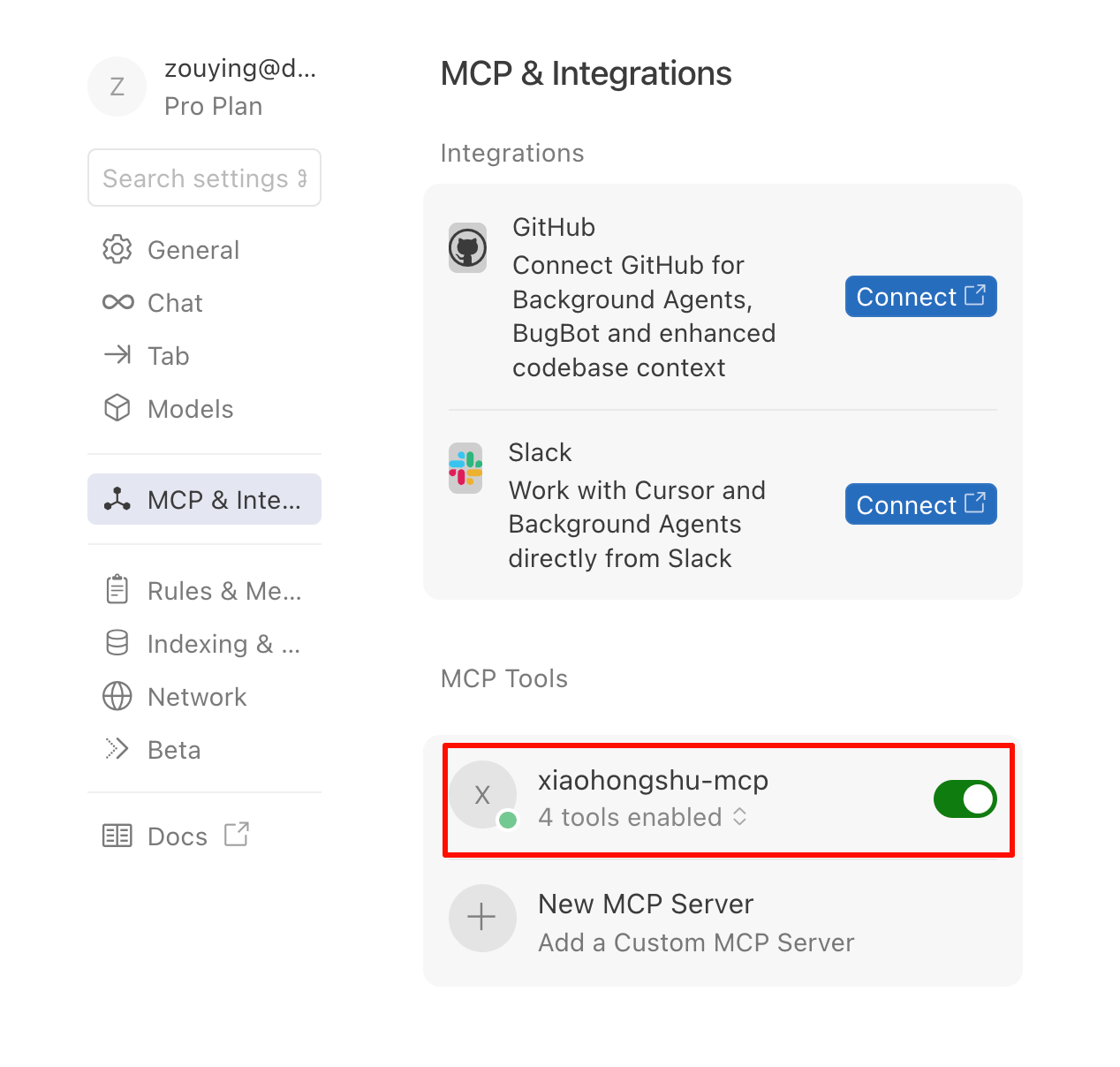 调用 MCP 工具:(以检查登录状态为例) 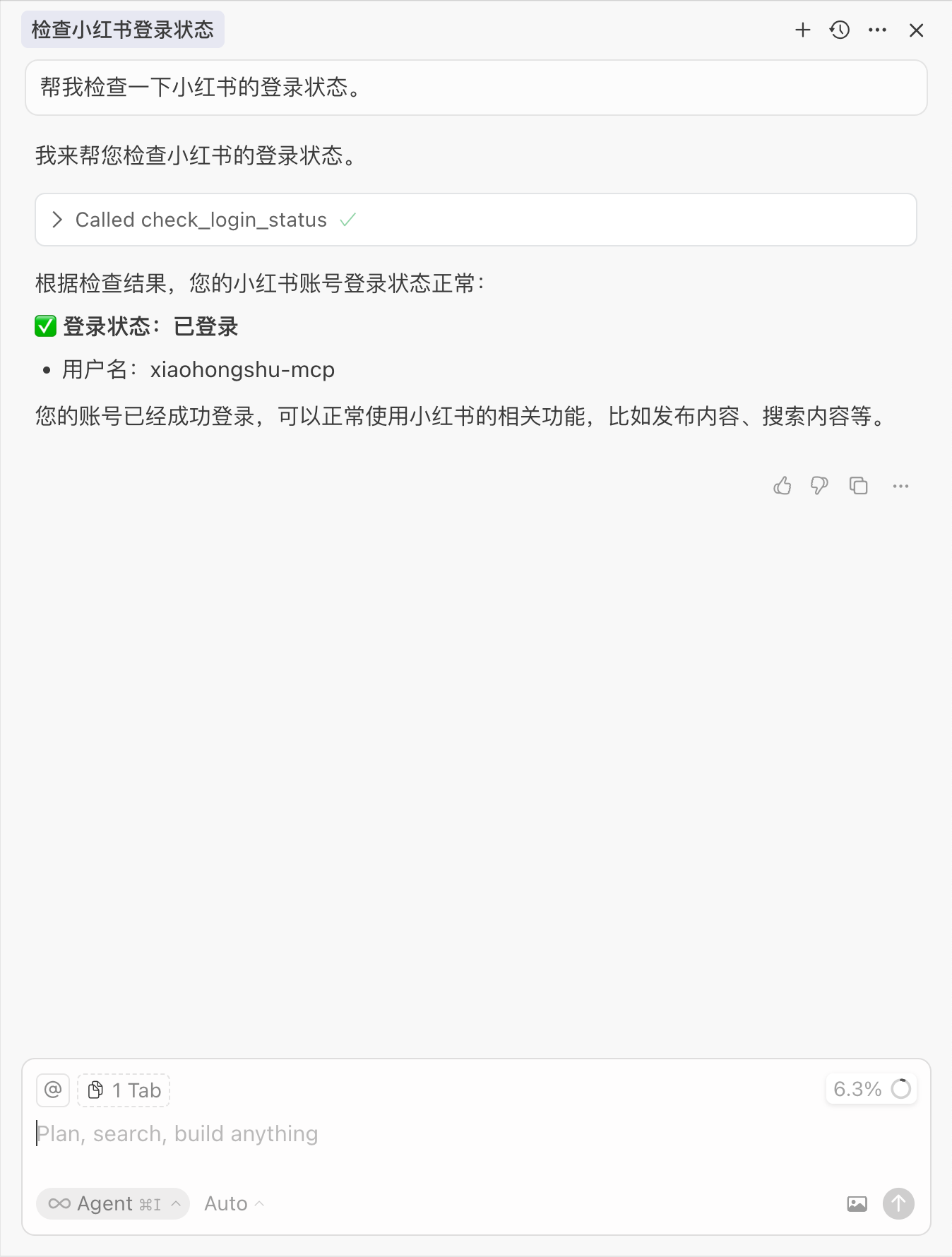 </details> <details> <summary><b>VSCode</b></summary> #### 方法一:使用命令面板配置 1. 按 `Ctrl/Cmd + Shift + P` 打开命令面板 2. 运行 `MCP: Add Server` 命令 3. 选择 `HTTP` 方式。 4. 输入地址: `http://localhost:18060/mcp`,或者修改成对应的 Server 地址。 5. 输入 MCP 名字: `xiaohongshu-mcp`。 #### 方法二:直接编辑配置文件 **工作区配置**(推荐): 在项目根目录创建 `.vscode/mcp.json`: ```json { "servers": { "xiaohongshu-mcp": { "url": "http://localhost:18060/mcp", "type": "http" } }, "inputs": [] } ``` **查看配置**: 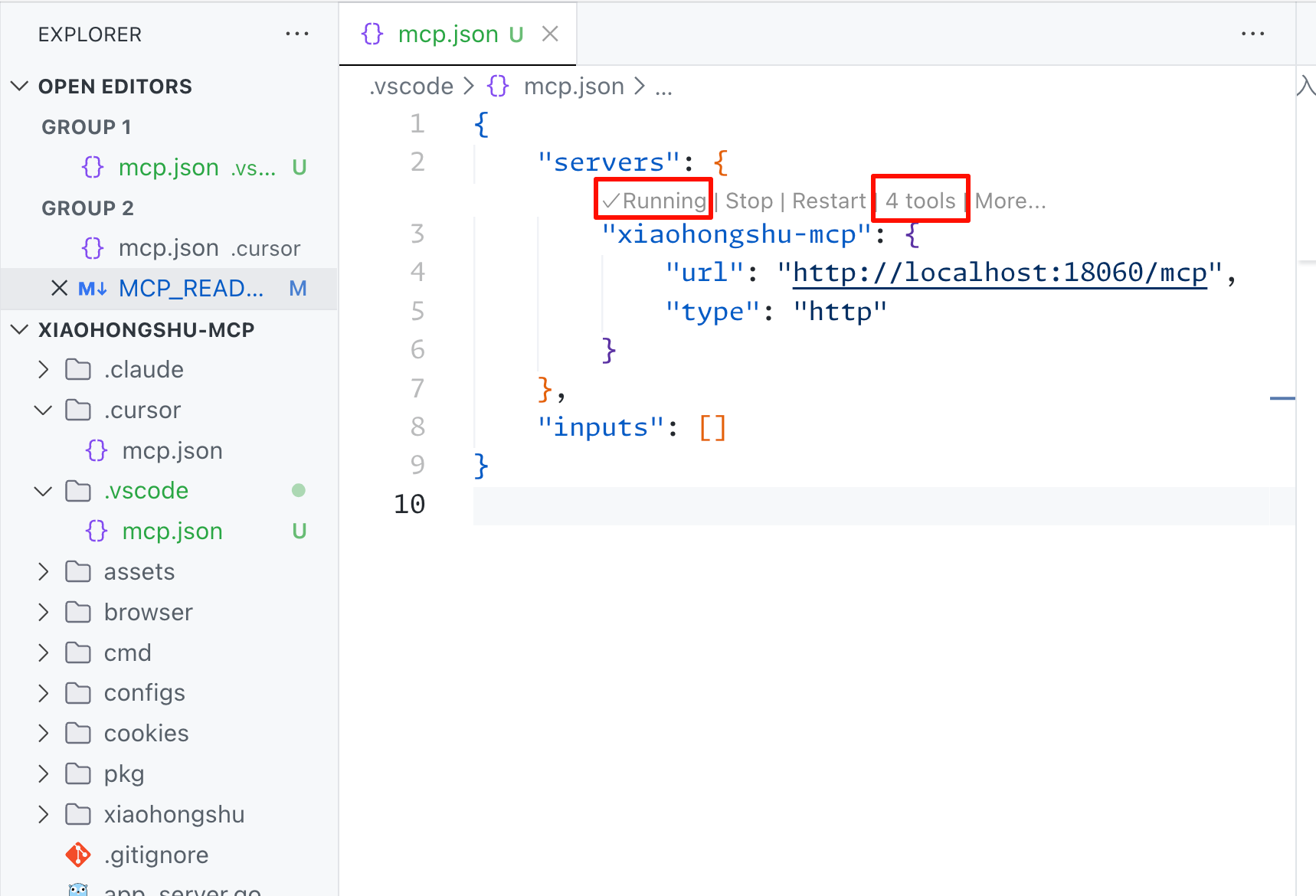 1. 确认运行状态。 2. 查看 `tools` 是否正确检测。 **Demo** 以搜索帖子内容为例: 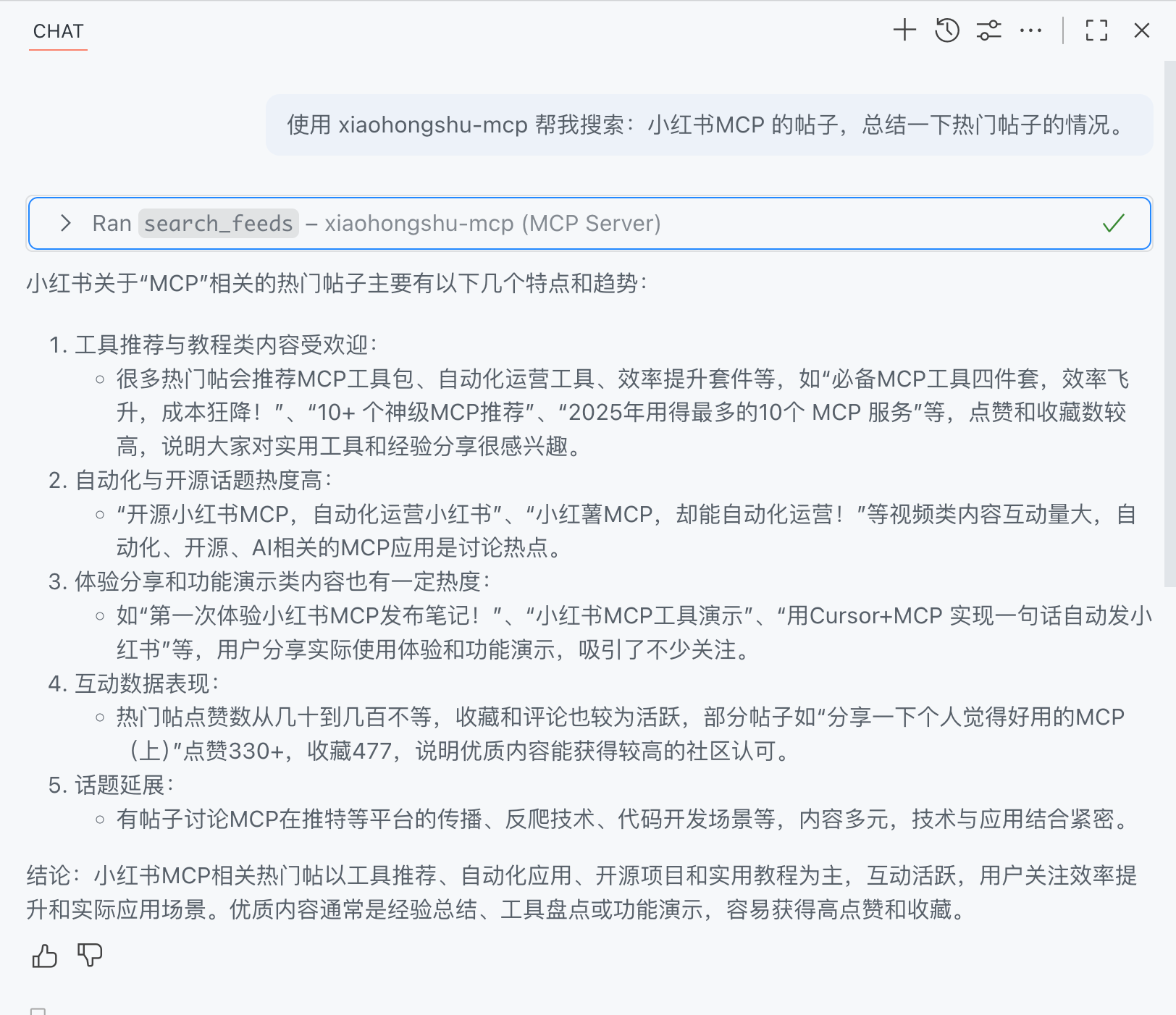 </details> <details> <summary><b>Google Gemini CLI</b></summary> 在 `~/.gemini/settings.json` 或项目目录 `.gemini/settings.json` 中配置: ```json { "mcpServers": { "xiaohongshu": { "httpUrl": "http://localhost:18060/mcp", "timeout": 30000 } } } ``` 更多信息请参考 [Gemini CLI MCP 文档](https://google-gemini.github.io/gemini-cli/docs/tools/mcp-server.html) </details> <details> <summary><b>MCP Inspector</b></summary> 调试工具,用于测试 MCP 连接: ```bash # 启动 MCP Inspector npx @modelcontextprotocol/inspector # 在浏览器中连接到:http://localhost:18060/mcp ``` 使用步骤: - 使用 MCP Inspector 测试连接 - 测试 Ping Server 功能验证连接 - 检查 List Tools 是否返回 13 个工具 </details> <details> <summary><b>Cline</b></summary> Cline 是一个强大的 AI 编程助手,支持 MCP 协议集成。 #### 配置方法 在 Cline 的 MCP 设置中添加以下配置: ```json { "xiaohongshu-mcp": { "url": "http://localhost:18060/mcp", "type": "streamableHttp", "autoApprove": [], "disabled": false } } ``` #### 使用步骤 1. 确保小红书 MCP 服务正在运行(`http://localhost:18060/mcp`) 2. 在 Cline 中打开 MCP 设置 3. 添加上述配置到 MCP 服务器列表 4. 保存配置并重启 Cline 5. 在对话中可以直接使用小红书相关功能 #### 配置说明 - `url`: MCP 服务地址 - `type`: 使用 `streamableHttp` 类型以获得更好的性能 - `autoApprove`: 可配置自动批准的工具列表(留空表示手动批准) - `disabled`: 设置为 `false` 启用此 MCP 服务 #### 使用示例 配置完成后,可以在 Cline 中直接使用自然语言操作小红书: ``` 帮我检查小红书登录状态 ``` ``` 帮我发布一篇关于春天的图文到小红书,使用这张图片:/path/to/spring.jpg ``` ``` 搜索小红书上关于"美食"的内容 ``` </details> <details> <summary><b>OpenClaw(通过 MCPorter)</b></summary> > 使用前请确保 xiaohongshu-mcp 已完成本地部署。**不建议**将 GitHub 链接直接丢给 OpenClaw 让其代为部署。 由于 OpenClaw 目前不原生支持 MCP,官方推荐通过 **MCPorter** 来调用 MCP 服务。 > 💡 **提示:** MCPorter 并非调用 MCP 的最佳方案,使用过程中可能出现一些兼容性问题,请知悉。 #### 安装与配置步骤 直接一次性将一下三行命令丢给 OpenClaw(可以是 Control UI、Telegram、Feishu等方式),Openclaw 会代为部署 MCPorter。 ``` npm i -g mcporter npx mcporter config add xiaohongshu-mcp http://localhost:18060/mcp npx mcporter list xiaohongshu-mcp ``` 完成上述步骤后,即可在 OpenClaw 中通过自然语言调用 xiaohongshu-mcp 的所有功能。 </details> <details> <summary><b>其他支持 HTTP MCP 的客户端</b></summary> 任何支持 HTTP MCP 协议的客户端都可以连接到:`http://localhost:18060/mcp` 基本配置模板: ```json { "name": "xiaohongshu-mcp", "url": "http://localhost:18060/mcp", "type": "http" } ``` </details> ### 2.3. 可用 MCP 工具 连接成功后,可使用以下 MCP 工具: - `check_login_status` - 检查小红书登录状态(无参数) - `get_login_qrcode` - 获取登录二维码,返回 Base64 图片和超时时间(无参数) - `delete_cookies` - 删除 cookies 文件,重置登录状态,删除后需要重新登录(无参数) - `publish_content` - 发布图文内容到小红书(必需:title, content, images) - `images`: 图片路径列表(至少1张),支持 HTTP 链接或本地绝对路径,推荐使用本地路径 - `tags`: 话题标签列表(可选),如 `["美食", "旅行", "生活"]` - `schedule_at`: 定时发布时间(可选),ISO8601 格式,支持 1 小时至 14 天内 - `is_original`: 是否声明原创(可选),默认不声明 - `visibility`: 可见范围(可选),支持 `公开可见`(默认)、`仅自己可见`、`仅互关好友可见` - `products`: 商品关键词列表(可选),用于绑定带货商品。填写商品名称或商品ID,系统会自动搜索并选择第一个匹配结果。需账号已开通商品功能。示例: [面膜, 防晒霜SPF50] - `publish_with_video` - 发布视频内容到小红书(必需:title, content, video) - `video`: 本地视频文件绝对路径(仅支持单个视频文件) - `tags`: 话题标签列表(可选),如 `["美食", "旅行", "生活"]` - `schedule_at`: 定时发布时间(可选),ISO8601 格式,支持 1 小时至 14 天内 - `visibility`: 可见范围(可选),支持 `公开可见`(默认)、`仅自己可见`、`仅互关好友可见` - `products`: 商品关键词列表(可选),用于绑定带货商品。填写商品名称或商品ID,系统会自动搜索并选择第一个匹配结果。需账号已开通商品功能。示例: [面膜, 防晒霜SPF50] - `list_feeds` - 获取小红书首页推荐列表(无参数) - `search_feeds` - 搜索小红书内容(必需:keyword) - `filters`: 筛选选项(可选) - `sort_by`: 排序依据 - `综合`(默认)| `最新` | `最多点赞` | `最多评论` | `最多收藏` - `note_type`: 笔记类型 - `不限`(默认)| `视频` | `图文` - `publish_time`: 发布时间 - `不限`(默认)| `一天内` | `一周内` | `半年内` - `search_scope`: 搜索范围 - `不限`(默认)| `已看过` | `未看过` | `已关注` - `location`: 位置距离 - `不限`(默认)| `同城` | `附近` - `get_feed_detail` - 获取帖子详情,包括互动数据和评论(必需:feed_id, xsec_token) - `load_all_comments`: 是否加载全部评论(可选),默认 false 仅返回前 10 条一级评论 - `limit`: 限制加载的一级评论数量(可选),仅当 load_all_comments=true 时生效,默认 20 - `click_more_replies`: 是否展开二级回复(可选),仅当 load_all_comments=true 时生效,默认 false - `reply_limit`: 跳过回复数过多的评论(可选),仅当 click_more_replies=true 时生效,默认 10 - `scroll_speed`: 滚动速度(可选),`slow` | `normal` | `fast`,仅当 load_all_comments=true 时生效 - `post_comment_to_feed` - 发表评论到小红书帖子(必需:feed_id, xsec_token, content) - `reply_comment_in_feed` - 回复笔记下的指定评论(必需:feed_id, xsec_token, content,以及 comment_id 或 user_id 至少一个) - `like_feed` - 点赞/取消点赞(必需:feed_id, xsec_token) - `unlike`: 是否取消点赞(可选),true 为取消点赞,默认为点赞 - `favorite_feed` - 收藏/取消收藏(必需:feed_id, xsec_token) - `unfavorite`: 是否取消收藏(可选),true 为取消收藏,默认为收藏 - `user_profile` - 获取用户个人主页信息(必需:user_id, xsec_token) ### 2.4. 使用示例 使用 Claude Code 发布内容到小红书: **示例 1:使用 HTTP 图片链接** ``` 帮我写一篇帖子发布到小红书上, 配图为:https://cn.bing.com/th?id=OHR.MaoriRock_EN-US6499689741_UHD.jpg&w=3840 图片是:"纽西兰陶波湖的Ngātoroirangi矿湾毛利岩雕(© Joppi/Getty Images)" 使用 xiaohongshu-mcp 进行发布。 ``` **示例 2:使用本地图片路径(推荐)** ``` 帮我写一篇关于春天的帖子发布到小红书上, 使用这些本地图片: - /Users/username/Pictures/spring_flowers.jpg - /Users/username/Pictures/cherry_blossom.jpg 使用 xiaohongshu-mcp 进行发布。 ``` **示例 3:发布视频内容** ``` 帮我写一篇关于美食制作的视频发布到小红书上, 使用这个本地视频文件: - /Users/username/Videos/cooking_tutorial.mp4 使用 xiaohongshu-mcp 的视频发布功能。 ``` 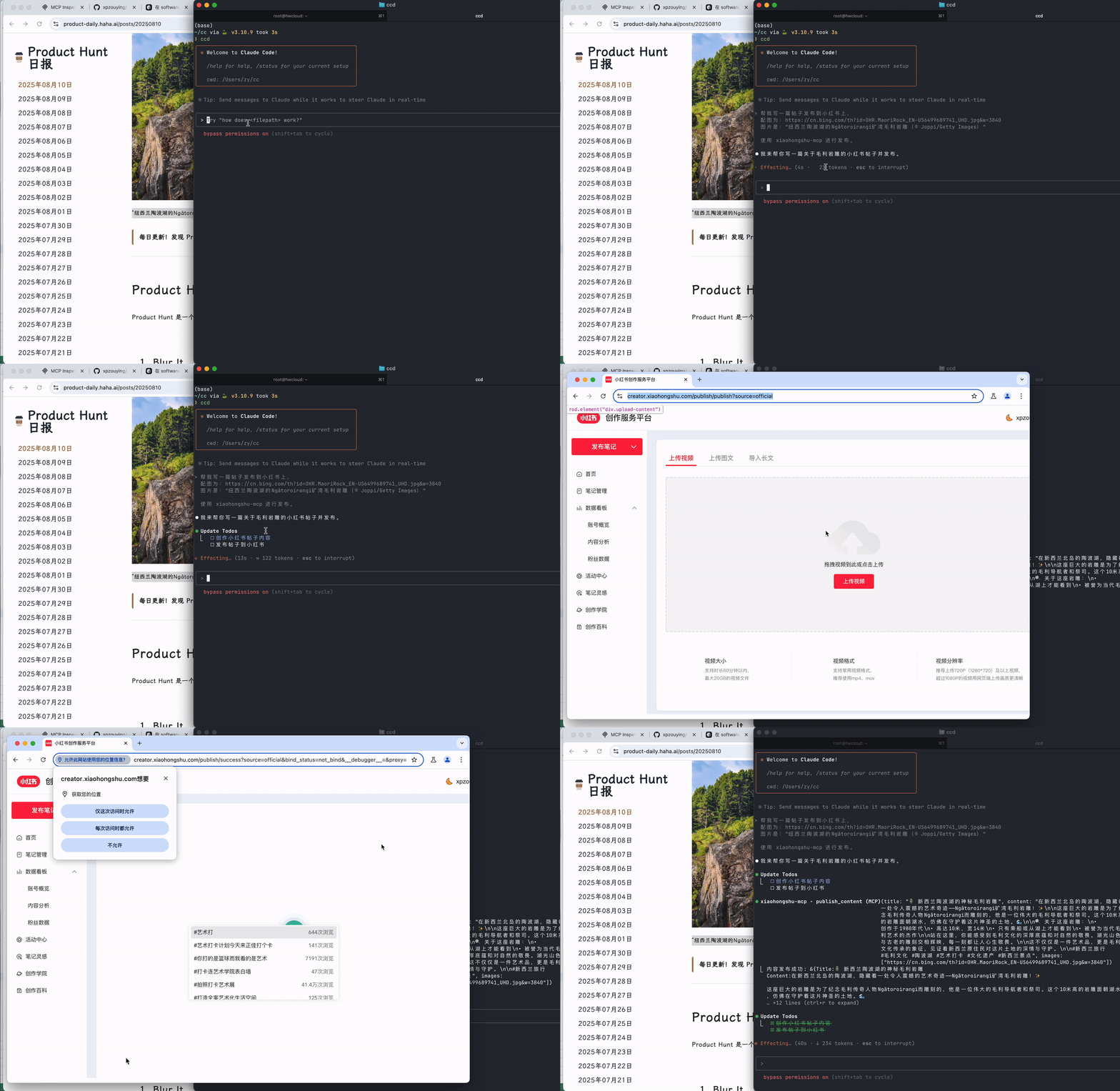 **发布结果:** <img src="./assets/publish_result.jpeg" alt="xiaohongshu-mcp 发布结果" width="300"> ### 2.5. 💬 MCP 使用常见问题解答 --- > ⚠️ 以下是使用 OpenClaw + MCPorter 时的已知风险,使用前请充分了解: - OpenClaw 的 AI 自动部署行为不在本项目的维护范围内,部署结果无法保证 - MCPorter 作为中间层可能引入额外的兼容性问题,与 xiaohongshu-mcp 本身无关 - 若遇到连接失败、工具调用异常等问题,请先排查 MCPorter 自身的配置,而非提交 Issue - 在提问社区或群组前,请先确认问题是否能在**不使用 OpenClaw** 的情况下复现 如果你没有强烈的 OpenClaw 使用需求,强烈建议改用 [Claude Code CLI](#claude-code-cli)、[Cursor](#cursor) 或 [Cline](#cline) 等原生支持 HTTP MCP 的客户端,体验会更稳定。 --- **Q:** 为什么检查登录用户名显示 `xiaghgngshu-mcp`? **A:** 用户名是写死的。 --- **Q:** 显示发布成功后,但实际上没有显示? **A:** 排查步骤如下: 1. 使用 **非无头模式** 重新发布一次。 2. 更换 **不同的内容** 重新发布。 3. 登录网页版小红书,查看账号是否被 **风控限制网页版发布**。 4. 检查 **图片大小** 是否过大。 5. 确认 **图片路径中没有中文字符**。 6. 若使用网络图片地址,请确认 **图片链接可正常访问**。 --- **Q:** 在设备上运行 MCP 程序出现闪退如何解决? **A:** 1. 建议 **从源码安装**。 2. 或使用 **Docker 安装 xiaohongshu-mcp**,教程参考: - [使用 Docker 安装 xiaohongshu-mcp](https://github.com/xpzouying/xiaohongshu-mcp#:~:text=%E6%96%B9%E5%BC%8F%E4%B8%89%EF%BC%9A%E4%BD%BF%E7%94%A8%20Docker%20%E5%AE%B9%E5%99%A8%EF%BC%88%E6%9C%80%E7%AE%80%E5%8D%95%EF%BC%89) - [X-MCP 项目页面](https://github.com/xpzouying/x-mcp/) --- **Q:** 使用 `http://localhost:18060/mcp` 进行 MCP 验证时提示无法连接? **A:** - 在 **Docker 环境** 下,请使用 👉 [http://host.docker.internal:18060/mcp](http://host.docker.internal:18060/mcp) - 在 **非 Docker 环境** 下,请使用 **本机 IPv4 地址** 访问。 --- ## 3. 🌟 实战案例展示 (Community Showcases) > 💡 **强烈推荐查看**:这些都是社区贡献者的真实使用案例,包含详细的配置步骤和实战经验! ### 📚 完整教程列表 1. **[n8n 完整集成教程](./examples/n8n/README.md)** - 工作流自动化平台集成 2. **[Cherry Studio 完整配置教程](./examples/cherrystudio/README.md)** - AI 客户端完美接入 3. **[Claude Code + Kimi K2 接入教程](./examples/claude-code/claude-code-kimi-k2.md)** - Claude Code 门槛太高,那么就接入 Kimi 国产大模型吧~ 4. **[AnythingLLM 完整指南](./examples/anythingLLM/readme.md)** - AnythingLLM 是一款 all-in-one 多模态 AI 客户端,支持 workflow 定义,支持多种大模型和插件扩展。 > 🎯 **提示**: 点击上方链接查看详细的图文教程,快速上手各种集成方案! > > 📢 **欢迎贡献**: 如果你有新的集成案例,欢迎提交 PR 分享给社区! ## 4. 小红书 MCP 互助群 **重要:在群里问问题之前,请一定要先仔细看完 README 文档以及查看 Issues。** ### 微信群 | 微信群 25 群 | 微信群 26 群 | | :------------------------------------------------------------------------------------------------: | :------------------------------------------------------------------------------------------------: | | <img src="https://github.com/user-attachments/assets/c4c0f7a0-fc7c-453a-8bb9-890e53a907d4" alt="WechatIMG119" width="300"> | <img src="https://github.com/user-attachments/assets/e9569332-cac5-4e9e-92d8-c1498ef8699b" alt="WechatIMG119" width="300"> | ### 飞书群 | 飞书 2 群 | 飞书 3 群 | 飞书 4 群 | 飞书 5 群 | | :-----------------------------------------------------------------------------------------------------------------------: | :-----------------------------------------------------------------------------------------------------------------------: | :-----------------------------------------------------------------------------------------------------------------------: | :-----------------------------------------------------------------------------------------------------------------------: | | <img src="https://github.com/user-attachments/assets/4983ea42-ce5b-4e26-a8c0-33889093b579" alt="qr-feishu02" width="260"> | <img src="https://github.com/user-attachments/assets/c77b45da-6028-4d3a-b421-ccc6c7210695" alt="qr-feishu03" width="260"> | <img src="https://github.com/user-attachments/assets/c42f5595-71cd-4d9b-b7f8-0c333bd25e2b" alt="qr-feishu04" width="260"> | <img src="https://github.com/user-attachments/assets/c032801c-bf02-4e8e-81ad-fb8471b3d765" alt="qr-feishu05" width="260"> | > **注意:** > > 1. 微信群的二维码有时间限制,有时候忘记更新,麻烦等待更新或者提交 Issue 催我更新。 > 2. 飞书群,如果有的群满了,可以尝试扫一下另外一个群,总有坑位。 ## 🙏 致谢贡献者 ✨ 感谢以下所有为本项目做出贡献的朋友!(排名不分先后) <!-- ALL-CONTRIBUTORS-LIST:START - Do not remove or modify this section --> <!-- prettier-ignore-start --> <!-- markdownlint-disable --> <table> <tbody> <tr> <td align="center" valign="top" width="14.28%"><a href="https://haha.ai"><img src="https://avatars.githubusercontent.com/u/3946563?v=4?s=100" width="100px;" alt="zy"/><br /><sub><b>zy</b></sub></a><br /><a href="https://github.com/xpzouying/xiaohongshu-mcp/commits?author=xpzouying" title="Code">💻</a> <a href="#ideas-xpzouying" title="Ideas, Planning, & Feedback">🤔</a> <a href="https://github.com/xpzouying/xiaohongshu-mcp/commits?author=xpzouying" title="Documentation">📖</a> <a href="#design-xpzouying" title="Design">🎨</a> <a href="#maintenance-xpzouying" title="Maintenance">🚧</a> <a href="#infra-xpzouying" title="Infrastructure (Hosting, Build-Tools, etc)">🚇</a> <a href="https://github.com/xpzouying/xiaohongshu-mcp/pulls?q=is%3Apr+reviewed-by%3Axpzouying" title="Reviewed Pull Requests">👀</a></td> <td align="center" valign="top" width="14.28%"><a href="http://www.hwbuluo.com"><img src="https://avatars.githubusercontent.com/u/1271815?v=4?s=100" width="100px;" alt="clearwater"/><br /><sub><b>clearwater</b></sub></a><br /><a href="https://github.com/xpzouying/xiaohongshu-mcp/commits?author=esperyong" title="Code">💻</a></td> <td align="center" valign="top" width="14.28%"><a href="https://github.com/laryzhong"><img src="https://avatars.githubusercontent.com/u/47939471?v=4?s=100" width="100px;" alt="Zhongpeng"/><br /><sub><b>Zhongpeng</b></sub></a><br /><a href="https://github.com/xpzouying/xiaohongshu-mcp/commits?author=laryzhong" title="Code">💻</a></td> <td align="center" valign="top" width="14.28%"><a href="https://github.com/DTDucas"><img src="https://avatars.githubusercontent.com/u/105262836?v=4?s=100" width="100px;" alt="Duong Tran"/><br /><sub><b>Duong Tran</b></sub></a><br /><a href="https://github.com/xpzouying/xiaohongshu-mcp/commits?author=DTDucas" title="Code">💻</a></td> <td align="center" valign="top" width="14.28%"><a href="https://github.com/Angiin"><img src="https://avatars.githubusercontent.com/u/17389304?v=4?s=100" width="100px;" alt="Angiin"/><br /><sub><b>Angiin</b></sub></a><br /><a href="https://github.com/xpzouying/xiaohongshu-mcp/commits?author=Angiin" title="Code">💻</a></td> <td align="center" valign="top" width="14.28%"><a href="https://github.com/muhenan"><img src="https://avatars.githubusercontent.com/u/43441941?v=4?s=100" width="100px;" alt="Henan Mu"/><br /><sub><b>Henan Mu</b></sub></a><br /><a href="https://github.com/xpzouying/xiaohongshu-mcp/commits?author=muhenan" title="Code">💻</a></td> <td align="center" valign="top" width="14.28%"><a href="https://github.com/chengazhen"><img src="https://avatars.githubusercontent.com/u/52627267?v=4?s=100" width="100px;" alt="Journey"/><br /><sub><b>Journey</b></sub></a><br /><a href="https://github.com/xpzouying/xiaohongshu-mcp/commits?author=chengazhen" title="Code">💻</a></td> </tr> <tr> <td align="center" valign="top" width="14.28%"><a href="https://github.com/eveyuyi"><img src="https://avatars.githubusercontent.com/u/69026872?v=4?s=100" width="100px;" alt="Eve Yu"/><br /><sub><b>Eve Yu</b></sub></a><br /><a href="https://github.com/xpzouying/xiaohongshu-mcp/commits?author=eveyuyi" title="Code">💻</a></td> <td align="center" valign="top" width="14.28%"><a href="https://github.com/CooperGuo"><img src="https://avatars.githubusercontent.com/u/183056602?v=4?s=100" width="100px;" alt="CooperGuo"/><br /><sub><b>CooperGuo</b></sub></a><br /><a href="https://github.com/xpzouying/xiaohongshu-mcp/commits?author=CooperGuo" title="Code">💻</a></td> <td align="center" valign="top" width="14.28%"><a href="https://biboyqg.github.io/"><img src="https://avatars.githubusercontent.com/u/125724218?v=4?s=100" width="100px;" alt="Banghao Chi"/><br /><sub><b>Banghao Chi</b></sub></a><br /><a href="https://github.com/xpzouying/xiaohongshu-mcp/commits?author=BiboyQG" title="Code">💻</a></td> <td align="center" valign="top" width="14.28%"><a href="https://github.com/varz1"><img src="https://avatars.githubusercontent.com/u/60377372?v=4?s=100" width="100px;" alt="varz1"/><br /><sub><b>varz1</b></sub></a><br /><a href="https://github.com/xpzouying/xiaohongshu-mcp/commits?author=varz1" title="Code">💻</a></td> <td align="center" valign="top" width="14.28%"><a href="https://google.meloguan.site"><img src="https://avatars.githubusercontent.com/u/62586556?v=4?s=100" width="100px;" alt="Melo Y Guan"/><br /><sub><b>Melo Y Guan</b></sub></a><br /><a href="https://github.com/xpzouying/xiaohongshu-mcp/commits?author=Meloyg" title="Code">💻</a></td> <td align="center" valign="top" width="14.28%"><a href="https://github.com/lmxdawn"><img src="https://avatars.githubusercontent.com/u/21293193?v=4?s=100" width="100px;" alt="lmxdawn"/><br /><sub><b>lmxdawn</b></sub></a><br /><a href="https://github.com/xpzouying/xiaohongshu-mcp/commits?author=lmxdawn" title="Code">💻</a></td> <td align="center" valign="top" width="14.28%"><a href="https://github.com/haikow"><img src="https://avatars.githubusercontent.com/u/22428382?v=4?s=100" width="100px;" alt="haikow"/><br /><sub><b>haikow</b></sub></a><br /><a href="https://github.com/xpzouying/xiaohongshu-mcp/commits?author=haikow" title="Code">💻</a></td> </tr> <tr> <td align="center" valign="top" width="14.28%"><a href="https://carlo-blog.aiju.fun/"><img src="https://avatars.githubusercontent.com/u/18513362?v=4?s=100" width="100px;" alt="Carlo"/><br /><sub><b>Carlo</b></sub></a><br /><a href="https://github.com/xpzouying/xiaohongshu-mcp/commits?author=a67793581" title="Code">💻</a></td> <td align="center" valign="top" width="14.28%"><a href="https://github.com/hrz394943230"><img src="https://avatars.githubusercontent.com/u/28583005?v=4?s=100" width="100px;" alt="hrz"/><br /><sub><b>hrz</b></sub></a><br /><a href="https://github.com/xpzouying/xiaohongshu-mcp/commits?author=hrz394943230" title="Code">💻</a></td> <td align="center" valign="top" width="14.28%"><a href="https://github.com/ctrlz526"><img src="https://avatars.githubusercontent.com/u/143257420?v=4?s=100" width="100px;" alt="Ctrlz"/><br /><sub><b>Ctrlz</b></sub></a><br /><a href="https://github.com/xpzouying/xiaohongshu-mcp/commits?author=ctrlz526" title="Code">💻</a></td> <td align="center" valign="top" width="14.28%"><a href="https://github.com/flippancy"><img src="https://avatars.githubusercontent.com/u/6467703?v=4?s=100" width="100px;" alt="flippancy"/><br /><sub><b>flippancy</b></sub></a><br /><a href="https://github.com/xpzouying/xiaohongshu-mcp/commits?author=flippancy" title="Code">💻</a></td> <td align="center" valign="top" width="14.28%"><a href="https://github.com/Infinityay"><img src="https://avatars.githubusercontent.com/u/103165980?v=4?s=100" width="100px;" alt="Yuhang Lu"/><br /><sub><b>Yuhang Lu</b></sub></a><br /><a href="https://github.com/xpzouying/xiaohongshu-mcp/commits?author=Infinityay" title="Code">💻</a></td> <td align="center" valign="top" width="14.28%"><a href="https://triepod.ai"><img src="https://avatars.githubusercontent.com/u/199543909?v=4?s=100" width="100px;" alt="Bryan Thompson"/><br /><sub><b>Bryan Thompson</b></sub></a><br /><a href="https://github.com/xpzouying/xiaohongshu-mcp/commits?author=bryankthompson" title="Code">💻</a></td> <td align="center" valign="top" width="14.28%"><a href="http://www.megvii.com"><img src="https://avatars.githubusercontent.com/u/7806992?v=4?s=100" width="100px;" alt="tan jun"/><br /><sub><b>tan jun</b></sub></a><br /><a href="https://github.com/xpzouying/xiaohongshu-mcp/commits?author=tanxxjun321" title="Code">💻</a></td> </tr> <tr> <td align="center" valign="top" width="14.28%"><a href="https://github.com/coldmountein"><img src="https://avatars.githubusercontent.com/u/95873096?v=4?s=100" width="100px;" alt="coldmountain"/><br /><sub><b>coldmountain</b></sub></a><br /><a href="https://github.com/xpzouying/xiaohongshu-mcp/commits?author=coldmountein" title="Code">💻</a></td> <td align="center" valign="top" width="14.28%"><a href="https://blog.litpp.com/"><img src="https://avatars.githubusercontent.com/u/44826388?v=4?s=100" width="100px;" alt="mamage"/><br /><sub><b>mamage</b></sub></a><br /><a href="https://github.com/xpzouying/xiaohongshu-mcp/commits?author=yqdaddy" title="Code">💻</a> <a href="https://github.com/xpzouying/xiaohongshu-mcp/commits?author=yqdaddy" title="Documentation">📖</a></td> <td align="center" valign="top" width="14.28%"><a href="https://runyang.vercel.app/"><img src="https://avatars.githubusercontent.com/u/54588936?v=4?s=100" width="100px;" alt="Runyang YOU"/><br /><sub><b>Runyang YOU</b></sub></a><br /><a href="https://github.com/xpzouying/xiaohongshu-mcp/commits?author=YRYangang" title="Code">💻</a> <a href="https://github.com/xpzouying/xiaohongshu-mcp/commits?author=YRYangang" title="Documentation">📖</a></td> <td align="center" valign="top" width="14.28%"><a href="https://www.hnfnu.edu.cn/"><img src="https://avatars.githubusercontent.com/u/134906805?v=4?s=100" width="100px;" alt="e0_7"/><br /><sub><b>e0_7</b></sub></a><br /><a href="https://github.com/xpzouying/xiaohongshu-mcp/commits?author=Daily-AC" title="Code">💻</a> <a href="https://github.com/xpzouying/xiaohongshu-mcp/commits?author=Daily-AC" title="Documentation">📖</a></td> <td align="center" valign="top" width="14.28%"><a href="https://github.com/prehisle"><img src="https://avatars.githubusercontent.com/u/2081344?v=4?s=100" width="100px;" alt="prehisle"/><br /><sub><b>prehisle</b></sub></a><br /><a href="https://github.com/xpzouying/xiaohongshu-mcp/commits?author=prehisle" title="Code">💻</a> <a href="https://github.com/xpzouying/xiaohongshu-mcp/commits?author=prehisle" title="Documentation">📖</a></td> <td align="center" valign="top" width="14.28%"><a href="https://github.com/blablabiu"><img src="https://avatars.githubusercontent.com/u/123888078?v=4?s=100" width="100px;" alt="Xinhao Chen"/><br /><sub><b>Xinhao Chen</b></sub></a><br /><a href="https://github.com/xpzouying/xiaohongshu-mcp/commits?author=blablabiu" title="Code">💻</a> <a href="https://github.com/xpzouying/xiaohongshu-mcp/commits?author=blablabiu" title="Documentation">📖</a></td> <td align="center" valign="top" width="14.28%"><a href="https://github.com/qiuxsgit"><img src="https://avatars.githubusercontent.com/u/15036686?v=4?s=100" width="100px;" alt="qiuxsgit"/><br /><sub><b>qiuxsgit</b></sub></a><br /><a href="https://github.com/xpzouying/xiaohongshu-mcp/commits?author=qiuxsgit" title="Code">💻</a></td> </tr> <tr> <td align="center" valign="top" width="14.28%"><a href="https://github.com/ZhuYichuan"><img src="https://avatars.githubusercontent.com/u/7954801?v=4?s=100" width="100px;" alt="openlts"/><br /><sub><b>openlts</b></sub></a><br /><a href="https://github.com/xpzouying/xiaohongshu-mcp/commits?author=ZhuYichuan" title="Code">💻</a></td> </tr> </tbody> </table> <!-- markdownlint-restore --> <!-- prettier-ignore-end --> <!-- ALL-CONTRIBUTORS-LIST:END --> ### ✨ 特别感谢 <table> <tbody> <tr> <td align="center" valign="top" width="20%"><a href="https://github.com/wanpengxie"><img src="https://avatars.githubusercontent.com/wanpengxie" width="130px;" alt="wanpengxie"/><br /><sub><b>@wanpengxie</b></sub></a></td> <td align="center" valign="top" width="20%"><a href="https://github.com/tanxxjun321"><img src="https://avatars.githubusercontent.com/u/7806992?v=4" width="130px;" alt="tanxxjun321"/><br /><sub><b>@tanxxjun321</b></sub></a></td> <td align="center" valign="top" width="20%"><a href="https://github.com/Angiin"><img src="https://avatars.githubusercontent.com/u/17389304?v=4" width="130px;" alt="Angiin"/><br /><sub><b>@Angiin</b></sub></a></td> </tr> </tbody> </table> 本项目遵循 [all-contributors](https://github.com/all-contributors/all-contributors) 规范。欢迎任何形式的贡献! ## 📄 许可证 本项目采用 [Apache License 2.0](LICENSE) 开源。 你可以自由地使用、修改和分发本项目,包括用于商业用途,只需保留原始的版权声明和许可证文件。详细条款以 [LICENSE](LICENSE) 文件为准。 向本项目提交的贡献,默认按同一许可证授权。
