KO
|
EN
gitlite — search
Search
#python
#java
#python3
#arduino
#golang
#machine-learning
#rust
#html
#flask
#javascript
#seismology
#nodejs
hoeks.ma
★ 10
Open GitHub ↗
hoeks.ma Location
Download README (.md)
Explore Similar Repositories
LowPolyLaserBeam
:
Unity project for simple cool laser beams using Blender.
asin-scraper
:
Amazon ASIN scraper - takes in search criteria, spits out ASINs.
-_-
:
ಠ_ಠ The most disapproving coding language on the Internet.
RayWenderlich-Alamofire-TurorialPart2-Update
:
Update for Xcode 7.0 - Swift 2.0 - Alamofire 3.0
2015-julia-hands-on
:
Julia Hands-on at ERAD-NE 2015
// repository documentation
Was this content helpful?
★ 0
(0 ratings)
Select Rating:
★
★
★
★
★
Submit Feedback
Recent Feedback
×
Download README
Do you want to download the
README.md
file for
hoeks.ma
?
Download (.md)
# HLC HLC is (Hoeks.ma Location) is a method, based on LoRaWAN and a wifi microcontroller (esp8266). The microcontroller will scan for BSSID's from wifi ap's, and sends it to the gateway. Then the server will calculate the location, based on the BSSID's by Google api request. I use The Thingsnetwork to connect my node # hardware - esp8266 / WemosD1 / Nodemcu / esp3212 / .. - rfm95 (for europe) - 3.3v power supply 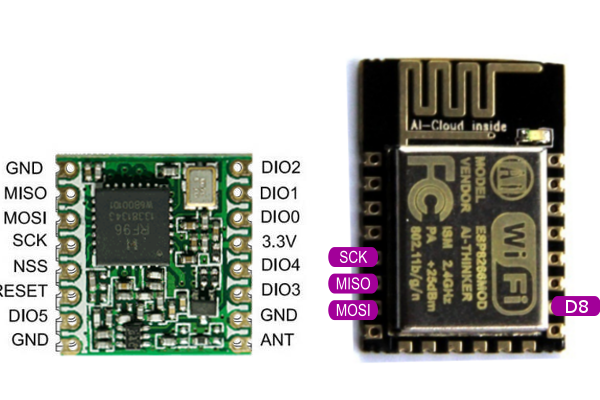 # shields @hallard made some shields you can use - https://github.com/hallard/WeMos-Lora # howto ***Arduino*** - Make sure you have a working ESP8266 / hoperfm node: - Install https://github.com/esp8266/Arduino - Install the lmic library: https://github.com/matthijskooijman/arduino-lmic/ (see installing) - Open the location.ino file in Arduino - Edit your keys - Flash to your esp ***Node.js*** - Install node.js on your local machine or on your server - run "npm install wifi-location -g" in your terminal. Maybe you have to use sudo or cmd adm. in windows. - copy the map node.js to your computer - edit the vars in location.js: appEUI and accessKey - in the terminal with the node.js files type: node location.js - browse to localhost or your ip from the server to see your node :D.
