KO
|
EN
gitlite — search
Search
#javascript
#python
#tailwindcss
#typescript
#ai
#css
#nextjs
#config
#github-config
#nodejs
#open-source
#ollama
compare
★ 119
Open GitHub ↗
Compare HAR files.
Download README (.md)
Explore Similar Repositories
PackageConfig
:
A Swift Package that allows you to define configuration settings inside a Package.swift
php-commitizen
:
PHP Commitizen - A CLI tool used to create commits according to Conventional Commits specification
Zint-Barcode-Generator-for-Delphi
:
Zint Barcode Generator for Delphi
sky-island
:
FaaS platform for running raw Go functions.
svelte-autocomplete
:
A lightweight typeahead / autocomplete component made with Svelte.js
// repository documentation
Was this content helpful?
★ 0
(0 ratings)
Select Rating:
★
★
★
★
★
Submit Feedback
Recent Feedback
×
Download README
Do you want to download the
README.md
file for
compare
?
Download (.md)
# Compare HAR files Make it easier to find regressions by comparing your [HAR](http://www.softwareishard.com/blog/har-12-spec/) files. Test it out https://compare.sitespeed.io.  ## First: Shout out! We couldn't have built compare without the support or inspiration from the following people: * Thank you [Patrick Meenan](https://twitter.com/patmeenan) :bow:. The waterfall is rendered with Pat's [waterfall-tools](https://github.com/pmeenan/waterfall-tools), and the WebPageTest HAR compare viewer is what inspired the blend slider. * Thank you [Michael Mrowetz](https://twitter.com/MicMro) :bow:. Earlier versions of compare used Michael's [PerfCascade](https://github.com/micmro/PerfCascade) and it carried us for years. If you like our project, please give them also some extra love :) ## Comparing 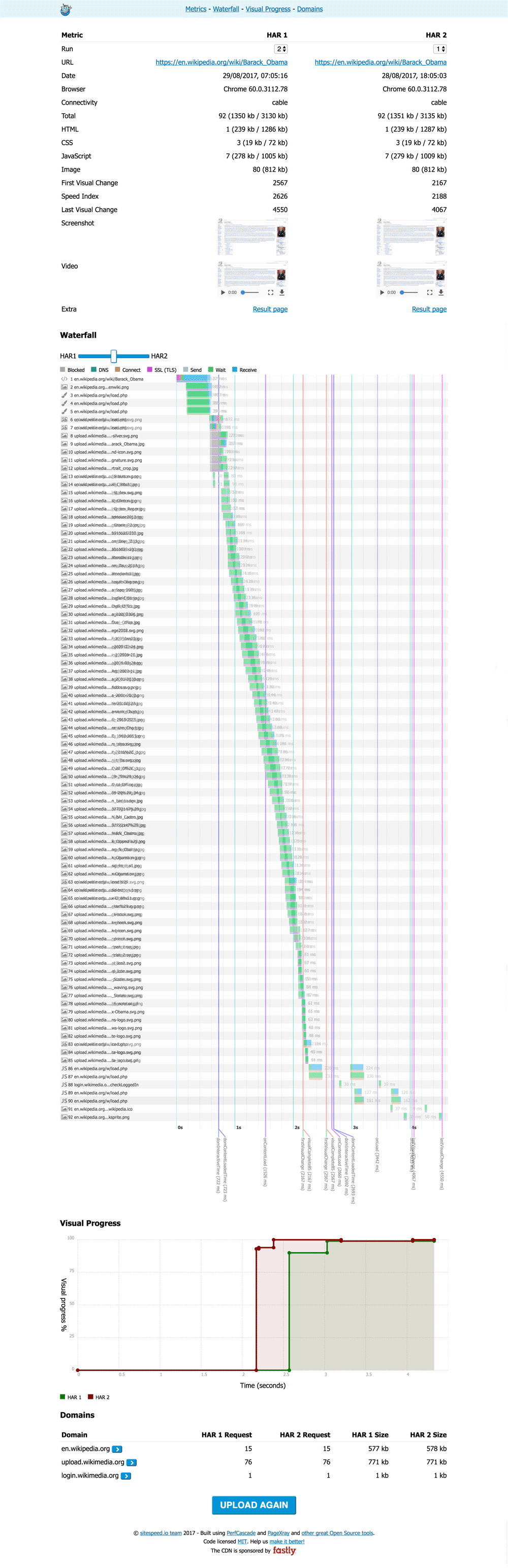 ## How it works As long as your HAR files follow the [HAR specification](http://www.softwareishard.com/blog/har-12-spec/) you can use them in compare. Standard HARs give you the basics; HARs from WebPageTest and sitespeed.io/Browsertime unlock the extras. The result page is the same for every HAR — sections that don't apply silently stay hidden, so a plain Chrome HAR doesn't show a half-empty "filmstrip" or "CPU" block. ### What you get for every HAR * A **stacked waterfall** rendered by [waterfall-tools](https://github.com/pmeenan/waterfall-tools). Both HARs share the same time axis so widths are comparable at a glance. A **blend slider** fades HAR2 over HAR1, and a per-result toggle switches between **side-by-side** and **overlay**. Hovering a request highlights its peer in the other waterfall. * A **Page X-ray** table (powered by [PageXray](https://github.com/sitespeedio/pagexray)) grouped into sections — Content, Render blocking, Visual metrics, Core Web Vitals, CPU and First/Third party. A **Δ column** shows the HAR2−HAR1 delta with regressions in red and improvements in green. An **"Only differences"** toggle hides rows where the two HARs match. * A **request/response diff** when both HARs are for the same URL — added requests, removed requests, and (per-request) size, status and timing changes. Tick **"Strip version parameters"** on the start page (or set `"stripVersion": true` in your config) to ignore cache-busting query strings. * A **domains** breakdown. * Chrome HARs with priority hints also produce a **Render blocking** row (blocking / potentially blocking / in-body parser blocking). * `.har` and `.har.gz` are both accepted on drag/drop and via URL. ### Extras for WebPageTest HARs SpeedIndex, FirstVisualChange and, if the run was captured on Chrome with the CPU profile enabled, CPU timings. ### Extras for sitespeed.io / Browsertime HARs * **Visual progress chart** with a line per HAR and vertical timing markers (First Visual Change, FCP, LCP and Speed Index) so a regressed metric shows up as two side-by-side guide lines. * A **filmstrip** section sampled from the VisualProgress change points, with a lightbox for full-size frames, plus a small thumbnail strip under the visual-progress chart. * The full set of visual metrics (FirstVisualChange, LargestImage, Logo, Heading, Speed Index, LastVisualChange, Visual Readiness). * **Core Web Vitals**: First Contentful Paint, Largest Contentful Paint, Total Blocking Time, Cumulative Layout Shift. * CPU details when sitespeed.io ran Lighthouse: Long Tasks, Total Blocking Time, Max Potential FID. If you deploy your sitespeed.io result with **--resultBaseURL**, compare will pick up the screenshot, video and a link to the result page. PageXray auto-detects first-party hosts from the page URL. If you want to override it (e.g. multi-domain sites), pass a regex via **--firstParty** when running sitespeed.io, or set `"firstParty"` in the config below; the result page then shows a first-vs-third party breakdown. 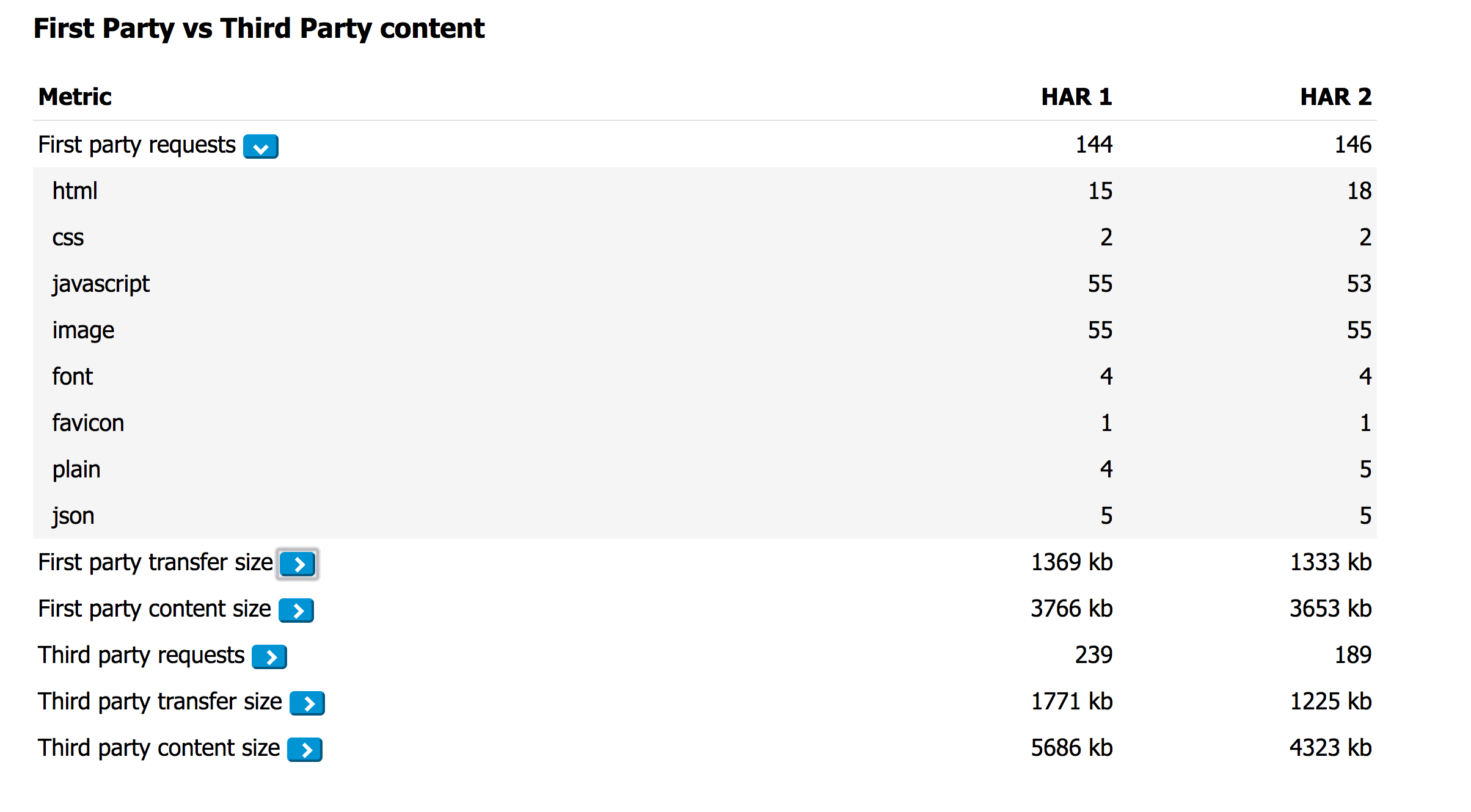 ## How to use it You can either upload two HAR files (drag/drop) or give the URL to two URLs hosted online. If your HAR got multiple pages/runs, you can use just one HAR file. Or you can just copy/paste your HAR file into the start page of [compare.sitespeed.io](https://compare.sitespeed.io/). If you host your sitespeed.io result pages, you can copy/paste the URL to a page or to a specific run and Compare will automagically find the URL to the HAR file. ### Configuration You can use a configuration JSON to choose which HAR files that will be tested. The minimal configuration needed: ```json { "har1": { "url": "https://www.url.com/page1.har" }, "har2": { "url": "https://www.url.com/page2.har" } } ``` But you can also add some extra sugar. All the extras are optional: ```json { "har1": { "url": "https://www.url.com/page1.har", "label": "Before change", "run": 1 }, "har2": { "url": "https://www.url.com/page2.har", "label": "After change", "run": 2 }, "title": "The page title used in the title bar", "firstParty" : " (.*wikipedia.*||.*wikimedia.*)", // RegEx that defines first party requests "stripVersion": true, // ignore query-string version params when diffing requests "comments": { "intro": "Extra information put at the top of the page", "waterfall": "Text displayed at top of the waterfall", "visualProgress": "Text displayed at the top of visual progress", "domains": "Text displayed at the top of domains", "requestDiff": "Text displayed at the top of request/response diff", "firstParty": "Text displayed at the top of first/third party" } } ``` And then you can use your configuration file in different ways. You can copy/paste the configuration into the start page of [compare.sitespeed.io](https://compare.sitespeed.io). Or you can use it like this: https://compare.sitespeed.io/?config=https://URL_TO_THE_CONFIG_FILE Make sure that your server has correct [CORS settings](https://en.wikipedia.org/wiki/Cross-origin_resource_sharing) so that compare.sitespeed.io can get the HAR file. ### Github gist You can also use host your configuration file on a [Github gist](https://gist.github.com/) and use the gist id https://compare.sitespeed.io?gist=GIST_ID to get the configuration file. You can checkout out our example: [https://gist.github.com/soulgalore/94e4d997a78e03b32b939fcea63eae8e](https://gist.github.com/soulgalore/94e4d997a78e03b32b939fcea63eae8e) You can also copy/paste gist id (or the full URL to the gist) into [compare.sitespeed.io](https://compare.sitespeed.io). Thank you [Matt Hobbs](https://github.com/Nooshu) for sharing the gist idea! ### Compare on the fly You can also compare two HAR files on the fly without using a configuration file. Add the parameters **?har1=FULL_URL1&har2=FULL_URL2&compare=1** and the two HAR files will be compared. ## Developers The project is built with [Vite](https://vitejs.dev/). Compare uses a small Vite-bundled entry (`src/main.js`, which pulls in the CSS and the waterfall-tools wrapper) plus a set of classic-script modules in `public/js/compare/` that share globals on `window`. Vite serves `public/` verbatim in both dev and production, so editing a file under `public/js/compare/` is a hard reload away from running. Run the dev server: ``` npm run develop ``` Send us a PR / create an issue. If you have a big change coming up, please discuss it with us in an issue first. ## Deploy your own version Deploying your own version is easy: 1. Clone the repo: `git clone git@github.com:sitespeedio/compare.git` 2. Build: `cd compare && npm install && npm run build` 3. Copy everything in `dist/` to your server. The build version-stamps the classic compare scripts so a new deploy invalidates any stale copies cached by visitors. ## Privacy We take your privacy really serious: We do not use any tracking software at all (no Google Analytics or any other tracking software) in [compare.sitespeed.io](https://compare.sitespeed.io). The page do no call home. And you can deploy your own version of [compare.sitespeed.io](https://compare.sitespeed.io) if you want to be 100% in control. ### Be kind If you deploy your own version: please keep the original logo and the link to the project. We have spent a lot of our free time to work on this! ## The logo The compare logo (and the rest of the sitespeed.io logos) are made by [Mochamad Arief](https://twitter.com/mochawalk), you can find his stuff at http://www.mochawalk.com/.
