KO
|
EN
gitlite — search
Search
#javascript
#python
#hacktoberfest
#react
#ai
#typescript
#llm
#go
#golang
#android
#machine-learning
#rust
#deep-learning
#linux
pseudolidar-tree-detection
★ 13
Open GitHub ↗
No description available.
Download README (.md)
Explore Similar Repositories
chronicondb-client
:
Chronicon (ARPG) item and skills database (React 17)
autojs-11-11
:
京东金币淘宝喵币苏宁易购领人气(在hyue418项目基础上增加苏宁易购双十一活动自动化功能
Profiles
:
No description available.
WindowsTerminalRightClick
:
Windows Terminal RightClick setup English\Spanish.
whiskey-cronjob
:
No description available.
// repository documentation
Was this content helpful?
★ 0
(0 ratings)
Select Rating:
★
★
★
★
★
Submit Feedback
Recent Feedback
×
Download README
Do you want to download the
README.md
file for
pseudolidar-tree-detection
?
Download (.md)
# Pseudolidar 3D Obstacle Detection 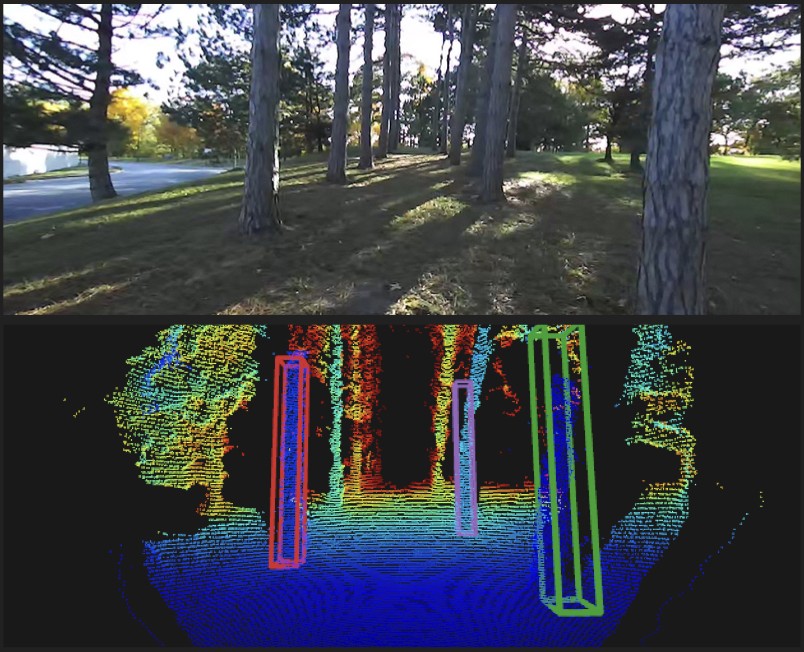 This repository supports training a 3D object detector to recognize trees, for the purpose of robotic navigation in forests. We include code for the following: * Generating labeled 3D object detector training data from ZED stereo camera video. Labeling requires minimal user supervision. * Training a PointRCNN detector on the labeled data. * Running a 3D Kalman filter tracker using detections, to filter out detector errors and output stable estimates of tree positions. ## Getting started ### Installation We've tested our code on Ubuntu 18.04 with Python 3.7. Dependencies: - Numpy - Open3D 0.10 or 0.11 [[Installation instructions](http://www.open3d.org/docs/release/getting_started.html)] For ZED SVO processing: - ZED SDK with Python API [[Installation instructions](https://www.stereolabs.com/docs/app-development/python/install/)] Install PointRCNN according to the instructions in the [PointRCNN repo](PointRCNN/README.md). You'll need to run the following command in the PointRCNN subdirectory: ```git submodule update --init --recursive``` Also install dependencies required by the [AB3DMOT](https://github.com/xinshuoweng/AB3DMOT) repository. ### Data preparation The `data/...` folders will be created by the code during data processing. To use our collected ZED SVO data (used in our paper), download the 'training' and 'testing' folders from our [Google Drive folder here](https://drive.google.com/drive/folders/10wYXolnH8tY95gJmOjIu8k3oubIv6AS3?usp=sharing) and add them under the 'zed_svo' directory. ``` pseudolidar-tree-detection |- zed_svo |- training |- Dataset1.svo |- Dataset2.svo ... |- testing |- TestDataset1.svo |- ... |- data |- training |- Dataset1 |- pointcloud |- rgb |- map.obj |- poses.txt |- calibration.yaml |- Dataset2 |- pointcloud |- ... ... |- testing |- TestDataset1 |- pointcloud |- ... |- pointcloud_annotation ``` ## Data preparation Currently, this repo supports 3D detector training for SVO format video collected using a Stereolabs ZED camera. ### Recording data We've tested this repo on video collected using a ZED 2 camera, at 60FPS 720p resolution, using H265 format compression. ### Processing ZED recorded SVO files ZED SDK and Python API are required for processing SVO files. Add .svo files to `zed_svo/training` or `zed_svo/testing`. Then, run ``python process_svo_files --svo_dir zed_svo/training --output_dir data/training --n_skip 5`` This processes all .svo files in the `zed_svo/training` directory, creating a for each .svo file a directory containing the following: - `pointcloud`: Contains sparsified stereo (pseudolidar) pointclouds. - `rgb`: Contains .jpeg RGB images. - `map.obj`: Dense fused point cloud global map. - `poses.txt`: Pose history file. - `calibration.yaml`: Camera calibration parameters file. The `n_skip` argument allows skipping every n-th frame in the SVO file, for the pointcloud and rgb outputs. ### Labeling training data Use the `label_pointcloud_clusters.py` script to manually label point cloud clusters, and use `create_3d_annotations.py` to label point clouds using the clusters. ## Training the object detector To do - detailed instructions on training. See the [PointRCNN readme] for instructions on training the 3D detector and performing inference on the test set. ### Convert labeled data to KITTI format Use `convert_zed_data.py` to convert point clouds, images, and camera calibration info into KITTI dataset format, required by the PointRCNN detector. ### PointRCNN training Follow instructions in the [PointRCNN readme](PointRCNN/README.md). ## Running the tracker To run the tracker, use the script `tracking/AB3DMOT/main.py`. To do - cleaning up tracking code. ## Visualizing results To visualize tracker results, use `` python visualize_tracking.py --results_path output/tracker_results.txt --pcd_dir data/kitti_object/ `` # Work in progress features - Integrate with other 3D object detectors in addition to PointRCNN - To do: Use [mmdetection3d repo](https://github.com/open-mmlab/mmdetection3d) for easier detector training. - Support for rosbag data from ZED and Intel RealSense
