KO
|
EN
gitlite — search
Search
#javascript
#docker
#react
#raspberry-pi
#docker-image
#express
#redux
#security
#nodejs
#webpack
#battery
#console
legend-engine
★ 111
Open GitHub ↗
Legend Engine module
Download README (.md)
Explore Similar Repositories
ProtoTree
:
ProtoTrees: Neural Prototype Trees for Interpretable Fine-grained Image Recognition, published at CVPR2021
MediatR.AspNetCore.Endpoints
:
No description available.
mlflow-torchserve
:
Plugin for deploying MLflow models to TorchServe
transparency-exchange-api
:
A standard API specification for exchanging supply chain artifacts and intelligence
jokes-app-multiplatform
:
A sample Kotlin multiplatform project using Kotlin code in Android and iOS
// repository documentation
Was this content helpful?
★ 0
(0 ratings)
Select Rating:
★
★
★
★
★
Submit Feedback
Recent Feedback
×
Download README
Do you want to download the
README.md
file for
legend-engine
?
Download (.md)
[](https://finosfoundation.atlassian.net/wiki/display/FINOS/Incubating) [](https://github.com/finos/legend-engine/actions/workflows/build.yml) [](https://central.sonatype.com/namespace/org.finos.legend.engine) # legend-engine Execution engine for Legend. It provides: - A Pure parser and compiler. - An execution engine, generating and/or executing execution plans when provided with a Pure function, a Mapping and a Runtime. - Access point for model transformers written using the Pure language (soon to come). ## Development setup - This application uses Maven 3.6+ and JDK 11. Run `mvn install` to compile. - To start the server, please use the `Main` class `org.finos.legend.engine.server.Server` with the parameters: `server legend-engine-config/legend-engine-server/legend-engine-server-http-server/src/test/resources/org/finos/legend/engine/server/test/userTestConfig.json`. - You can test by trying http://127.0.0.1:6300 on a web browser. The swagger page can be accessed at http://127.0.0.1:6300/api/swagger > Given the size of the project, developers should consider using parallelism to speed up build times, given enough RAM is provided. > In IntelliJ IDEA, this can be done by setting `Thread Count` (in `Preferences > Build, Execution, Deployment > Build Tools > Maven`) and `Shared build process heap size (Mbytes)` (in `Preferences > Build, Execution, Deployment > Compiler > Java Compiler`). > For example, setting `Thread Count` to `4` and `Shared build process heap size (Mbytes)` to `30000` can significantly reduce build times, you need to fine-tune this to match your machine's specs. > > ⚠️ It's also important to disable the `Clear output directory on rebuild` in `Preferences > Build, Execution, Deployment > Complier` as this removes generated resources needed to run the servers from the IDE. ### Running memSQL tests on Mac - Follow these instructions: https://github.com/singlestore-labs/singlestoredb-dev-image?tab=readme-ov-file#how-to-run-the-docker-image-on-apple-silicon-m1m2-chips ### Starting Pure IDE If you're making changes to the `Pure` codebase, it's highly recommended that you also spin up our `Pure IDE` application: - To start the server, please use the `Main` class `org.finos.legend.engine.ide.PureIDELight` with the parameters: `server legend-engine-pure/legend-engine-pure-ide/legend-engine-pure-ide-light-http-server/src/main/resources/ideLightConfig.json`. - You can now access the IDE at http://127.0.0.1:9200/ide in a web browser. #### Debugging Pure Code 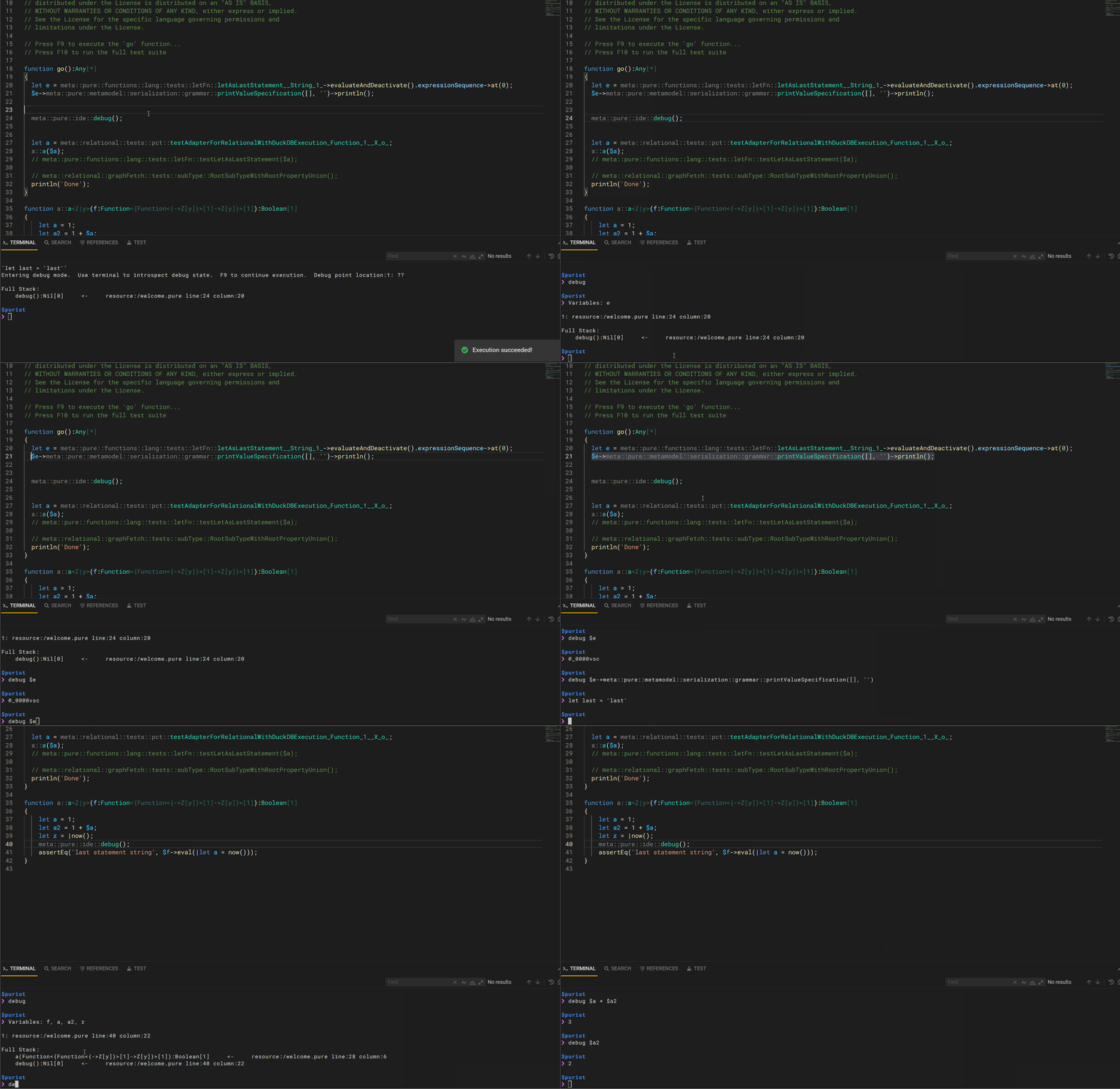 To debug your `Pure` code, you need to use the `meta::pure::ide::debug()` function to create breakpoints. When you execute the `go` function using _F9_, the execution will be paused at the breakpoint, and a **_summary_** will be printed. This **_summary_** include the current stack (for easy navigation to the current breakpoint point) and the variables accessible on such breakpoint. Once in a breakpoint, using the Pure IDE terminal, you can take certain debugging actions: - `debug` or `debug summary`: print the aforementioned **_summary_**. - `debug <pure expression>`: evaluate the given expression. All variables on the current breakpoint are available. - ie. `debug $f->map(x | $x->type())`: introspect variable `f` and apply some functions to it. - `debug abort`: stop the current execution. Pressing _F9_ after an abort command will start the execution from the beginning (ie. from the `go` function) To resume the execution to next breakpoint or to completion, just press _F9_ again. Caveats: - Editing the code while on a breakpoint will lead to evaluation errors. You need to complete or abort current execution to pick new changes. - Print commands within the debug expressions won't show on console. Avoid the print and evaluate to a string value instead. ## Roadmap Visit our [roadmap](https://github.com/finos/legend#roadmap) to know more about the upcoming features. ## Contributing Visit Legend [Contribution Guide](https://github.com/finos/legend/blob/master/CONTRIBUTING.md) to learn how to contribute to Legend. ## License Copyright 2020 Goldman Sachs Distributed under the [Apache License, Version 2.0](http://www.apache.org/licenses/LICENSE-2.0). SPDX-License-Identifier: [Apache-2.0](https://spdx.org/licenses/Apache-2.0)
