KO
|
EN
gitlite — search
Search
#python
#java
#python3
#arduino
#golang
#machine-learning
#rust
#html
#flask
#javascript
#seismology
#nodejs
ROS2_Teleop_Isaac_Sim
★ 15
Open GitHub ↗
No description available.
Download README (.md)
Explore Similar Repositories
catalogrr
:
personal media cataloging
fin-primitives
:
Financial market primitives — price types, order book, OHLCV, indicators, position ledger, risk monitor
glqr
:
An easy to use gleam qr code generator
cowork-social
:
No description available.
AutoClash
:
AutoClash 是一款基于 Android 平台的 Clash 或 sing-box 自动策略组切换工具
// repository documentation
Was this content helpful?
★ 0
(0 ratings)
Select Rating:
★
★
★
★
★
Submit Feedback
Recent Feedback
×
Download README
Do you want to download the
README.md
file for
ROS2_Teleop_Isaac_Sim
?
Download (.md)
# Drone Swarm ROS 2 Workspace + NVIDIA Isaac Sim (Pegasus + PX4) This repository contains a ROS 2 workspace for controlling **PX4-powered Iris drones inside NVIDIA Isaac Sim** using the **Pegasus Simulator** extension. - `warehouse_drone` → single-drone workflow - `warehouse_multi_px4` → multi-drone / swarm workflow (multiple PX4 instances) > Tested setup (author’s working environment) > - **NVIDIA Isaac Sim v5.1** > - **NVIDIA driver 580.119.02** (verify with `nvidia-smi`) > - Ubuntu 22.04 + ROS 2 Humble > > - 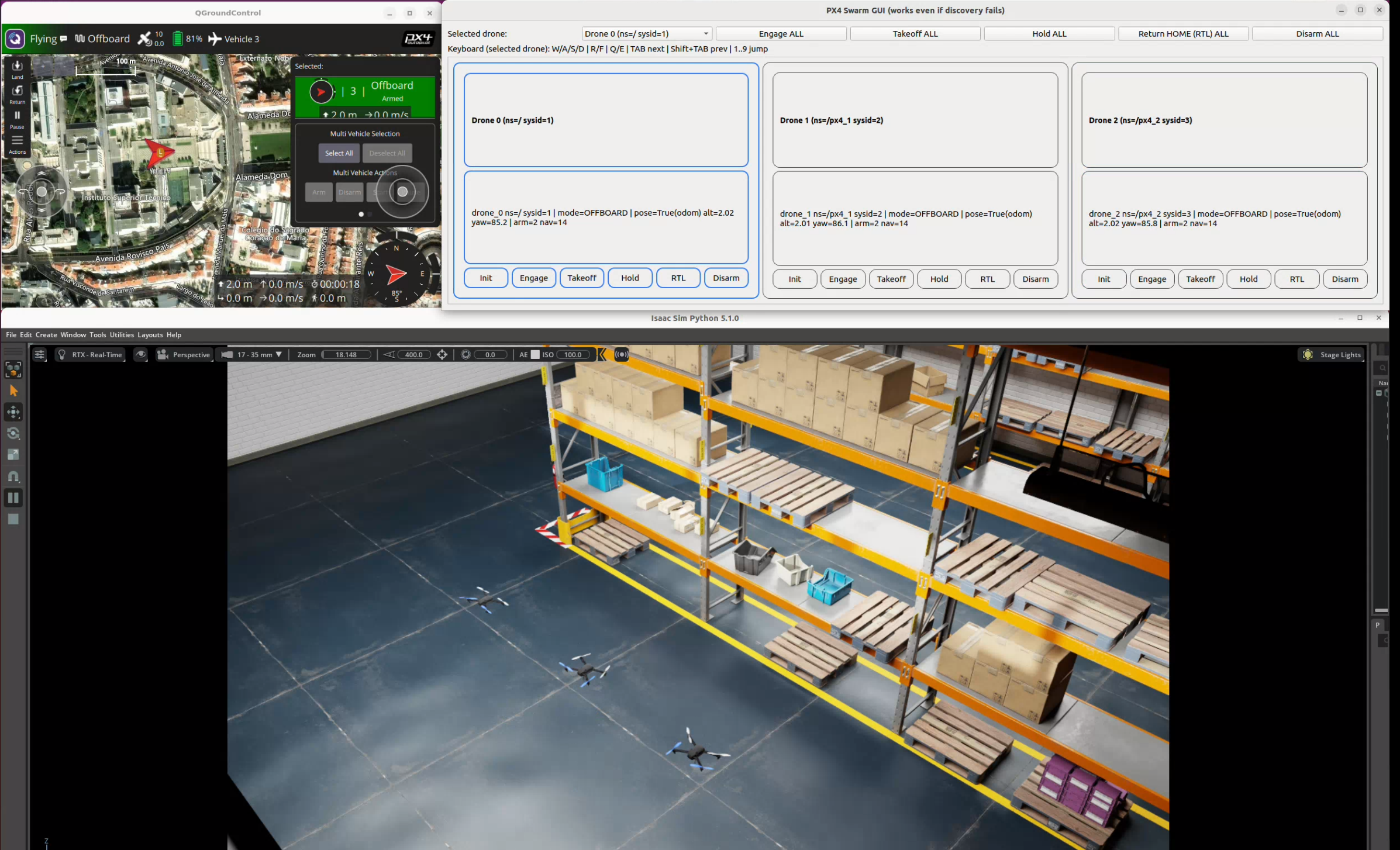 --- ## Repo layout ``` ws_px4_ros2/ src/ px4_msgs/ # PX4 message definitions px4_ros_com/ # PX4 <-> ROS 2 uXRCE-DDS bridge packages px4_keyboard_teleop/ # Optional teleop my_px4_offboard/ # Your offboard rclpy script(s) ``` **Pegasus / Isaac Sim launcher scripts** - `warehouse_drone.py` (single drone) - `warehouse_multi_px4.py` (N drones; swarm line spawn) --- ## Prerequisites ### 1) GPU / driver (critical for Pegasus + Isaac Sim) Your known-good combination: - **Isaac Sim:** v5.1 - **NVIDIA driver:** `580.119.02` Verify: ```bash nvidia-smi ``` ### 2) NVIDIA Isaac Sim 5.1 Install Isaac Sim via Omniverse Launcher (or your preferred Isaac Sim install method). Set a convenience variable (example path from your setup): ```bash export ISAAC_SIM_INSTALL_ROOT="$HOME/.local/share/ov/pkg/isaac-sim-5.1.0" ``` (Optional) Add to `~/.bashrc`. ### 3) Pegasus Simulator (Isaac Sim extension) Pegasus is an Isaac Sim framework/extension for PX4 multirotor simulation. See the official docs + repo for installation and usage. - Pegasus docs: https://pegasussimulator.github.io/PegasusSimulator/ - Pegasus repo: https://github.com/PegasusSimulator/PegasusSimulator > **Note (Isaac Sim 5.1 change):** Pegasus mentions a helper launcher `isaac_run` in newer docs. If you already use `python.sh` from Isaac Sim, that’s fine too. ### 4) PX4-Autopilot (required) Clone PX4: ```bash cd ~ git clone https://github.com/PX4/PX4-Autopilot.git cd PX4-Autopilot ``` Build once (so autolaunch is fast): ```bash make px4_sitl_default ``` You will later pass this path as `--px4_dir`. ### 5) ROS 2 Humble + build tools Install ROS 2 Humble (Ubuntu 22.04). Also install build tools: ```bash sudo apt update sudo apt install -y python3-colcon-common-extensions python3-rosdep git ``` Initialize rosdep (first time only): ```bash sudo rosdep init || true rosdep update ``` --- ## Workspace setup (ROS 2) The workspace is as follows : ws_px4_ros2 -> src -> Unzip the attached 'px4_keyboard_teleop' into a folder + Here install latest builds of px4_msgs and px4_ros_com The src folder should look like this : 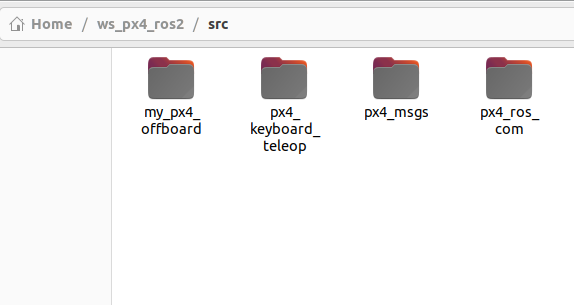 git clone https://github.com/PX4/px4_msgs.git git clone https://github.com/PX4/px4_ros_com.git Unzip / place the workspace where you want it, then: ```bash cd ws_px4_ros2 source /opt/ros/humble/setup.bash # Install deps (best-effort) rosdep install --from-paths src --ignore-src -r -y # Build colcon build --symlink-install # Source source install/setup.bash ``` --- ## PX4 ↔ ROS 2 bridge notes (uXRCE-DDS) PX4’s ROS 2 integration typically uses **uXRCE-DDS**: - A **uXRCE-DDS client** runs on PX4. - A **micro XRCE-DDS agent** runs on the companion computer (your machine). PX4 docs: https://docs.px4.io/main/en/middleware/uxrce_dds ROS 2 user guide: https://docs.px4.io/main/en/ros2/user_guide If you don’t see `/fmu/*` topics, you usually need: 1) Agent on your machine (example): ```bash MicroXRCEAgent udp4 -p 8888 ``` 2) Client started inside PX4: ```bash uxrce_dds_client start -t udp -p 8888 ``` > Exact transport/ports depend on your sim/bridge setup. Start from PX4 docs above and align with your PX4 SITL configuration. --- ## Run: Single/Swarm drone (warehouse_drone) ### Terminal 1 — Start Isaac Sim + Pegasus + PX4 autolaunch (I place these scripts inside PegasusSimulator/examples) From your Isaac Sim directory: ```bash cd "$ISAAC_SIM_INSTALL_ROOT" ./python.sh /ABS/PATH/warehouse_drone.py --px4_dir /home/$USER/PX4-Autopilot ``` ```bash cd "$ISAAC_SIM_INSTALL_ROOT" ~/isaacsim/python.sh /home/PegasusSimulator/examples/warehouse_multi_px4.py --px4_dir /home/varun/PX4-Autopilot --num_drones 3 ``` ### Terminal 2 — Start ROS 2 nodes (example offboard): ```bash cd ws_px4_ros2 source /opt/ros/humble/setup.bash source install/setup.bash For controlling one drone `ros2 run px4_keyboard_teleop gui` For controlling 3 drones (change number for as many drones as you want, tested for 3 drones) `ros2 run px4_keyboard_teleop gui_multi --num_drones 3 ` ``` > If you later convert `my_px4_offboard` into a proper ROS 2 package (with `package.xml` + `setup.py`), you can use `ros2 run ...` instead. --- ## Run: Multi-drone / swarm (warehouse_multi_px4) ### Terminal 1 — Start Isaac Sim + Pegasus + N PX4 instances ```bash cd "$ISAAC_SIM_INSTALL_ROOT" ./python.sh /ABS/PATH/warehouse_multi_px4.py --px4_dir /home/$USER/PX4-Autopilot --num_drones 5 --spacing 2.0 --start_x 4.0 --start_y 0.0 --start_z 0.07 ``` Useful options: - Place drones in a line along **Y** (default): `--line_axis y` - Place drones in a line along **X**: `--line_axis x` - Flip direction: `--line_dir -` - Headless: `--headless` --- ## QGroundControl (recommended) ### Virtual / USB Joystick control To fly manually in sim: 1. Open **QGroundControl** 2. Go to **Application Settings → Fly View** 3. **Enable Virtual Joystick** --- ## Known issues / fixes (from the working setup) ### A) Iris drone USD failing to load in Isaac Sim If Pegasus expects `.../pegasus.simulator` but your extension folder is versioned, create a symlink: ```bash ln -s /home/varun/.local/share/ov/data/exts/v2/pegasus.simulator-5.1.0 /home/varun/.local/share/ov/data/exts/v2/pegasus.simulator ``` ### B) NVIDIA driver / Isaac Sim version mismatch Pegasus is sensitive to driver + Isaac Sim compatibility. The working combo for this repo is: - **Isaac Sim 5.1** - **Driver 580.119.02** (`nvidia-smi` to verify) --- ## ⌨️ Keyboard Controls (Pitch / Roll / Yaw) The drone can be manually controlled using a keyboard with conventional attitude-style inputs. ### 🚁 Pitch (Forward / Back Tilt) | Key | Action | |------|--------| | **W** | Pitch Forward | | **S** | Pitch Backward | Controls forward / backward motion. --- ### 🚁 Roll (Left / Right Tilt) | Key | Action | |------|--------| | **A** | Roll Left | | **D** | Roll Right | Controls lateral (sideways) motion. --- ### 🔄 Yaw (Rotation / Heading) | Key | Action | |------|--------| | **Q** | Yaw Left (Counter-Clockwise) | | **E** | Yaw Right (Clockwise) | Rotates the drone without translating. --- ### ⬆ Throttle / Altitude | Key | Action | |------|--------| | **↑ R** | Increase Throttle / Ascend | | **↓ F** | Decrease Throttle / Descend | Controls vertical movement. --- ### ✅ Control Layout Reference ## Tips for swarm workflows - Keep a clean mapping of **vehicle_id → namespace/topics** for multi-drone control. - Start with **2 drones** and confirm: - All PX4 instances launch - QGC sees the vehicles - ROS topics appear for each instance - Then scale up. --- ## Credits - PX4 + PX4 ROS 2 bridge (`px4_ros_com`, `px4_msgs`) - Pegasus Simulator (Isaac Sim extension) - NVIDIA Isaac Sim - https://github.com/artastier/PX4_Swarm_Controller - https://github.com/ARK-Electronics/ROS2_PX4_Offboard_Example
