KO
|
EN
gitlite — search
Search
#typescript
#ai-agents
#deepseek-harness
#dsh-plugin
#open-source
#ai
#claude-code
#cli
#windows
#codex
#developer-tools
#dsh
emuit
★ 73
Open GitHub ↗
Easy-to-use IDA plugin for code emulation
Download README (.md)
Explore Similar Repositories
containers
:
Automated privilege escalation of the world's most popular Docker images.
The-Python-Workshop-Second-Edition
:
The Python Workshop - Second Edition, published by Packt
message-exploit
:
:trollface: Collection of text exploits / hacks
MultiDocumenter.jl
:
Aggregating all the docs
CVE-2022-30206
:
Exploit for CVE-2022-30206
// repository documentation
Was this content helpful?
★ 0
(0 ratings)
Select Rating:
★
★
★
★
★
Submit Feedback
Recent Feedback
×
Download README
Do you want to download the
README.md
file for
emuit
?
Download (.md)
## EmuIt - easy-to-use IDA emulator plugin ### Features - Emulate selected chunk of code and see decrypted/assembled strings - Automatic memory allocation in case of incorrect write operations, stack unwinding and other techniques to improve emulation stability - Find decryption function in malware and get all decrypted strings - Emulation of all calls to the specified function - Automatic addition of a comment at the place where the string is decrypted (disassembly, pseudocode) - Support all architectures supported by [unicorn emulator](https://github.com/unicorn-engine/unicorn) ### Quick example 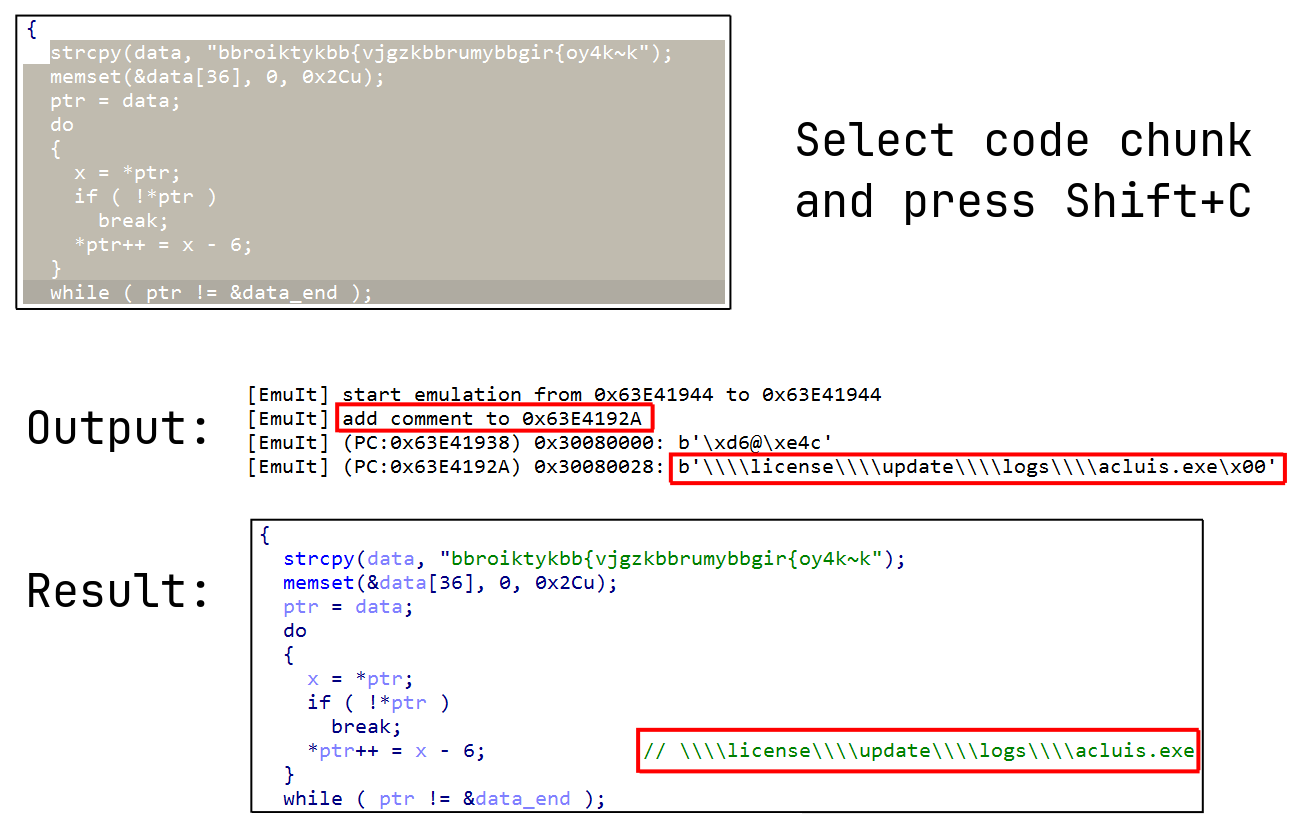 ### Installation Copy `emuit.py` and `emuit` directory to your IDA plugins directory (depends on your system): - **Windows**: `%APPDATA%\Hex-Rays\IDA Pro\plugins\` - **macOS**: `~/Library/Application Support/IDA Pro/plugins/` - **Linux**: `~/.idapro/plugins/` Install `unicorn` with `pip install unicorn`. ### Usage in scripts ```python from emuit import EmuIt emu = EmuIt.create(architecture='x86', bitness=64) ``` Memory and registers operations just like in [Qiling](https://github.com/qilingframework/qiling): ```python buffer = emu.mem[0x400000:0x401000] # read memory region emu.mem[0x1002F0C8] = b"string" # write string at address ip = emu.arch.regs.arch_pc # get RIP value emu.arch.regs['RDX'] = 0xABCDEF # access by register name emu.arch.regs['*DX'] = 0xABCDEF # asterisk mean 'R' for x64 or 'E' for x86 emu.arch.stack_push(0xABCDEF) # push value to stack value = emu.arch.stack_pop() # pop value from stack ``` Emulate arbitrary code chunk: ```python results = emu.run(0x100000, 0x100020) >>> [Buffer(pc=0x20030, ea=0x100016, data=b'plain')] ``` Call function: ```python start_ea, end_ea = 0x10021050, 0x10023010 emu.arch.fastcall( start_ea, end_ea, emu.mem.map_buffer(b'string!'), 0x6, ) ``` ### Limitations - It is not possible to emulate code with API calls, syscalls, etc. The following projects are suitable for this: [Qiling](https://github.com/qilingframework/qiling), [Speakeasy](https://github.com/mandiant/speakeasy), [MWEmu](https://github.com/sha0coder/mwemu). - Access to internal structures (PEB, SEH, ...) partially available in debug session
