KO
|
EN
gitlite — search
Search
#javascript
#python
#hacktoberfest
#react
#ai
#typescript
#llm
#go
#golang
#android
#machine-learning
#rust
#deep-learning
#linux
rule-builder
★ 18
Open GitHub ↗
GUI rule builder using reactjs
Download README (.md)
Explore Similar Repositories
BilibiliSpider
:
bilibili视频信息爬虫
pwndock
:
A pwning environment, now on docker!
reddit-pgn-to-gif
:
Converts PGN from /r/chess into gifs hosted on imgur and leaves a reddit comment
console-app-settings
:
Source code for blog post how to use appsettings in .net core console application
vue-simple-multi-select
:
autocomplete multiple select component for vue
// repository documentation
Was this content helpful?
★ 0
(0 ratings)
Select Rating:
★
★
★
★
★
Submit Feedback
Recent Feedback
×
Download README
Do you want to download the
README.md
file for
rule-builder
?
Download (.md)
# RuleBuilder #### v1.0.0 #### api to build rules from gui This project was bootstrapped with [Create React App](https://github.com/facebookincubator/create-react-app). Below you will find some information on how to perform common tasks.<br> You can find the most recent version of this guide [here](https://github.com/facebookincubator/create-react-app/blob/master/packages/react-scripts/template/README.md). ## Table of Contents - [Features](#features) - [How to use](#how-to-use) - [Input data format](#input-data-format) - [Dependencies](#dependencies-used) - [Screenshot of ui](#screenshot-of-ui) - [Folder Structure](#folder-structure) - [Available Scripts](#available-scripts) - [npm start](#npm-start) - [npm test](#npm-test) - [npm run build](#npm-run-build) - [npm run eject](#npm-run-eject) - [Supported Browsers](#supported-browsers) ## Features * Dynamically update your input data on every event (such as adding and removing rules, switching condition) * Drag and drop a rule to any rule group node * Getting the rules in JSON format ## How to use ``` ReactDOM.render(<RuleBuilder data={data} />,document.getElementById('divToRender')) ``` ## input data format NOTE: This is a sample input data. Attribute 'rules' can be nested as shown below ``` { "condition": "AND", "rules": [ { "model": "Patient", "attribute": "PatientName", "op": "EQUALS", "value": "rama" }, { "model": "Patient", "attribute": "Age", "op": "GREATER", "value": "25" }, { "condition": "AND", "rules": [ { "model": "Doctor", "attribute": "DoctorName", "op": "EQUALS", "value": "something 1" }, { "model": "Doctor", "attribute": "DoctorName", "op": "EQUALS", "value": "something 1" }] }] } ``` ## Dependencies used Following dependencies are used in this project - [Lodash](https://lodash.com/) - [office-ui-fabric-react](https://developer.microsoft.com/en-us/fabric) - [react slick-carousel](https://www.npmjs.com/package/slick-carousel) ## Screenshot of ui 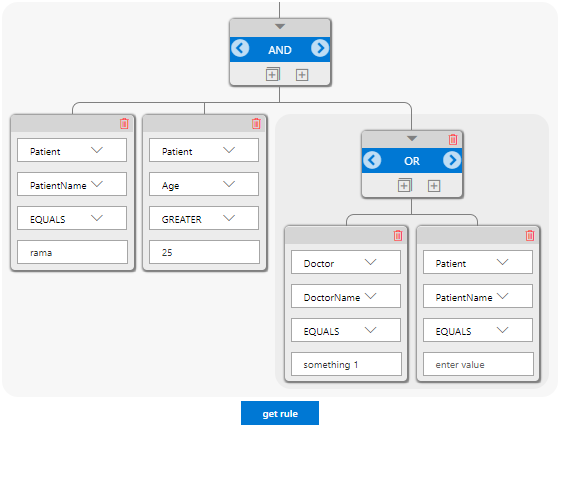 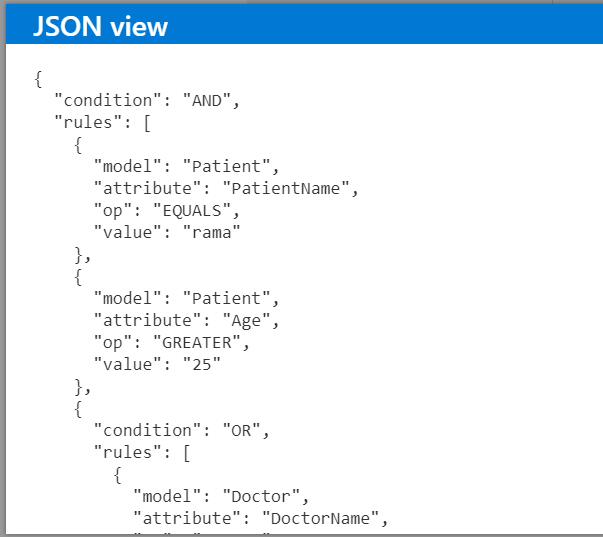 ## Updating to New Releases Create React App is divided into two packages: * `create-react-app` is a global command-line utility that you use to create new projects. * `react-scripts` is a development dependency in the generated projects (including this one). You almost never need to update `create-react-app` itself: it delegates all the setup to `react-scripts`. When you run `create-react-app`, it always creates the project with the latest version of `react-scripts` so you’ll get all the new features and improvements in newly created apps automatically. To update an existing project to a new version of `react-scripts`, [open the changelog](https://github.com/facebookincubator/create-react-app/blob/master/CHANGELOG.md), find the version you’re currently on (check `package.json` in this folder if you’re not sure), and apply the migration instructions for the newer versions. In most cases bumping the `react-scripts` version in `package.json` and running `npm install` in this folder should be enough, but it’s good to consult the [changelog](https://github.com/facebookincubator/create-react-app/blob/master/CHANGELOG.md) for potential breaking changes. We commit to keeping the breaking changes minimal so you can upgrade `react-scripts` painlessly. ## Sending Feedback We are always open to [your feedback](https://github.com/facebookincubator/create-react-app/issues). ## Folder Structure After creation, your project should look like this: ``` my-app/ README.md node_modules/ package.json public/ index.html favicon.ico src/ buttons/ conditionButton.jsx components/ attribute.jsx collapsedRule.jsx field.jsx model.jsx operator.jsx rule.jsx ruleBuilder.jsx ruleGroup.jsx json-files/ data.json (optional) services/ httpClient.jsx utility/ rgb.js validateJson.js css/ animate.css custom.css index.css tree.css index.js logo.svg ``` For the project to build, **these files must exist with exact filenames**: * `public/index.html` is the page template; * `src/index.js` is the JavaScript entry point. You can delete or rename the other files. You may create subdirectories inside `src`. For faster rebuilds, only files inside `src` are processed by Webpack.<br> You need to **put any JS and CSS files inside `src`**, otherwise Webpack won’t see them. Only files inside `public` can be used from `public/index.html`.<br> Read instructions below for using assets from JavaScript and HTML. You can, however, create more top-level directories.<br> They will not be included in the production build so you can use them for things like documentation. ## Available Scripts In the project directory, you can run: ### `npm start` Runs the app in the development mode.<br> Open [http://localhost:3000](http://localhost:3000) to view it in the browser. The page will reload if you make edits.<br> You will also see any lint errors in the console. ### `npm test` Launches the test runner in the interactive watch mode.<br> See the section about [running tests](#running-tests) for more information. ### `npm run build` Builds the app for production to the `build` folder.<br> It correctly bundles React in production mode and optimizes the build for the best performance. The build is minified and the filenames include the hashes.<br> Your app is ready to be deployed! See the section about [deployment](#deployment) for more information. ### `npm run eject` **Note: this is a one-way operation. Once you `eject`, you can’t go back!** If you aren’t satisfied with the build tool and configuration choices, you can `eject` at any time. This command will remove the single build dependency from your project. Instead, it will copy all the configuration files and the transitive dependencies (Webpack, Babel, ESLint, etc) right into your project so you have full control over them. All of the commands except `eject` will still work, but they will point to the copied scripts so you can tweak them. At this point you’re on your own. You don’t have to ever use `eject`. The curated feature set is suitable for small and middle deployments, and you shouldn’t feel obligated to use this feature. However we understand that this tool wouldn’t be useful if you couldn’t customize it when you are ready for it. ## Supported Browsers By default, the generated project uses the latest version of React. You can refer [to the React documentation](https://reactjs.org/docs/react-dom.html#browser-support) for more information about supported browsers.
