KO
|
EN
gitlite — search
Search
#python
#java
#python3
#arduino
#golang
#machine-learning
#rust
#html
#flask
#javascript
#seismology
#nodejs
fcitx-nord-skin
★ 20
Open GitHub ↗
Nord theme for fcitx
Download README (.md)
Explore Similar Repositories
Laravel-CRUD-Ajax-Datatables
:
No description available.
PaintingOnlineClient
:
使用Flutter搭建的你画我猜游戏的客户端
ArtNet
:
ArtNet Swift library
fairensics
:
:mag: A python library to discover and mitigate biases in machine learning models and datasets :mag:
style_trans
:
图片风格迁移
// repository documentation
Was this content helpful?
★ 0
(0 ratings)
Select Rating:
★
★
★
★
★
Submit Feedback
Recent Feedback
×
Download README
Do you want to download the
README.md
file for
fcitx-nord-skin
?
Download (.md)
# Fcitx Nord Skin ## Feature - Two skins for **fcitx** based on [Nord Scheme](https://www.nordtheme.com/), suitable for both dark and light variant desktop. - Transparent background (need [compton](https://github.com/chjj/compton) or other composing software enabled). - Support both horizontal and vertical layout. ## Screenshot 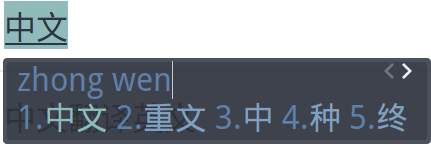 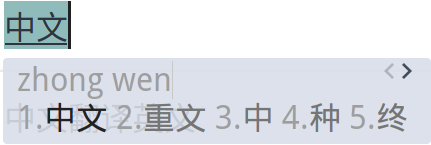 ## Installation 1. Type the following command in the terminal. If `~/.config/fcitx/skin` doesn't exist, then create one. ```bash git clone https://github.com/Yucklys/fcitx-nord-skin.git ~/.config/fcitx/skin ``` 2. Restart fcitx and select `nord-light` or `nord-dark` from the skins list. ## FAQ > How can I change the color of the candidates? Just head to the appearance tab under the fcitx setting and select the skin you want to customize. You can also manually change the setting by editing `fcitx_skin.conf` file under corresponding directory. > The input character overlap with the icons under vertical layout. This is the limitation of vertical layout in fcitx, especially when inputing a long string. So if you are not using Wubi or other special input scheme, it is recommended to use horizontal layout instead. > The skins do not show up after restart fcitx. Check are the contents of each theme is complete, and are placed under the correct directory. If the skins still could not work, try to put the theme under `/usr/share/fcitx/skin`.
