KO
|
EN
gitlite — search
Search
#javascript
#python
#hacktoberfest
#react
#ai
#typescript
#llm
#go
#golang
#android
#machine-learning
#rust
#deep-learning
#linux
Ilion
★ 8
Open GitHub ↗
Localization helper tool for macOS
Download README (.md)
Explore Similar Repositories
test-suites
:
A read-only Git copy of the OpenBenchmarking.org test suites.
hacker-news-ios
:
Hacker News iOS App
dewordify
:
Prepare an online courses in MS Word and quickly convert it to clean HTML using this application
csec-hugo
:
No description available.
node-red-contrib-zeromq
:
ZeroMQ Pub/Sub nodes for Node-RED
// repository documentation
Was this content helpful?
★ 0
(0 ratings)
Select Rating:
★
★
★
★
★
Submit Feedback
Recent Feedback
×
Download README
Do you want to download the
README.md
file for
Ilion
?
Download (.md)
# Ilion [](https://github.com/Carthage/Carthage) Ilion is (going to be) a localization helper tool for macOS that cuts the lengthy translate-build-verify loop by allowing for run-time localization adjustments. 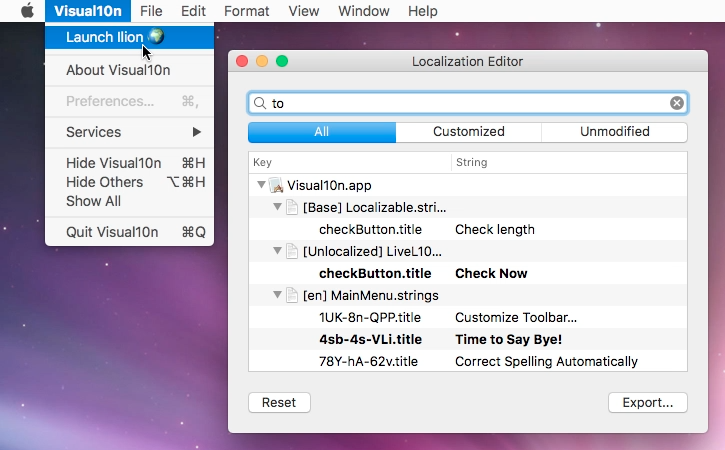 ### About the name Ilion stands for i(nstant)-localization (l10n), but the name also makes reference to the ancient city of Troy, which the Greeks infiltrated by means of the famous Trojan Horse trick. ### What is it good for? Ilion's purpose is to allow for near-live app localization on macOS. This means that localized string overrides can be added, removed, or changed run-time, without having to rebuild the project. In some cases, the app should be relaunched in order to see the changes, but sometimes not even that is necessary. Translators who have been suffering from lack of context can now have something real to play with. Checking whether the resizing behavior is properly configured for a text UI element or iterating on a translation until it fits-- all these can now be done with almost instant feedback using Ilion. ### How does it work? Ilion needs to be built into the target application. When the app is launched, the framework intercepts calls to `NSLocalizedString` and proxies them to a string database built from the `.strings` resources and the previously set overrides. This database can then be accessed and modified via the Ilion UI. ### Installation 1. With Carthage (recommended): add the following line to your Cartfile: ``` github "lvsti/Ilion" ``` Or check out the repo and build the framework yourself if you will. 2. Add the built `Ilion.framework` to your app target 3. Make sure to include the framework in a _Copy Files_ build phase with _Frameworks_ set as destination That's it! Ilion will take care of the rest when your app is launched (namely, it will inject a menu item into the application menu if it finds one). If you want to prevent Ilion from tampering with the menu, you can set the boolean `IlionSuppressMenu` flag to `YES` in your app's `Info.plist`. Alternatively, you may as well invoke the Ilion UI manually as follows: ```swift import Ilion ... func launchIlion() { Ilion.shared.start() } ``` or in ObjC: ```objc #import <Ilion/Ilion-Swift.h> ... - (void)launchIlion { [[Ilion shared] start]; } ``` ### Requirements macOS 10.10 ### Usage For a detailed description of Ilion's features, see the [Getting Started](doc/GettingStarted.md) guide. ### Limitations - only `.strings`/`.stringsdict` files and UI base localization are supported (that is, one XIB + many strings files) - changes are only preserved on the machine they have been made on - changes cannot be committed back into the app bundle ### Planned improvements - instant update of changed views - integration with cloud-based translation services ### License MIT License
