KO
|
EN
gitlite — search
Search
#javascript
#python
#hacktoberfest
#react
#ai
#typescript
#llm
#go
#golang
#android
#machine-learning
#rust
#deep-learning
#linux
remote-cluster-agent
★ 9
Open GitHub ↗
No description available.
Download README (.md)
Explore Similar Repositories
Cappana
:
No description available.
Skeletonix
:
Plug-and-play React Skeleton Loader for fast, smooth placeholders.
OpenClaw_Knowledge
:
No description available.
panescale
:
Spatial terminal workspace — organize terminals, files, SSH connections and browser tiles on an infinite canvas
ReStar
:
a SteamVR driver for the StarVR One.
// repository documentation
Was this content helpful?
★ 0
(0 ratings)
Select Rating:
★
★
★
★
★
Submit Feedback
Recent Feedback
×
Download README
Do you want to download the
README.md
file for
remote-cluster-agent
?
Download (.md)
# Remote Cluster Agent  English | [中文](README.zh-CN.md) > A skill for Claude Code / Codex to operate GPU clusters — edit code locally, run commands remotely with ~0.1s latency via persistent SSH agent connections. ## Install ```bash npx skills add https://github.com/jiahao-shao1/remote-cluster-agent ``` Restart your agent after installing, then say "connect to cluster" to start. Your agent will guide you through the setup automatically on first use (nodes, paths, MCP server installation). ## Architecture 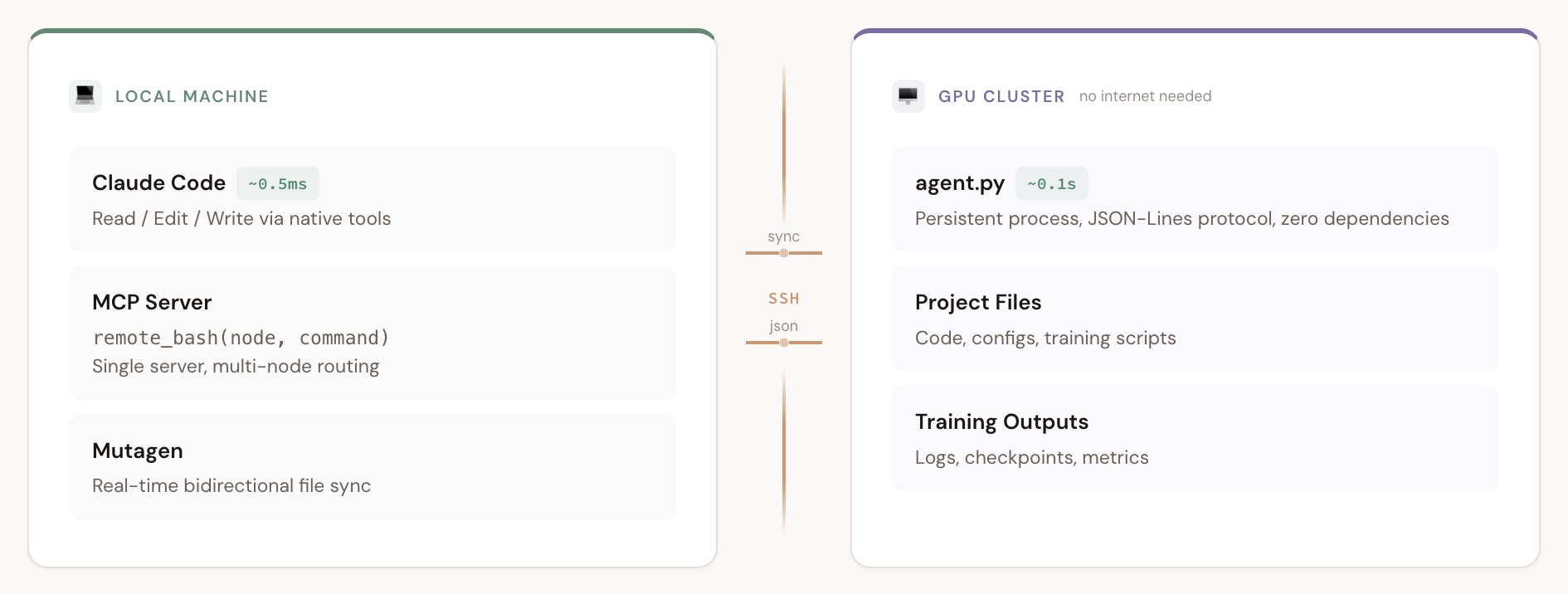 > [Interactive version](docs/architecture.html) — click to toggle between Agent and Sentinel modes. **Two execution modes** — agent mode is ~10x faster, sentinel mode is the automatic fallback: | Mode | Latency | How it works | |------|---------|-------------| | **Agent mode** | ~0.1s | Persistent SSH connection → cluster-side `agent.py` → JSON-Lines protocol | | **Sentinel mode** | ~1.5s | Per-command SSH → sentinel pattern detection → `proc.kill()` | ``` Local Machine GPU Cluster (no internet needed) ├── Claude Code / Codex (Read/Edit/Write)└── /path/to/project/ │ ~0.5ms per operation ├── training scripts ├── Mutagen real-time sync ◄──SSH──────────► code + logs ├── remote_bash MCP ──────────SSH──────────► bash commands │ agent mode: ~0.1s └── agent.py (persistent) │ sentinel fallback: ~1.5s └── Read results locally (~20x faster) ``` ### The Automation Loop ``` Edit code (local) → Mutagen syncs instantly → Run experiment (remote) → Logs sync back → Read results (local) → repeat ``` - **Code editing**: Local native tools (fast, ~0.5ms) - **Code sync**: [Mutagen](https://mutagen.io) real-time bidirectional sync over SSH (see [MUTAGEN.md](MUTAGEN.md)) - **Remote execution**: `remote_bash` MCP tool — single MCP server, multi-node routing via `node` parameter - **Reading results**: Local native Read tool (~20x faster than reading through remote MCP) ## Quick Start ### 1. Install the skill For Claude Code: ```bash npx skills add https://github.com/jiahao-shao1/remote-cluster-agent ``` For Codex: ```bash mkdir -p ~/.codex/skills ln -s /path/to/remote-cluster-agent ~/.codex/skills/remote-cluster-agent ``` ### 2. Install the MCP server The installer now supports both Claude Code and Codex. It auto-detects the client by default; if both are installed, use `--client` to pick one explicitly. For Claude Code: ```bash bash .agents/skills/remote-cluster-agent/mcp-server/setup.sh --client claude <name> "<ssh_cmd>" <remote_project_dir> # Example: register two nodes bash .agents/skills/remote-cluster-agent/mcp-server/setup.sh --client claude train "ssh -p 2222 gpu-node" /home/user/project bash .agents/skills/remote-cluster-agent/mcp-server/setup.sh --client claude eval "ssh gpu-eval" /data/project ``` For Codex: ```bash bash .agents/skills/remote-cluster-agent/mcp-server/setup.sh --client codex <name> "<ssh_cmd>" <remote_project_dir> # Example: register two nodes bash .agents/skills/remote-cluster-agent/mcp-server/setup.sh --client codex train "ssh -p 2222 gpu-node" /home/user/project bash .agents/skills/remote-cluster-agent/mcp-server/setup.sh --client codex eval "ssh gpu-eval" /data/project ``` Auto-detect example: ```bash bash .agents/skills/remote-cluster-agent/mcp-server/setup.sh train "ssh -p 2222 gpu-node" /home/user/project ``` Prerequisites: [uv](https://docs.astral.sh/uv/), SSH access to cluster, Claude Code or Codex CLI installed. ### 3. Deploy the cluster-side agent (optional, ~10x faster) ```bash scp .agents/skills/remote-cluster-agent/cluster-agent/agent.py <host>:~/.mcp-agent/agent.py ``` Or let your agent do it after restart — just say "deploy agent". Without the agent, everything still works via sentinel mode (~1.5s/command). ### 4. Restart your client After installing, restart the client you use so it reloads the new MCP server: - Claude Code: restart Claude Code - Codex: restart the Codex CLI session Then just describe what you want to do on the cluster. ### 5. Set up Mutagen sync ```bash bash .agents/skills/remote-cluster-agent/mutagen-setup.sh gpu-node ~/repo/my_project /home/user/my_project ``` See [MUTAGEN.md](MUTAGEN.md) for details. Mutagen works entirely over SSH — no public internet required on the cluster. ### 6. First-time interactive setup On first use, your agent will ask you a few questions (SSH endpoints, paths, sync methods, safety rules) and generate your personal `reference/context.local.md`. This file is gitignored — your config stays private. ## How It Works ### Agent Mode (fast, ~0.1s) ``` MCP Server Cluster Node ┌──────────┐ SSH long connection ┌────────────┐ │ AgentConn│── stdin: JSON req ───→│ agent.py │ │ Pool │←─ stdout: JSON resp ──│ subprocess │ │ (per │ │ .run(cmd) │ │ node) │ └────────────┘ └──────────┘ ``` One SSH connection per node, kept alive with `ServerAliveInterval`. Commands sent as JSON-Lines, results returned immediately. ### Sentinel Mode (fallback, ~1.5s) ``` remote_bash("nvidia-smi") → ssh -tt gpu-node 'nvidia-smi 2>&1; echo "___MCP_EXIT_${?}___"' stdout: | NVIDIA H100 ... ___MCP_EXIT_0___ ← sentinel detected → proc.kill() ← force-kill SSH (proxy won't close it) → return clean output ``` Used automatically when the agent is not available. ## File Structure ``` remote-cluster-agent/ ├── SKILL.md # Skill instructions for your agent ├── README.md # This file ├── README.zh-CN.md # Chinese version ├── .gitignore # Excludes context.local.md and .venv ├── cluster-agent/ │ └── agent.py # Cluster-side agent (zero deps, ~100 lines) ├── mcp-server/ │ ├── mcp_remote_server.py # MCP server with agent mode + sentinel fallback │ ├── pyproject.toml # Dependencies: mcp>=1.25 │ ├── setup.sh # One-command install for Claude Code / Codex │ └── tests/ # Unit tests ├── mutagen-setup.sh # Mutagen file sync setup script ├── MUTAGEN.md # Mutagen sync guide ├── reference/ │ ├── context.template.md # Configuration template │ └── context.local.md # Your config (gitignored, auto-generated) └── VERSION ``` ## Configuration The skill generates a `reference/context.local.md` through interactive setup on first use, containing: - Cluster nodes (names, SSH commands, purposes) - Project paths and directory structure - Shared storage safety rules - GPU management scripts - Mutagen sync sessions ## Acknowledgements Heavily inspired by [claude-code-local-for-vscode](https://github.com/justimyhxu/claude-code-local-for-vscode). Thanks to [@cherubicXN](https://github.com/cherubicXN) for the implementation of Mutagen-based local-cluster real-time sync. ## License MIT
