KO
|
EN
gitlite — search
Search
#python
#hacktoberfest
#react
#javascript
#nodejs
#typescript
#html
#android
#docker
#markdown
#cli
#go
Icons.Avalonia
★ 430
Open GitHub ↗
No description available.
Download README (.md)
Explore Similar Repositories
trailing-slash-guide
:
Understand and fix your static website trailing slash issues!
DataDrivenDiffEq.jl
:
Data driven modeling and automated discovery of dynamical systems for the SciML Scientific Machine Learning organization
imbalanced-ensemble
:
[NeurIPS'25]🛠️Class-imbalanced Ensemble Learning Toolbox. | 类别不平衡/长尾机器学习库
rpt
:
A physically-based path tracer
actor-boilerplate
:
A starting point for web apps based on the actor model.
// repository documentation
Was this content helpful?
★ 0
(0 ratings)
Select Rating:
★
★
★
★
★
Submit Feedback
Recent Feedback
×
Download README
Do you want to download the
README.md
file for
Icons.Avalonia
?
Download (.md)
# Icons.Avalonia A library to easily display icons in an Avalonia App. [](https://github.com/Projektanker/Icons.Avalonia/actions/workflows/push.yml) [](https://github.com/Projektanker/Icons.Avalonia/actions/workflows/sync-fontawesome.yml) [](https://github.com/Projektanker/Icons.Avalonia/actions/workflows/sync-materialdesign.yml) ## NuGet | Name | Description | Version | | :----------------------------------------------------------------------------------------------------------------------- | :-------------------------------------------------------------- | :------------------------------------------------------------------------------ | | [Projektanker.Icons.Avalonia](https://www.nuget.org/packages/Projektanker.Icons.Avalonia/) | Core library |  | | [Projektanker.Icons.Avalonia.FontAwesome](https://www.nuget.org/packages/Projektanker.Icons.Avalonia.FontAwesome/) | [Font Awesome 6 Free](https://fontawesome.com) |  | | [Projektanker.Icons.Avalonia.MaterialDesign](https://www.nuget.org/packages/Projektanker.Icons.Avalonia.MaterialDesign/) | [Material Design Icons](https://pictogrammers.com/library/mdi/) |  | ## Icon providers | Name | Prefix | Example | | :------------- | :----: | :----------- | | FontAwesome 6 | `fa` | `fa-github` | | MaterialDesign | `mdi` | `mdi-github` | ## Usage A full example is available in the [Demo project](src/Demo/Demo.csproj). ### 1. Register icon providers on app start up Register the icon provider(s) with the `IconProvider.Current`. ```csharp class Program { // Initialization code. Don't use any Avalonia, third-party APIs or any // SynchronizationContext-reliant code before AppMain is called: things aren't initialized // yet and stuff might break. public static void Main(string[] args) { BuildAvaloniaApp() .StartWithClassicDesktopLifetime(args); } // Avalonia configuration, don't remove; also used by visual designer. public static AppBuilder BuildAvaloniaApp() { IconProvider.Current .Register<FontAwesomeIconProvider>() .Register<MaterialDesignIconProvider>(); return AppBuilder.Configure<App>() .UsePlatformDetect() .LogToTrace(); } } ``` ### 2. Add xml namespace Add `xmlns:i="https://github.com/projektanker/icons.avalonia"` to your view. ### 3. Use the icon **Standalone** ```xml <i:Icon Value="fa-brands fa-anchor" /> ``` **Attached to ContentControl (e.g. Button)** ```xml <Button i:Attached.Icon="fa-brands fa-anchor" /> ``` **Attached to MenuItem** ```xml <MenuItem Header="About" i:MenuItem.Icon="fa-solid fa-circle-info" /> ``` **Custom icon size** ```xml <i:Icon Value="fa-brands fa-anchor" FontSize="24" /> ``` **Animated** ```xml <i:Icon Value="fa-spinner" Animation="Pulse" /> <i:Icon Value="fa-sync" Animation="Spin" /> ``` **As an [Image](https://docs.avaloniaui.net/docs/reference/controls/image) source** ```xml <Image> <Image.Source> <i:IconImage Value="fa-brands fa-anchor" Brush="(defaults to black)" /> </Image.Source> </Image> ``` ### Done 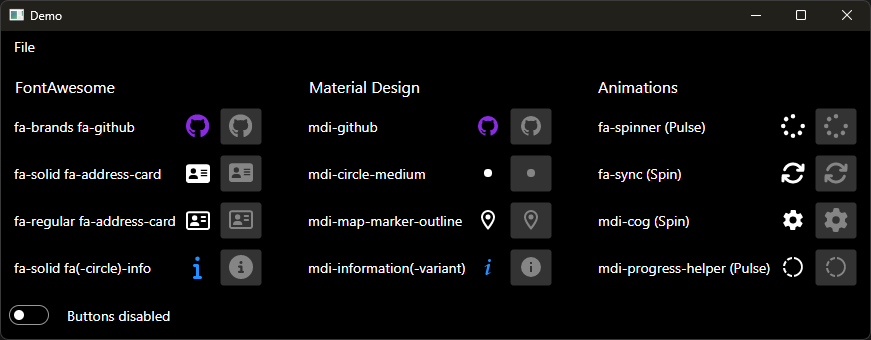 ## Implement your own Icon Provider Just implement the `IIconProvider` interface: ```csharp namespace Projektanker.Icons.Avalonia { /// <summary> /// Represents an icon reader. /// </summary> public interface IIconReader { /// <summary> /// Gets the model of the requested icon. /// </summary> /// <param name="value">The value specifying the icon to return it's model from.</param> /// <returns>The model of the icon.</returns> /// <exception cref="System.Collections.Generic.KeyNotFoundException"> /// The icon associated with the specified <paramref name="value"/> does not exists. /// </exception> IconModel GetIcon(string value); } /// <summary> /// Represents an icon provider. /// </summary> public interface IIconProvider : IIconReader { /// <summary> /// Gets the prefix of the <see cref="IIconProvider"/>. /// </summary> string Prefix { get; } } } ``` and register it with the `IIconProviderContainer`: ```csharp IconProvider.Current.Register<MyCustomIconProvider>() ``` or ```csharp IIconProvider provider = new MyCustomIconProvider(/* custom ctor arguments */); IconProvider.Current.Register(provider); ``` The `IIconProvider.Prefix` property has to be unique within all registered providers. It is used to select the right provider. E.g. `FontAwesomeIconProvider`'s prefix is `fa`.
