KO
|
EN
gitlite — search
Search
#typescript
#ai-agents
#ai
#dsh-plugin
#deepseek-harness
#open-source
#cli
#claude-code
#codex
#developer-tools
#react
#windows
easyexcel
★ 55
Open GitHub ↗
简单、高效、易扩展,且支持百万数据读写的ExcelUtils
Download README (.md)
Explore Similar Repositories
easyexcel-spring-boot-starter
:
基于 easyexcel 的 spring-boot-starter,简化了 Web 环境下 Excel 的导入与导出操作。
easyexcel-utils
:
EasyExcel 简单封装 , 通过修改源码增加更多的model注解支持
easyexcelTest
:
根据阿里的easyexcel通过validation+正则实现excel导入校验
easyexcel-demo
:
阿里easyexcel 2.x实现百万级海量数据效率导入导出demo
EasyExcel
:
NetCore excel 导入,导出
// repository documentation
Was this content helpful?
★ 0
(0 ratings)
Select Rating:
★
★
★
★
★
Submit Feedback
Recent Feedback
×
Download README
Do you want to download the
README.md
file for
easyexcel
?
Download (.md)
# 你的ExcelUtil简单、高效、易扩展吗 > Author: Dorae > Date: 2018年10月23日12:30:15 > 转载请注明出处 ---- ## 一、背景 最近在看和Excel导出相关的代码,但是: 1. 大部分项目中的excelutil工具类会存在安全问题,而且无法扩展; 2. 一些开源的Excel工具太过重量级,并且不不能完全适合业务定制; 3. 于是乎产生了**easyExcel**(巧合,和阿里的easeExcel重名了😀)。 #### HSS、XSS 如果数据量较小的话,这种方式并不会存在问题,但是当数据量比较大时,存在非常严重的问题: 1. OOM(因为数据并没有被即使的写入磁盘); 2. 耗时(串行化); 3. HSS对单sheet的数据量限制(65535),XSS为100万+。 HSSFWorkbook workbook = new HSSFWorkbook(); HSSFSheet sheet = workbook.createSheet(sheetName); // 创建表头 ... // 写入数据 for (...) { HSSFRow textRow = sheet.createRow(rowIndex); for (...) { HSSFCell textcell = textRow.createCell(colIndex); textcell.setCellValue(value); } } #### SXSS 为了改善上出方案的问题,SXSS采用了缓冲的方式,即按照某种策略定期刷盘。从而解决了OOM与耗时太长的问题。使用姿势: InputStream inputStream = new FileInputStream(file); XSSFWorkbook xssfWorkbook = new XSSFWorkbook(inputStream); SXSSFWorkbook sxssfWorkbook = new SXSSFWorkbook(xssfWorkbook,properties.getRowAccessWindowsize()); Sheet sheet = sxssfWorkbook.getSheet(properties.getSheetName()); if (sheet == null) { sheet = sxssfWorkbook.createSheet(properties.getSheetName()); } // 创建表头 ... // 写入数据 for (...) { Row row = sheet.createRow(row); row.setValue(value); } FileOutputStream outputStream = new FileOutputStream(file); sxssfWorkbook.write(outputStream); ## 二、EasyUtil 虽然SXSS解决了OMM与耗时的问题,但是使用起来不太方便,会造成很多重复代码,于是产生了**EasyUtil**,在介绍之前我们先思考几个问题: 1. excel操作有哪些公用逻辑可以抽离; 2. 业务需求是什么,有哪些逻辑可以抽离; 3. 如何开放较好的扩展点。 #### 架构 按照上述的几个问题,EasyUtil-1.0的架构如图1-1所示,其中绿色部分为扩展点。 1. IFillSheet为填充excel的接口,可以扩展自定义格式,目前在FillSheetModeEnums中提供了两种(建议使用APPENDMODE); 2. AbstractDataSupplier为需要根据业务实现的数据获取接口,类似于stream; 3. IExcelProcesor生成的file的后处理接口,比如可以将文件上传到某个公共空间。 <center> <img src="http://images.cnblogs.com/cnblogs_com/Dorae/1325782/o_easyexcel.jpg"/> </center> <center> 图 1-1 </center> #### 使用姿势 ##### git [戳这里](https://github.com/Dorae132/easyexcel) ##### pom <groupId>com.github.Dorae132</groupId> <artifactId>easyutil.easyexcel</artifactId> <version>1.2.0</version> ##### test static class TestValue { @ExcelCol(title = "姓名") private String name; @ExcelCol(title = "年龄", order = 1) private String age; @ExcelCol(title = "学校", order = 3) private String school; @ExcelCol(title = "年级", order = 2) private String clazz; public TestValue(String name, String age, String school, String clazz) { super(); this.name = name; this.age = age; this.school = school; this.clazz = clazz; } } private List<TestValue> getData(int count) { List<TestValue> dataList = Lists.newArrayListWithCapacity(10000); for (int i = 0; i < count; i++) { dataList.add(new TestValue("张三" + i, "age: " + i, null, "clazz: " + i)); } return dataList; } @Test public void testAppend() throws Exception { List<TestValue> dataList = getData(10000); long start = System.currentTimeMillis(); ExcelProperties<TestValue, File> properties = ExcelProperties.produceAppendProperties("", "C:\\Users\\Dorae\\Desktop\\ttt\\", "append.xlsx", 0, TestValue.class, 0, null, new AbstractDataSupplier<TestValue>() { private int i = 0; @Override public Pair<List<TestValue>, Boolean> getDatas() { boolean hasNext = i < 10; i++; return Pair.of(dataList, hasNext); } }); File file = (File) ExcelUtils.excelExport(properties, FillSheetModeEnums.APPEND_MODE.getValue()); System.out.println("apendMode: " + (System.currentTimeMillis() - start)); } #### 效果 1. 10万行4列数据耗时3s左右(我的渣渣笔记本); 2. 对内存基本没消耗(当然需要合适的缓冲参数)。 ## 三、To do 1. 导出excel和获取数据的接口并行化;(done, see the PARALLEL_APPEND_MODE) 2. 完善utils。 # 读取篇 # 高效读取百万级数据 接[上一篇](https://github.com/Dorae132/easyexcel/blob/master/README.md)介绍的高效写文件之后,最近抽时间研究了下Excel文件的读取。概括来讲,poi读取excel有两种方式:**用户模式和事件模式**。 然而很多业务场景中的读取Excel仍然采用用户模式,但是这种模式需要创建大量对象,对大文件的支持非常不友好,非常容易OOM。但是对于事件模式而言,往往需要自己实现listener,并且需要根据自己需要解析不同的event,所以用起来比较复杂。 <font color = "red">基于此,EasyExcel封装了常用的Excel格式文档的事件解析,并且提供了接口供开发小哥**扩展定制化**,实现让你解析Excel不再费神的目的。</font> Talk is cheap, show me the code. ### 使用姿势 #### 普通姿势 看看下边的姿势,是不是觉得**只需要关心业务逻辑了**? ExcelUtils.excelRead(ExcelProperties.produceReadProperties("C:\\Users\\Dorae\\Desktop\\ttt\\", "append_0745704108fa42ffb656aef983229955.xlsx"), new IRowConsumer<String>() { @Override public void consume(List<String> row) { System.out.println(row); count.incrementAndGet(); try { TimeUnit.MICROSECONDS.sleep(100); } catch (InterruptedException e) { // TODO Auto-generated catch block e.printStackTrace(); } } }, new IReadDoneCallBack<Void>() { @Override public Void call() { System.out.println( "end, count: " + count.get() + "\ntime: " + (System.currentTimeMillis() - start)); return null; } }, 3, true); #### 定制姿势 什么?你想**定制context,添加handler**?请看下边!你只需要实现一个Abstract03RecordHandler然后regist到context(关注ExcelVersionEnums中的factory)就可以了。 public static void excelRead(IHandlerContext context, IRowConsumer rowConsumer, IReadDoneCallBack callBack, int threadCount, boolean syncCurrentThread) throws Exception { // synchronized main thread CyclicBarrier cyclicBarrier = null; threadCount = syncCurrentThread ? ++threadCount : threadCount; if (callBack != null) { cyclicBarrier = new CyclicBarrier(threadCount, () -> { callBack.call(); }); } else { cyclicBarrier = new CyclicBarrier(threadCount); } for (int i = 0; i < threadCount; i++) { THREADPOOL.execute(new ConsumeRowThread(context, rowConsumer, cyclicBarrier)); } context.process(); if (syncCurrentThread) { cyclicBarrier.await(); } } ### 框架结构 如图,为整个EasyExcel的结构,其中(如果了解过设计模式,或者读过相关源码,应该会很容易理解): 1. 绿色为可扩展接口, 2. 上半部分为写文件部分,下办部分为读文件。 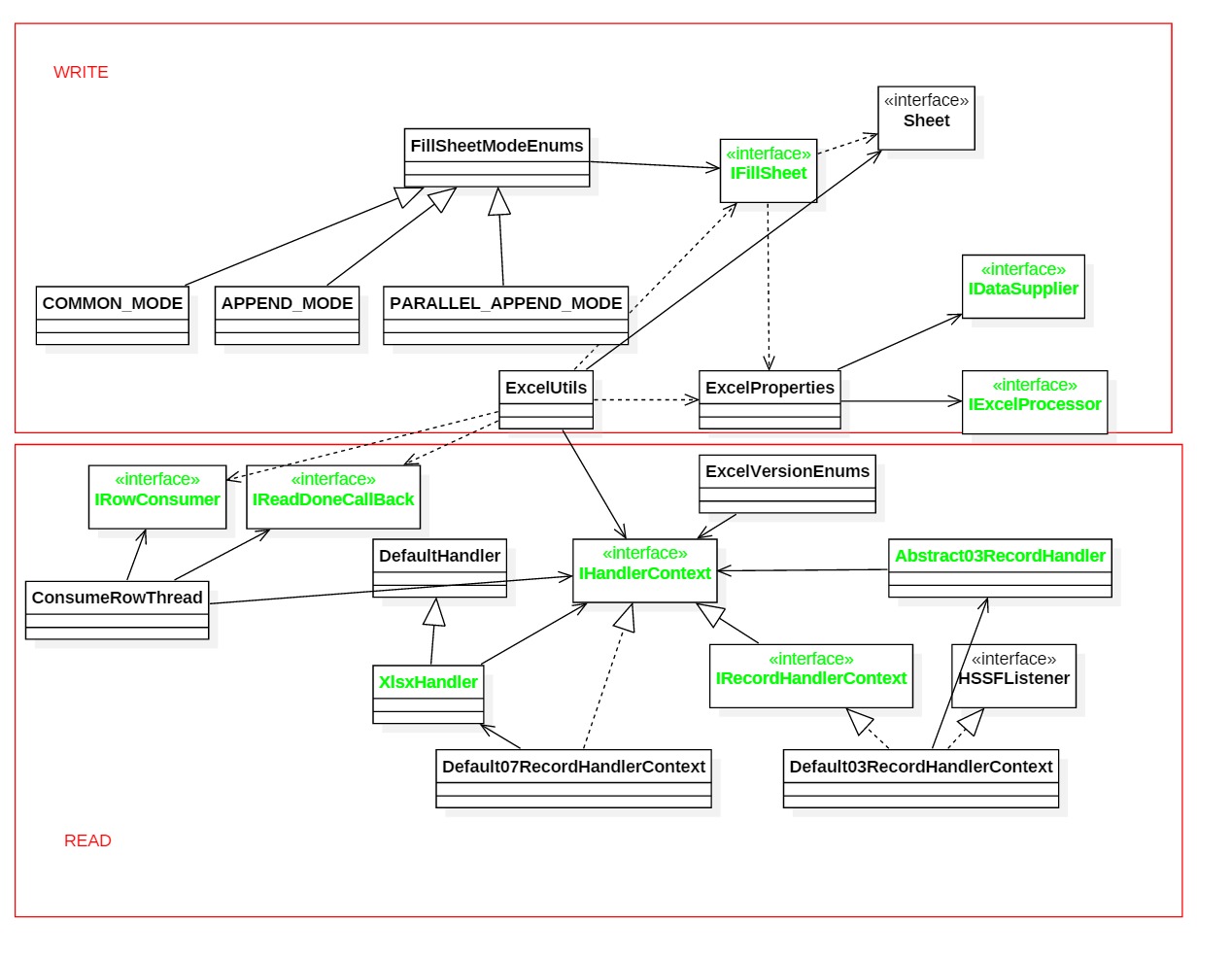 ### 总结 至此,EasyExcel的基本功能算是完善了,欢迎各路大神提Issue过来。🍗
