KO
|
EN
gitlite — search
Search
#typescript
#ai-agents
#ai
#dsh-plugin
#deepseek-harness
#open-source
#claude-code
#codex
#cli
#developer-tools
#react
#windows
gotrue-js
★ 481
Open GitHub ↗
JavaScript client library for GoTrue
Download README (.md)
Explore Similar Repositories
Angular-ReactiveForms
:
Materials for my Pluralsight course: Angular Reactive Forms.
fromfrom
:
A JS library written in TS to transform sequences of data from format to another
aparapi
:
The New Official Aparapi: a framework for executing native Java and Scala code on the GPU.
Only
:
:bouquet: An easy way to persist and run code block only as many times as necessary on Android.
compose-performance-skills
:
⚡️ A curated library of Agent Skills focused on Jetpack Compose performance.
// repository documentation
Was this content helpful?
★ 0
(0 ratings)
Select Rating:
★
★
★
★
★
Submit Feedback
Recent Feedback
×
Download README
Do you want to download the
README.md
file for
gotrue-js
?
Download (.md)
 This is a JavaScript client library for the [GoTrue](https://github.com/netlify/gotrue) API. It lets you create and authenticate users and is a building block for constructing the UI for signups, password recovery, login and logout. Play around the methods via the [demo site](https://gotruejs-playground.netlify.com/). ## Installation ```bash yarn add gotrue-js ``` ## Usage ```js import GoTrue from 'gotrue-js'; // Instantiate the GoTrue auth client with an optional configuration auth = new GoTrue({ APIUrl: 'https://<your domain name>/.netlify/identity', audience: '', setCookie: false, }); ``` ### GoTrue configuration APIUrl: The absolute path of the GoTrue endpoint. To find the `APIUrl`, go to your Netlify site dashboard and navigate to **Project configuration > Identity**. The URL will be `https://<your-site>.netlify.app/.netlify/identity`. audience(optional): `audience` is one of the pre-defined [JWT payload](https://tools.ietf.org/html/rfc7519#section-4.1.3) claims. It's an optional attribute which is set to be empty by default. If you were hosting your own identity service and wanted to support [multitenancy](https://en.wikipedia.org/wiki/Multitenancy), you would need `audience` to separate the users. setCookie(optional): set to `false` by default. When set to `true`, the library sends an `X-Use-Cookie` header with requests, which tells the GoTrue server to set HttpOnly cookies containing the authentication tokens. This is more secure than localStorage alone because HttpOnly cookies cannot be accessed by JavaScript (protecting against XSS attacks). **Remember me:** The `login()`, `confirm()`, and `recover()` methods accept an optional `remember` boolean parameter. When `remember` is `true` and `setCookie` is enabled, the server sets longer-lived session cookies. When `false`, the cookies expire when the browser session ends. ### Server settings Fetch the server's identity settings to check configuration like autoconfirm, signup status, and enabled external providers. `auth.settings()` ```js auth.settings().then((settings) => console.log(settings)); ``` Example response object: ```json { "autoconfirm": false, "disable_signup": false, "external": { "bitbucket": true, "email": true, "facebook": false, "github": true, "gitlab": true, "google": true } } ``` ### Error handling If an error occurs during the request, the promise may be rejected with an `Error`, `HTTPError`, `TextHTTPError`, or `JSONHTTPError`. These error classes are exported from the library and can be used for type checking: ```js import GoTrue, { HTTPError, JSONHTTPError, TextHTTPError } from 'gotrue-js'; auth.login(email, password).catch((error) => { if (error instanceof JSONHTTPError) { console.log('JSON error:', error.json); } else if (error instanceof TextHTTPError) { console.log('Text error:', error.data); } else if (error instanceof HTTPError) { console.log('HTTP error:', error.status); } }); ``` ## Authentication examples ### Create a new user Create a new user with the specified email and password ```js auth.signup(email, password); ``` Example usage: ```js auth .signup(email, password) .then((response) => console.log('Confirmation email sent', response)) .catch((error) => console.log("It's an error", error)); ``` Example response object: ```json { "id": "example-id", "aud": "", "role": "", "email": "example@example.com", "confirmation_sent_at": "2018-04-27T22:36:59.636416916Z", "app_metadata": { "provider": "email" }, "user_metadata": null, "created_at": "2018-04-27T22:36:59.632133283Z", "updated_at": "2018-04-27T22:37:00.061039863Z" } ``` Also, make sure the `Registration preferences` under `Identity settings` in your Netlify dashboard are set to `Open`. 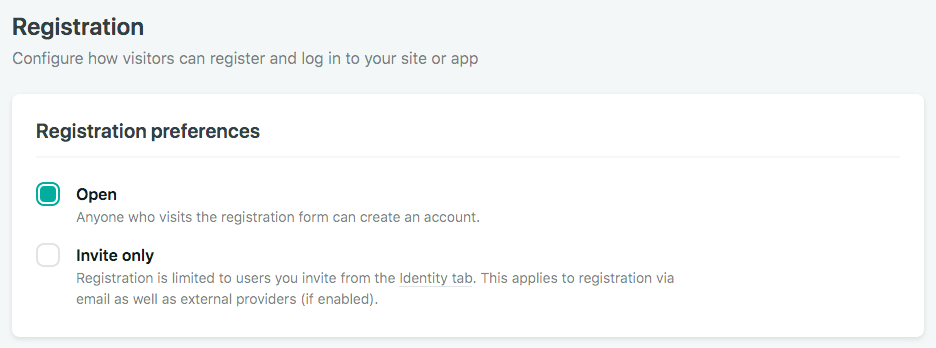 If the registration preferences is set to be `Invite only`, you'll get an error message like this: `{code: 403, msg: 'Signups not allowed for this instance'}` ### Confirm a new user signup This function confirms a user sign up via a unique confirmation token ```js auth.confirm(token, remember); ``` When a new user signed up, a confirmation email will be sent to the user if `Autoconfirm` isn't turned on under the [identity settings](https://www.netlify.com/docs/identity/#adding-users). In the email, there's a link that says "Confirm your email address". When a user clicks on the link, it'll be redirected to the site with a [fragment identifier](https://en.wikipedia.org/wiki/Fragment_identifier) `#confirmation_token=Iyo9xHvsGVbW-9A9v4sDmQ` in the URL. For all good reasons, the `confirmation_token` is hidden from the browser via a redirect. If you wish to manually confirm a user using the `auth.confirm(token, remember)` method, you can copy the link location of the email and use the `curl -I` script to get the `confirmation_token` from your terminal. E.g., ```bash $ curl -I https://mandrillapp.com/track/click/30002868/example.netlify.com?p=example-token HTTP/1.1 302 Moved Temporarily Server: nginx/1.12.2 Date: Tue, 15 May 2018 21:19:13 GMT Content-Type: text/html; charset=utf-8 Set-Cookie: PHPSESSID=77c421bf85fa412e5f994f28a6b30956; expires=Wed, 16-May-2018 07:19:13 GMT; path=/; secure; HttpOnly Expires: Thu, 19 Nov 1981 08:52:00 GMT Cache-Control: no-store, no-cache, must-revalidate, post-check=0, pre-check=0 Pragma: no-cache Set-Cookie: PHPSESSID=77c421bf85fa412e5f994f28a6b30956; expires=Wed, 16-May-2018 07:19:13 GMT; path=/; secure; httponly Location: https://example.netlify.com/#confirmation_token=Iyo9xHvsGVbW-9A9v4sDmQ ``` Example usage: ```js auth .confirm(token, true) .then((response) => { console.log('Confirmation email sent', JSON.stringify({ response })); }) .catch((error) => { console.log(error); }); ``` _This method requires usage of browser window object `localStorage`. Test the usage in your front end code._ Example response object: ```json { "response": { "api": { "apiURL": "https://example.netlify.com/.netlify/identity", "_sameOrigin": true, "defaultHeaders": {} }, "url": "https://example.netlify.com/.netlify/identity", "token": { "access_token": "example-jwt-token", "token_type": "bearer", "expires_in": 3600, "refresh_token": "example-refresh_token", "expires_at": 1526110512000 }, "id": "example-id", "aud": "", "role": "", "email": "example@netlify.com", "confirmed_at": "2018-05-12T06:35:13Z", "confirmation_sent_at": "2018-05-12T06:34:35Z", "app_metadata": { "provider": "email" }, "user_metadata": {}, "created_at": "2018-05-12T06:34:35Z", "updated_at": "2018-05-12T06:34:35Z" } } ``` ### Login a user Handles user login via the specified email and password `auth.login(email, password, remember)` Example usage: ```js auth .login(email.value, password.value, true) .then((response) => { showMessage(`Success! Response: ${JSON.stringify({ response })}`, form); }) .catch((error) => showMessage(`Failed :( ${JSON.stringify(error)}`, form)); ``` Example response object: ```json { "response": { "api": { "apiURL": "https://example.netlify.com/.netlify/identity", "_sameOrigin": true, "defaultHeaders": {} }, "url": "https://example.netlify.com/.netlify/identity", "token": { "access_token": "example-jwt-token", "token_type": "bearer", "expires_in": 3600, "refresh_token": "example-refresh_token", "expires_at": 1526062471000 }, "id": "example-id", "aud": "", "role": "", "email": "example@netlify.com", "confirmed_at": "2018-05-04T23:57:17Z", "app_metadata": { "provider": "email" }, "user_metadata": {}, "created_at": "2018-05-04T23:57:17Z", "updated_at": "2018-05-04T23:57:17Z" } } ``` ### Request password recover email This function sends a request to GoTrue API and triggers a password recovery email to the specified email address. Similar to `confirmation_token`, the `recovery_token` is baked in the link of the email. You can also copy the link location from the email and run `curl -I` in the command line to grab the token. `auth.requestPasswordRecovery(email)` Example usage: ```js auth .requestPasswordRecovery(email) .then((response) => console.log('Recovery email sent', { response })) .catch((error) => console.log('Error sending recovery mail: %o', error)); ``` Example response object: `{}` ### Recover a user account This function recovers a user account via a recovery token `auth.recover(recoveryToken, remember)` Example usage: ```js auth .recover(token, true) .then((response) => console.log('Logged in as %s', JSON.stringify({ response }))) .catch((error) => console.log('Failed to verify recover token: %o', error)); ``` Example response object: ```json { "response": { "api": { "apiURL": "https://example.netlify.com/.netlify/identity", "_sameOrigin": true, "defaultHeaders": {} }, "url": "https://example.netlify.com/.netlify/identity", "token": { "access_token": "example-jwt-token", "token_type": "bearer", "expires_in": 3600, "refresh_token": "example-refresh_token", "expires_at": 1526107729000 }, "id": "example-id", "aud": "", "role": "", "email": "example@netlify.com", "confirmed_at": "2018-05-12T05:48:49Z", "invited_at": "2018-05-04T23:40:00Z", "recovery_sent_at": "2018-05-12T05:48:13Z", "app_metadata": { "provider": "email" }, "user_metadata": {}, "created_at": "2018-05-04T23:40:00Z", "updated_at": "2018-05-04T23:40:00Z" } } ``` ### Get current user This function returns the current user object when a user is logged in. The user data is recovered from localStorage, so it may be stale if the user's profile was updated elsewhere. `auth.currentUser()` To fetch fresh user data from the server, call `getUserData()` on the user object: ```js const user = auth.currentUser(); if (user) { await user.getUserData(); // Fetches and updates user data from server } ``` Example usage: ```js const user = auth.currentUser(); ``` Example response object: ```json { "api": { "apiURL": "https://example.netlify.com/.netlify/identity", "_sameOrigin": true, "defaultHeaders": {} }, "url": "https://example.netlify.com/.netlify/identity", "token": { "access_token": "example-jwt-token", "token_type": "bearer", "expires_in": 3600, "refresh_token": "example-refresh_token", "expires_at": 1525214326000 }, "id": "example-id", "aud": "", "role": "", "email": "example@example.com", "confirmed_at": "2018-05-01T19:21:00Z", "app_metadata": { "provider": "email" }, "user_metadata": {}, "created_at": "2018-05-01T19:21:00Z", "updated_at": "2018-05-01T19:21:00Z" } ``` ### Validate current session This method validates the cached user against the server. Returns `Promise<User | null>`. If the user's account has been deleted or the session is invalid, it clears the local session and returns `null`. `auth.validateCurrentSession()` Use this for server-side rendering or when you need to confirm the local session is still valid before trusting it. ```js const user = await auth.validateCurrentSession(); if (user) { console.log('Session is valid', user); } else { console.log('No valid session'); } ``` ### Update a user This function updates a user object with specified attributes `user.update(attributes)` Users can update their `user_metadata` field. To do this, pass an object to the `attributes.data` key with the fields you want to update. Updates to a users `app_metadata` must be performed from a secure environment, such as a [Lambda function](https://www.netlify.com/docs/functions/). For examples on updating user and app metadata, see [netlify/identity-update-user-data](https://github.com/netlify/identity-update-user-data). Example usage: ```js const user = auth.currentUser(); user .update({ email: 'example@example.com', password: 'password' }) .then((user) => console.log('Updated user %s', user)) .catch((error) => { console.log('Failed to update user: %o', error); throw error; }); ``` Example response object: ```json { "api": { "apiURL": "https://example.netlify.com/.netlify/identity", "_sameOrigin": true, "defaultHeaders": {} }, "url": "https://example.netlify.com/.netlify/identity", "token": { "access_token": "example-jwt-token", "token_type": "bearer", "expires_in": 3600, "refresh_token": "example-refresh_token", "expires_at": 1525215471000 }, "id": "example-id", "aud": "", "role": "", "email": "example@example.com", "confirmed_at": "2018-05-01T19:21:00Z", "app_metadata": { "provider": "email" }, "user_metadata": {}, "created_at": "2018-05-01T19:21:00Z", "updated_at": "2018-05-01T22:04:07.923944421Z", "new_email": "new-example@example.com", "email_change_sent_at": "2018-05-01T22:04:07.49197052Z" } ``` ### Get a JWT token This function retrieves a JWT token from a currently logged in user. `user.jwt(forceRefresh)` **When to call `.jwt()`:** Call this method before making authenticated API requests to your backend. The method automatically refreshes the token if it's expired (tokens expire after 1 hour by default), so you don't need to manually track expiration. Pass `true` to force a refresh even if the token hasn't expired. Example usage: ```js const user = auth.currentUser(); const jwt = user.jwt(); jwt .then((response) => console.log('This is a JWT token', response)) .catch((error) => { console.log('Error fetching JWT token', error); throw error; }); ``` Example response object: ```bash eyJhbGciOiJIUzI1NiIsInR5cCI6IkpXVCJ9.eyJleHAiOjE1MjUyMTk4MTYsInN1YiI6ImE5NG.98YDkB6B9JbBlDlqqef2nme2tkAnsi30QVys9aevdCw debugger eval code:1:43 ``` ### Token refresh flow When a user logs in, they receive two tokens: - **Access token** (`access_token`): A short-lived JWT (1 hour by default) used to authenticate API requests - **Refresh token** (`refresh_token`): A longer-lived token used to obtain new access tokens The `.jwt()` method handles token refresh automatically: 1. If the access token is still valid, it returns immediately 2. If the access token has expired, it uses the refresh token to obtain a new one 3. The new tokens are stored and the fresh access token is returned You don't need to manually track expiration or refresh tokens — just call `.jwt()` before each authenticated request: ```js async function fetchProtectedData() { const user = auth.currentUser(); const token = await user.jwt(); // Automatically refreshes if needed return fetch('/api/protected', { headers: { Authorization: `Bearer ${token}` }, }); } ``` If the refresh token is invalid or expired (e.g., user was logged out on another device), the `.jwt()` call will fail and the session will be cleared. ### Logout a user This function removes the current session of the user and log out the user `user.logout()` Example usage: ```js const user = auth.currentUser(); user .logout() .then(response => console.log("User logged out");) .catch(error => { console.log("Failed to logout user: %o", error); throw error; }); ``` ## Admin methods Admin methods require a logged-in user with an admin role. You can call them directly via the `user.admin` accessor: ```js const user = auth.currentUser(); const admin = user.admin; // List all users const users = await admin.listUsers(aud); // Get a specific user const userData = await admin.getUser({ id: 'user-id' }); // Create a user const newUser = await admin.createUser('email@example.com', 'password', { confirm: true }); // Update a user (e.g., set roles) await admin.updateUser({ id: 'user-id' }, { app_metadata: { roles: ['editor'] } }); // Delete a user await admin.deleteUser({ id: 'user-id' }); ``` Alternatively, you can perform admin operations server-side through a Lambda function using `context.clientContext.identity` to get a short-lived admin token. See [Functions and Identity](https://docs.netlify.com/functions/functions-and-identity/) for more info. > For users of [Netlify CLI](https://github.com/netlify/cli) - functions using admin methods will _not_ work locally - they need to be deployed to your site to work as intended. Below are examples of calling the admin API from a Lambda function using `fetch`. 1. Create an HTML form for user login ```html <h2>Log in</h2> <form name="login"> <div class="message"></div> <p> <label>Email<br /><input type="email" name="email" required /></label> </p> <p> <label>Password<br /><input type="password" name="password" required /></label> </p> <button type="submit">Log in</button> </form> ``` 2. Invoke lambda function. (In this example our function is names as `hello.js`) ```js document.querySelector("form[name='login']").addEventListener("submit", e => { e.preventDefault(); const form = e.target; const { email, password } = form.elements; auth .login(email.value, password.value, true) .then(response => { const myAuthHeader = "Bearer " + response.token.access_token; //creates the bearer token fetch("/.netlify/functions/hello", { headers: { Authorization: myAuthHeader }, credentials: "include" }) .then(response => { console.log({ response }); }) .catch(error => {...}); }) .catch(error => {...}); }); ``` ### Get a user This function retrieves a user object with the specified user id ```js getUser(user) { return this.user.\_request(`/admin/users/${user.id}`); } ``` Example usage: ```js import fetch from 'node-fetch'; exports.handler = async (event, context) => { const { identity, user } = context.clientContext; const userID = user.sub; const userUrl = `${identity.url}/admin/users/{${userID}}`; const adminAuthHeader = `Bearer ${identity.token}`; try { return fetch(userUrl, { method: 'GET', headers: { Authorization: adminAuthHeader }, }) .then((response) => response.json()) .then((data) => { console.log('data', JSON.stringify(data)); return { statusCode: 204 }; }) .catch((error) => { console.log('Failed to get user! 500! Internal.'); return { statusCode: 500, body: `Internal Server Error: ${error}`, }; }); } catch (error) { console.log('GOT HERE! 500! outer'); return { statusCode: 500, body: `Internal Server Error: ${error}` }; } }; ``` Example response object: ```json { "id": "example-id", "aud": "", "role": "", "email": "example@netlify.com", "confirmed_at": "2018-05-09T06:28:46Z", "app_metadata": { "provider": "email" }, "user_metadata": {}, "created_at": "2018-05-09T06:28:46Z", "updated_at": "2018-05-09T06:28:46Z" } ``` ### Update a user This function updates the an existing user with the specified attributes ```js updateUser(user, attributes = {}) { return this.user._request(`/admin/users/${user.id}`, { method: "PUT", body: JSON.stringify(attributes) }); } ``` Example usage: ```js import fetch from "node-fetch"; exports.handler = async (event, context) => { const { identity, user } = context.clientContext; const userID = user.sub; const userUrl = `${identity.url}/admin/users/${userID}`; const adminAuthHeader = "Bearer " + identity.token; try { return fetch(userUrl, { method: "PUT", headers: { Authorization: adminAuthHeader }, body: JSON.stringify({ app_metadata: { roles: ["superstar"] } }) }) .then(response => { return response.json(); }) .then(data => { console.log("Updated a user! 204!"); console.log(JSON.stringify({ data })); return { statusCode: 204 }; }) .catch(e => return {...}); } catch (e) { return e; } }; ``` Example response object: ```json { "data": { "id": "example-id", "aud": "", "role": "", "email": "example@netlify.com", "confirmed_at": "2018-05-09T06:52:58Z", "app_metadata": { "provider": "email", "roles": ["superstar"] }, "user_metadata": {}, "created_at": "2018-05-09T06:52:58Z", "updated_at": "2018-05-11T00:26:27.668465915Z" } } ``` ### Invite a user To invite a user using the admin token, do a `POST` request to `/invite` endpoint. It's not possible to set `user_metadata` or `app_metadata` until a user has been created. Example usage: ```js import fetch from 'node-fetch'; exports.handler = async (event, context) => { const { identity } = context.clientContext; const inviteUrl = `${identity.url}/invite`; const adminAuthHeader = "Bearer " + identity.token; try { return fetch(inviteUrl, { method: "POST", headers: { Authorization: adminAuthHeader }, body: JSON.stringify({ email: "example@example.com" }) }) .then(response => { return response.json(); }) .then(data => { console.log("Invited a user! 204!"); console.log(JSON.stringify({ data })); return { statusCode: 204 }; }) .catch(e => return {...}); } catch (e) { return e; }; }; ``` Example response: ```json { "id": "example-id", "aud": "", "role": "", "email": "example@example.com", "invited_at": "2018-05-25T20:28:04.436230023Z", "app_metadata": { "provider": "email" }, "user_metadata": null, "created_at": "2018-05-25T20:28:03.684905861Z", "updated_at": "2018-05-25T20:28:04.862592451Z" } ``` ### Create a new user This function creates a new user object with the specified new email and password and other optional attributes. User will not be confirmed unless `confirm` parameter is set to true. ```js createUser(email, password, attributes = {}) { attributes.email = email; attributes.password = password; return this.user.\_request("/admin/users", { method: "POST", body: JSON.stringify(attributes) }); } ``` Example usage: ```js import fetch from "node-fetch"; exports.handler = async (event, context) => { const { identity, user } = context.clientContext; const userID = user.sub; const usersUrl = `${identity.url}/admin/users`; const adminAuthHeader = "Bearer " + identity.token; try { return fetch(usersUrl, { method: "POST", headers: { Authorization: adminAuthHeader }, body: JSON.stringify({ email: "new-email@netlify.com", password: "newpw", confirm: true }) }) .then(response => { return response.json(); }) .then(data => { console.log("Created a user! 204!"); console.log(JSON.stringify({ data })); return { statusCode: 204 }; }) .catch(e => {...}; }); } catch (e) { return e; } }; ``` Example response object: ```json { "data": { "id": "new-id", "aud": "", "role": "", "email": "new-email@netlify.com", "app_metadata": { "provider": "email" }, "user_metadata": null, "created_at": "2018-05-11T00:37:34.475713996Z", "updated_at": "2018-05-11T00:37:34.481743781Z" } } ``` ### Delete a user This function deletes an existing user object ```js deleteUser(user) { return this.user.\_request(`/admin/users/${user.id}`, { method: "DELETE" }); } ``` Example usage: ```js import fetch from 'node-fetch'; exports.handler = async (event, context) => { const { identity, user } = context.clientContext; const userID = user.sub; const userUrl = `${identity.url}/admin/users/{${userID}}`; const adminAuthHeader = `Bearer ${identity.token}`; try { return fetch(userUrl, { method: 'DELETE', headers: { Authorization: adminAuthHeader }, }) .then((response) => { console.log('Deleted a user!'); return response.json(); }) .then((data) => { console.log({ data }); return { statusCode: 204 }; }) .catch((error) => ({ statusCode: 500, body: `Internal Server Error: ${error}`, })); } catch (error) { return error; } }; ``` Example response object: ```json { "data": {} } ``` ### Get a list of users This function retrieves an array of user objects. The `audience` param is optional. It's for when you are hosting your own identity service and want to support [multitenancy](https://en.wikipedia.org/wiki/Multitenancy). ```js listUsers(aud) { return this.user._request("/admin/users", { method: "GET", audience: aud }); } ``` Example usage: ```js import fetch from 'node-fetch'; exports.handler = async (event, context) => { const { identity, user } = context.clientContext; const usersUrl = `${identity.url}/admin/users`; const adminAuthHeader = `Bearer ${identity.token}`; try { return fetch(usersUrl, { method: 'GET', headers: { Authorization: adminAuthHeader }, }) .then((response) => response.json()) .then((data) => { console.log('data', JSON.stringify(data)); return { statusCode: 204 }; }) .catch((error) => ({ statusCode: 500, body: `Internal Server Error: ${error}`, })); } catch (error) { return error; } }; ``` Example response object: ```json { "aud": "", "users": [ { "id": "example-id-01", "aud": "", "role": "", "email": "example-email-01@netlify.com", "app_metadata": { "provider": "email" }, "user_metadata": {}, "created_at": "2018-05-09T18:14:51Z", "updated_at": "2018-05-09T18:14:51Z" }, { "id": "example-id-02", "aud": "", "role": "", "email": "example-email-02@netlify.com", "confirmed_at": "2018-05-09T06:52:58Z", "app_metadata": { "provider": "email" }, "user_metadata": {}, "created_at": "2018-05-09T06:52:58Z", "updated_at": "2018-05-09T06:52:58Z" }, { "id": "example-id-03", "aud": "", "role": "", "email": "example-email-03@netlify.com", "confirmed_at": "2018-05-09T06:28:46Z", "app_metadata": { "provider": "email", "roles": ["admin"] }, "user_metadata": {}, "created_at": "2018-05-09T06:28:46Z", "updated_at": "2018-05-09T06:28:46Z" } ] } ``` ## Oauth providers supported by Netlify Currently we support Google, GitHub, GitLab, and BitBucket as directly supported in the Netlify app UI (other oauth providers require serverless functions to be set up correctly, but these don't.) [`acceptInviteExternalUrl`](https://github.com/netlify/gotrue-js/blob/6dda47191dac9194658c5899272fc962d96f8cd6/index.d.ts#L21) and [`loginExternalUrl`](https://github.com/netlify/gotrue-js/blob/6dda47191dac9194658c5899272fc962d96f8cd6/index.d.ts#L26) are useful for that. You can see example usage in [`netlify-identity-widget`](https://github.com/netlify/netlify-identity-widget/blob/ece08ed2a3653adcad87cf3998277362e362da60/src/state/store.js#L99-L119) ## Exports The library exports the following: **Default export:** - `GoTrue` — the main client class **Named exports:** - `User` — user instance class - `Admin` — admin API class (accessed via `user.admin`) - `HTTPError`, `JSONHTTPError`, `TextHTTPError` — error classes for response handling **TypeScript types:** - `Token` — access/refresh token shape - `UserData` — server user data shape - `UserAttributes` — attributes for user updates - `GoTrueInit` — constructor options (`APIUrl`, `audience`, `setCookie`) - `Settings` — server settings shape (from `auth.settings()`) - `SignupResponse` — response from `auth.signup()` ```js import GoTrue, { User, Admin, HTTPError, JSONHTTPError, TextHTTPError } from 'gotrue-js'; ``` ## See also - [gotrue](https://github.com/netlify/gotrue) - [netlify-identity-widget](https://github.com/netlify/netlify-identity-widget/) - [Netlify identity docs](https://www.netlify.com/docs/identity/)
