KO
|
EN
gitlite — search
Search
#python
#java
#python3
#arduino
#golang
#machine-learning
#rust
#html
#flask
#javascript
#seismology
#nodejs
EOverlays
★ 13
Open GitHub ↗
No description available.
Download README (.md)
Explore Similar Repositories
Unity-RefractiveFlowRender
:
No description available.
ansi-width
:
Calculate the width of a string when printed to the terminal
community-meetings
:
A place for agendas and minutes from regular MDN community meetings
FedLMG
:
The implementation of FedCADO (Classifier-Assisted Diffusion for One-shot Federated learning method)
TubiFY
:
TubiFy is a Python script that converts Spotify playlists into YouTube links for easy access to music and videos.
// repository documentation
Was this content helpful?
★ 0
(0 ratings)
Select Rating:
★
★
★
★
★
Submit Feedback
Recent Feedback
×
Download README
Do you want to download the
README.md
file for
EOverlays
?
Download (.md)
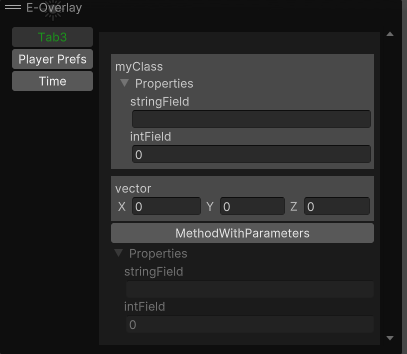
# EOverlays EOverlays is a editor tool for Unity 3D game engine to write custom editor tools & utilities. EOverlay uses Overlays at Unity (you can discover overlays from [this link](https://docs.unity3d.com/Manual/overlays.html)). # Support EOverlays is an open-source project that I am developing in my free time. If you like it you can support me by donating. <a href="https://www.buymeacoffee.com/erdemkly"><img src="https://img.buymeacoffee.com/button-api/?text=Buy me a pizza&emoji=🍕&slug=erdemkly&button_colour=FFDD00&font_colour=000000&font_family=Poppins&outline_colour=000000&coffee_colour=ffffff" /></a> ## Installation ### Asset Store You can install from [this](https://assetstore.unity.com/packages/tools/utilities/e-overlays-268776) link. ### Git For git installation you need to know git link (https://github.com/erdemkly/EOverlays.git) Paste this link to<br> <b>Window -> Package Manager -> + -> Add package from git url -> [Paste link here] -> Add</b><br> (The location of this feature may vary depending on the Unity version. I am using version 2021.3.21f1 of the Unity game engine.) ### Install via OpenUPM [](https://openupm.com/packages/com.erdem.overlays/) [](https://openupm.com/packages/com.erdem.overlays/) The package is available on the [openupm registry](https://openupm.com). It's recommended to install it via [openupm-cli](https://github.com/openupm/openupm-cli). ``` openupm add com.erdem.overlays ``` ## Usage #### Your scripts must be children of the Editor folder. You can discover some usages from Samples in the package. ### Attribute You must add this attribute to method to serialize. ```csharp [EOverlayElement(name:"Tab Name",order:0,enableCondition:"condition_variable_name")] ``` #### Enable Condition If you want to control your methods visibility with bool variable you can use enable condition parameter. ```csharp public static bool EnableCondition {get; set;} [EOverlayElement(name:"Tab Name",order:0,enableCondition:"EnableCondition")] ``` ### Methods Your methods must be static and public to work correctly. <details> <summary>Supported Types</summary> ```csharp void, int, float, double, long, Enum, Object, Vector2, Vector3, Vector2Int, Vector3Int, string, Color, struct, class ``` For now. </details> ```csharp [EOverlayElement(name:"Tab Name",order:0,enableCondition:"condition_variable_name")] public static Type MyMethod(Type a,Type b,Type c){} ``` Also you can show your custom VisualElement. ```csharp [EOverlayElement(name:"Tab Name",order:0,enableCondition:"condition_variable_name")] public static VisualElement MyMethod(){} ``` #### Method Samples ```csharp [EOverlayElement(name:"Tab1")] public static Color MixColors(Color myColor,Color secondaryColor) { return (myColor + secondaryColor)/2; } ``` <br> <br> 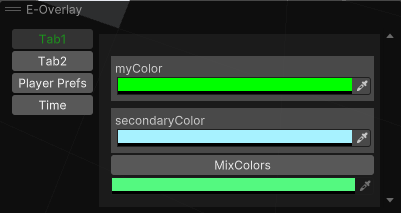 ```csharp public static bool myBool { get => Selection.gameObjects.Length == 2; } [EOverlayElement(name: "Tab1", enableCondition: "myBool")] public static float AngleOfSelectedObjects() { var from = Selection.gameObjects[0].transform.position; var to = Selection.gameObjects[1].transform.position; return Vector3.Angle(from, to); } ``` <br> <br> 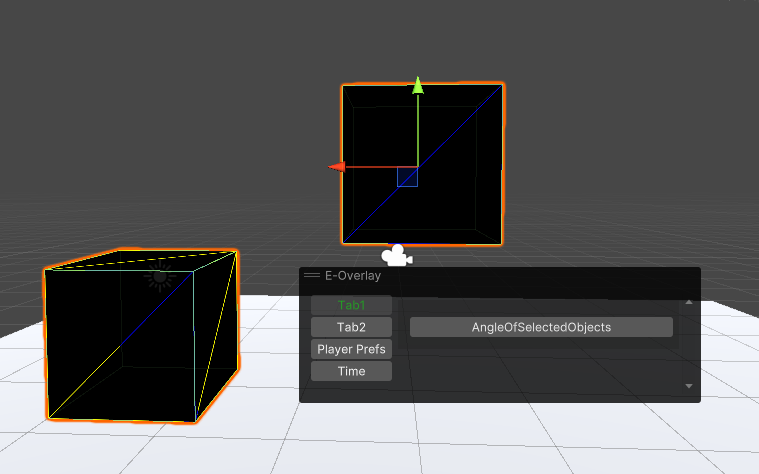 ```csharp [EOverlayElement(name: "Tab1")] public static VisualElement AngleOfSelectedObjects() { var root = new VisualElement(); root.Add(new Label("Dummy label")); root.Add(new Slider("Dummy Slider", 0, 10)); root.Add(new Button() { text = "Dummy button" }); return root; } ``` 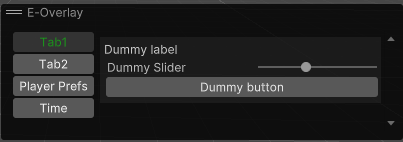 ## NEW! SUPPORTS CLASSES & STRUCTS AS PARAMETER & RETURN TYPE ```csharp [EOverlayElement("Tab3")] public static MyClass MethodWithParameters(MyClass myClass,Vector3 vector) { return myClass; } ```