KO
|
EN
gitlite — search
Search
#javascript
#python
#hacktoberfest
#react
#ai
#typescript
#llm
#go
#golang
#android
#machine-learning
#rust
#deep-learning
#linux
MMM-CountEvents
★ 13
Open GitHub ↗
Countdown or countup for events
Download README (.md)
Explore Similar Repositories
vscode-instant-weather
:
Show instant weather in Visual Studio Code
HeroesONE-Reloaded
:
An objectively superior to all previous tool & library combination for reading and writing .ONE archives from Sonic Heroes and Shadow The Hedgehog.
ytdown
:
An open source, fat-free YouTube downloader.
LoRaGateway
:
LoRa网关:SX1278间通讯,MCU:stm32l07
lodestone-parser
:
Parse lodestone for those juicy details
// repository documentation
Was this content helpful?
★ 0
(0 ratings)
Select Rating:
★
★
★
★
★
Submit Feedback
Recent Feedback
×
Download README
Do you want to download the
README.md
file for
MMM-CountEvents
?
Download (.md)
# MMM-CountEvents Countdown or countup for events > This module is revamped from the scratch. If you are using the previous version, you may need reinstall again. ## Screenshots 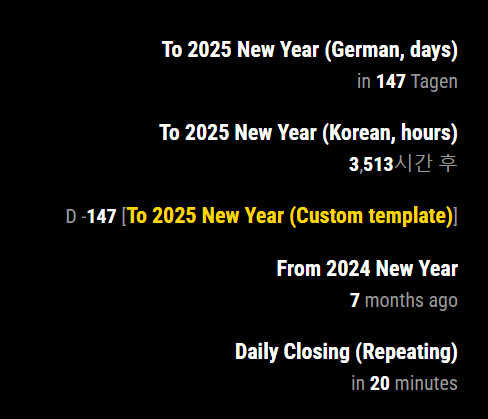 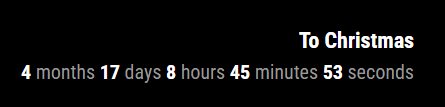 ## Features - Count up / down to specific date/time - Various formatting & custom template - Auto repeat : yearly, monthly, daily, hourly. - Callback functions for updating or passing the event. ## Installation ```sh cd ~/MagicMirror/modules git clone https://github.com/MMRIZE/MMM-CountEvents cd MMM-CountEvents npm install ``` This module needs `MMM-CustomElementTime` module also. It would be installed by execution of `postinstall.sh`. Usually This script will be run automatically by `npm install` but, when that is not executed properly, do it by manual. ```sh # In some environments, you may need to allow permission chmod 755 ./postinstall.sh sh ./postinstall.sh # OR ./postinstall.sh ``` But when you have still a problem, you can install that module also by manual. ```sh cd ~/MagicMirror/modules git clone https://github.com/MMRIZE/MMM-CustomElementTime ``` ## Configuration **IMPORTANT** You should include `MMM-CustomElementTime` also in the `config.js` ```js { module: "MMM-CustomElementTime" }, { module: "MMM-CountEvents", position: "top_right", config: { events: [ { title: "To Christmas", targetTime: "25 Dec 2024", }, ] } }, ``` ### Simplest Example ```js { module: "MMM-CountEvents", position: "top_right", config: { events: [ { title: "To Christmas", targetTime: "25 Dec 2024", }, ] } }, ``` ### Detailed (and default) ```js { module: "MMM-CountEvents", position: "top_right", config: { /* Common default properties */ locale: null, refresh: 1000 * 60, unit: "auto", repeat: false, ignoreBefore: false, ignoreAfter: false, className: "default", output: `<dl><dt class="title"></dt><dd class="output"></dd></dl>`, numericAlways: false, reverse: false, numberOnly: false, numberSign: false, useQuarter: false, onPassed: null, onUpdated: null, events: [ { title: "To Christmas", targetTime: "2024-12-25", repeat: "yearly", ignoreAfter: 1000 * 60 * 60 * 24, }, ] } }, ``` ### Config values for common default properties These properties in `config:[]` will be applied to each event by default. You can reassign specific property in each event again. |Property | default value | Description | |:---|:---:|:---| |`locale`|MM's default `locale` or system locale | `BCP-47` format locale identifier. It needs for displaying format by user's locale. <br/> e.g. "de", "en-CA" | |`refresh`| 60_000 | (ms) self-refreshing interval of the event. `0` means no refreshing. |`unit`| "auto" | **Available values**: `"auto"`, `"year"`, `"month"`, `"day"`, `"hour"`, `"minute"`, `"second"` and `"quarter"`<br/> `"years"`, `"months"`, `"days"`, `"hours"`, `"minutes"`, `"seconds"` would be available also.| |`repeat`| false | **Available values**: `"yearly"`, `"monthly"`, `"daily"`, `"hourly"` or `false`<br/> When the event is a kind of recurred events.<br/>`"minutely"` and `"secondly"` are not supported. It sounds weird and out-of-sense. | |`ignoreBefore`| false | **Available values**: `false` or `(miliseconds)` <br/> If you set `1000 * 60 * 60 * 24 * 7`, this events will not be displayed before 7days from `targetTime`. | |`ignoreAfter` | false | **Available values**: `false` or `(miliseconds)` <br/> If you set `1000 * 60 * 60`, this events will not be displayed after 1 hour from `targetTime`.| |`className`| "default" | You can assign specific CSS class name to the event. | |`output` | HTML Template | You can modify the output of the event displaying. The element with `title` class and `output` class will be fulfilled with event title and the count result. | |`numericAlways` | false | The result will be various depends on the locale <br/>`false`: "tomorrow" <br/>`true`: `in 1 day` | |`reverse` | false | By default (`false`), the displayed time would be counter to the `targetTime` from now. When `true`, vice versa. } |`numberOnly` | false | Wheter displaying only number (without literals) or not. <br/>`false`: "in 12 hours" <br/>`true`: "12". | |`numberSign` | false | Displaying `+` or `-` <br/> This will be valid only with `numberOnly: true` options.| |`useQuarter` | false | Add `quarter` unit into the `unit: "auto"` options. | |`onPassed` | callback function `(event, element)`| When the `targetTime` is passed, this callback function would be called. Usually this will be used for an alarm function. See the [Examples]<br/>- The check for passing moment is depending on the `refresh` interval.<br/>- When if the event is repeated, this function would be called again at a time.| |`onUpdated` | callback function `(event, element)` | When the event is refreshed by `refresh` option, this callback function would be called. Usually this will be used for modifying the result on real-time. See the [Examples]| |`events` | [] | Array of event objects to display. | ### Event object |Property | default value | Description | |:---|:---:|:---| |`title`| "nonamed" | The title of the event. This value will be injected into the first `class="title"` element in `output` template of the event. | |`targetTime` | "2025-01-01" | The target time of the event. <br/>**Available Types**<br/>- *Unix Timestamp* <br/>- *Date-like String*: See the below [[Time format]] <br/>- *Javascript Date Object* | > All common default properties could be used and reassigned for the specific evnet object. ## CSS Styling The displaying result of this module woule have the HTML like this. (with default `output` template) ```html <div id="module_13_MMM-CountEvents" class="module MMM-CountEvents MMM-CountEvents"> <header class="module-header" style="display: none;">Module Header</header> <div class="module-content"> <ul class="CE" id="CE_module_13_MMM-CountEvents"> /* event begin */ <li class="default"> /* className of the event */ /* output template begin */ <dl> <dt class="title">Daily Closing (Repeating)</dt> /* title injection */ <dd class="output"> /* result injection */ <mm-time relative locale="en-US" time="1723128780000" decouple data-numeric="auto" relative-unit="auto" refresh="1000" class="future default"> /* mm-time custom element to display the targetTime */ <span class="mm-time-parts literal">in </span> <span class="mm-time-parts integer hour">23</span> <span class="mm-time-parts literal"> hours</span> </mm-time> </dd> </dl> /* output template end */ </li> /* event end */ </ul> </div> </div> ``` You can handle CSS to style for your purpose. ## Examples ### Various configs  ```js { module: "MMM-CountEvents", position: "top_right", config: { events: [ { title: "To 2025 New Year (German, days)", targetTime: "2025-01-01", locale: "de-DE", unit: "days", }, { title: "To 2025 New Year (Korean, hours)", targetTime: "2025-01-01", locale: "ko-KR", unit: "hours", }, { title: "To 2025 New Year (Custom template)", targetTime: "2025-01-01", locale: "ja-JP", numberOnly: true, numberSign: true, unit: "days", output: `<div>D <span class="output"></span>(<span class="title" style="color:gold;"></span>)</div>`, }, { title: "From 2024 New Year", targetTime: "2024-01-01", }, { title: "Daily Closing (Repeating)", targetTime: "2025-01-01T17:00:00", repeat: "daily", refresh: 1000, } ] } }, ``` ### `onPassed` example for notification alert 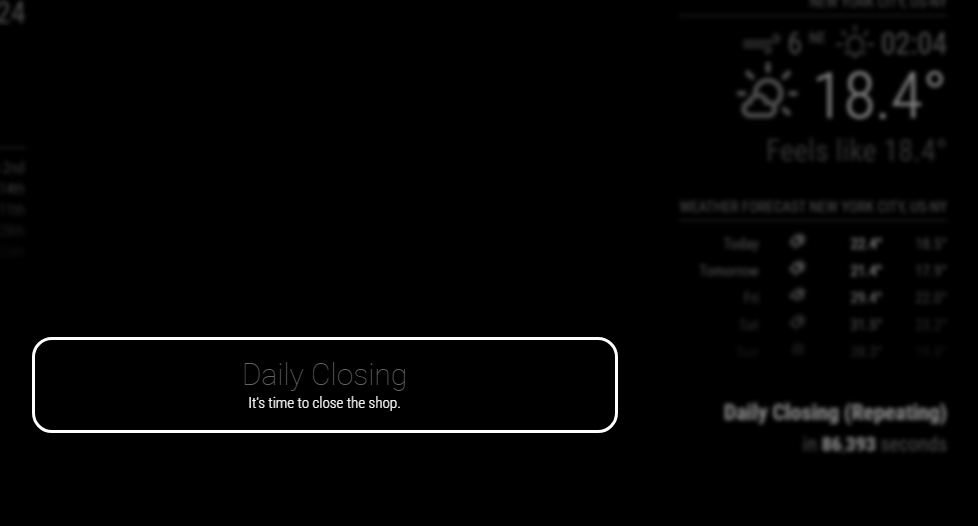 ```js { module: "MMM-CountEvents", position: "top_right", config: { events: [ { title: "Daily Closing (Repeating)", targetTime: "2025-01-01T16:53:00", repeat: "daily", refresh: 1000, onPassed: (event, element) => { const self = MM.getModules().withClass("MMM-CountEvents")[0] MM.sendNotification( "SHOW_ALERT", { type: "alert", title: "Daily Closing", message: "It's time to close the shop.", timer: 60_000 }, self ) }, } ] } }, ``` ### `onUpdated` example for displaying **`Years, Months, Days, Hours, Minutes, Seconds`** This module doesn't provide "OO years, OO months, OO days, OO hours, OO minutes, OO seconds" format, however, you can hook the result with `onUpdated` callback function.  ```js /* event object definition*/ title: "To Christmas", targetTime: "2024-12-25", repeat: "yearly", onUpdated: (event, element) => { const pluralMap = { // In 'english-something' locales, 'one' and 'other' are only used. // However, other locales may have more. ('zero', 'two', 'few', 'many' in 'arabic' locale. 'Chinese' locale has only 'other') // You need to modify this map according to your locale. "year": { one: "year", other: "years" }, "month": { one: "month", other: "months" }, "day": { one: "day", other: "days" }, "hour": { one: "hour", other: "hours" }, "minute": { one: "minute", other: "minutes" }, "second": { one: "second", other: "seconds" }, } const pluralRules = new Intl.PluralRules(event.locale) const methodMap = { FullYear: "year", Month: "month", Date: "day", Hours: "hour", Minutes: "minute", Seconds: "second", } const method = (type, name) => { return type + name } const upTo = (start, upto, unit) => { let count = 0 const s = new Date(start.valueOf()) do { s?.[method('set', unit)](s?.[method('get', unit)]() + 1) count++ } while (s.valueOf() < upto.valueOf()) return count - 1 } const [small, big] = [element.time, Date.now()].sort((a, b) => a - b).map(v => new Date(v)) const moment = new Date(small.valueOf()) let result = "" for (const m of Object.keys(methodMap)) { const u = upTo(moment, big, m) if (u > 0) { moment?.[method('set', m)](moment?.[method('get', m)]() + u) result += `<span class="mm-time-parts integer ${methodMap[m]}">${u}</span> <span class="mm-time-parts literal">${pluralMap[methodMap[m]]?.[pluralRules.select(u)]}</span> ` } } element.innerHTML = result } ``` ### Time format For `targetTime`, [ISO 8601](https://en.wikipedia.org/wiki/ISO_8601) and [RFC 2822](https://tools.ietf.org/html/rfc2822#section-3.3) available. **[RFC 2822]** ``` 6 Mar 17 21:22 UT 6 Mar 17 21:22:23 UT 6 Mar 2017 21:22:23 GMT 06 Mar 2017 21:22:23 Z Mon 06 Mar 2017 21:22:23 z Mon, 06 Mar 2017 21:22:23 +0000 ``` **[ISO 8601]** ``` 2013-02-08 # A calendar date part 2013-W06-5 # A week date part 2013-039 # An ordinal date part 20130208 # Basic (short) full date 2013W065 # Basic (short) week, weekday 2013W06 # Basic (short) week only 2013050 # Basic (short) ordinal date 2013-02-08T09 # An hour time part separated by a T 2013-02-08 09 # An hour time part separated by a space 2013-02-08 09:30 # An hour and minute time part 2013-02-08 09:30:26 # An hour, minute, and second time part 2013-02-08 09:30:26.123 # An hour, minute, second, and millisecond time part 2013-02-08 24:00:00.000 # hour 24, minute, second, millisecond equal 0 means next day at midnight 20130208T080910,123 # Short date and time up to ms, separated by comma 20130208T080910.123 # Short date and time up to ms 20130208T080910 # Short date and time up to seconds 20130208T0809 # Short date and time up to minutes 20130208T08 # Short date and time, hours only 2013-02-08 09 # A calendar date part and hour time part 2013-W06-5 09 # A week date part and hour time part 2013-039 09 # An ordinal date part and hour time part 2013-02-08 09+07:00 # +-HH:mm 2013-02-08 09-0100 # +-HHmm 2013-02-08 09Z # Z 2013-02-08 09:30:26.123+07:00 # +-HH:mm 2013-02-08 09:30:26.123+07 # +-HH ``` ## History ### `2.0.0` (2024-08-07) - Revamped ## Author - Author: Seongnoh Sean Yi <eouia0819@gmail.com> [](https://ko-fi.com/Y8Y56IFLK) - Repository : https://github.com/MMRIZE/MMM-CountEvents - Version: 2.0.0 (2024-08-07)
