KO
|
EN
gitlite — search
Search
#python
#java
#python3
#arduino
#golang
#machine-learning
#rust
#html
#flask
#javascript
#seismology
#nodejs
swift_ios_ollama_client_v3
★ 19
Open GitHub ↗
No description available.
Download README (.md)
Explore Similar Repositories
leftright
:
How fast is your left / right hand?
tabulens
:
🔍📃 LLM-powered PDF Table Extractor
knotgym
:
[NeurIPS DB 2025] A gym environment for visual spatial reasoning - knot so simple :)
emby-tools
:
Emby 周边工具集:数据统计、海报生成、批量重命名、每日推荐。Vue3 + Node.js + Docker 全栈解决方案。
obsidian-linear-plugin
:
No description available.
// repository documentation
Was this content helpful?
★ 0
(0 ratings)
Select Rating:
★
★
★
★
★
Submit Feedback
Recent Feedback
×
Download README
Do you want to download the
README.md
file for
swift_ios_ollama_client_v3
?
Download (.md)
# LLM Client - for Multiple AI Providers [한국어](README-ko.md) | [日本語](README-jp.md) | English MyOllama3 is an iOS application developed with SwiftUI that provides conversational AI chatbot functionality by connecting to multiple AI providers including Ollama servers, LMStudio, Claude API, and OpenAI API. 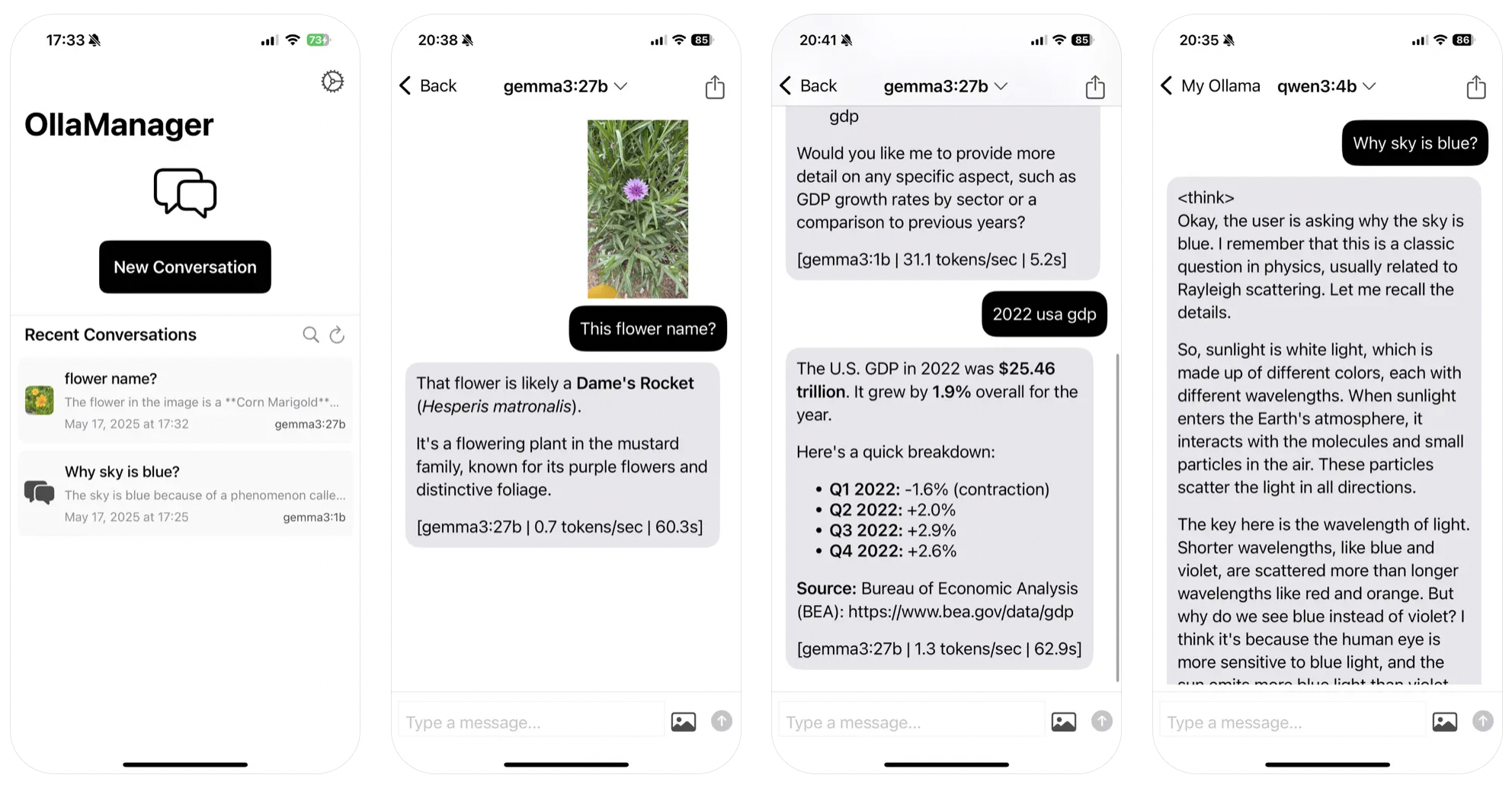 ## 🎁 Download App - For those who have difficulty building, you can download the app from the link below. - [https://apps.apple.com/us/app/llm-client-for-ollama/id6738298481](https://apps.apple.com/us/app/llm-client-for-ollama/id6738298481) ## 📱 Project Overview This app is a **unified AI conversation application** designed for users who prioritize **privacy protection** and **flexibility**. It provides an intuitive interface for interacting with multiple large language model (LLM) providers, with all conversation content securely stored only on the user's device. ## ✨ Core Features ### 🤖 Multi-Provider AI Support - **Ollama Integration**: Connect to local or remote Ollama servers - **LMStudio Compatibility**: Support for LMStudio local inference server - **Claude API**: Direct integration with Anthropic's Claude models - **OpenAI API**: Support for GPT models via OpenAI API - **Dynamic Switching**: Seamlessly switch between providers during conversations - **Provider Persistence**: Automatically remember last used LLM provider and model ### 🔄 Enhanced User Experience - **Real-time Model Updates**: Available models automatically refresh when switching providers - **Persistent Selections**: Last used LLM and model automatically restored on app launch - **Dynamic Configuration**: All settings applied in real-time without app restart - **Connection Status**: Real-time monitoring of server/API connectivity - **Flexible URL Handling**: Support for empty/invalid URLs with graceful error handling ### 🤖 AI Conversation Features - **Real-time Streaming Responses**: Fast real-time AI responses with streaming support - **Multiple Model Support**: All AI models from supported providers (Llama, Mistral, Qwen, GPT, Claude, etc.) - **Multimodal Conversations**: Support for image attachments and image analysis through vision models - **Document Processing**: PDF and text file upload and analysis capabilities - **File Attachment Support**: Support for various file formats including images (JPG, PNG, GIF, etc.), PDF documents, and text files - **Response Cancellation**: Ability to stop AI response generation at any time - **Auto Image Resizing**: Automatic image compression and resizing for optimal performance ### 📚 Conversation Management - **Persistent Storage**: Automatic saving of all conversation history using SQLite database - **Conversation Search**: Keyword-based conversation content search functionality - **Conversation Restoration**: Load and continue previous conversations seamlessly - **Provider-based Management**: Separate management of conversations with different AI providers - **Message Management**: Copy, share, and delete individual messages with context menus - **Full Conversation Export**: Export entire conversations as text for external use - **Conversation Deletion**: Complete conversation removal with confirmation ### ⚙️ Advanced Settings - **Multi-Provider Configuration**: Manage settings for Ollama, LMStudio, Claude, and OpenAI separately - **API Key Management**: Secure storage and management of Claude and OpenAI API keys - **AI Parameter Adjustment**: Fine-tuning of Temperature (0.1-2.0), Top P (0.1-1.0), Top K (1-100) - **Custom Instructions**: System prompt settings for AI behavior customization - **Connection Testing**: Built-in connectivity testing for all supported providers - **Settings Persistence**: All settings automatically saved and restored - **Real-time Settings Application**: Immediate application of setting changes without app restart - **Data Management**: Complete conversation data deletion with confirmation ### 🌍 User Experience - **Multilingual Support**: Complete localization in Korean, English, and Japanese - **Dark Mode Support**: Automatic color adaptation based on system theme - **Intuitive UI**: Message bubbles, context menus, haptic feedback, and responsive design - **Accessibility**: VoiceOver and accessibility feature support - **Camera Integration**: Direct camera access for image capture and analysis - **Document Picker**: Native iOS document picker integration - **Touch Gestures**: Long press for message actions, tap to dismiss keyboard - **Loading States**: Visual feedback for all async operations ### 📎 File & Media Support - **Image Formats**: JPG, JPEG, PNG, GIF, BMP, TIFF, HEIC, WebP - **Document Formats**: PDF (with text extraction), TXT, RTF, Plain Text - **Image Processing**: Automatic compression and Base64 encoding - **PDF Text Extraction**: Full text extraction from PDF documents - **File Preview**: Visual previews for attached files before sending - **Multi-format Handling**: Intelligent file type detection and processing ## 🏗️ Architecture Structure ``` myollama3/ ├── 📱 UI Views │ ├── ContentView.swift # Main screen (conversation list and new conversation) │ ├── ChatView.swift # Chat interface (real-time conversation) │ ├── SettingsView.swift # Multi-provider settings screen │ ├── WelcomeView.swift # Onboarding screen (first launch guide) │ └── AboutView.swift # App information and usage guide │ ├── 🧩 Components │ ├── MessageBubble.swift # Message bubble UI (markdown rendering) │ ├── MessageInputView.swift # Enhanced input with dynamic model loading │ ├── DocumentPicker.swift # Document selection and processing │ ├── CameraPicker.swift # Camera integration component │ └── ShareSheet.swift # Native sharing functionality │ ├── ⚙️ Services │ ├── swift_llm_bridge.swift # Unified multi-provider LLM communication │ └── DatabaseService.swift # SQLite database management │ ├── 🔧 Utils & Extensions │ ├── AppColor.swift # Adaptive color theme management │ ├── ImagePicker.swift # Camera/gallery image selection │ ├── Localized.swift # Multilingual string extensions │ ├── KeyboardExtensions.swift # Keyboard management utilities │ └── SettingsManager.swift # Centralized settings and persistence management │ └── 🌍 Localization ├── ko.lproj/ # Korean (default) ├── en.lproj/ # English └── ja.lproj/ # Japanese ``` ### 🔧 Key Architecture Changes #### Dynamic Configuration System - **Removed Static Configuration**: Eliminated hardcoded server settings - **UserDefaults Integration**: All configurations now dynamically read from persistent storage - **Real-time Updates**: Settings changes applied immediately without app restart - **Provider Switching**: Seamless switching between different AI providers #### Enhanced LLM Bridge - **Multi-Provider Support**: Single unified interface for all supported AI providers - **Dynamic Base URL**: Flexible URL handling with empty string support - **Provider Detection**: Automatic provider identification and appropriate API handling - **Persistent State**: Last used provider and model automatically restored ## 🛠️ Technology Stack ### Frameworks and Libraries - **Swift & SwiftUI**: Native iOS development with declarative UI - **Combine**: Reactive programming and state management - **SQLite**: Local database with raw SQL queries - **URLSession**: Asynchronous network communication with async/await - **MarkdownUI**: Advanced markdown text rendering - **Toasts**: User notification and feedback display - **PDFKit**: PDF document processing and text extraction - **PhotosUI**: Advanced image selection and processing - **UniformTypeIdentifiers**: File type detection and handling ### Core Technologies - **AsyncSequence**: Real-time streaming data processing - **UIKit Integration**: Seamless SwiftUI and UIKit integration - **UserDefaults**: Persistent app settings storage - **NotificationCenter**: In-app event communication and updates - **Task Management**: Modern Swift concurrency for background operations - **File System Access**: Secure file access with scoped resources ## 💾 Database Schema ```sql CREATE TABLE IF NOT EXISTS questions( id INTEGER PRIMARY KEY AUTOINCREMENT, groupid TEXT NOT NULL, -- Conversation group ID (UUID) instruction TEXT, -- System instructions (optional) question TEXT, -- User question answer TEXT, -- AI response image TEXT, -- Base64 encoded image (optional) created TEXT, -- Creation time (ISO8601 format) engine TEXT, -- AI model name used baseurl TEXT -- Ollama server URL ); ``` ### Data Field Description - **groupid**: UUID that groups conversations, representing one conversation session - **instruction**: System prompt specifying AI behavior and personality - **image**: Base64 encoded string of attached image or document - **engine**: Model name used (llama, mistral, qwen, etc.) - **baseurl**: Ollama server address where the conversation took place ## 🚀 Usage ### 1. Initial Setup #### For Ollama/LMStudio (Local Servers) 1. **Prepare Server**: Run Ollama or LMStudio server locally or on network 2. **First App Launch**: Check server setup guide on welcome screen 3. **Enter Server Address**: Go to Settings → LLM Servers and enter URL (e.g., `http://192.168.0.1:11434`) 4. **Enable Provider**: Toggle on Ollama Server or LMStudio 5. **Connection Test**: Test connection with "Check Server Connection Status" button #### For Claude/OpenAI (API Services) 1. **Obtain API Key**: Get your API key from Anthropic or OpenAI 2. **Enable Provider**: Go to Settings → Toggle on Claude API or OpenAI API 3. **Enter API Key**: Input your API key in the respective field 4. **Configure Parameters**: Adjust Temperature, Top P, Top K values as needed ### 2. Starting a Conversation 1. **New Conversation**: Touch "Start New Conversation" button on main screen 2. **Provider Selection**: Choose your AI provider (Ollama, LMStudio, Claude, or OpenAI) from the dropdown 3. **Model Selection**: Available models will automatically update based on selected provider 4. **Message Input**: Enter questions or instructions in bottom input field 5. **File Attachment**: Add images, PDFs, or text files using the paperclip icon (where supported) 6. **Send Message**: Use arrow button or Enter key to send ### 2.1. Provider-Specific Features - **Ollama/LMStudio**: Full multimodal support with local processing - **Claude**: Advanced reasoning with image analysis capabilities - **OpenAI**: GPT models with comprehensive feature support - **Auto-Restoration**: Last used provider and model automatically restored on app restart ### 3. Advanced Features - **Conversation Search**: Search previous conversations with magnifying glass icon on main screen - **Message Management**: Long press messages to show copy, share, delete menu - **AI Parameter Adjustment**: Fine-tune Temperature, Top P, Top K values in settings - **Conversation Sharing**: Share entire conversations or individual Q&A as text - **Document Analysis**: Upload PDFs for text extraction and analysis - **Image Analysis**: Attach images for visual analysis using vision models ### 4. File Management - **Image Upload**: Camera or gallery selection with automatic resizing - **PDF Processing**: Automatic text extraction from PDF documents - **Text Files**: Support for various text file formats - **File Preview**: Visual confirmation before sending attachments - **File Removal**: Easy attachment removal before sending ## ⚙️ AI Parameter Settings ### Temperature (0.1 ~ 2.0) - **Low values (0.1-0.5)**: Consistent and predictable responses - **Medium values (0.6-0.9)**: Balanced creativity and consistency - **High values (1.0-2.0)**: Creative and diverse responses ### Top P (0.1 ~ 1.0) - Selects only from top P% of probability distribution when choosing next token - Lower values are more conservative, higher values yield more diverse responses ### Top K (1 ~ 100) - Selects only from K highest probability candidates when choosing next token - Lower values for consistency, higher values for creativity ## 🔧 Provider Setup Guide ### Ollama Server Setup #### Local Server (macOS/Linux) ```bash # Install Ollama curl -fsSL https://ollama.ai/install.sh | sh # Start server (allow external access) OLLAMA_HOST=0.0.0.0:11434 ollama serve # Example model downloads ollama pull llama2 ollama pull mistral ollama pull qwen ollama pull llava # For image analysis ollama pull codellama # For code assistance ``` #### Network Configuration - **Firewall**: Open port 11434 - **Router**: Set up port forwarding if needed - **IP Address**: Enter correct server IP in app settings - **Connection Testing**: Use built-in connection test feature ### LMStudio Setup 1. **Download LMStudio**: Install from [https://lmstudio.ai](https://lmstudio.ai) 2. **Load Model**: Download and load your preferred model 3. **Start Server**: Enable the local server (default port: 1234) 4. **Configure App**: Enter LMStudio server URL in app settings ### Claude API Setup 1. **Get API Key**: Sign up at [https://console.anthropic.com](https://console.anthropic.com) 2. **Create API Key**: Generate an API key in your account settings 3. **Configure App**: Enter API key in Settings → Claude API 4. **Enable Provider**: Toggle on Claude API in the app ### OpenAI API Setup 1. **Get API Key**: Sign up at [https://platform.openai.com](https://platform.openai.com) 2. **Create API Key**: Generate an API key in your account 3. **Configure App**: Enter API key in Settings → OpenAI API 4. **Enable Provider**: Toggle on OpenAI API in the app ## 🌍 Multilingual Support Currently supported languages: - **Korean** (default) - `ko.lproj` - **English** - `en.lproj` - **Japanese** - `ja.lproj` Language is automatically selected based on device settings, with all UI text and system messages fully localized. ## 🔐 Privacy Protection MyOllama3 prioritizes user privacy: - ✅ **Local Storage**: All conversation content stored only on user device - ✅ **No External Transmission**: No data transmission except to configured Ollama server - ✅ **Local AI Processing**: All AI processing performed on local Ollama server - ✅ **File Security**: Secure file processing with scoped resource access - ✅ **Encryption**: SQLite database default security applied - ✅ **No Tracking**: No user behavior tracking or analytics data collection - ✅ **Data Control**: Complete user control over data deletion ## 📋 System Requirements - **iOS**: 16.0 or later - **Xcode**: 15.0 or later (for development) - **Swift**: 5.9 or later - **Network**: Ollama server running on local network or remote server - **Storage**: Minimum 100MB (additional space based on conversation history and attachments) - **Memory**: Adequate RAM for image processing and PDF text extraction ## 🚀 Supported Models ### Ollama Models All models available through Ollama are supported: - **Llama 2/3**: General conversation models with excellent performance - **Mistral**: High-performance conversation model with multilingual support - **Qwen**: Advanced multilingual support model with strong reasoning - **Gemma**: Google's lightweight and efficient model - **CodeLlama**: Programming and development assistance - **DeepSeek-Coder**: Advanced coding specialist with multiple languages - **LLaVA**: Image recognition and visual analysis model - **Bakllava**: Advanced vision-language model for complex visual tasks ### LMStudio Models All models compatible with LMStudio's OpenAI-compatible API: - **Quantized Models**: GGUF format models with various quantization levels - **Local Models**: Downloaded models running locally - **Custom Models**: User-imported models and fine-tuned versions ### Claude Models (Anthropic) - **Claude 3 Haiku**: Fast and efficient for everyday tasks - **Claude 3 Sonnet**: Balanced performance for most use cases - **Claude 3 Opus**: Most capable model for complex tasks - **Claude 3.5 Sonnet**: Latest model with improved capabilities ### OpenAI Models - **GPT-4**: Latest multimodal model with vision capabilities - **GPT-4 Turbo**: Optimized version with larger context window - **GPT-3.5 Turbo**: Fast and cost-effective model - **Custom Models**: Fine-tuned models available in your account ## 🛠️ Development and Build ### Development Environment Setup 1. **Clone Repository** ```bash git clone https://github.com/yourusername/swift_myollama3.git cd swift_myollama3 ``` 2. **Open in Xcode** ```bash open myollama3.xcodeproj ``` 3. **Install Dependencies** - Project uses Swift Package Manager - Xcode automatically resolves package dependencies ### Dependency Libraries - **MarkdownUI**: Advanced markdown rendering with syntax highlighting - **Toasts**: User notification and feedback display - **PDFKit**: Built-in PDF processing capabilities - **PhotosUI**: Native iOS photo selection interface ## 🐛 Known Issues - Some SwiftUI features limited on iOS 16.0 and below - Very large images may increase memory usage temporarily - Streaming may be interrupted during network instability - PDF text extraction may vary based on PDF structure - Camera access requires explicit user permission ## 🤝 Contributing 1. Fork the Project 2. Create your Feature Branch (`git checkout -b feature/AmazingFeature`) 3. Commit your Changes (`git commit -m 'Add some AmazingFeature'`) 4. Push to the Branch (`git push origin feature/AmazingFeature`) 5. Open a Pull Request ## 📄 License For license information of this project, please refer to [LICENSE](LICENSE) file. ## 👨💻 Developer Information - **Developer**: BillyPark - **Created**: May 9, 2025 - **Contact**: Use "Send Feedback to Developer" feature in the app ## 🙏 Acknowledgments - [Ollama](https://ollama.ai/) - Providing excellent local LLM server platform - [MarkdownUI](https://github.com/gonzalezreal/MarkdownUI) - Beautiful markdown rendering - [Swift-Toasts](https://github.com/EnesKaraosman/Toast-SwiftUI) - User notification display - [PDFKit](https://developer.apple.com/documentation/pdfkit) - Apple's PDF processing framework --- **Experience safe and private AI conversations with advanced file support using MyOllama3! 🚀**
