KO
|
EN
gitlite — search
Search
#python
#react
#hacktoberfest
#typescript
#game
#cpp
#machine-learning
#docker
#go
#golang
#vue
#c
lilac
★ 52
Open GitHub ↗
A modern Qt6 qstyle theme
Download README (.md)
Explore Similar Repositories
Compare2Score
:
[Neurips 24 Spotlight] Training in Pairs + Inference on Single Image with Anchors
gd-data-binding
:
A library of the MVVM pattern for Godot
DINO-R1
:
No description available.
fastfetch-config
:
my fastfetch config with a cat
pg_analytica
:
Postgres extension that speeds up analytics queries by upto 90%
// repository documentation
Was this content helpful?
★ 0
(0 ratings)
Select Rating:
★
★
★
★
★
Submit Feedback
Recent Feedback
×
Download README
Do you want to download the
README.md
file for
lilac
?
Download (.md)
# Lilac **Lilac**, a Qt6 theme based on the [Orchis GTK theme](https://github.com/vinceliuice/Orchis-theme) by [Vinceliuice](https://github.com/vinceliuice) ## About A native Qt6 application style for KDE Plasma that provides modern widget styling without relying on Kvantum. This theme fully supports KDE color schemes, automatically adapting to your system colors. This is strictly an application style - it handles only the appearance of Qt widgets and interface elements. It does not include icons, color schemes, or window decorations. Users are encouraged to pair it with their preferred color scheme, icon theme, window decorations… 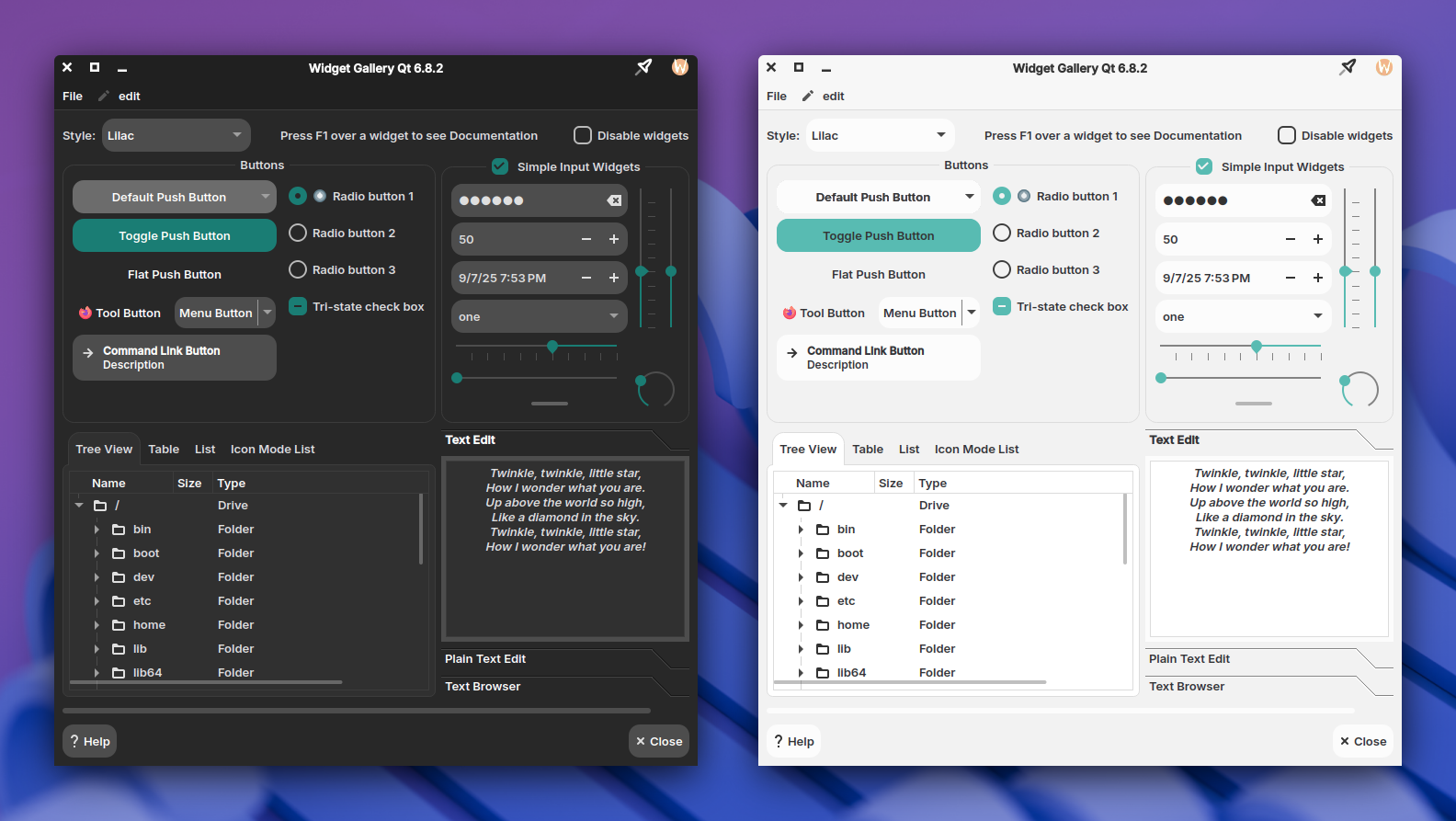 Screenshot: Icons: _Vimix_, ColorScheme: _FluentDark/FluentLight_, Window Decorations: _Klassy_, Font: _Inter SemiBold_ ## Building: ### Build Configuration #### KStyle Integration [KStyle](https://api.kde.org/kstyle-module.html) provides enhanced integration with KDE Plasma. If you don't use KStyle, QCommonStyle is used. KStyle is also used for styling some KDE frameworks widgets. - **Default behavior**: `OFF` (i.e. KStyle will be used) - **Available options**: - `-DNO_KSTYLE=ON`: Don't use KStyle **Recommendation**: Use KStyle with KDE Plasma, otherwise probably use QCommonStyle (KStyle has a lot of dependencies) #### KColorScheme Support [KColorScheme](https://api.kde.org/kcolorscheme-index.html) extends QPalette functionality to provide better color consistency across KDE applications. - **Default behavior**: `OFF` (i.e. KColorScheme will be used) - **Available options**: `-DNO_KCOLORSCHEME=ON`: Disable KColorScheme support **Note**: KColorScheme is recommended for better color consistency, but can be disabled to reduce dependencies. #### Settings Whether to enable settings, this requires `QDbus` and `KConfig` as dependencies. When enabled, two additional targets will be created, a standalone settings app and a library to integrate with the KDE plasma systemsetings. - **Default behavior**: `OFF` (i.e. Settings will be enabled) - **Available options**: `-DNO_SETTINGS=ON`: Disable settings #### KWindowSystem [KWindowSystem](https://api.kde.org/kwindowsystem-index.html) is a library abstracting the window system. This style uses KWindowSystem to create a blur behind menus. Note that your system may not support this way of blurring behind windows/menus. - **Default behavior**: `OFF` (i.e. KWindowSystem will be included) - **Available options**: `-DNO_KWINDOWSYSTEM=ON`: Disable KWindowSystem #### Qt Quick [Qt Quick](https://doc.qt.io/qt-6/qtquick-index.html) is part of Qt, used to interface between C++ and Qt Quick applications. This style uses this library to allow Qt Quick windows to be dragged by their contents. - **Default behavior**: `OFF` (i.e. Qt Quick will be included) - **Available options**: `-DNO_QTQUICK=ON`: Disable Qt Quick ### Installation steps: **Note:** this theme only supports **Qt >= 6.6.0** 1. **Install dependencies** **All Dependencies:** _Build:_ `git` `cmake` `gcc-c++` _Run:_ <br> `cmake(Qt6Widgets)` `cmake(Qt6Gui)`, KStyle: `cmake(KF6FrameworkIntegration)`, KColorScheme: `cmake(KF6ColorScheme)`, Settings: `cmake(KF6Config)` `cmake(Qt6DBus)`, KWindowSystem: `cmake(KF6WindowSystem)`, Qt Quick: `cmake(Qt6Quick)` **OpenSUSE:** ```shell sudo zypper in git cmake gcc-c++ 'cmake(Qt6Widgets)' 'cmake(Qt6Gui)' 'cmake(KF6FrameworkIntegration)' 'cmake(KF6ColorScheme)' 'cmake(KF6Config)' 'cmake(Qt6DBus)' 'cmake(KF6WindowSystem)' 'cmake(Qt6Quick)' ``` **Fedora:** ```shell sudo dnf install git cmake gcc-c++ 'cmake(Qt6Widgets)' 'cmake(Qt6Gui)' 'cmake(KF6FrameworkIntegration)' 'cmake(KF6ColorScheme)' 'cmake(KF6Config)' 'cmake(Qt6DBus)' 'cmake(KF6WindowSystem)' 'cmake(Qt6Quick)' ``` **Ubuntu/Debian:** ```shell sudo apt install git cmake g++ qt6-base-dev libkf6style-dev libkf6colorscheme-dev libkf6config-dev libkf6windowsystem-dev qt6-declarative-dev ``` **Arch:** ```shell sudo pacman -Sy git cmake gcc qt6-base frameworkintegration kcolorscheme kconfig kwindowsystem qt6-declarative ``` 2. **Clone the repository** ```shell git clone https://github.com/zalesyc/lilac.git && cd lilac ``` 3. **Configure** 3.1 create the build directory ```shell mkdir build && cd build ``` 3.2 Configure the project with cmake here you can add the options from the Build Configuration section ```shell cmake -DCMAKE_BUILD_TYPE=Release -DCMAKE_INSTALL_PREFIX=/usr .. ``` 4. **Build and Install** 4.1 Compile ```shell cmake --build . --parallel ``` 4.2 Install ```shell sudo cmake --install . ``` The style can now be selected from system settings > [!NOTE] > Written in C++, the theme may contain bugs that could cause an application using it to crash. If you find such a crash, test with a different theme and please report it here. ## Issues / TODO: - Right-to-left language support - Mnemonics
