KO
|
EN
gitlite — search
Search
#typescript
#ai-agents
#ai
#dsh-plugin
#deepseek-harness
#open-source
#cli
#claude-code
#codex
#developer-tools
#react
#windows
ionic4-hidenav
★ 49
Open GitHub ↗
Ionic 4 header animations
Download README (.md)
Explore Similar Repositories
angular-toolkit
:
Angular Schematics and Builders for `@ionic/angular` apps.
ionic4-master-course
:
Source Code for the Ionic 4 Master Course
ionic4-angular7-example
:
Ionic 4, Angular 7 and Cordova Tutorial: Build CRUD Mobile Apps
128-ionic4-theme-generator
:
Generate Ionic 4 themes on the fly with CSS variables
ionic-vue-examples
:
Examples for @ionic/vue
// repository documentation
Was this content helpful?
★ 0
(0 ratings)
Select Rating:
★
★
★
★
★
Submit Feedback
Recent Feedback
×
Download README
Do you want to download the
README.md
file for
ionic4-hidenav
?
Download (.md)
# Hide Navigation Bar for Ionic 4 [![NPM version][npm-image]][npm-url] With this module you can: - implement an expansible header that stretches when pulling the page down - auto-hide the page header when scrolling down ### 🔥 ..Also works with Supertabs 🔥 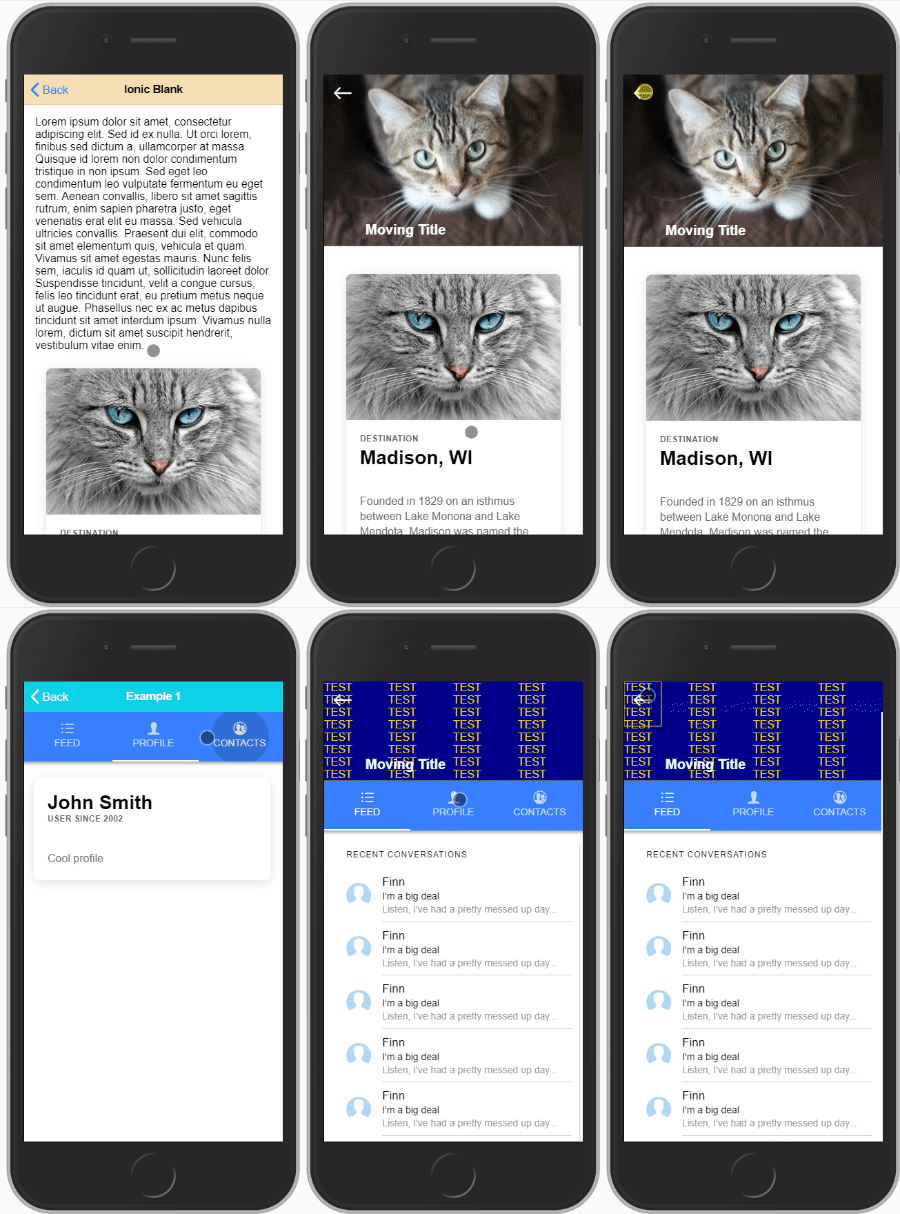 Check out the [example](https://github.com/heidji/ionic4-hidenav-example) #### Note: _Both should not be used together on the same page, either you want to make room for reading content or you want to add an expansible header, not both together :)_ _This plugin is also made as generic as possible, making it maybe a bit harder to setup but giving the user much more freedom to design what he wants._ ## Installation ``` npm i ionic4-hidenav ``` ## Implementation Create (or modify if you already have) a **shared.module.ts** in your project root folder: ```typescript import { NgModule } from '@angular/core'; import {HidenavModule} from 'ionic4-hidenav'; @NgModule({ imports: [HidenavModule], exports: [HidenavModule] }) export class SharedModule { } ``` and import the SharedModule on every page you intend to use this plugin: ```typescript import { NgModule } from '@angular/core'; import { CommonModule } from '@angular/common'; import { FormsModule } from '@angular/forms'; import { Routes, RouterModule } from '@angular/router'; import { IonicModule } from '@ionic/angular'; import { HomePage } from './home.page'; import {SharedModule} from '../shared.module'; const routes: Routes = [ { path: '', component: HomePage } ]; @NgModule({ imports: [ CommonModule, FormsModule, IonicModule, RouterModule.forChild(routes), SharedModule ], declarations: [HomePage] }) export class HomePageModule { } ``` --- ## Part 1: Expansible header This is a custom component defined using this HTML tag: ```html <hidenav-stretchheader></hidenav-stretchheader> ``` This component must be defined outside of `<ion-content>` and comes with required and optional child DOM elements: ## Creating the expansible header element **home.page.html** `#shrinkexpand`: This is the element that will shrink and expand with scrolling the page `#static`: Element(s) with this tag will be left alone. You can use these to create buttons on your header for example. ```html <hidenav-stretchheader header-height="50"> <div #shrinkexpand><!-- Expanding DOM element --></div> <div #static><!-- Title --></div> <div #static><!-- Nav button --></div> </hidenav-stretchheader> ``` Inputs for `<hidenav-stretchheader>`: | input | type | Description | | ----------------- | ---------------------------- | ------------------------------------------------------------------------------ | | `header-height` | **required** | height to which the header shrinks to | | `opacity-factor` | optional / default = 0 | `1 - 10` opacity of shrunk header overlay | | `opacity-color` | optional / default = black | accepts any css color description (name, rgb, # ..) | | `blur-factor` | optional / default = 0 | the maximum blur when the header is collapsed (accepts integer) | | `init-expanded` | optional / default = false | set to `true` if you want the header to initiate expanded | | `no-border` | optional / default = false | set to `true` if you want to remove the bottom styling of the header | | Tabspage params only: | | `preserve-header` | optional / default = false | set to `true` if you want to keep the header state separate on each tab | ### Adding your Header to a simple page: add the `hidenav-sh-content` directive to your `<ion-content>` ````html <hidenav-stretchheader header-height="50"> <div #shrinkexpand>...</div> </hidenav-stretchheader> <ion-content hidenav-sh-content> .... </ion-content> ```` ### Adding your Header to a Supertabs Page: You need to give the the `<ion-content>` that holds the `<super-tabs>` element the directive `hidenav-sh-tabscontent` then you need to add to each `<ion-content>` on every tab two directives: `hidenav-sh-content` and `hidenav-tabspage` ````html <hidenav-stretchheader header-height="50"> <div #shrinkexpand style="background: darkblue; color: gold" (click)="expand()" >...</div> </hidenav-stretchheader> <ion-content hidenav-sh-tabscontent> <super-tabs> <super-tabs-toolbar slot="top"> <super-tab-button>...</super-tab-button> <super-tab-button>...</super-tab-button> </super-tabs-toolbar> <super-tabs-container> <super-tab> <ion-content hidenav-sh-content hidenav-tabspage>...</ion-content> </super-tab> <super-tab> <ion-content hidenav-sh-content hidenav-tabspage>...</ion-content> </super-tab> </super-tabs-container> </super-tabs> </ion-content> ```` ### Events: you can subscribe to the `(scroll)` event for example like: ```html <hidenav-stretchheader (scroll)="handleScrollEvent($event)">...</hidenav-stretchheader> ``` The **$event** variable returns the current header height. ### Functions: - `expand(duration)`: scrolls content to top and expands the header. - `shrink(duration)`: scrolls just about enought to shrink the header if it is expanded. - `toggle(duration)`: toggles between `expand()` and `shrink()`. Note that `duration` is optional and defaults to 200. --- ## Part 2: Hide Header on scroll This function is fairly simple to implement than the previous one, all you will have to do is define directives `hidenav-header` and `hidenav-content` in the page you want to use. ### Adding the hidenav component to a simple page In the following example, both header and content carry the previously mentioned directives. ```html <ion-header hidenav-header>...</ion-header> <ion-content hidenav-content>...</ion-content> ``` ### Adding the hidenav component to a Supertabs page Give the `<ion-header>` the `hidenav-header` directive and the `<ion-content>` that holds the `<super-tabs>` component the directive `hidenav-tabscontent`. As for the `<ion-content>` elements in each of the tabs give them the `hidenav-content` and `hidenav-tabspage` directive. ````html <ion-header hidenav-header>...</ion-header> <ion-content hidenav-tabscontent> <super-tabs> <super-tabs-toolbar slot="top"> <super-tab-button>...</super-tab-button> <super-tab-button>...</super-tab-button> </super-tabs-toolbar> <super-tabs-container> <super-tab> <ion-content hidenav-content hidenav-tabspage>...</ion-content> </super-tab> <super-tab> <ion-content hidenav-content hidenav-tabspage>...</ion-content> </super-tab> </super-tabs-container> </super-tabs> </ion-content> ```` **PS**.: as mentioned in the beginning, you should not use both methods (Part1 and Part2) together on one page. It was never tested and is not intended to be used. [npm-url]: https://npmjs.org/package/ionic4-hidenav [npm-image]: https://img.shields.io/badge/npm-1.0.0-green.svg
