KO
|
EN
gitlite — search
Search
#javascript
#python
#hacktoberfest
#react
#ai
#typescript
#llm
#go
#golang
#android
#machine-learning
#rust
#deep-learning
#linux
plutt
★ 8
Open GitHub ↗
Safe micro frontends without the hassle
Download README (.md)
Explore Similar Repositories
Chakra
:
Instagram 限時動態自動閱讀器
GsonConverterFactory
:
在集成使用Retrofit过程中,后台返回的数据格式不固定(成功和错误的时候不固定,导致无法序列出错误码出来),替代com.squareup.retrofit2:converter-gson
sketchbook
:
The design tool that lives in your repo.
blog-2020
:
Code samples for my 2020 blogposts
mezon-pop3-client
:
Small and simple POP3 client
// repository documentation
Was this content helpful?
★ 0
(0 ratings)
Select Rating:
★
★
★
★
★
Submit Feedback
Recent Feedback
×
Download README
Do you want to download the
README.md
file for
plutt
?
Download (.md)
<p align="center"> <img src="images/logo.png" title="Plutt" alt="Plutt logo" width="530"> </p> <!-- prettier-ignore-start --> Plutt: Safe microfrontends without the hassle ============================================== <!-- prettier-ignore-end --> [](https://npmjs.org/package/@digitalroute/plutt) [](https://npmjs.org/package/@digitalroute/plutt) [](https://github.com/digitalroute/plutt/blob/master/package.json) <!-- toc --> * [🗒 Description](#-description) * [✨ Features](#-features) * [🏗 Usage](#-usage) * [📚 Examples](#-examples) * [🔍 How Plutt Works](#-how-plutt-works) * [🔨 Commands](#-commands) * [🐢 Learn More](#-learn-more) <!-- tocstop --> # 🗒 Description Plutt is a build tool that enables developers to generate microfrontends from framework-native components and to serve them version safely. The microfrontends are automatically safe to use in production if they work during development. # ✨ Features - **Access transparency:** Consuming applications use the microfrontends as regular components, without having to know that it is a microfrontend. - **Automatic Version Safety:** At run-time Plutt will always upgrade to the latest version of a microfrontend, as long as it is non-breaking. This is done by supporting lock-step deployments. - **Framework Agnostic:** Plutt applications can be consumed by any framework. Currently Plutt supports React and Vue, but it is easy to extend Plutt to support more frameworks. - **Type Safety:** Microfrontends can be consumed with type safety. Any props that are used incorrectly can be found at compile-time. # 🏗 Usage <!-- usage --> ```sh-session $ npm install -g @digitalroute/plutt $ plutt COMMAND running command... $ plutt (-v|--version|version) @digitalroute/plutt/0.0.0-semantically-released darwin-x64 node-v13.10.1 $ plutt --help [COMMAND] USAGE $ plutt COMMAND ... ``` <!-- usagestop --> # 📚 Examples All examples are located at [Plutt Examples Collection](https://github.com/juliuscc/plutt-examples-collection). # 🔍 How Plutt Works Plutt is a build tool that enables developers to generate microfrontends from framework-native components and to serve them version safely. Plutt takes a framework-native component as input and outputs two types of artifacts: a _Plutt Application_ (composed of the original Component and a _Wrapper_) and a _Proxy_. To serve Plutt applications, Plutt provides a _Plutt Server_. You can use only a Plutt Application, but to get most benefits you should use the provided Proxy and Plutt Server. 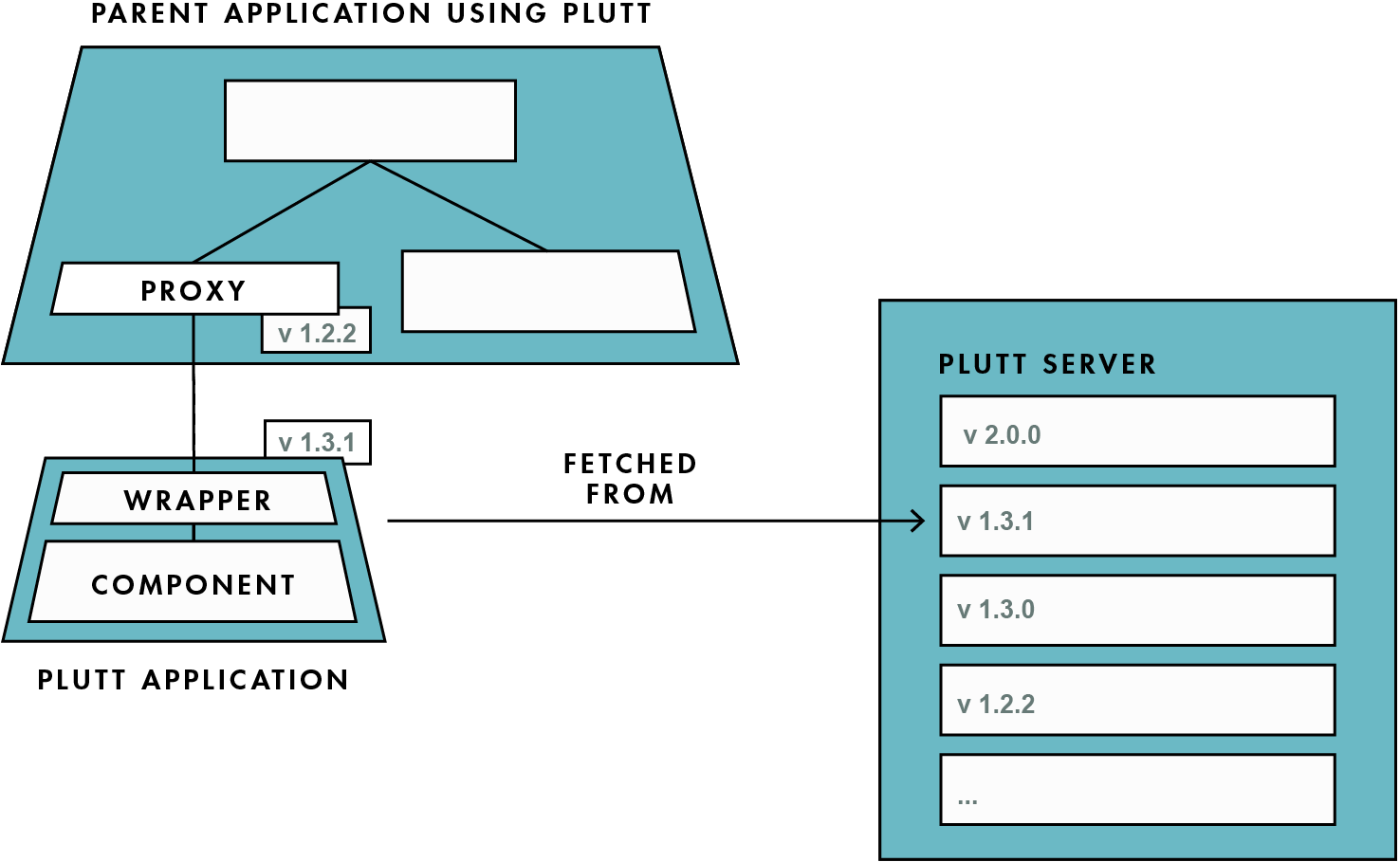 ## Plutt Application A Plutt application is a self-contained microfrontend application that exposes functions for mounting with properties, updating the properties, and unmounting. Plutt applications are stored on a Plutt server and accessed in run-time, to ensure that the latest version is consumed. ## Proxy A proxy is a framework-native component that knows how to fetch and mount a corresponding Plutt application. Plutt generates one proxy per supported framework, which currently is React and Vue. Proxies integrate into a parent application during compile-time. Proxies do not include any business logic, but they do include everything required to safely consume a Plutt application. Proxies fetch a specific version of a Plutt application which can be verified at compile-time to be non-breaking. If the Plutt application is typed, the proxy is also typed, and static analysis can be used to indicate if a Plutt application is integrated correctly. ## Plutt Server Plutt applications are stored on a Plutt server, which is where dependents fetch Plutt applications from. Plutt server upgrade requests to Plutt applications so that dependents receive the latest non-breaking version. Semantic versioning is used to ensure that the upgraded version is non-breaking. This way, the team that provides a microfrontend is responsible for deciding when to update to production, while ensuring that updates do not break dependent applications. Dependent teams own the decision of when to upgrade breaking versions. Plutt server provides every team with the correct responsibilities that facilitate independent deployments. # 🔨 Commands <!-- commands --> * [`plutt build`](#plutt-build) * [`plutt help [COMMAND]`](#plutt-help-command) * [`plutt serve [DIRECTORY]`](#plutt-serve-directory) ## `plutt build` Build a plutt app. ``` USAGE $ plutt build OPTIONS -s, --sourceDirectory=sourceDirectory [default: src] Source directory for the plutt app. -v, --verbose Prints extra information. Useful for debuging. DESCRIPTION Build a plutt app. Make sure that there exists a src/ directory with an index.js. ``` ## `plutt help [COMMAND]` display help for plutt ``` USAGE $ plutt help [COMMAND] ARGUMENTS COMMAND command to show help for OPTIONS --all see all commands in CLI ``` _See code: [@oclif/plugin-help](https://github.com/oclif/plugin-help/blob/v2.2.3/src/commands/help.ts)_ ## `plutt serve [DIRECTORY]` Serve a plutt app. ``` USAGE $ plutt serve [DIRECTORY] ARGUMENTS DIRECTORY [default: .] Directory to serve plutt apps from OPTIONS -p, --port=port [default: 5000] Port used to serve plutt app ``` <!-- commandsstop --> # 🐢 Learn More This project is developed together with a thesis, that will finish this summer. A link to the thesis will be published here when the thesis is finished.
