KO
|
EN
gitlite — search
Search
#javascript
#python
#hacktoberfest
#react
#ai
#typescript
#llm
#go
#golang
#android
#machine-learning
#rust
#deep-learning
#linux
PepTron
★ 14
Open GitHub ↗
Ensemble generator for multi-domain proteins
Download README (.md)
Explore Similar Repositories
AppleMusicDL
:
Download Apple Music tracks in ALAC (Apple Lossless) format using Python and Frida. For personal use only.
DyG-Mamba
:
The Source Code of DyG-Mamba: Continuous State Space Modeling on Dynamic Graphs
Q3C
:
Actor-Free Continuous Control via Structurally Maximizable Q-Functions
product-catalog-service
:
Provides product listing, categorization, and search capabilities.
Quizbot
:
Feature rich Quizbot for telegram, an alternative to official telegram quizbot.
// repository documentation
Was this content helpful?
★ 0
(0 ratings)
Select Rating:
★
★
★
★
★
Submit Feedback
Recent Feedback
×
Download README
Do you want to download the
README.md
file for
PepTron
?
Download (.md)
# PepTron - Multi-domain Protein Ensemble Generator [](https://www.biorxiv.org/content/10.1101/2025.10.18.680935v2) [](https://doi.org/10.5281/zenodo.17306061) [](https://github.com/PeptoneLtd/PeptoneBench) [](https://github.com/PeptoneLtd/IDP-o) [](https://huggingface.co/spaces/PeptoneLtd/PepTron) PepTron is a sequence to ensemble generative model designed to accurately represent protein ensembles with any level of disorder content. This makes it the ideal choice for multi-domain proteins, which are the most common target class in cutting-edge therapeutics. 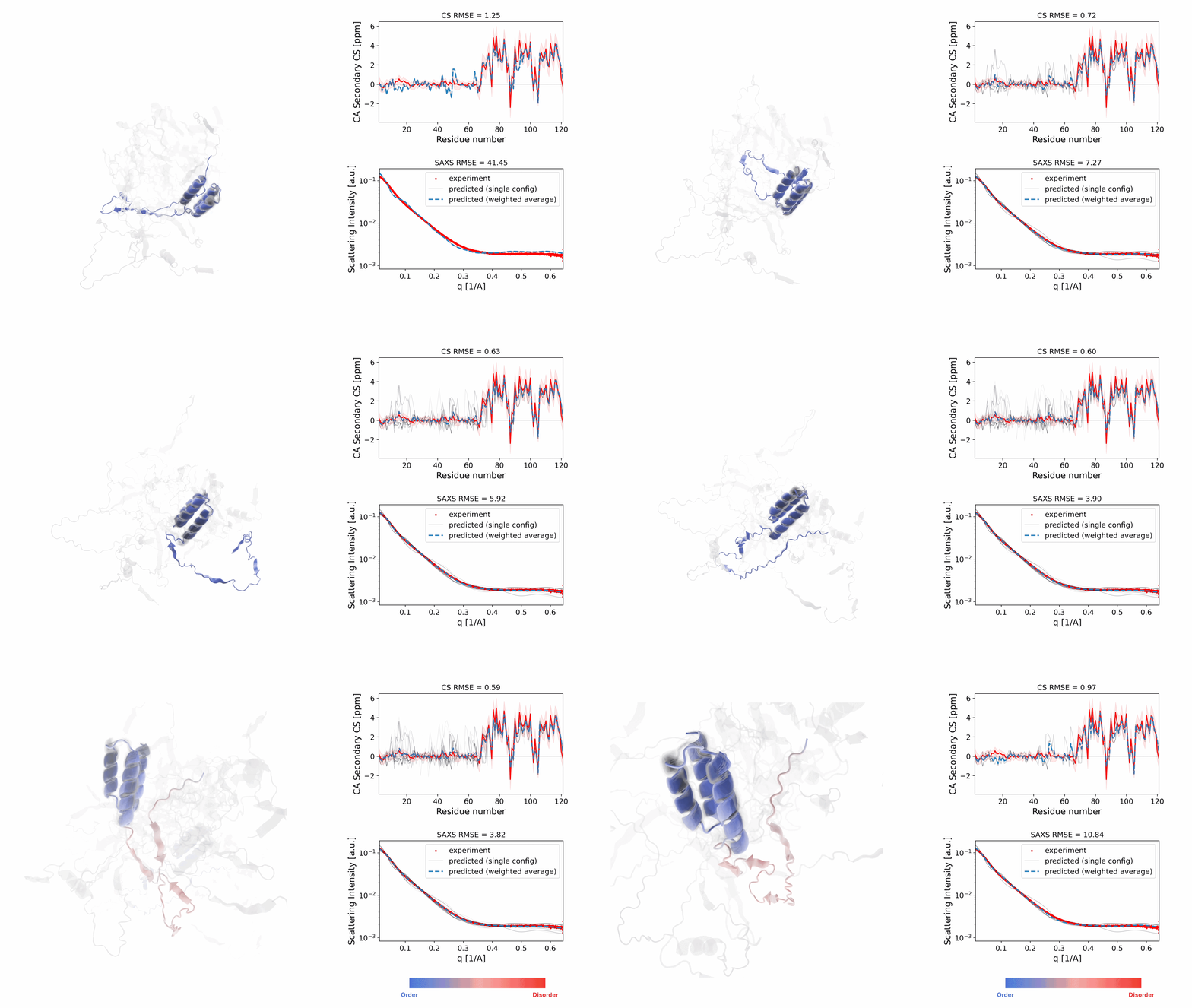 PepTron is also available as a stand-alone application on [HuggingFace](https://huggingface.co/spaces/PeptoneLtd/PepTron)! ## Installation ```bash # Clone the repository git clone https://github.com/PeptoneLtd/peptron.git cd peptron # Build Docker container docker build -t peptron:latest . # Run container docker run --gpus all -it --rm peptron:latest ``` ## Pre-trained Models Pre-trained PepTron checkpoints are available for download at [https://zenodo.org/records/17306061](https://zenodo.org/records/17306061). - `PepTron`: best performance across the whole proteome - `PepTron-base`: model pre-trained on the PDB, used for the fine-tuning on disordered regions to get `PepTron` ## Quick Start ### Inference Generate protein structure ensembles from sequences: #### 1. Configuration Modify the configuration in `peptron/infer.py` if needed (we suggest to keep the default): ```python EXEC_CONFIG = config_flags.DEFINE_config_file('config', 'peptron/model/config.py:peptron_o_inference') ``` #### 2. Prepare Input Create a CSV file with your protein sequences: ```csv name,seqres protein1,MKTAYIAKQRQISFVKSHFSRQLEERLGLIEVQA protein2,MSHHWGYGKHNGPEHWHKDFPIAKGERQSPVDID ``` #### 3. Download checkpoint Download `PepTron.tar.gz` from [here](https://zenodo.org/records/17306061) and unzip it. The `peptron-checkpoint` directory is your checkpoint. #### 4. Run Inference Using the convenience script: ```bash # Edit run_peptron_infer.sh with your paths export CKPT_PATH="/path/to/the/peptron-checkpoint" export RESULTS_PATH="/path/to/results" export CSV_FILE="/path/to/sequences.csv" sh run_peptron_infer.sh ``` ### Training #### 1. Downloading Datasets Here MSAs are need only for the processing and input pipelines and not used during the training. ##### PDB Dataset To download and preprocess the PDB: 1. Run `aws s3 sync --no-sign-request s3://pdbsnapshots/20230102/pub/pdb/data/structures/divided/mmCIF pdb_mmcif` from the desired directory. 2. Run `find pdb_mmcif -name '*.gz' | xargs gunzip` to extract the MMCIF files. 3. Prepare an MSA directory and place the alignments in .a3m format at the following paths: `{alignment_dir}/{name}/a3m/{name}.a3m`. If you don't have the MSAs, there are two ways to generate them: 1. Query the ColabFold server with `python -m dataprep.mmseqs_query --split [PATH] --outdir [DIR]`. 2. Download UniRef30 and ColabDB according to https://github.com/sokrypton/ColabFold/blob/main/setup_databases.sh and run `python -m scripts.mmseqs_search_helper --split [PATH] --db_dir [DIR] --outdir [DIR]`. 4. From the repository root, run `python -m dataprep.unpack_mmcif --mmcif_dir [DIR] --outdir [DIR] --num_workers [N]`. This will preprocess all chains into NPZ files and create a `pdb_mmcif.csv` index. 5. Download OpenProteinSet with `aws s3 sync --no-sign-request s3://openfold/openfold` from the desired directory. 6. Run `python -m dataprep.add_msa_train_info --openfold_dir [DIR]` to produce a `pdb_mmcif_msa.csv` index with OpenProteinSet MSA lookup. 7. Run `python -m dataprep.cluster_chains` to produce a `pdb_clusters` file at 40% sequence similarity (Mmseqs installation required). 8. Create MSAs for the PDB validation split (`splits/cameo2022.csv`) according to standard MSA generation procedures and `add_msa_val_info`. ##### IDRome-o Dataset The IDRome-o dataset has been created predicting the ensembles of the sequences in [IDRome](https://github.com/KULL-Centre/_2023_Tesei_IDRome) for respectively [training](https://github.com/PeptoneLtd/PepTron/blob/main/splits/IDRome_DB-train.csv) and [validation](https://github.com/PeptoneLtd/PepTron/blob/main/splits/IDRome_DB-val.csv) with [https://github.com/PeptoneLtd/IDP-o](https://github.com/PeptoneLtd/IDP-o). To download and preprocess the IDRome-o dataset: 1. Download IDRome-o from [https://zenodo.org/records/17306061](https://zenodo.org/records/17306061). 2. Place the MSA directory in your preferred location 3. From the repository root, run `python -m dataprep.prep_idrome --split [FILE] --ensemble_dir [DIR] --outdir [DIR] --num_workers [N]`. This will preprocess the IDRome trajectories into NPZ files. Do tha for both train and val splits. 4. Run `python -m dataprep.add_msa_train_info` and `python -m dataprep.add_msa_val_info` 5. Create MSAs for all entries in `splits/IDRome_DB-train-msa.csv` and `splits/IDRome_DB-val-msa.csv` according to standard MSA generation procedures. #### 2. Configuration Modify the configuration in `peptron/train.py` based on your training strategy: ```python EXEC_CONFIG = config_flags.DEFINE_config_file('config', 'peptron/model/config.py:peptron_o_mixed') ``` #### 3. Set Training Parameters Edit `peptron/model/config.py` in the training section: ```python "training": { "experiment_dir": "/path/to/your/experiment/dir", "wandb_project": "peptron-stable", "experiment_name": "your-experiment-name", "n_steps_train": 2500, "warmup_steps_percentage": 0.10, "train_epoch_len": 80000, "val_epoch_len": 5, "micro_batch_size": 8, "num_nodes": 1, "devices": 8, "tensor_model_parallel_size": 1, "pipeline_model_parallel_size": 1, "accumulate_grad_batches": 1, "steps_to_save_ckpt": 100, "val_check_interval": 100, "limit_val_batches": 3, "precision": "bf16-mixed", "initial_nemo_ckpt_path": "/path/to/initial/checkpoint", # Data paths "train_data_dir_pdb": "/path/to/pdb_mmcif_npz_dir", "val_data_dir_pdb": "/path/to/pdb_mmcif_npz_dir", "train_msa_dir_pdb": "/path/to/pdb_msa_dir", "val_msa_dir_pdb": "/path/to/cameo2022_msa_dir", # Chain files "train_chains_pdb": "splits/pdb_chains_msa.csv", "valid_chains_pdb": "splits/cameo2022_msa.csv", "train_data_dir_idp": "/path/to/IDRome_train_dir", "train_msa_dir_idp": "/path/to/IDRome_train_msa_dir", "train_chains_idp": "splits/IDRome_DB-train-msa.csv", "mmcif_dir": "/path/to/pdb_mmcif_dir", "dataset_prob_pdb": 0.3, "dataset_prob_idp": 0.7, "train_clusters": "/path/to/pdb_clusters", "train_cutoff": "2020-05-01", "encoder_frozen": True, "structure_frozen": False, "pretrained_structure_head_path": "", } ``` #### 4. Run Training ```bash # Single node training sh run_peptron_train.sh # Multi-node distributed training sh run_peptron_distributed_train.sh ``` ## Configuration Options ### Inference Parameters Key parameters you can modify in the inference configuration: - `samples`: Number of ensemble conformations to generate (default: 10) - `steps`: Number of diffusion denoising steps (default: 10) - `max_batch_size`: Number of structures generated in parallel for each predicted ensemble (default: 1) - `num_gpus` : Number of GPUs PepTron will use during inference (default: 1) **NOTE1:** The `num_gpus` parameter has to be $\leq$ the number of sequences in your `CSV_FILE` **NOTE2:** The longer the sequence and the smaller `max_batch_size` has to be to avoid Out-Of-Memory errors. We set the default to 1 as safe configuration but we encourage to increase it based on your GPU memory and max-sequence-length. The bigger the ensemble you want to generate and the more you want to increase this parameter. **NOTE3:** Deactivate cuEquivariance `use_cuequivariance=False` in `config.py` if all your generated structures don't pass the physical acceptance test. ### Training Parameters Key parameters for training configuration: - `flow_matching.noise_prob`: Probability of adding noise during training - `flow_matching.self_cond_prob`: Self-conditioning probability - `crop_size`: Input sequence crop size for memory management ## Evaluation ### PeptoneBench PepTron's performance compared to other structural models can be evaluated using PeptoneBench, [https://github.com/PeptoneLtd/PeptoneBench](https://github.com/PeptoneLtd/peptonebench). To run PeptoneBench evaluation with PepTron: 1. Install PeptoneBench following the instructions 2. Generate PepTron ensembles for your target proteins using the inference pipeline above 3. Use PeptoneBench to evaluate the generated ensembles against experimental observables ## Troubleshooting ### Common Issues 1. **CUDA Out of Memory**: Keep `micro_batch_size=1` and tune `max_batch_size` based on your needs. 2. **cuEquivariance Import Error**: Ensure cuequivariance-torch is properly installed. Discard the torchdynamo warnings 3. **Checkpoint Loading Error**: Verify checkpoint path and model configuration compatibility 4. **Training Convergence Issues**: Check data paths and CSV file formats ### Getting Help - Check the [Issues](https://github.com/PeptoneLtd/peptron/issues) for common problems - Review configuration examples in `peptron/model/config.py` - Ensure all data paths are correctly set in the training configuration ## Impact and Applications PepTron delivers the predictive accuracy required to finally characterize multi-domain proteins and IDPs, unlocking new frontiers in: - **Drug Discovery**: Accurate modeling of disordered therapeutic targets - **Protein Engineering**: Design of flexible, functional protein domains - **Fundamental Biology**: Understanding disorder's role in cellular processes - **Therapeutic Development**: Targeting the most common protein class in modern medicine ## Citation If you use PepTron in your research, please cite: ```bibtex @article{peptone2025, title = {Advancing Protein Ensemble Predictions Across the Order-Disorder Continuum}, author = {Invernizzi, Michele and Bottaro, Sandro and Streit, Julian O and Trentini, Bruno and Venanzi, Niccolo AE and Reidenbach, Danny and Lee, Youhan and Dallago, Christian and Sirelkhatim, Hassan and Jing, Bowen and Airoldi, Fabio and Lindorff-Larsen, Kresten and Fisicaro, Carlo and Tamiola, Kamil}, year = 2025, journal = {bioRxiv}, publisher = {Cold Spring Harbor Laboratory}, doi = {10.1101/2025.10.18.680935}, url = {https://www.biorxiv.org/content/early/2025/10/19/2025.10.18.680935} } ``` ## License Copyright 2025 Peptone Ltd Licensed under the Apache License, Version 2.0. You may obtain a copy of the License at: [http://www.apache.org/licenses/LICENSE-2.0](http://www.apache.org/licenses/LICENSE-2.0) ## Acknowledgments PepTron is developed through collaboration between [Peptone Ltd](https://peptone.io), NVIDIA and the MIT, leveraging the BioNeMo platform for optimized biological AI computing. Special thanks to the computational biology community for advancing our understanding of protein disorder and dynamics.
